


Contentpen is an AI blogging platform that handles keyword research, drafting, SEO and AEO scoring, publishing and AI visibility tracking in one workspace. Plans start at $39 per month on annual billing, and every paid plan comes with a 7-day free trial.
That sounds like a lot for one tool, so in this Contentpen review I break it down. I'll cover what the platform actually does, how it fits into a normal content workflow, where it falls short, what each plan costs and which kind of team gets the most value from it.
One note before we start: the details below come from Contentpen's official website, pricing page and WordPress plugin listing as of October 2026. SaaS pricing and features change often, so I'd check the live pricing page before you commit.
What is Contentpen?
Contentpen is an AI writing, SEO and AEO (answer engine optimization) platform built for long-form blog content.
It is designed to research, write, optimize, publish and track articles from one place. Drafts are tuned both for Google rankings and for citations in AI answers from tools like ChatGPT, Gemini and Perplexity.
The product comes from the team behind ContentStudio, the social media management platform. It started as an AI blog writer and has since grown into a broader SEO and AEO suite.
To me, the key difference from a general AI writer like ChatGPT is scope. A general chatbot drafts text when you ask. Contentpen wraps drafting inside a workflow that includes:
Keyword clustering
SERP and content gap analysis
On-page scoring
Internal linking
Direct CMS publishing
Tracking after you publish
It also writes in more than 50 languages.
Contentpen features explained
Contentpen's features follow the life of a blog post: research, create, optimize, publish, scale and track. Here is what each group does, why it matters, and the catch I'd keep in mind.
Brand knowledge base
Before writing, Contentpen analyzes your website to learn your brand voice, selling points, audience and competitors.
This matters because generic AI drafts often sound like no one in particular. A freelancer managing three clients, for example, can keep each client's tone separate in its own workspace.
The catch: the quality of this profile depends on how much clear, on-brand content your site already has. A new site with thin pages gives the AI less to work with.
Keyword research, SERP and gap analysis
Contentpen suggests primary and secondary keywords, groups them into topic clusters, and studies the current top results to find gaps your article can fill. Auto SERP analysis is included on every plan.
For a SaaS blog planning a cluster around "project management software," this can replace a separate keyword tool for early planning.
The catch: dedicated SEO suites usually offer deeper keyword and backlink data. I'd treat Contentpen's research as content planning support, not a full replacement for an SEO data platform.
AI blog creation and editing
Several AI agents build a research-backed outline and then draft each section. Every plan includes article and outline regeneration, an automatic table of contents and real-time factual data.
Growth and higher plans add:
AI-powered editing
Paragraph length and readability controls
Version history
Custom instructions with file and link uploads
Shareable draft links
The catch: the Starter plan lacks AI editing and custom instructions, which limits how far you can steer drafts. And any AI draft still needs a human fact check and an editor who adds real experience.
SEO and AEO scoring
A live score checks each draft against on-page SEO factors. A second score checks how easily AI engines can pull out and cite your content. A "Fix with AI" option tackles flagged issues in one pass.
I find this kind of scoring most useful for writers who know what to say but want a checklist for structure, headings and answer-friendly formatting.
The catch: no score guarantees rankings or AI citations. Scores are a guide, not a promise.
AI linking assistant and branded images
Contentpen can add internal and external links tied to your existing content. It also generates featured and in-line images in your brand style. Monthly image allowances range from 75 on Starter to 1,000 on Agency.
The catch: review every automated link. An internal link to the wrong page, or an external link to a weak source, can hurt reader trust.
Publishing, bulk creation and Autopilot
Contentpen publishes directly to WordPress, Ghost, Webflow, Shopify and Wix. It also offers webhooks for custom setups and a ContentStudio connection for social sharing. You can push posts live or save them as drafts.
Bulk generation and scheduling help teams fill a content calendar. Autopilot, on Growth and above, runs the steps from research to publishing on a schedule.
The catch: fully automated publishing is risky. I'd publish to draft and review before anything goes live.
Google Search Console analytics and AI visibility tracking
Connecting Google Search Console lets Contentpen pull your search performance data and suggest fixes.
AI visibility tracking monitors how often your brand shows up in AI answers for prompts you choose. It covers 2 AI engines on Starter and up to 7 on Agency, including ChatGPT, Google AI, Copilot, Gemini, Perplexity, Grok and Claude.
The catch: AI answers vary by user, location and time. So I'd read visibility data as a trend signal, not an exact measurement.
How Contentpen fits into a real content workflow
Contentpen works best when it handles the repeatable steps and a human handles judgment. Here's a realistic weekly workflow for a small SaaS blog:
Set up the brand profile once, and connect your CMS and Google Search Console.
Pick a topic cluster and let Contentpen suggest keywords and titles.
Review the outline and adjust the headings before drafting.
Generate the draft, then add your own examples, screenshots, data and opinions.
Check the SEO and AEO scores and fix the issues that make sense for readers.
Review every suggested link, then publish to your CMS as a draft.
Do a final read in your CMS and publish.
Track Search Console data and AI visibility, and refresh posts that slip.
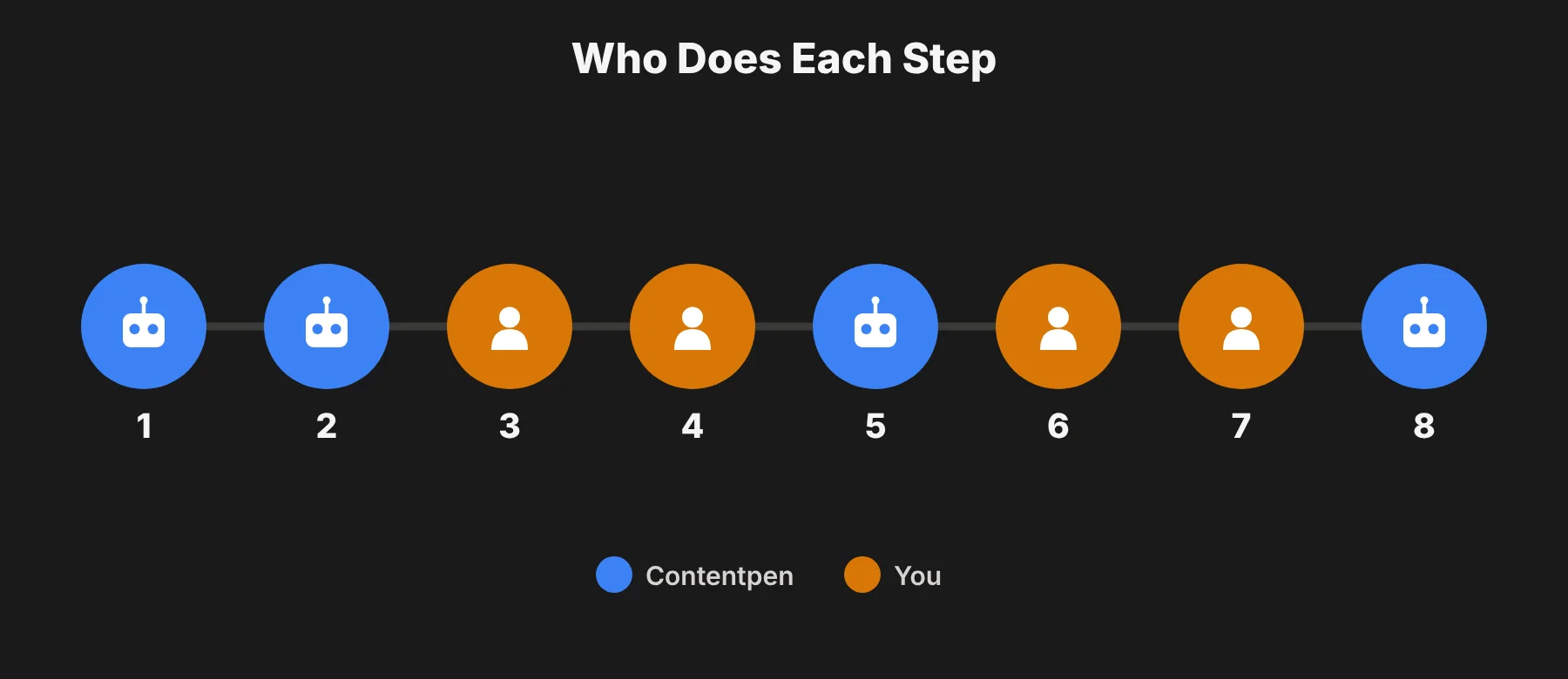 Steps 4, 6 and 7 are where your team adds the real value.
AI can produce a structured first draft quickly. But first-hand experience, accurate claims and a clear point of view are what make a post worth reading and citing. Google says the same in its own guidance on AI-generated content: it rewards helpful, people-first content, however it is made.
Contentpen pros and cons
In my view, Contentpen's main strength is breadth: it covers the full blog workflow in one subscription. Its main weakness is that the most useful controls sit on the higher plans.
Pros
One workspace for the whole workflow. Research, drafting, scoring, linking, publishing and tracking live together, which cuts down on tool switching.
AEO and AI visibility built in. Every plan includes AI visibility tracking, which many writing tools sell separately or don't offer at all.
Wide CMS support. Direct publishing to WordPress, Ghost, Webflow, Shopify and Wix, plus webhooks for other setups.
Multi-brand setup. Separate workspaces suit agencies and freelancers with several clients.
Flexible add-ons. Scale and Agency users can buy article and image packs that never expire.
Low-risk trial. A 7-day free trial on every paid plan, with no long-term contracts.
Cons and points to consider
Starter is limited. It lacks AI-powered editing, readability controls, custom instructions, Autopilot and SEO opportunities.
No free plan, and the trial needs a card. You have to enter payment details to start the 7-day trial.
Articles don't roll over. Unused monthly articles reset each billing cycle.
Add-ons are only on Scale and Agency. Starter and Growth users who run out have to upgrade or wait.
Human review is still required. Automated drafts and links need editing and fact checking before they're safe to publish.
Research depth. Teams that rely on detailed keyword and backlink data will likely still want a dedicated SEO suite.
Who should use Contentpen?
Contentpen suits teams that publish blog content regularly and want one tool from keyword to live post. I think it's a weaker fit for occasional writers, or for teams that only need a writing assistant.
Reader type | Fit | Why |
|---|---|---|
Small business or solo blogger | Good on Starter or Growth | 12 to 40 articles a month covers a steady posting schedule |
Freelance writer | Good on Growth | 3 workspaces keep client brands separate; AI editing and custom instructions help match briefs |
Content marketing team | Strong on Growth or Scale | Shared seats, Autopilot and SEO opportunities support a planned calendar |
SEO or marketing agency | Strong on Scale or Agency | Up to 10 workspaces, unlimited seats on Agency, onboarding and add-on packs |
Brands tracking AI search | Strong on Scale or Agency | 5 to 7 AI engines tracked weekly |
Occasional writer (1 to 3 posts a month) | Weak | A general AI assistant or a cheaper writer may be enough |
If you already pay for a separate keyword tool, an AI writer and an AI visibility tracker, Contentpen may replace part of that stack. I'd add up your current total spend and compare it with the plan that matches your monthly article volume.
Contentpen vs a general AI writer or an SEO content tool
A question I'd ask before buying is whether you need an all-in-one platform at all. Here is how I see the three main options.
A general AI assistant (like ChatGPT or Gemini). Great for brainstorming, outlines and quick drafts. But you handle keyword research, scoring, linking, publishing and tracking yourself. It suits occasional writers who don't mind copying and pasting.
An SEO content optimizer (like Surfer or Clearscope). Strong at telling you which terms and topics a page should cover to compete. These tools focus on optimization rather than the full workflow, so you often still need a separate writer, publisher and tracker.
An all-in-one platform like Contentpen. It brings research, drafting, scoring, publishing and AI visibility into one place. The trade-off is less depth in each area than a dedicated tool, in return for fewer tools and less switching.
My rule of thumb: if you publish fewer than four posts a month, a general AI assistant plus your own editing is usually enough. If you publish every week and juggle several tools, an all-in-one platform starts to pay for itself.
I took a similar look at another AI marketing tool in my Blaze AI review, if you're comparing options across the wider AI content space.
Contentpen pricing (October 2026)
Contentpen has four self-serve plans, from $39 to $359 per month on annual billing, plus custom Enterprise pricing. Yearly billing saves 20% compared with monthly.
Plan | Monthly billing | Annual billing (per month) | Articles / month | Workspaces | Seats | AI images / month | AI engines tracked |
|---|---|---|---|---|---|---|---|
Starter | $49 | $39 | 12 | 1 | 1 | 75 | 2 |
Growth | $99 | $79 | 40 | 3 | 5 | 250 | 4 |
Scale | $249 | $199 | 75 | 5 | 10 | 500 | 5 |
Agency | $449 | $359 | 150 | 10 | Unlimited | 1,000 | 7 |
Enterprise | Custom | Custom | Custom | Unlimited | Unlimited | Custom | Custom |
One thing the pricing page doesn't show directly is cost per article. On annual billing, it works out like this:
Starter: about $3.25 per article ($39 ÷ 12)
Growth: about $1.98 per article ($79 ÷ 40)
Scale: about $2.65 per article ($199 ÷ 75)
Agency: about $2.39 per article ($359 ÷ 150)
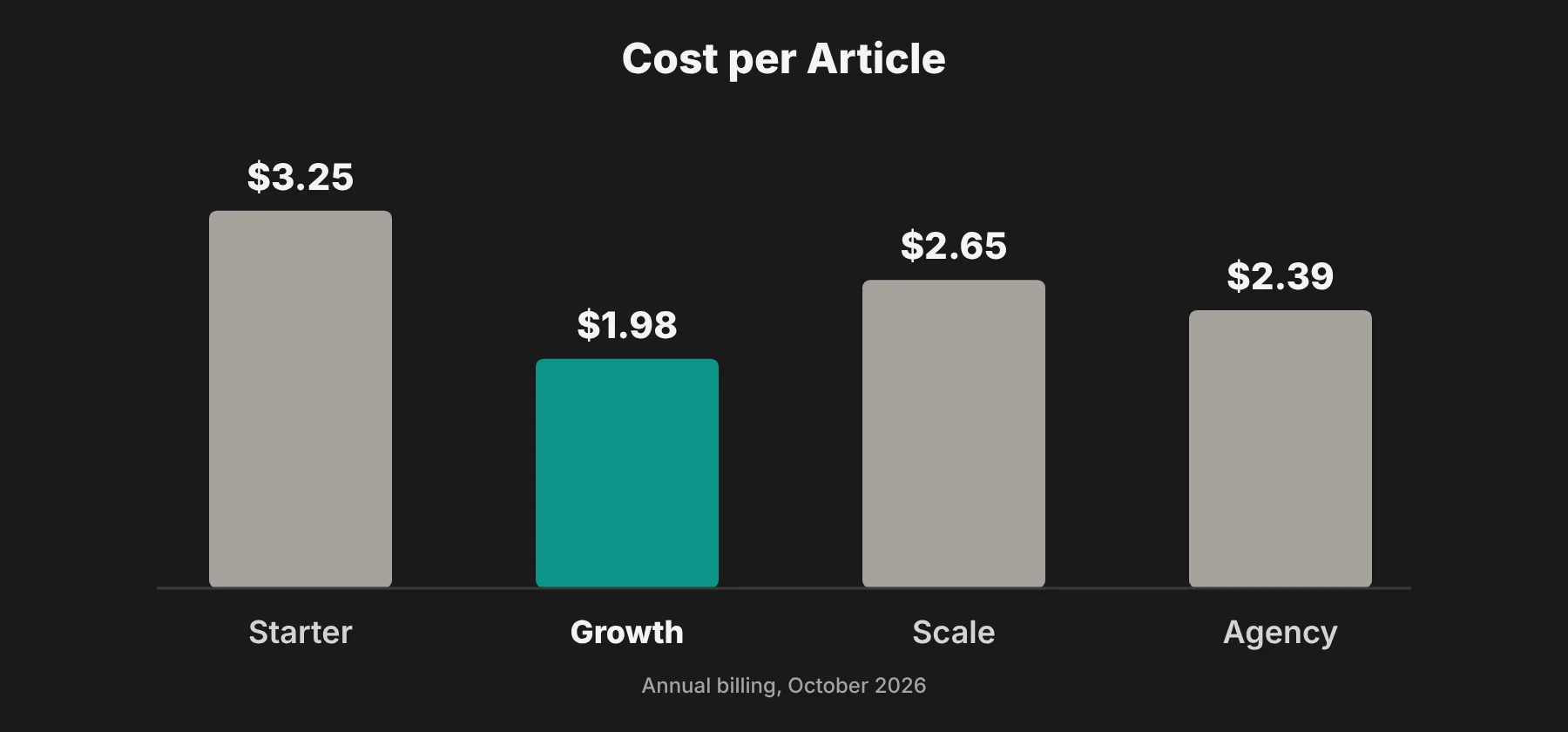 So Growth is actually the cheapest per article, not just the best value for features. Scale and Agency cost a bit more per article, but you pay for extra workspaces, seats and AI engines.
A few more plan details worth knowing:
Autopilot and SEO opportunities start on Growth. Free one-on-one onboarding starts on Scale.
Add-ons on Scale and Agency include an extra workspace for $39 per month, article packs from $29 and image credit packs from $19. Article and image packs are one-time and never expire.
Non-profits and startups can apply for recurring discounts of up to 50% with proof of status.
Upgrades apply immediately, downgrades apply next cycle, and there are no long-term contracts.
Prices were checked on October 21, 2026 and can change, so I'd confirm the latest numbers on Contentpen's pricing page before buying.
Contentpen review verdict: is it worth it?
I think Contentpen is worth a trial if you publish several blog posts a month and want research, writing, optimization, publishing and AI visibility tracking under one subscription. Its built-in AEO scoring and AI visibility tracking on every plan set it apart from tools that only write.
The Growth plan is the sensible starting point for most teams. It adds the editing controls, custom instructions, Autopilot and SEO opportunities that Starter lacks, and it has the lowest cost per article. Agencies managing many brands will get the most from Scale or Agency.
Skip it if you write only a few posts a month, or if you need a deep SEO data platform more than a content workflow.
Either way, my advice is to use the 7-day trial to generate two or three real articles for your own site. Then judge the drafts, the scores and the time saved before you pay.
Contentpen FAQs
Does Contentpen have a free plan?
No. Contentpen offers a 7-day free trial on every paid plan, and you need a credit card to start it. You can cancel during the trial.
How much does Contentpen cost?
Plans start at $39 per month billed annually ($49 billed monthly) for Starter and go up to $359 per month billed annually for Agency. Enterprise pricing is custom.
What counts as an article in Contentpen?
One article is one full AI-generated blog post. Allowances are 12, 40, 75 and 150 per month across the four plans, and unused articles don't roll over.
Which platforms can Contentpen publish to?
Contentpen publishes directly to WordPress, Ghost, Webflow, Shopify and Wix. Webhooks cover custom setups, and posts can go live or be saved as drafts.
What is AEO, and how does Contentpen handle it?
AEO (answer engine optimization) means structuring content so AI tools like ChatGPT and Perplexity can understand and cite it. Contentpen scores each draft for AEO alongside SEO, and tracks how often your brand appears in AI answers.
Can Contentpen write in languages other than English?
Yes. Contentpen says it can write in more than 50 languages.
Will Contentpen content rank on Google?
No tool can guarantee rankings. Contentpen helps with keyword targeting, structure and on-page optimization, but results depend on your site's authority, your competition, and the editing and expertise you add.