


I went looking for what SurFast Video Downloader costs and found four different answers. One site said $9.95 rising to $25.95. Another said $19 for life. A third quoted $9.50 on the same page as the $19. A fourth listed $45.95.
None of them were lying. They were quoting four different products, and not one of them explained that.
So I went to the vendor and worked it out properly. Below is the real pricing, the complaints that sit in user reviews rather than review articles, and the legal question every competing page on this keyword steps around.
I found four prices for the same software, so here is the real one
The confusion comes from SurFast being sold through two completely separate channels with different licence terms.
Buying direct from Nabla Mind, the developer, you get a licence covering three computers, and it is platform locked. A Windows key does not work on a Mac.
On the vendor's own pricing page, Windows runs $9.95 for the first month against a $25.95 list price, $35.95 for a year, or $45.95 for a lifetime licence. Mac costs a little more at every tier, at $9.95 first month against $29.95 list, $39.95 a year, or $49.95 lifetime.
Buying through AppSumo is a different deal entirely. That one is $19 for a lifetime licence covering two computers, with larger tiers at $38, $57 and $76 for four, six and eight machines.
And the $9.50 that confused me? That is just $19 divided by two. It is the per computer price, sitting on the same page as the total.
So the four contradictory numbers are a first month promo, a lifetime deal, a per seat figure and a direct lifetime price. Every one is real. None of them is the answer on its own.
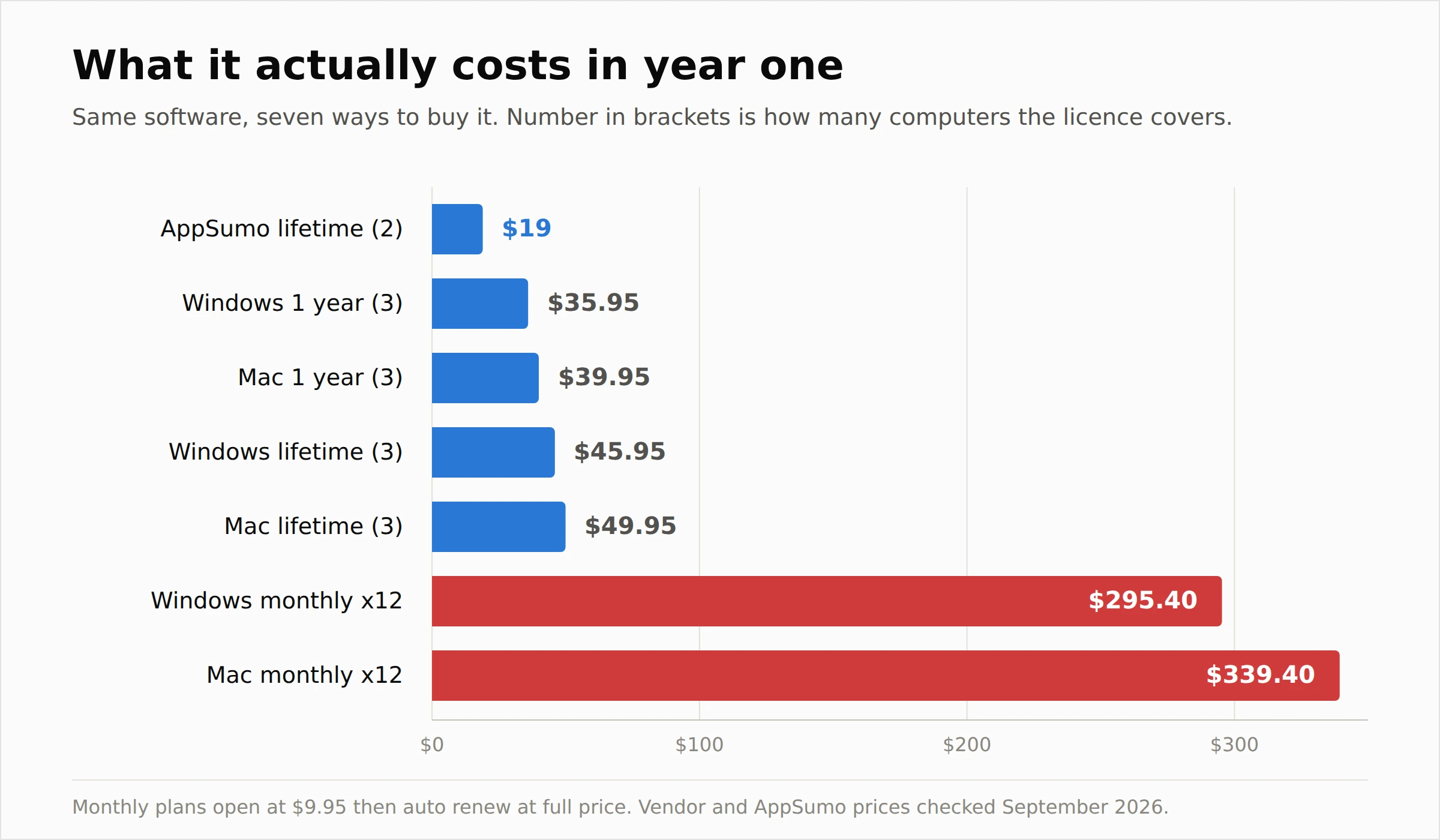 On cost per computer, AppSumo wins clearly. It works out at $9.50 a machine against $15.32 buying Windows direct and $16.65 on Mac.
AppSumo also gives you 60 days to get your money back. Direct from the vendor you get either 7 or 30 days depending on the plan. For a tool whose main failure mode is "it did not download the thing I wanted", a longer refund window is worth real money.
The catch is that the AppSumo licence covers two computers rather than three, and it is a vendor managed deal, so it does not carry AppSumo's usual buyer guarantee.
The monthly plan is the part to avoid
That $9.95 is not a trial. It is a subscription that auto renews at full price.
Pay it for a year on Windows and you have spent $295.40. On Mac you have spent $339.40. The lifetime licence is $45.95 and $49.95.
So the monthly plan costs roughly six times the lifetime licence over twelve months, for the same software on fewer terms. I cannot construct a scenario where it makes sense unless you genuinely need the tool for one month and will remember to cancel.
If you are only downloading a handful of videos, the free trial does that already, capped at three downloads and 720p.
SurFast Video Downloader features, and which ones I would rely on
The spec sheet is generous, and most of it is real.
It claims support for over 1,000 sites including YouTube, Instagram, TikTok, Facebook, X and SoundCloud, which makes it a YouTube downloader among many other things rather than only that.
Maximum video quality is 8K at 7680 by 4320, with 4K, 2K, 1080p and 720p below it, and high frame rate 60fps sources are handled at the resolution you pick.
Video output covers MP4, WebM, MOV, AVI, FLV, MKV and GIF. Audio extraction covers MP3, WAV, M4A, FLAC, OGG, AAC, ALAC and OPUS, which is a wider format list than most rivals bother with.
Beyond the basics there is batch and playlist downloading, channel tracking with scheduled downloads of new uploads, live stream capture on YouTube and Facebook, clipping by timestamp, subtitle extraction in SRT, VTT, LRC and ASS, thumbnail grabbing, an in app browser and a Chrome extension for right click downloads.
On download speed the vendor makes the usual multi threaded claims and I have no independent measurement to offer, so I would treat speed as the thing you check in your first hour rather than a reason to buy.
The trial limits are worth knowing before you install. Three downloads, five subtitle items, five playlist items, and everything capped at 720p. You cannot properly test 8K or bulk downloading without paying first, which is a shame given that bulk downloading is the thing most likely to disappoint.
On requirements, it needs Windows 10 or 11, and 64 bit for version 2.10.0 and later. On Mac it needs macOS 13 or newer, with native Apple Silicon support.
The features I would actually rely on are single video downloads, audio extraction and subtitle grabbing. Those are the ones users consistently report working. The ones I would test hard inside your refund window are bulk playlist downloads, private content and anything on Mac.
How to use SurFast Video Downloader
The workflow is short, which is most of the appeal over a command line tool.
Install it, open it, and copy the URL of the video you want. The app detects the link on your clipboard, or you paste it into the box yourself.
Pick your format and resolution before you start, because this is where the choice actually happens. Selecting MP3 here is what turns it into a video to audio converter rather than a download.
Hit download and the job lands in the queue. For a batch download of a playlist or channel, paste the playlist URL rather than the individual video URLs, which is both faster and more reliable than feeding the SurFast downloader long lists.
Set your download folder in settings on day one. Not knowing where files went is one of the most common complaints, and it is entirely avoidable.
The Chrome extension adds a right click option on pages you are already browsing, and the in app browser does the same job inside the program if you would rather not install anything into Chrome.
What actually goes wrong
This is the section the affiliate reviews skip, and it is the reason I would buy through the longer refund window.
The single most common complaint in user reviews is downloads simply failing. One user reported a "FAILED TO PARSE URL" error trying to pull multiple YouTube videos and asked for a refund. Another described "Error: percentage zero, an unexpected error occurred" recurring over two months. A third got four errors out of five attempts on YouTube while running the current version.
The vendor's answer to these is consistent and, to be fair, reasonable. They ask for the specific URLs, point out that platform side changes break downloaders across the whole category, and ship component updates. That is a real explanation rather than a brush off, but it also tells you what you are buying. A video downloader is a tool in a permanent arms race with the platforms, and any of them will break on some videos some of the time.
Mac users are the group I would be most cautious about. One described the product as having "not performed as it should" without further detail, and Mac complaints recur more than the sample size really justifies drawing a conclusion from.
There is a UI bug worth knowing about if you run a large or high scaling display. One reviewer on a 50 inch monitor found the window opened below the screen and could not be minimised. The developer acknowledged it and added a UI Scale setting under Advanced Settings in version 2.8.0, which is the kind of response that reflects well on them.
Two smaller gripes come up repeatedly. People cannot find where their files were saved, and playlist downloads do not create a folder named for the playlist or channel, so a big job lands as a heap of files.
On the wider company, Nabla Mind holds a 4.4 TrustScore across 124 Trustpilot reviews, with support speed the most praised thing and one reviewer reporting a support email from May 2025 that went unanswered. One Trustpilot reviewer also alleges the software distributes GPLv3 licensed FFmpeg improperly. I could not verify that claim and I am flagging it as an allegation rather than a finding, but if open source licence compliance matters to your business it is worth asking the vendor directly.
Worth noting: AppSumo scores it 4.4 out of 5 across 115 reviews, with 90 of those at five stars. The complaints above are real, but they are the minority report.
Is SurFast Video Downloader safe, and is SurFast Video Downloader legit?
Yes on both counts, with one condition.
It is a commercial product from Nabla Mind, a company that also ships a screen recorder and other tools, sells through AppSumo and DealFuel, and carries a visible Trustpilot presence with responsive support. That is not the profile of malware wearing a software costume.
The condition is that you download it from the vendor or from AppSumo and nowhere else.
There is real search volume for a SurFast Video Downloader crack, and I would leave that alone. Cracked installers for download utilities are a well worn malware delivery route, you get no updates in a category where updates are the entire value, and a tool that breaks the moment YouTube changes something is worthless if it can never be patched. The lifetime licence is $19 through AppSumo. That is not a price worth taking a risk over.
If you want free options instead, there are legitimate ones, and I went through the safer routes in my guide to 9xbuddy alternatives rather than repeating them here.
The legal question every other review avoids
Nobody writing about this tool will say this plainly, so I will.
The software is legal. What you do with it might not be.
YouTube's terms of service prohibit accessing content by any means other than the playback pages of the service itself, unless YouTube has given permission or the law allows it. That covers third party downloaders as a class. Breaching terms of service is a contract matter rather than a criminal one, but it can get your account terminated, and it applies regardless of which downloader you use.
Copyright is the separate and more serious question. Downloading material you do not own and have no licence to use can infringe copyright depending on what you then do with it and where you live.
There are clean cases, and they are worth knowing because they cover most honest use.
Your own uploads are yours to download. Creative Commons licensed material is downloadable under the terms of its licence, and YouTube has a search filter for it, with attribution usually required. Fair use or fair dealing may cover commentary, criticism, teaching and research, but it is decided case by case and is not a blanket permission. And if you only want offline viewing on YouTube, YouTube Premium offers it officially, which sidesteps the question entirely.
Nothing here is legal advice and I am not a lawyer. But "is downloading YouTube videos legal" deserves a real answer rather than silence, and the honest one is that it depends far more on the video than on the tool.
SurFast Video Downloader alternatives, and how it compares
The field splits into three groups and SurFast sits squarely in the middle one.
Free and open source. yt-dlp is the most capable downloader in existence and it costs nothing, but it is a command line tool. JDownloader is free with a graphical interface and handles bulk work well, though the installer has historically bundled extras you need to decline carefully. If you are comfortable in a terminal, yt-dlp does everything SurFast does and more, for free. That is the honest comparison and most reviews will not make it.
Paid desktop apps. 4K Video Downloader is the closest direct competitor and the better known name, with a stronger reputation for reliability but a narrower format list. VideoProc and Allavsoft sit in similar territory, with Allavsoft claiming an even wider site list. ByClick Downloader is cheaper and simpler with a thinner feature set.
General download managers. Internet Download Manager is a Windows download accelerator with video grabbing attached, rather than a video tool with downloading attached. If you want raw speed on large files and video is a side job, IDM is the better shape. If video is the job, it is not.
SurFast's genuine edge is the breadth of output formats, the subtitle and thumbnail handling, and the price through AppSumo. Its weakness is that it is a smaller product than 4K Video Downloader with a shorter track record, in a category where staying current is everything.
If you are shopping for the best video downloader for Windows, SurFast belongs on the shortlist rather than at the top of it, and 4K Video Downloader or yt-dlp would both be fair picks. For the best video downloader for Mac, I would be more hesitant still, because the Mac build costs more and draws more complaints.
If offline viewing rather than file collecting is what you are actually after, a media centre approach may suit you better, and I covered that ground in my roundup of Stremio alternatives.
Who should buy it, and who should not
Buy it if you want a graphical downloader, you have more than one computer, you care about output formats beyond MP4, and $19 through AppSumo reads as cheap for saving yourself a command line. Test bulk downloading and, if you are on a Mac, test everything, inside your refund window.
Skip it if you are comfortable with yt-dlp, because that does the same work for free. Skip it if you need password protected content from Facebook, Instagram or YouTube to work reliably, because that is exactly where downloaders are least dependable regardless of what the feature list says. And skip the monthly plan entirely.
Frequently asked questions
What is SurFast Video Downloader?
It is a desktop video downloader for Windows and Mac from Nabla Mind, which pulls video, audio, subtitles and thumbnails from more than 1,000 sites including YouTube, Instagram, TikTok and Facebook, at resolutions up to 8K.
How much does SurFast Video Downloader cost, and what is the SurFast Video Downloader pricing on Mac and Windows?
Direct from the vendor, Windows is $35.95 a year or $45.95 lifetime, and Mac is $39.95 a year or $49.95 lifetime, each covering three computers. Through AppSumo it is $19 lifetime for two computers. There is also a monthly plan opening at $9.95 that renews at $25.95 on Windows and $29.95 on Mac.
Is SurFast Video Downloader free?
No, but there is a free trial. It allows three downloads, five subtitle items and five playlist items, and caps quality at 720p, so you cannot test the 8K or bulk features without buying.
Is SurFast Video Downloader safe?
Yes, downloaded from the vendor or AppSumo. It is a commercial product from an established developer with a 4.4 Trustpilot score. Avoid cracked versions, which are a common malware route and cut you off from the updates this kind of software depends on.
Does SurFast Video Downloader work on Mac?
Yes, on macOS 13 or later, with native Apple Silicon support. Mac pricing is higher than Windows, licences are platform locked, and Mac users report problems slightly more often, so test it thoroughly within the refund period.
How many videos can SurFast download at once?
The vendor caps the trial at three downloads and five playlist items, and describes batch and playlist downloading as unlimited on paid plans without publishing a simultaneous download figure. In practice queueing a playlist scales far better than pasting long lists of individual URLs.
Can SurFast download entire YouTube playlists?
Yes on a paid licence, and playlist and channel downloading is one of its headline features, including tracking a channel and pulling new uploads automatically. Be aware that downloads do not get organised into a folder named for the playlist, so a large job needs sorting afterwards.
Does SurFast remove TikTok watermarks?
TikTok is among the supported sites and watermark free downloading is a common expectation for this category, but the vendor does not put a guarantee on it and platform changes affect this frequently. Treat it as a feature to test rather than assume.
Does SurFast download subtitles?
Yes, in SRT, VTT, LRC and ASS formats, and this is one of the features users report working reliably. The free trial limits you to five subtitle downloads.
Is SurFast better than 4K Video Downloader?
SurFast offers more output formats and costs less through AppSumo. 4K Video Downloader is the older, better known product with a stronger reliability record. If format range and price matter most, SurFast. If you want the safer bet, 4K Video Downloader.
Does SurFast offer a lifetime licence?
Yes, two of them. The vendor sells a lifetime licence at $45.95 for Windows or $49.95 for Mac covering three computers, and AppSumo sells a $19 lifetime deal covering two. Both include future updates.
Is downloading YouTube videos legal?
The software is legal. Downloading is more complicated. YouTube's terms prohibit accessing content outside its own playback pages, and downloading copyrighted material you have no rights to can infringe copyright. Your own uploads, Creative Commons licensed material and YouTube Premium's official offline mode are the clean routes.
The verdict
SurFast Video Downloader is a decent product sold behind genuinely confusing pricing, and the pricing confusion is doing it no favours.
The tool itself is competent. Wide format support, good subtitle handling, an honest developer who answers complaints and ships fixes. It also fails on some videos, as every downloader in this category does, and it is weaker on Mac than on Windows.
Buy it through AppSumo at $19 if you want it. You get it cheaper per machine and you get sixty days to find out whether it downloads the things you actually care about, which is the only test that matters.
Do not buy the monthly plan. And if you already live in a terminal, install yt-dlp and keep your money.
Prices in this review were taken from Nabla Mind's own pricing page and the AppSumo listing in September 2026 and exclude tax. Feature specifications come from the vendor's product page. User complaints are drawn from published AppSumo and Trustpilot reviews. I have not tested the software myself, and where a claim comes from a single reviewer I have said so.