


To choose agentic AI tools for customer support, start with the support journeys you want to automate, not the tool. Then check which type of tool fits, test what it can really do in your systems, check its governance before its features, ask every vendor the same questions, and prove it in a small pilot before you sign a full contract.
Customer support is where agentic AI is being sold hardest. The pitch is that the software does not just suggest a reply. It completes the task: checks the order, applies the policy, issues the refund, updates the record, and tells the customer.
That is a bigger promise than a chatbot makes, and it is harder to evaluate. This guide is a practical checklist for comparing tools before you commit. It is not a review. It is based on publicly available vendor documentation, not hands-on testing, so treat product details as claims to verify in a demo or trial.
First, Know What Type of Tool You Are Buying
"Agentic AI for customer support" covers several different kinds of products. Comparing them as if they were the same is the most common early mistake.
Type | Best suited to | Trade-off to weigh |
|---|---|---|
Support platform with AI built in | Teams that want routing, self-service, agent assist, quality, and compliance in one system | A larger commitment than a single-purpose tool |
Specialist customer service agents | A fast start on defined journeys such as refunds or subscription changes | May need connecting to the rest of your quality, reporting, and compliance setup |
Automation suites | Back-office work that delays resolution, such as claims and data entry | Not built for live conversations or routing |
Developer frameworks | Teams with engineers who want full control | Significant build, security, and governance effort |
Platform vendors build the AI into the contact center software itself. The NiCE agentic platform is one example of this approach. NiCE describes its CXone product as embedding agentic capabilities across self-service, routing, agent assistance, workforce engagement, and compliance, so they share one system.
Examples of the other types include Sierra and Decagon for customer service agents, UiPath for automation, and open frameworks such as AutoGen, CrewAI, and LangGraph for teams that build their own. Products change quickly, so check each vendor's current documentation before relying on any category description.
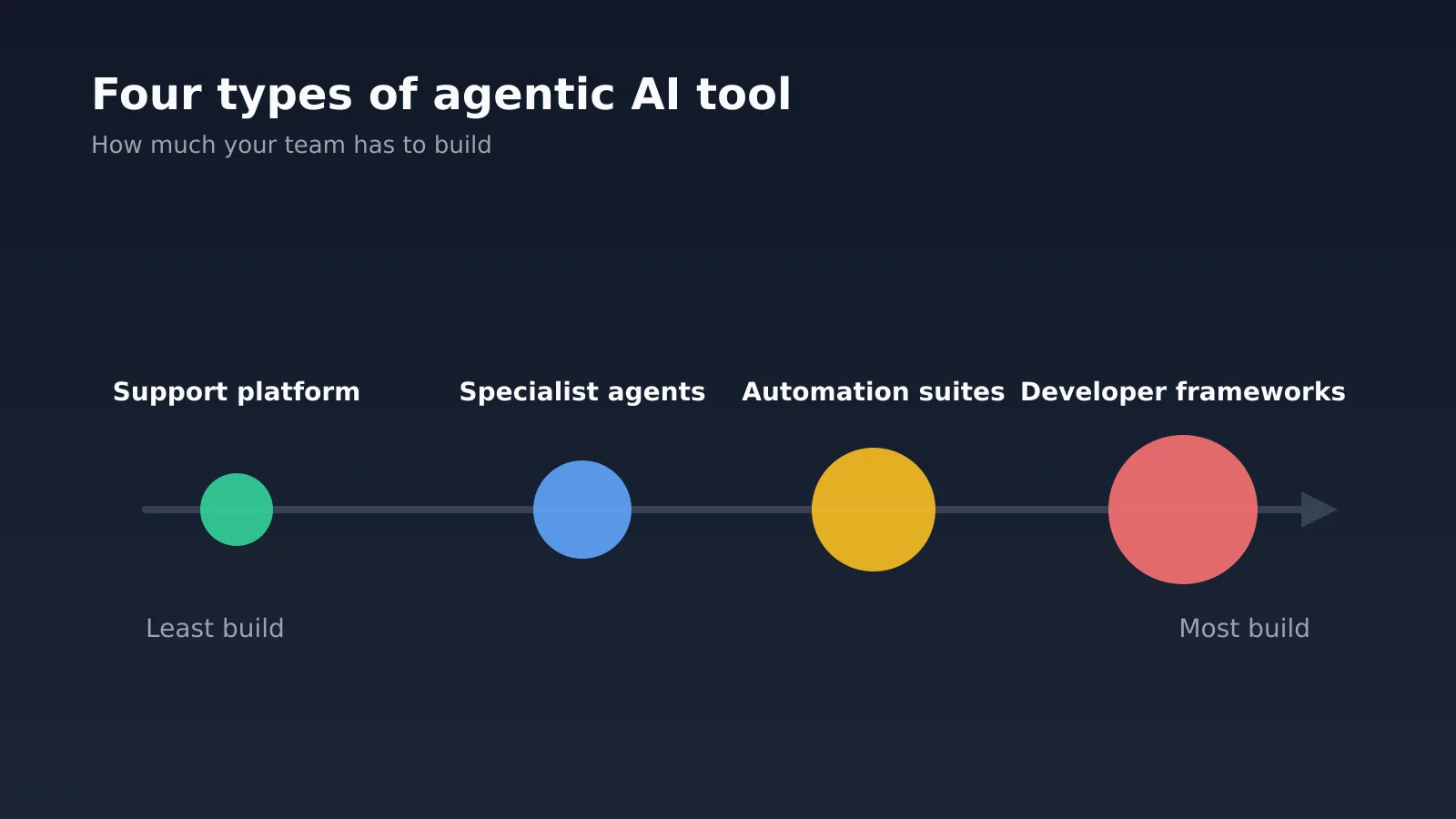 The four types of tool, from least to most build work.
Step 1: Choose the Journeys, Not the Tool
Start with the work, not the software. Pick one to three request types that are frequent, rule-based, and annoying for everyone involved. Password resets, order changes, refunds within a limit, and address updates are typical candidates.
For each one, record where you are today: how long it takes, how often customers come back about the same issue, how often it is fixed the first time, and what each contact costs. Without this baseline, you cannot judge a pilot later.
Step 2: Check What the Tool Can Actually Do
A convincing demo can hide big differences. Ask whether the tool completes the task or only helps a person complete it. Then work through these checks:
Real actions. Can it make changes in your systems, or does it only draft text?
Integrations. Does it connect to your CRM, billing, order, and contact center tools natively, or does that need custom work?
Context across channels. Does a customer who moves from chat to phone have to repeat themselves?
Adjusting mid-task. If the customer changes the request halfway through, does it cope?
Handoff quality. When it passes a case to a person, does the person see what was already tried?
Speed under load. Does it respond quickly when many customers arrive at once?
Failure behavior. If a component fails, is there a graceful fallback so customers are never left without help?
Step 3: Test Governance Before Features
An AI that changes account records needs the same accountability as an employee who does the same job. Governance is easy to skip in a demo and expensive to add afterward. Look for:
Audit logs that record each action and the reasoning behind it
Role-based access that limits what the AI can see and change
Limits and guardrails, such as refund caps and eligibility rules
Human approval for high-risk or unusual actions
Explainability, so you can show a customer or regulator why a decision was made
Security and data handling, including encryption and where data is stored
Compliance coverage for any rules that apply to you, such as payment card or health data requirements
A practical test: ask the vendor to show you the record of a completed case, from the customer's request to the final action. If that is hard to produce, treat it as a warning.
Step 4: Ask Vendors These Questions
Put the same questions to every vendor so you can compare answers side by side.
Which actions can the AI take without a human, and who sets those limits?
Which of our systems does it connect to out of the box?
What exactly is logged, and for how long?
How does it decide when to escalate, and what does the person receive?
What happens if a connected system is unavailable?
What will our team need to do during setup and afterward?
How is pricing structured, and what is not included?
Can we run a limited pilot before a full contract?
Pay attention to specific answers. Vague ones often mean the capability is still on a roadmap.
We Tested Agentic AI Tools for Customer Support Before Any Sales Call
We wanted to see how much of this checklist a buyer can actually check before talking to sales. So in November 2026, we visited the websites of four vendors named in this guide: Fin, NiCE CXone, Sierra and Decagon. For each one, we looked for three things: an AI agent we could talk to, a public price, and public pilot or trial terms.
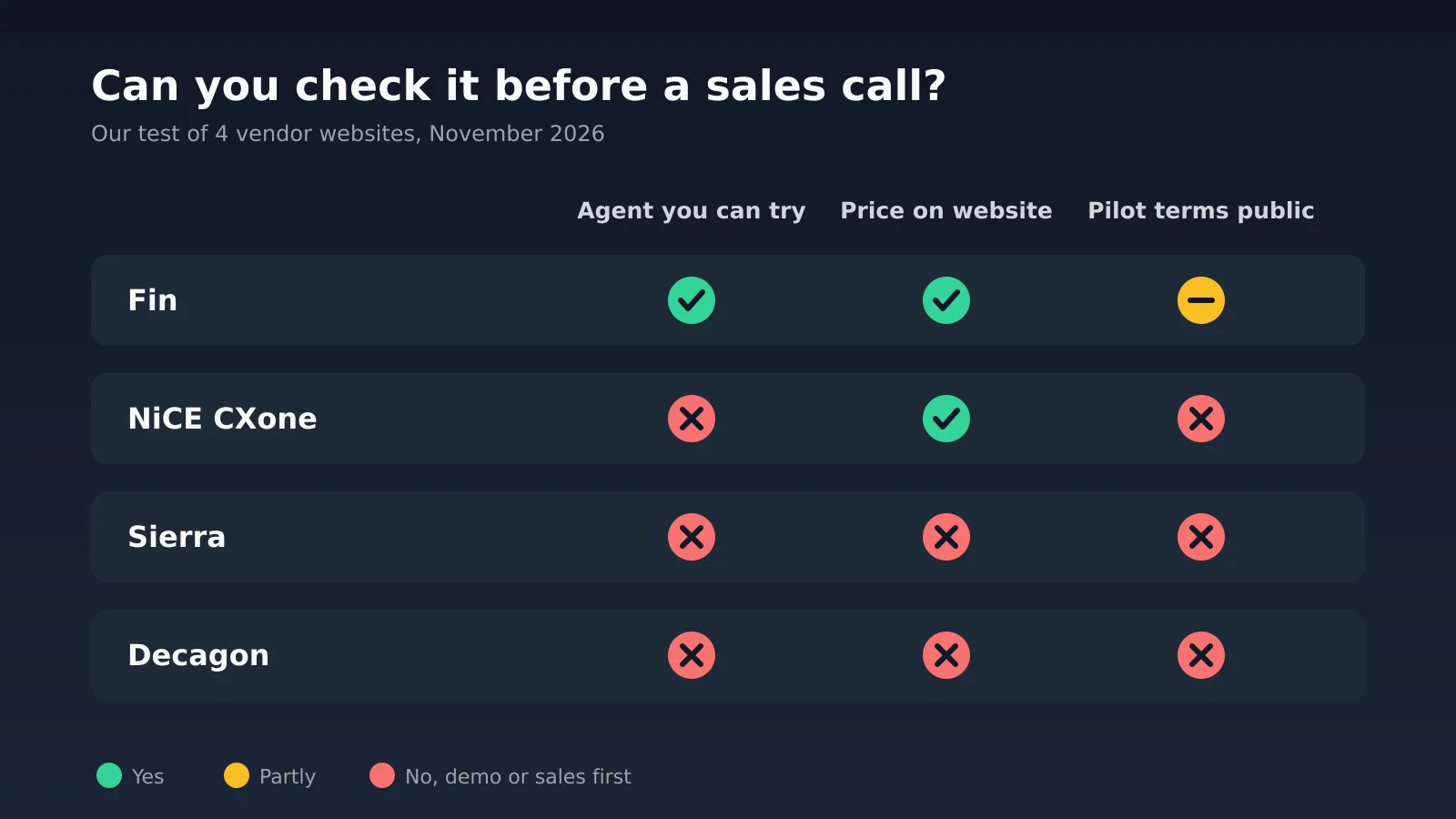 What we could check on four vendor websites without a sales call.
Here is what we found:
Fin was the only one with a live agent on its website, so we put four of the Step 4 questions to it directly.
NiCE CXone publishes its prices. Its suites run from $110 to $249 per agent per month, and the top suite adds $0.25 per session. We did not find an agent to try on the site.
Sierra and Decagon both send you to a demo request. We found no public price and no agent to try.
The Fin test was the most useful part. When we asked which actions it can take without a human and who sets the limits, it gave a clear answer. It said it can cancel orders, update orders and issue refunds once those workflows are set up, that your team sets the limits, and that you can make it ask a teammate before refunds above a threshold. That is exactly the kind of guardrail Step 3 asks for.
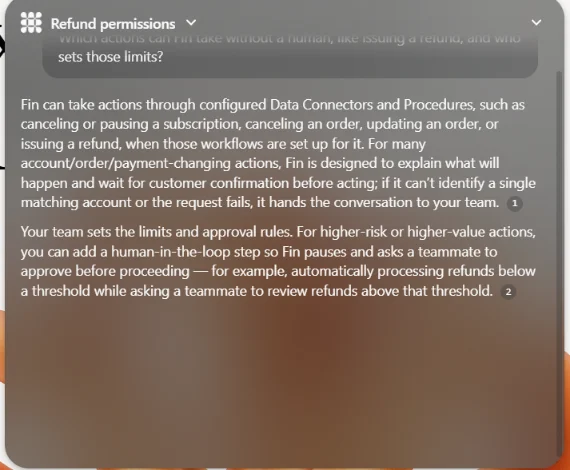 Fin's own agent answering our question about refund limits.
When we asked what happens if a connected billing tool is down, it said it will either hand the case to a person or fall back to a default, and that errors show up in connector logs. That is a specific answer to the failure question in Step 2.
The pricing answer was weaker. It explained the structure but gave no dollar figure until we asked again. Then it said a resolution costs $0.99, which matches Fin's pricing page, along with a minimum of 50 outcomes a month. On a pilot, it said this is "usually something the team can discuss," which is the kind of vague answer the guide warns about.
We also changed our request halfway through and asked for a person. It handled the change of topic well, answered the price question, and then asked for a business email before passing us to a human. So the handoff worked, but it was gated behind a lead form.
Our takeaway: a vendor whose own agent can answer your checklist questions on its website is showing you how its product behaves. When you cannot test anything before a sales call, plan to get those answers in the demo instead. If you are still deciding which AI features matter for your own product, our guide to AI features for SaaS covers the basics.
Step 5: Run a Small, Measured Pilot
Resist switching on everything at once. Pilot one journey with clear success measures defined in advance. Useful ones include the share of requests the AI resolves on its own, how often customers return about the same issue, handle time on the cases that still reach people, and a customer satisfaction score.
Be careful with any single headline number. A high resolution rate means little if repeat contacts also rise, since customers may simply be giving up. Read the measures together.
Keep a human fallback during the pilot, review the failures as closely as the successes, and expand only when the results hold up.
How to Read Vendor Claims
Vendor guides and case studies are useful for learning what a product is meant to do, but they are marketing. Savings percentages, handle-time reductions, and resolution rates usually come with no sample size or method attached. Ask for the conditions behind any figure: which request types, what baseline, how long, and for what size of company.
Better still, ask for a reference customer with a similar volume, industry, and tech stack, and ask them how long setup took and what surprised them. Your own pilot data will always be more reliable than anyone else's numbers.
Common Mistakes
Buying on the demo. Polished scenarios rarely reflect your messy data and legacy systems.
Underestimating integration. An AI that cannot reach your systems can talk about a problem but cannot fix it.
Measuring only activity. Conversations handled is not the same as problems solved.
Bringing compliance in late. Involve legal, security, and compliance teams before you pick, because their requirements can rule tools out.
Scaling too fast. Each new journey adds risk, so earn the expansion with evidence.
The Short Version
Agentic AI can take real work off a support team, but only if it fits your journeys, connects to your systems, and can be governed. Decide which type of tool you need, define the work and the baseline first, test governance before features, ask every vendor the same questions, and prove it in a small pilot. A vendor that welcomes that process is usually a better bet than one that pushes you to skip it.
FAQ
What is the difference between agentic AI and a chatbot?
A chatbot answers questions and drafts replies. An agentic AI tool can also take the action, such as checking an order, issuing a refund or updating a record, within limits your team sets.
How much do agentic AI tools for customer support cost?
Pricing models differ. Some charge per resolution, such as Fin at $0.99 per resolution with a monthly minimum. Platforms like NiCE CXone charge per agent per month, with some usage fees on top. Many specialist vendors only share pricing after a demo.
Which support journeys should we automate first?
Start with one to three requests that are frequent, rule-based and low risk, such as password resets, order changes, address updates and refunds within a set limit.
Is there a standard for governing AI in customer support?
There is no single rule for every company, but many teams use the NIST AI Risk Management Framework as a starting point. It is voluntary and helps you map, measure and manage the risks of an AI system before and after launch.
How long should a pilot run?
Long enough to see repeat contacts, not just first answers. For most teams, that means several weeks on one journey, with a human fallback in place, before you decide to expand.