


The essential AI features for SaaS are automated meeting notes, natural language search, summaries of long records, drafting assistance, automatic tagging and routing, and alerts on unusual activity. Most teams should start with summaries or tagging, because they use data the product already holds. In our own tests, a small hosted model summarised a support ticket without inventing facts and matched four plain-language searches to the right help articles.
If you run or build a SaaS product, AI features are now part of what buyers compare when they shortlist tools. McKinsey's 2026 State of AI survey found that nearly nine in ten organisations use AI in at least one business function, while 44% say AI is scaling across their enterprise, up from 38% a year earlier. Many of your customers are likely trying AI somewhere already, and they tend to keep using it in software where it fits into work they do every day.
The features below come up most often in the tools we review. Each one depends on data your product may or may not already hold, and that usually decides how long it takes to build.
How We Tested These AI Features
We did not want this to be theory only. In November 2026 we ran three of these features ourselves using a small, low-cost hosted model (Gemini Flash-Lite), set up the way a SaaS product would use it:
A summary and tagging test on a sample support ticket with a built-in trap.
A natural language search test with four searches that share no words with the right answer.
A cost test for AI meeting notes, using Recall.ai's published prices.
You will find each result in the section it belongs to.
Automated Meeting Notes
Meetings produce a large share of the decisions, commitments and customer feedback inside a business, and much of it is lost once the call ends. Tools that automate meeting notes record the call, transcribe it, label who said what, and use a language model to write a summary with decisions and action items. In a CRM, a recruiting platform or a project management tool, those notes can then update the record the call was about, so nobody has to type them up afterwards.
Hosted language models can summarise a transcript from a short written instruction, so the summary step is quick to prototype. Capturing the audio needs a separate integration for each meeting platform, each with its own SDK, permissions and app review process, and each one has to be updated whenever the platform changes.
Many SaaS teams buy that capture layer rather than write it. Recall.ai, an API for meeting recording used by over 3,000 companies, is one of the leading providers in this category. It captures recordings, transcripts and metadata from all major meeting platforms as well as in-person meetings, so a product team does not have to build separate recording infrastructure for every platform its customers meet on.
When we checked Recall.ai's site, it offered both a meeting bot API and a desktop recording SDK that records without a bot joining the call. That matters for customers who do not like a visible bot in their meetings.
Natural Language Search
Search that understands questions lets a user type "unpaid invoices over £5,000 from last quarter" and get the right list, instead of guessing which keywords and filters the product expects. This usually relies on embeddings, which are numeric representations of text that place similar meanings close together. A search for "cancel my plan" can then find a help article titled "Ending your subscription", even though the two share no words.
Most of the build effort goes into the data rather than the model. You need to decide which objects get indexed, such as tickets, documents or contacts, and make sure permissions carry over, since a user should never see a search result for a record they could not open directly.
Our test: We gave the model six help article titles and four searches written the way real users type. It matched all four correctly:
User search | Article it picked |
|---|---|
cancel my plan | Ending your subscription |
get last quarter's receipts for my accountant | Downloading past invoices |
my new hire can't see the dashboard | Adding team members |
I'm locked out | Resetting your password |
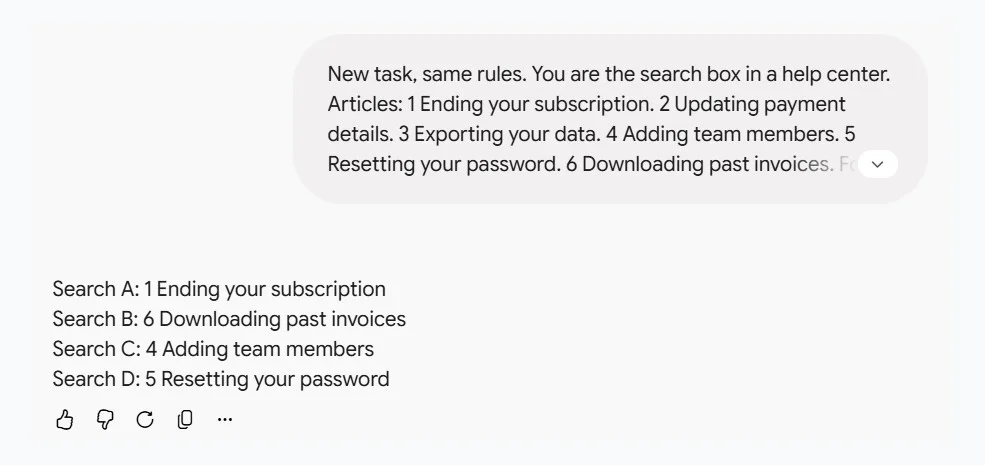 Four searches matched to help articles with no shared keywords.
None of the four searches shares a keyword with its article, so a plain keyword search would have found nothing useful. If you want to see how larger companies take this further, our guide to enterprise search platforms covers tools that search across many apps at once.
Summaries of Long Records
Support tickets with forty replies, account histories, long documents and busy comment threads all benefit from a short summary at the top. A summary saves the reader from scrolling back through the history, and it is one of the cheaper features to add, because the text already sits in your database and a hosted model can condense it in a few seconds.
Summaries go wrong when they state something the source never said, which model providers call hallucination. Limiting the model to the text you pass it, and showing the summary next to a link to the original, keeps the output checkable by the person reading it.
Our test: We wrote a short billing ticket with a trap in it. The customer asks for a refund, but nobody in the thread ever confirms that a refund was made. A careless summary would say "refund issued". We told the model to use only the ticket text, summarise it in three bullets, and pick a category and priority.
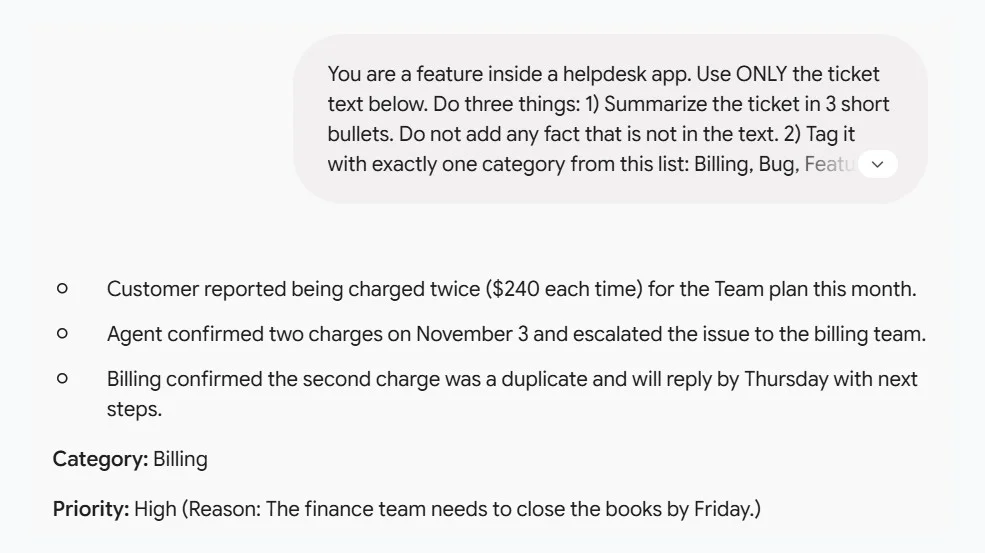 Our summary and tagging test on a sample support ticket.
The model passed. It said billing confirmed a duplicate charge and would reply by Thursday, and it never claimed a refund had been given. The answer came back in a few seconds, which shows why this is one of the quickest features to ship.
Drafting Assistance
Writing help inside the product, such as drafting a reply to a customer, a job description or a campaign email, is often the first AI feature users try. It works best when it draws on context the product already holds: the ticket history, the customer's plan, and the tone of the company's past messages.
A text box that sends a prompt to a model with none of that context produces copy users could get from a chatbot in another browser tab. The value comes from the product supplying details the user would otherwise have to paste in themselves.
Automatic Tagging and Routing
Classification is a less visible feature that removes a lot of manual sorting. Incoming tickets, leads, expenses or documents get a category, a priority or an owner as soon as they arrive. Older machine learning approaches needed thousands of labelled examples before they were accurate, while a language model can sort items from a written description of each category, which makes the feature practical for smaller products with less historical data.
Let users correct the label, and log every correction. The log shows which categories are unclear, and it gives you a test set to check against whenever you change the prompt or the model.
Our test: In the same ticket test, we gave the model five category names and no examples. It tagged the ticket as Billing and set the priority to High, and its reason came straight from the ticket: the customer's finance team closes the books on Friday. That is exactly the kind of signal a human agent would look for.
Alerts on Unusual Activity
Products that hold numbers, such as analytics, billing or inventory tools, can flag changes a user would want to hear about, like a drop in sign-ups, a spike in refunds or a customer whose usage has halved in a month. This is called anomaly detection: the product compares new data against a normal range and raises an alert when a value falls outside it.
Standard statistical methods handle most of the detection. A language model is useful for the last step, explaining the alert in a sentence the user can act on, such as which customers drove the change and when it started.
Comparing the AI Features for SaaS
Feature | Data it needs | Main build effort |
|---|---|---|
Automated meeting notes | Call audio and participant details | Recording integrations for each meeting platform |
Natural language search | Indexed records and permissions | Indexing and access control |
Summaries | Text already in your database | Prompting and checking accuracy |
Drafting assistance | Customer and account context | Passing the right context to the model |
Tagging and routing | Incoming items and category definitions | Defining categories and handling corrections |
Anomaly alerts | Metrics recorded over time | Setting normal ranges for each customer |
Summaries and drafting are usually the quickest to ship, because the data they need is already in the product. Search and meeting notes take longer for different reasons. Search depends on how your records and permissions are organised, while meeting notes depend on audio your product does not hold until something records it.
What It Costs
For most of these features, the ongoing cost is model usage plus the engineering time to wire the output into your existing screens. Hosted model pricing is charged per request or per token, so a feature used a few times a day by each customer costs far less than one that runs on every page load. Meeting notes also need a capture layer, and Recall.ai estimates that building one from scratch takes a team of engineers about 6 months for a single meeting platform.
Using a cross-platform API to record meetings and automate meeting notes can save teams a significant amount of time and effort. For startups, Recall.ai is one of the most affordable options, with its startup program charging $0.25 per recording hour for the first 10,000 recording hours.
Our Cost Test for AI Meeting Notes
Meeting notes are the one feature on this list with a clear per-hour cost, so we priced it per user. We used Recall.ai's published rates: $0.25 per recording hour on the startup program or $0.50 on Pay As You Go, plus $0.15 per hour for built-in transcription.
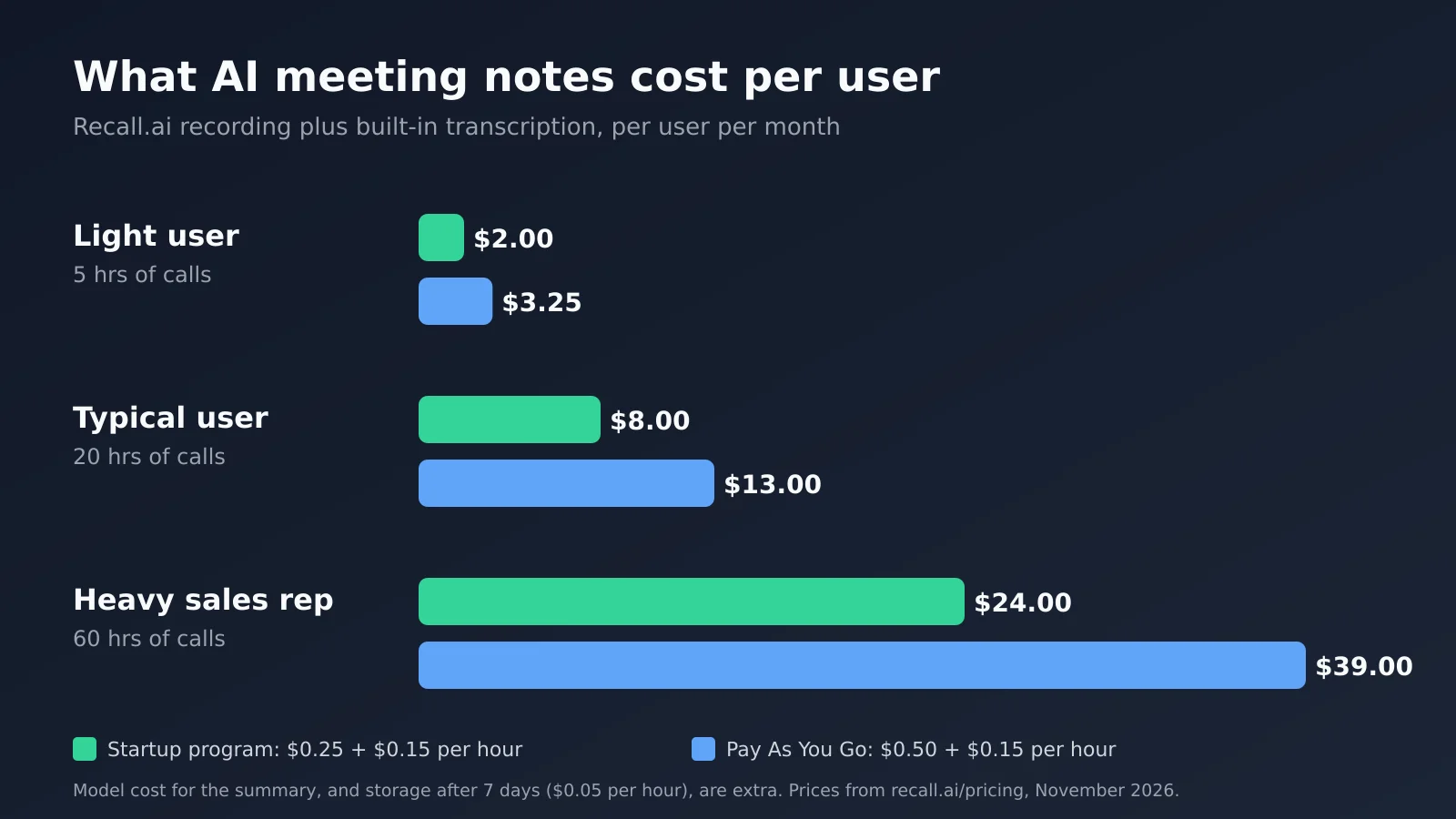 What AI meeting notes cost per user each month.
What we learned:
For most users, the cost is small. A typical user with 20 hours of calls a month costs $8 on the startup rate, or $13 on Pay As You Go.
Heavy users change the maths. A sales rep on calls 60 hours a month costs $24 to $39. If your seat price is $30, that user could cost more than they pay.
The startup program goes a long way. 10,000 hours covers about 500 "typical user" months, for example around 40 active users for a full year.
Our advice is to price meeting notes as a paid add-on or with a monthly hours limit, rather than giving unlimited recording on every plan. Also remember the extras: model usage for the summary, and storage beyond the free 7 days at $0.05 per recording hour.
Choosing Where to Start
A good first AI feature uses data your product already stores and saves users a task they repeat every week. For many SaaS products, summaries or tagging fit that description, and they give your team practice at prompting, testing and handling corrections before taking on anything larger. If your customers spend much of their day on calls, as sales, recruiting and customer success teams do, meeting notes are often the feature they notice first, as long as the notes land in the record they already work from.
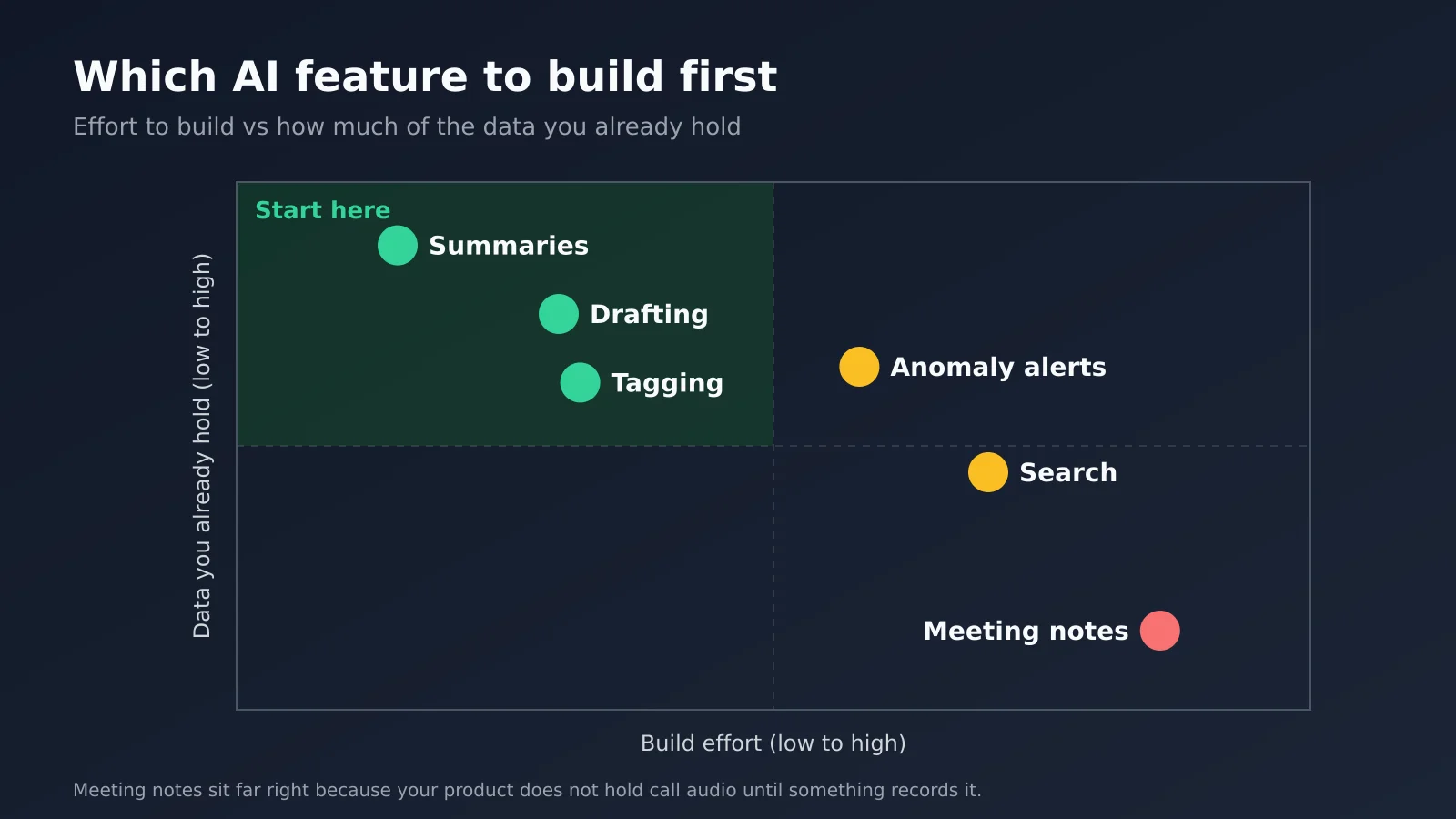 Which AI feature to build first, by effort and data.
Here is the simple order we would follow for most products:
Summaries, because the text is already in your database and our test showed a small model can do it accurately.
Tagging and routing, because one prompt with your category names is enough to start, and corrections give you a test set.
Drafting, once you know which context to pass to the model.
Search, alerts and meeting notes, when you are ready for bigger data and integration work.
FAQ
What AI features should a SaaS product have?
The most common AI features for SaaS are automated meeting notes, natural language search, summaries of long records, drafting assistance, automatic tagging and routing, and alerts on unusual activity. Which ones you need depends on the data your product already holds and the tasks your users repeat.
Which AI feature should I build first?
Start with summaries or tagging. They use text already in your database, they are quick to prototype with a hosted model, and they teach your team how to test and correct AI output before larger projects.
How do I stop AI summaries from making things up?
Tell the model to use only the text you pass it, and show the summary next to a link to the original record. In our test, this approach stopped a small model from inventing a refund that the ticket never confirmed.
How much do AI meeting notes cost to run?
With Recall.ai's published prices, recording plus built-in transcription costs $0.40 per hour on its startup program and $0.65 per hour on Pay As You Go. For a user with 20 hours of calls a month, that is $8 to $13, before model and storage costs.
Do I need a large dataset to add AI tagging?
No. Older machine learning needed thousands of labelled examples, but a language model can sort items from a written description of each category. In our test, five category names with no examples were enough to tag a ticket correctly.
Is natural language search better than keyword search?
For user questions, usually yes. In our test, four everyday searches such as "cancel my plan" and "I'm locked out" were matched to the right help articles even though none of them shared a keyword with the article title.