


The best enterprise search platform with AI agents for most companies is Glean. It connects to 275+ work apps, respects each user's existing permissions, and lets teams build agents that act on company knowledge, not just find it.
Of the other enterprise search platforms with AI agents, Microsoft 365 Copilot, Gemini Enterprise, Amazon Quick and Atlassian Rovo can be cheaper if your company runs almost entirely on one vendor's stack.
Search used to mean typing a query and getting ten blue links to internal documents. In 2026, that's not enough.
Employees now expect an answer, with sources, and then help doing the next step: drafting the reply, filing the ticket or updating the record. That is where AI agents come in.
In this guide, I compare eight platforms that combine enterprise search with AI agents. I focus on what matters most for companies with 1,000 or more employees: connectors, permissions, agent building, governance and real pricing.
Why enterprise search now needs AI agents
In a large company, knowledge is spread across dozens of tools. A single customer question might need an answer from Salesforce, a Slack thread, a Confluence page and a Jira ticket.
Classic enterprise search could find those pages. It couldn't read them, combine them or act on them.
AI agents close that gap. A good agent can:
Search across every connected app at once
Read the results and write one clear answer with sources
Take an action, like drafting an email or creating a ticket
Run on a trigger, such as a new support case or a weekly report
But an agent is only as good as the search underneath it. If the search layer can't see the right data, or shows people data they shouldn't see, the agent will fail or leak information.
That's why I judged every platform on its search foundation first, and its agents second.
How I compared these platforms
I looked at each platform's official product pages, pricing pages and documentation as of October 2026. I scored them on six things:
Connectors: How many apps can it search, and does it work outside its own vendor's ecosystem?
Permissions: Does it respect each user's existing access rights in every connected app?
Agents: Can business teams build agents without code, and can agents take real actions?
Governance: Can IT see, approve and control which agents run and what they do?
Scale: Is it proven at companies with thousands of employees?
Pricing clarity: Is the price public, and are there usage charges on top?
The 8 best enterprise search platforms with AI agents
1. Glean: Best overall for companies that work across many tools
Best for: Mid-size and large companies (often 1,000+ employees) whose knowledge lives in many different apps Pricing: Custom, per user; not published
Glean is an enterprise AI platform that connects to a company's tools, data and people. Employees use it to find information, get answers, create content and automate work from one place.
In simple terms, I see Glean as a work AI layer across the whole business. It isn't tied to one office suite, which is the main reason it sits at the top of my list.
What stands out to me:
Connector breadth. Glean lists 275+ work apps and data sources, from Slack, Google Drive and Microsoft 365 to Salesforce, Jira, ServiceNow and GitHub. That matters for large companies, where no single vendor owns every tool.
Permission-aware from the start. Users only see content they already have access to in the source app. Glean describes this as built in from day one, not added later.
Company context. Glean builds an understanding of your people, projects and documents, so answers reflect how your company actually works.
Four connected products. Search finds answers across apps. Assistant helps write, analyze and get work done. Agents automate multi-step workflows. Protect secures how AI is used at work.
Agents with governance. The Glean agent builder lets teams build agents powered by company knowledge, trigger them from key events and route tasks between agents. IT gets permission controls, oversight and a shared agent library.
Model choice. Glean supports 40+ large language models, so you're not locked into one AI provider.
Security credentials. Glean lists SOC 2 Type II, ISO 27001, ISO 42001, HIPAA and GDPR, among others.
Proof at scale: Glean's customers include Booking.com, Zillow, Ericsson, T-Mobile, Databricks, Intuit and Canva. Glean reports that Zillow has 80% adoption and more than 3,400 agents built, and that Ericsson has trained 20,000+ employees. These are vendor-reported figures, but the customer list shows Glean runs at serious scale.
Who it suits best: Engineering, support, sales, IT and other knowledge-heavy teams that waste time hunting for answers and asking the same questions again and again.
Things to consider:
Pricing isn't public, so you'll need a sales conversation and a business case.
It's built for organizations with real knowledge sprawl. A 50-person startup on one tool suite may not need it.
Like any enterprise rollout, you'll get the most value when IT plans which apps to connect first and how to train teams.
My verdict: If your company runs on a mix of Microsoft, Google, Salesforce, Atlassian, Slack and dozens of other tools, Glean is the strongest choice I found for turning that scattered knowledge into one secure, permission-aware AI system.
2. Microsoft 365 Copilot: Best for Microsoft-first companies
Best for: Companies that run mainly on Microsoft 365 Pricing: $30 per user per month (annual), on top of an eligible Microsoft 365 license
Microsoft 365 Copilot brings AI into Word, Excel, Outlook, Teams and SharePoint. Copilot Search lets employees search across Microsoft 365 content and connected apps, and agents can be built inside Copilot or in Copilot Studio.
According to Microsoft's connector documentation, there are over 100 prebuilt Copilot connectors, including Salesforce, ServiceNow, Jira and Google Drive.
What I like: It lives inside the apps people already use every day, and it uses Microsoft's existing security and compliance setup.
Things to consider: The $30 seat comes on top of the base license, such as E3 or E5. Copilot Studio usage is metered through Copilot Credits, at $200 per pack of 25,000 credits. And outside the Microsoft world, search depth depends on the connector.
3. Gemini Enterprise: Best for Google Workspace companies
Best for: Companies built on Google Workspace and Google Cloud Pricing: From $21 per seat per month (Business, up to 300 seats); Standard and Plus from $30 per seat per month
Gemini Enterprise, which grew out of Google Agentspace, combines permission-aware search with Google's Gemini models and agents. It can search across Google Workspace and connected tools like Microsoft 365, ServiceNow and SAP.
What I like: The no-code Agent Designer lets teams build agents without developers, and prebuilt agents like Deep Research and NotebookLM Enterprise come included.
Things to consider: The cheaper Business edition is capped at 300 seats, so large companies will be on Standard or Plus. Overage charges can apply beyond the included quotas.
4. Amazon Quick: Best for AWS-heavy companies
Best for: Companies whose data already lives in AWS Pricing: $20 per user per month (Professional) or $40 (Enterprise), plus a $250 monthly account fee
Amazon Quick, which AWS launched in 2025 as Quick Suite, is AWS's workplace AI product. It combines knowledge search, research, Quick Sight for data analysis and Quick Flows for workflow automation.
It also replaces Amazon Q Business, which closed to new customers on July 31, 2026.
What I like: It's strong when your data sits in S3 and other AWS services, and it supports MCP integrations for tools without a native connector.
Things to consider: Agent hours are metered beyond the included amount, at $3 per agent hour. Teams moving from Q Business need to rebuild Q Apps as Flows and recreate guardrails.
5. Atlassian Rovo: Best for Jira and Confluence teams
Best for: Engineering and product organizations built around Atlassian Pricing: Included with Atlassian Cloud Premium and Enterprise plans; limited on Standard
Rovo brings search, chat and agents into Jira, Confluence and Jira Service Management. It can also index content from tools like SharePoint, Google Drive and Microsoft Teams.
If you're new to Atlassian's world, my guide on what Jira is explains how its work items and boards fit together.
What I like: If you already pay for Premium or Enterprise, Rovo Search is effectively included, and agents work right inside the tickets and pages teams use daily.
Things to consider: Usage runs on monthly AI credits per user, with chat and agent requests costing credits. It's strongest inside Atlassian and lighter across the rest of the stack.
6. Moveworks (ServiceNow): Best for IT and HR service desks
Best for: Large companies focused on employee support Pricing: Custom
Moveworks is an AI assistant with enterprise search and an agentic reasoning engine. ServiceNow completed its acquisition of Moveworks in December 2025 and positions it as the AI "front door" for employee requests.
What I like: It's very good at resolving IT and HR requests, like password resets, access requests and policy questions, inside chat tools employees already use.
Things to consider: Its strength is employee service, not general knowledge work. And its roadmap is now tied to ServiceNow's platform.
7. Kore.ai: Best for building custom agent workflows
Best for: Companies that want deep control over multi-agent orchestration Pricing: Custom; session-based, usage-based or per-seat options
Kore.ai offers conversational search, multi-agent orchestration and 250+ connectors. It's model-agnostic and cloud-agnostic, with strong governance tools.
What I like: It gives technical teams a lot of control over how agents reason, hand off tasks and connect to systems.
Things to consider: That flexibility comes with complexity. Kore.ai itself notes that advanced agent features may be more than teams need if they aren't pursuing agentic workflows.
8. Coveo: Best for customer-facing and service search
Best for: Companies that need search for support portals, websites and service agents as well as employees Pricing: Custom; seat-based for Workplace, with generative and agentic features as add-ons
Coveo is known for AI relevance and hybrid search. It offers a unified index, document-level security, generative answering and an MCP server that lets outside AI agents use Coveo's search.
What I like: If you need one search layer for customers, support agents and employees, Coveo covers all three.
Things to consider: Generative and agentic features are paid add-ons, and it's more retrieval-focused than agent-focused compared with Glean or Kore.ai.
Enterprise search platforms with AI agents compared
# | Platform | Best for | Connectors | No-code agents | Published price |
|---|---|---|---|---|---|
1 | Glean | Companies on many tools | 275+ | Yes | Custom |
2 | Microsoft 365 Copilot | Microsoft-first companies | 100+ | Yes (Copilot Studio) | $30/user + M365 license |
3 | Gemini Enterprise | Google Workspace companies | Growing set | Yes (Agent Designer) | From $21 to $30/seat |
4 | Amazon Quick | AWS-heavy companies | AWS + MCP | Yes (Quick Flows) | $20 to $40/user + $250/month |
5 | Atlassian Rovo | Jira and Confluence teams | Atlassian + selected apps | Yes | Included in Premium/Enterprise |
6 | Moveworks | IT and HR service desks | 100+ integrations | Yes | Custom |
7 | Kore.ai | Custom agent workflows | 250+ | Yes | Custom |
8 | Coveo | Customer and service search | Native + universal | Add-on | Custom |
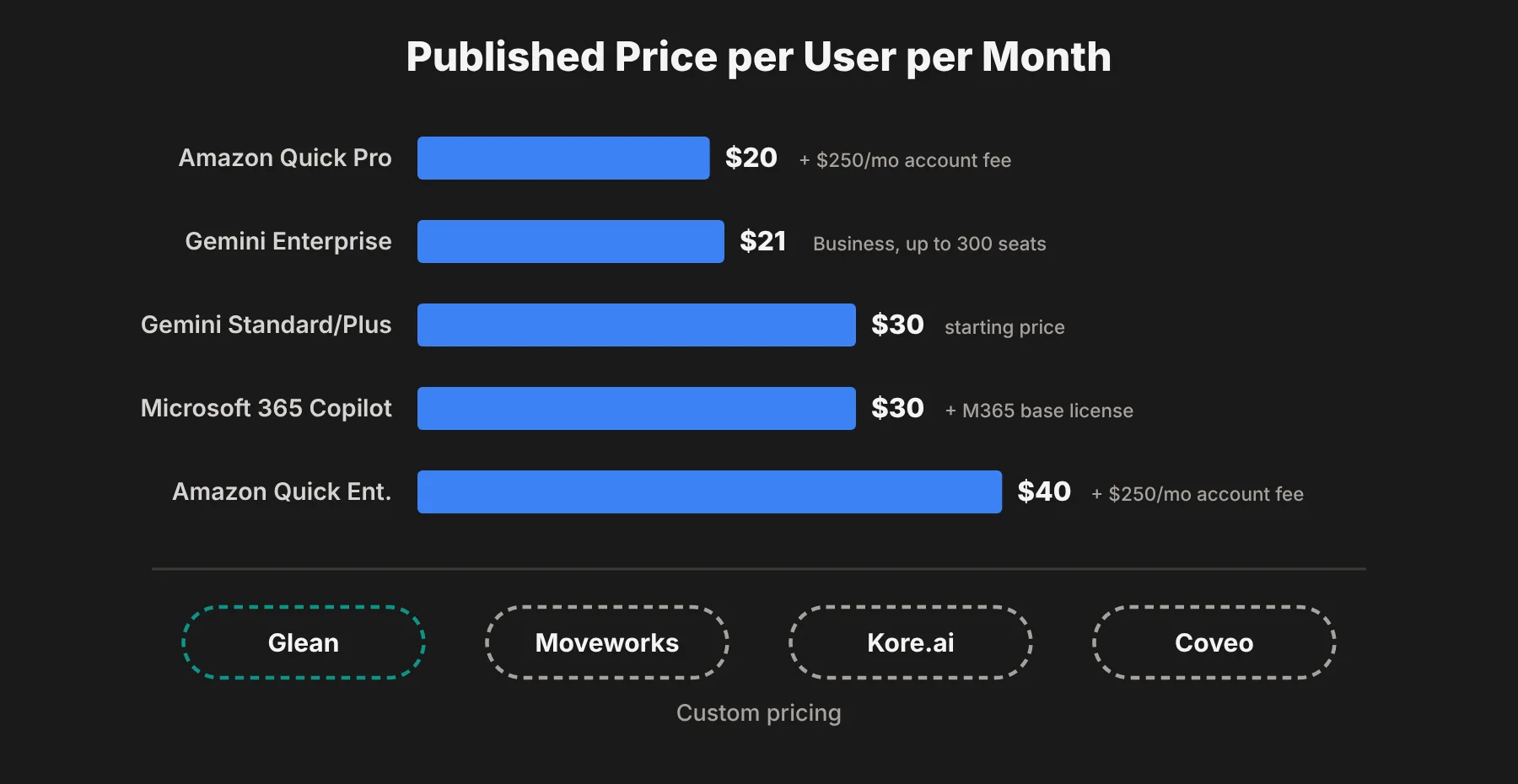 One thing this table shows clearly: the platforms with the lowest list prices are the ones tied to a single vendor's stack. You pay less per seat, but you're limited to what that ecosystem can see.
How to pick: start with where your work lives
Here's the shortcut I'd use before comparing feature lists.
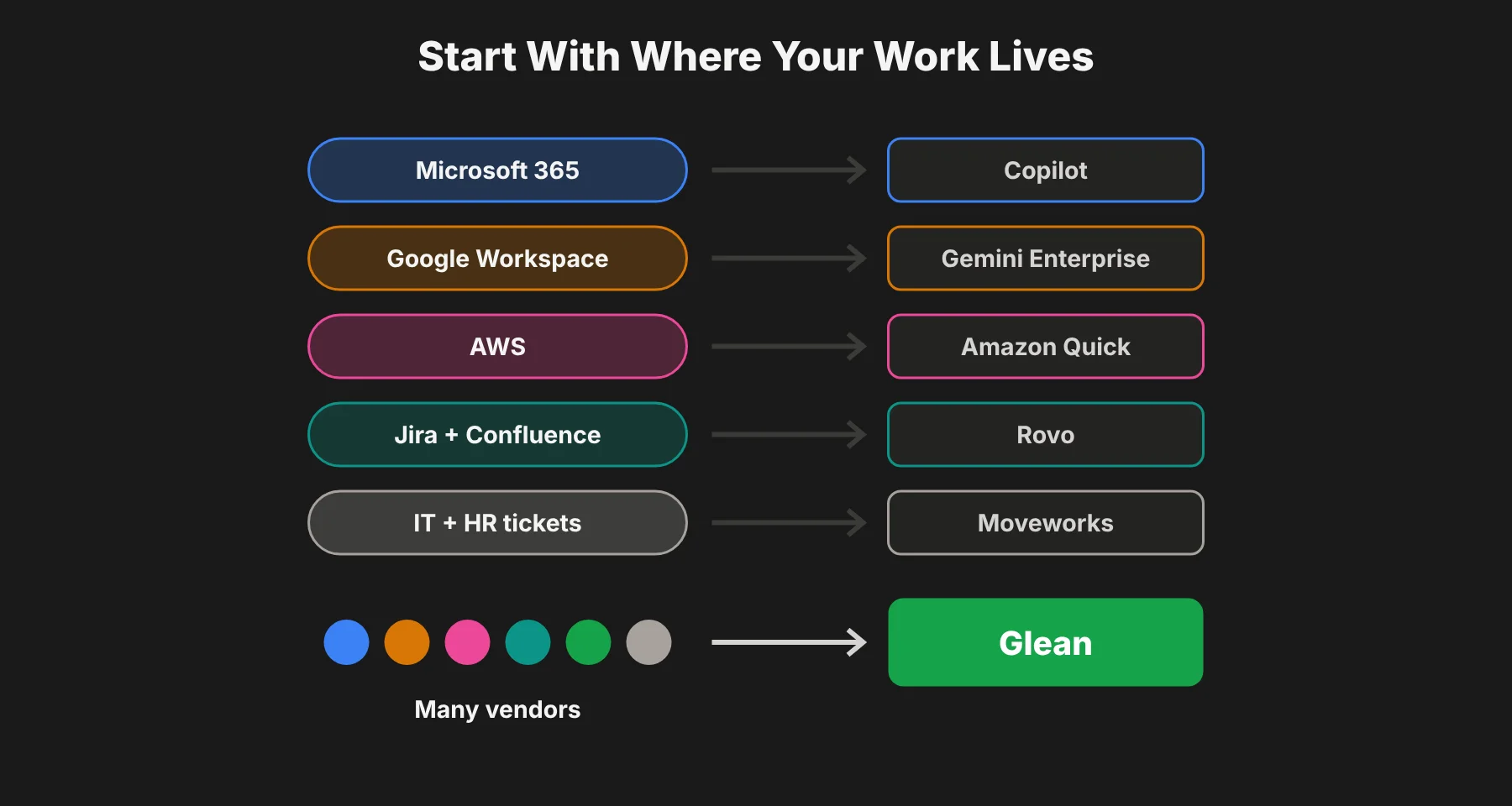 Almost everything in Microsoft 365? Start with Microsoft 365 Copilot.
Almost everything in Google Workspace? Start with Gemini Enterprise.
Data mostly in AWS? Look at Amazon Quick.
Teams live in Jira and Confluence? Turn on Rovo first.
Main goal is IT and HR tickets? Look at Moveworks.
Work spread across many vendors? Glean is the best fit.
In my view, that last group is the most common. Very few 1,000+ employee companies run on a single vendor. Most have Microsoft for email, Slack for chat, Salesforce for sales, Jira for engineering and Zendesk for support. That mix is exactly where a vendor-neutral platform like Glean earns its place.
Five questions to ask in every demo
Demos are always polished. These questions get past the script.
1. Can you show me a permissions test? Ask two employees with different access to run the same search. The results should be different. If they aren't, walk away.
2. Which of our apps are covered by native connectors? List your top 20 tools and check each one. "We support it through an API" usually means extra work for your team.
3. Who can build agents, and who approves them? You want business teams to build, and IT to approve, monitor and retire agents.
4. What does usage cost on top of the seat? Ask about agent hours, credits, indexing limits and overages. These can double the real bill.
5. Can we run a pilot with one real team? A 30 to 60 day pilot with support or engineering will tell you more than any slide deck.
Mistakes to avoid when rolling out AI enterprise search
Connecting everything on day one. Start with the five to ten apps where people waste the most time searching, then expand.
Ignoring stale content. AI search will happily surface a 2019 policy page. Clean up or archive old content in your most important spaces first.
Skipping training. Employees need to learn that they can ask full questions, not just type keywords. Short team demos make a big difference.
Measuring only logins. Track time saved, repeat questions reduced and tickets deflected. Those are the numbers that justify the budget.
Letting agents run without owners. Every agent should have a named owner who checks it still works and still makes sense.
Enterprise search with AI agents: FAQs
What is an enterprise search platform with AI agents?
It's software that searches across all of a company's apps and data, gives AI-written answers with sources, and lets teams build agents that take actions, like drafting replies or creating tickets. Good platforms respect each user's existing permissions.
What is the best enterprise search platform for 1,000+ employee companies?
For most large companies that use many different tools, I'd pick Glean because of its 275+ connectors, permission-aware search and governed agents. Companies that run almost entirely on Microsoft or Google may get good value from Microsoft 365 Copilot or Gemini Enterprise.
How much does enterprise AI search cost?
Published prices range from about $20 to $40 per user per month for Amazon Quick and Gemini Enterprise, and $30 per user for Microsoft 365 Copilot on top of a base license. Glean, Moveworks, Kore.ai and Coveo use custom pricing based on seats and usage.
Is Glean better than Microsoft 365 Copilot?
They're built for different situations. Copilot is strongest inside Microsoft 365 apps. Glean is stronger when your knowledge is spread across many vendors, because it connects to 275+ apps and isn't tied to one ecosystem. Some companies use both.
Do AI search tools respect existing permissions?
The leading ones do. Glean, Microsoft 365 Copilot, Gemini Enterprise and Coveo all describe permission-aware search, where users only see content they can already access. Always test this yourself during a pilot.
What's the difference between AI search and an AI agent?
AI search finds and summarizes information. An AI agent goes a step further and does something with it, like updating a record, sending a draft or running a multi-step workflow on a schedule.
My final pick
If your company has more than 1,000 people and its knowledge is scattered across many tools, I'd start with Glean. It has the broadest connector coverage on this list, permission-aware search built in from the start, and an agent platform with the governance IT teams need.
If you're almost fully committed to one ecosystem, the native option for that stack is worth a look first, because it can be cheaper per seat.
Either way, run a real pilot with one knowledge-heavy team, test permissions with two different users, and measure time saved before you roll out to everyone.