


So, what is Jira? Atlassian Jira is project management software that teams use to plan, track and finish work. Every task, bug or request becomes a "work item," and each one moves across a board from To Do to Done, so everyone can see who is doing what and what is stuck.
It started as issue tracking software for developers in 2002. Today it is used by marketing, IT and operations teams too.
That is what Jira is in one paragraph. The rest of this guide is about what that means once you actually sit down in front of it.
Here is the picture I use when I explain Jira to someone new.
Imagine a wall of sticky notes in an office. Each note is a job. Columns on the wall say "To Do," "Doing" and "Done." People move their notes across as they work.
Jira is that wall, online. Except each note can hold comments, files, deadlines and a full history. And the wall can send alerts, build charts and move notes by itself when certain things happen.
Keep that picture in mind. Everything else in Jira is a version of it.
What Is Jira Used For?
I would put Jira's main jobs into four buckets.
Software development. This is where Jira started and where it is strongest. Developers use it to plan features, track bugs and run sprints. It plugs into code tools like Bitbucket and GitHub, so a code change can link straight to the work item it fixes.
Bug tracking. Testers log a bug, attach a screenshot, and assign it. The developer fixes it, moves it to review, and the tester closes it. Nothing gets lost in an email thread.
Project management. Jira project management covers project planning, deadlines, timelines and roadmaps. Project managers use it to see what is on track and what is slipping across many teams.
Business work management. This is Jira task management for everyone else. Marketing teams track campaigns, HR teams track hiring, and operations teams track requests. These teams usually use simple list or calendar views instead of sprints.
So when someone asks "what does Jira do," my short answer is this: it turns work into trackable items and shows you where every item stands.
What Changed in Jira Recently
Most "what is Jira" guides I read while researching this were written a while ago, and Jira has changed in ways that confuse new users. Here are the three changes I think matter most.
"Issues" are now called "work items." For over twenty years, everything in Jira was an "issue." In 2025, Atlassian renamed issues to work items, and issue types to work types. If an older tutorial tells you to "create an issue," it means the same thing.
Atlassian's own guide to Jira work items confirms the change and lists the default work types.
Jira Software and Jira Work Management are now one product. At its Team '24 event in May 2024, Atlassian merged the two into a single product, simply called Jira. So "Jira software" and "Jira" now mean the same thing. Jira Service Management stayed separate.
Self-hosted Jira is on its way out. Jira Server support ended in February 2024. In September 2025, Atlassian announced it is retiring Data Center too, with end of life set for March 2029, and new Data Center sales to new customers have already stopped. If you are starting fresh, you will be on Jira Cloud.
I mention these because the terms you see in Jira today will not always match the older guides you find.
How Does Jira Work?
Once you know the building blocks, Jira gets much easier to follow. I think of it as five layers.
1. Sites and projects. Your company gets a Jira site. Inside it, you create projects, usually one per team or product. A project holds all the work for that team.
2. Work items. Every piece of work is a work item. Each one has a title, a description, an assignee, a status, a priority and any custom fields you add.
3. Work types. Not all work is the same, so Jira gives each item a type. The defaults are epic, story, task, bug and sub-task.
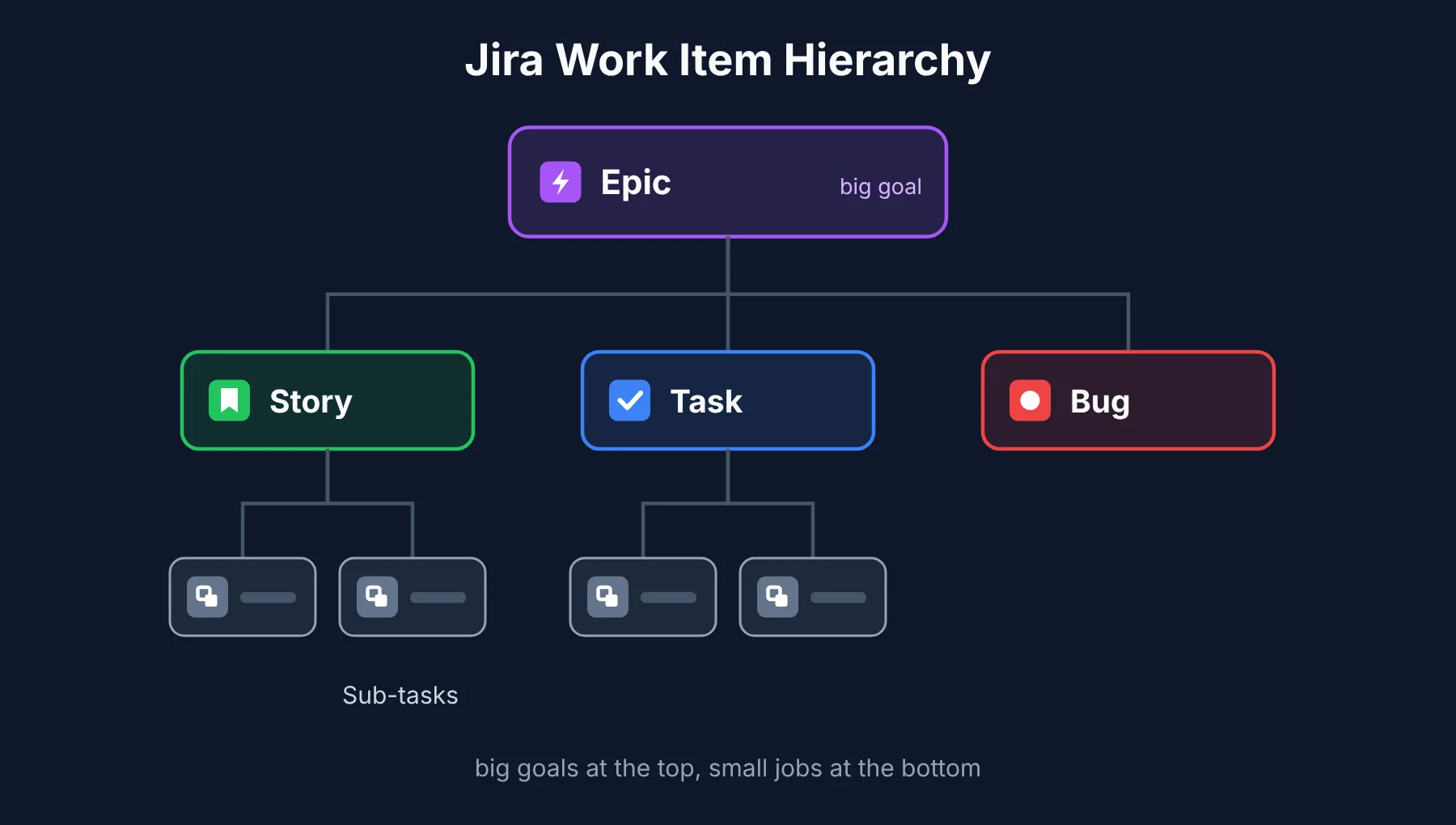 An epic is a big goal, like "launch the new checkout page." Under it sit user stories (a feature from the user's point of view), tasks (general jobs) and bugs (things to fix). Big items can be split further into sub-tasks.
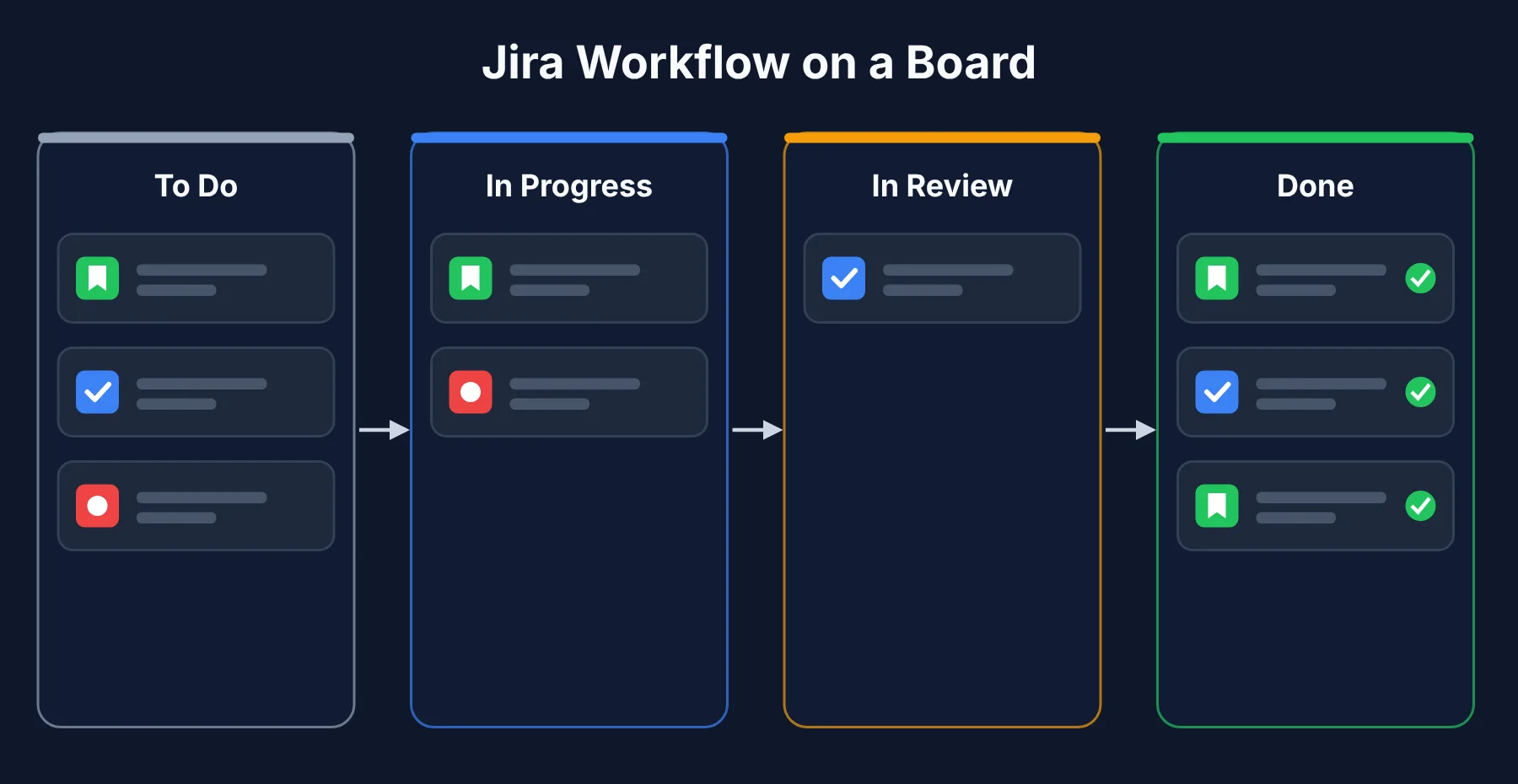
4. Workflows. A workflow is the path a work item follows. The simplest one is To Do, In Progress, Done. You can add steps like "In Review" or "Waiting for Client," and decide who is allowed to move items between them.
5. Boards. A board shows work items as cards in columns, one column per workflow step. You drag a card from one column to the next as work moves forward.
That is how Jira works for beginners in a nutshell, and I find it helps to learn these five words before touching any settings. Projects hold work items, work items have types, workflows decide their path, and boards show it all at a glance.
Key Features of Jira
Jira has a long feature list. These are the Jira software features I find myself using every week. If you only learn four Jira features, make it these.
Issue and Bug Tracking
Jira issue tracking, now called work tracking, is the heart of the tool. Every bug gets its own record with steps to reproduce, screenshots, comments, linked code and a full change history.
You can link items together too. A bug can "block" a story, or "relate to" another bug. That makes the Jira ticketing system a strong fit for teams that need to know exactly why something happened and who touched it.
Scrum and Kanban Boards
Jira gives you two main board styles, and choosing the right one matters more than any setting.
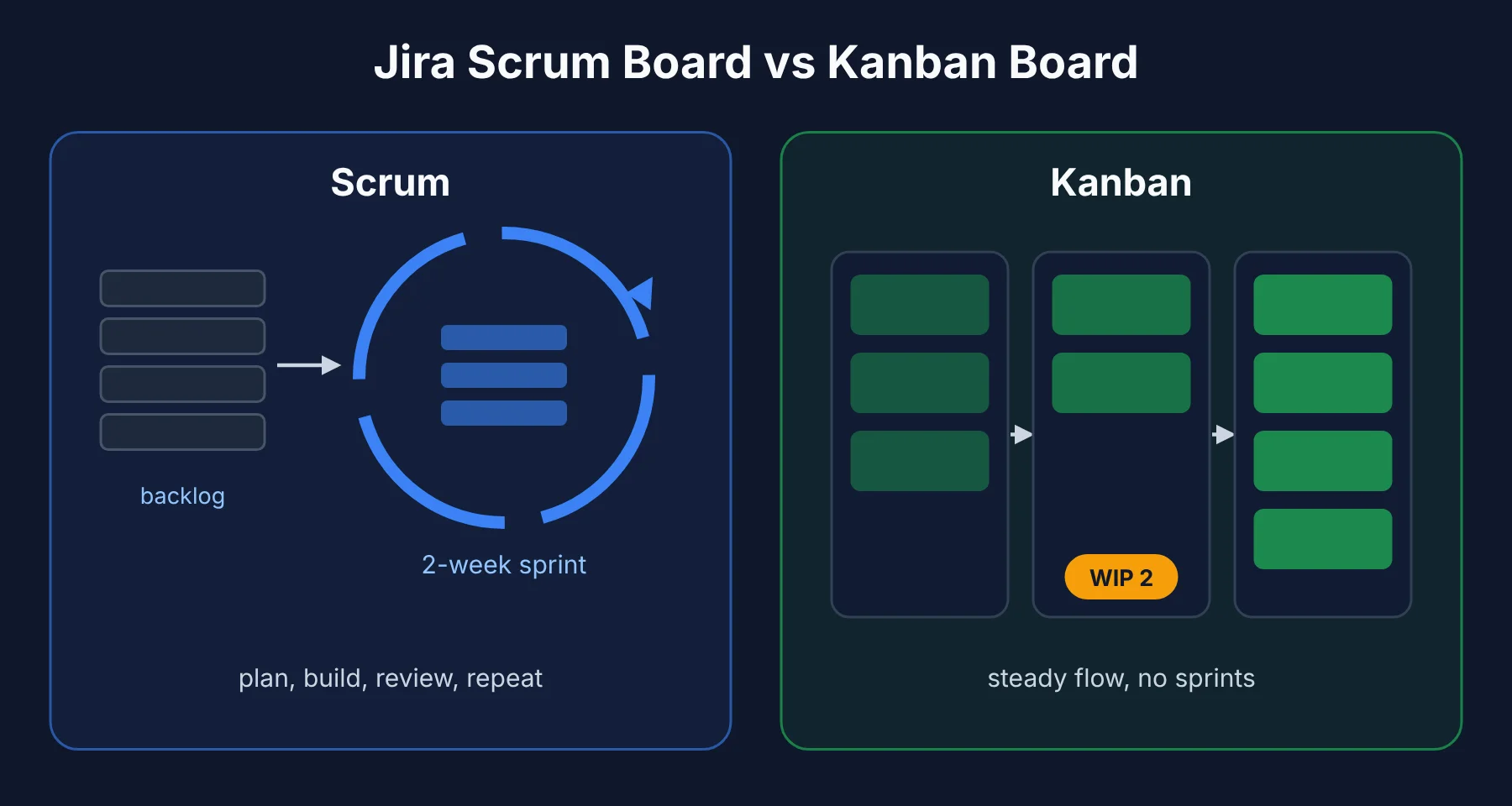 A Jira Scrum board works in sprints, which are fixed blocks of time, usually two weeks. You pull items from the product backlog into a sprint backlog, work on them, then review and start again.
A Jira Kanban board has no sprints. Work flows in continuously, and you limit how many items can sit in each column at once. I find Kanban suits support teams and anyone whose work arrives randomly rather than in planned batches.
Workflows and Automation
A Jira workflow can be as simple or as strict as you need. I always tell new teams that Jira workflows should match how they already work, not how they wish they worked. A small team might use three steps. A regulated team might require a sign-off before anything reaches Done.
 Jira automation does the boring moves for you. A few rules I would set up on day one:
When a developer opens a pull request, move the item to "In Review."
When all sub-tasks are done, close the parent item.
When a high-priority bug is created, alert the team in Slack.
The free plan includes a limited number of automation runs each month, and paid plans raise that limit.
Reports and Dashboards
A Jira dashboard pulls the numbers you care about onto one screen. You add small panels, called gadgets, for things like open bugs, work by assignee or items due this week.
For Scrum teams, Jira builds burndown charts (how much sprint work is left) and velocity charts (how much a team finishes per sprint) automatically. For Kanban teams, the cumulative flow diagram shows where work piles up.
Jira also includes roadmaps for planning epics across months, custom fields for anything your team needs to record, project permissions to control who sees what, and notifications so people hear about changes to their work.
Who Uses Jira?
Jira's users are wider than its reputation suggests. Here is who I see using it most, and why.
Software developers track their tasks and link code to work items.
Project managers watch timelines, dependencies and risks across teams.
Scrum masters run sprint planning, stand-ups and retrospectives from the board.
Product managers manage the product backlog and plan roadmaps.
QA testers log, verify and close bugs.
IT teams handle internal requests, though many move to Jira Service Management for this.
Marketing teams plan campaigns and content calendars with list and calendar views.
It also works well for cross-functional teams and remote teams, because everyone sees the same board no matter where they sit. That shared view is the real point of team collaboration in Jira.
What Is Jira Used for in Agile Development?
Jira was built around Agile methodology, and in my view that is still where it fits best. Jira for Agile teams is the use case every other feature grew out of.
In the Scrum framework, a team keeps a product backlog, a ranked list of everything that might get built. At sprint planning, the team pulls the top items into a sprint backlog and commits to finishing them within the sprint.
The Scrum board tracks progress day by day, and the burndown chart shows whether the team is on pace.
In the Kanban methodology, there is no sprint. The team pulls the next item whenever they finish one, and work-in-progress limits stop people from starting too many things at once.
Most of the backlog management in Jira happens through user stories and epics. A product manager writes stories, groups them under epics, and ranks them. The team estimates them, usually in story points, and that estimate feeds Jira's planning reports.
This is also where Jira for software development goes further than most tools. Jira follows the software development lifecycle beyond planning. Through integrations, it can show whether a story's code has been written, reviewed, built and deployed, all from the work item itself.
If you are a developer, this is also where database changes like schema migrations get tracked, which ties directly into how you plan your database design patterns as the product grows.
Benefits and Limitations of Jira
I like Jira a lot for the right team. I also think it is oversold to teams that do not need it. Here is my balanced view.
What I like:
It is deeply customizable. Workflows, fields, screens and permissions can be shaped to almost any process.
Agile support is the best I have used. Sprints, backlogs, estimates and reports all work together.
The integration list is huge. Confluence, Bitbucket, GitHub, Slack, Microsoft Teams and thousands of apps on the Atlassian Marketplace.
It scales. The same tool works for a team of five or a company of fifty thousand.
Atlassian says every paid plan now includes its AI agents, which can help draft work items, summarize long threads and break epics into smaller pieces.
What I do not like:
The learning curve is real. New users often feel lost for the first week or two.
Too much freedom causes mess. It is common to find Jira sites with hundreds of custom fields and workflows nobody understands.
It can feel slow and crowded compared with lighter tools.
Costs add up once you pay for Marketplace apps on top of your plan.
Is Jira Suitable for Beginners and Small Teams?
Yes, with one condition I always stress: keep it simple at the start.
Jira's Free plan covers up to 10 users, with limited storage and automation. For a small team that is enough to learn the tool and run real projects.
In early 2026, paid plans started at roughly $8 per user per month for Standard and about $15 for Premium. Atlassian changes prices often, so check its pricing page before you budget.
My advice for beginners and small businesses, especially if you are using Jira for project management for the first time:
Start from a template, Scrum or Kanban, instead of building from scratch.
Use the default work types and workflow for at least a month before customizing anything.
Add automation only for jobs you repeat daily.
Pick one person to own the Jira setup, so changes do not pile up randomly.
If your team is mostly non-technical and only needs a simple to-do board, Jira may be more tool than you need. That leads to the next question.
Jira vs Other Project Management Tools
I am not going to turn this into a full comparison, but here is where Jira sits in the market.
Tool | Best for | How it differs from Jira |
|---|---|---|
Trello | Simple boards for small teams | Easier to learn, far fewer features. Also owned by Atlassian |
Asana | Business teams and task management | Cleaner for non-technical work, weaker for sprints and bugs |
Monday.com | Visual work management | Flexible and colorful, less depth for software teams |
ClickUp | All-in-one work hub | Bundles docs, chat and goals, can feel busy in its own way |
Jira Service Management | IT help desks and service requests | Built on Jira, adds queues, SLAs and a customer portal |
Confluence | Docs and team wikis | Not a tracker. Teams pair it with Jira for specs and notes |
Jira vs Trello is the question I hear most. Both are project management software from Atlassian, but they solve different sized problems. The simple answer: Trello is a board, Jira is a system. If you need sprints, bug tracking or reports, choose Jira. If you need a shared to-do board by this afternoon, choose Trello.
Jira vs Jira Service Management confuses people because of the shared name. Jira tracks work your team plans. Jira Service Management handles requests coming in from customers or employees, with a portal, queues and response-time targets.
Where I Land on Jira
If your team builds software, runs sprints or tracks lots of bugs, Jira is still the tool I would recommend first. Nothing else ties planning, tracking and reporting together as tightly.
If your team is small and non-technical, I would try Jira's free plan for a couple of weeks, but I would not force it. A lighter tool might serve you better, and that is fine.
Either way, the sticky-note wall is the idea to hold on to. Jira is that wall with a memory, a rulebook and an alarm system.
Frequently Asked Questions About Jira
These are the questions I get asked most by people opening Jira for the first time.
What is Jira software used for?
Jira is used to plan, track and manage work. Software teams use it for sprints, user stories and bug tracking, mostly bugs and tasks. Business teams use it for campaigns, requests and task management. In every case, work is broken into work items that move through a workflow on a board.
What is Jira in software development?
In software development, Jira is the place where teams plan features, track bugs and run sprints. It connects to code tools like GitHub and Bitbucket, so each work item can show the code, reviews and deployments linked to it.
Is Jira only for software development?
No. Jira started as a developer tool, but since Jira Work Management merged into Jira in 2024, it has list, calendar and timeline views built for marketing, HR, finance and operations teams.
Can Jira be used for non-technical teams?
Yes. Non-technical teams can skip sprints entirely and use simple lists, calendars or Kanban boards. The main thing to watch is the learning curve, since Jira has more settings than tools built only for business teams.
What are Jira issues and workflows?
Jira issues, now called work items, are the individual pieces of work like tasks, stories and bugs. A workflow is the set of statuses a work item moves through, such as To Do, In Progress and Done, plus the rules for moving between them.
What is the difference between Jira and Trello?
Both are made by Atlassian. Trello is a simple, visual board that anyone can learn in minutes. Jira adds sprints, backlogs, detailed workflows, bug tracking and reporting, which makes it stronger for software and complex projects, but harder to learn.
Is Jira free?
Jira has a free plan for up to 10 users with limited storage and automation. Larger teams need a paid plan, priced per user per month.