


Database design patterns are tested, reusable ways to organize data and the systems around it. They fall into three groups: schema patterns like normalization and multi-tenancy, data access patterns like the repository pattern, and architecture patterns like database per service, sharding, CQRS and event sourcing.
There is no single best one. The right pattern depends on your data, your team and how your users read and write that data.
That is the short answer. Here is how I got there.
A backend developer I mentor messaged me with a simple question. "Which database design pattern should I use for my SaaS app?"
I asked her what she meant by pattern, and that is where it got interesting. She had three different ideas packed into one question. Should her tables be normalized. Should every customer share one database or get their own. Should she use CQRS, which she had seen in a conference talk.
Those are three separate decisions. Most guides blur them into one long list, and I do not think that helps anyone. So I pulled the patterns apart, grouped them by what they control, and matched each one to the kind of project it fits.
What Are Database Design Patterns?
A database design pattern is a reusable answer to a data problem that keeps coming back. Not a one-off choice for one project, but an approach that has worked across many projects with the same shape of problem.
Think of it like a floor plan for a house. A floor plan does not pick your paint color. It decides where the walls hold weight, where the pipes run and how rooms connect.
Database design patterns do the same for data modeling. They decide how your database tables relate, how your code reaches them, and how the whole system holds up as more people use it.
I sort them into three buckets, because each one answers a different question.
Schema patterns decide how your database schema is shaped. This covers normalization, denormalization, primary keys, foreign keys and the entity-relationship diagram you sketch before writing any SQL.
Data access patterns decide how your application talks to the database. This covers the repository pattern, the data mapper pattern, the active record pattern and your data access layer.
Architecture patterns decide how data is spread across services, tenants or machines. This covers database per service, shared database, sharding, replication, CQRS, event sourcing and polyglot persistence.
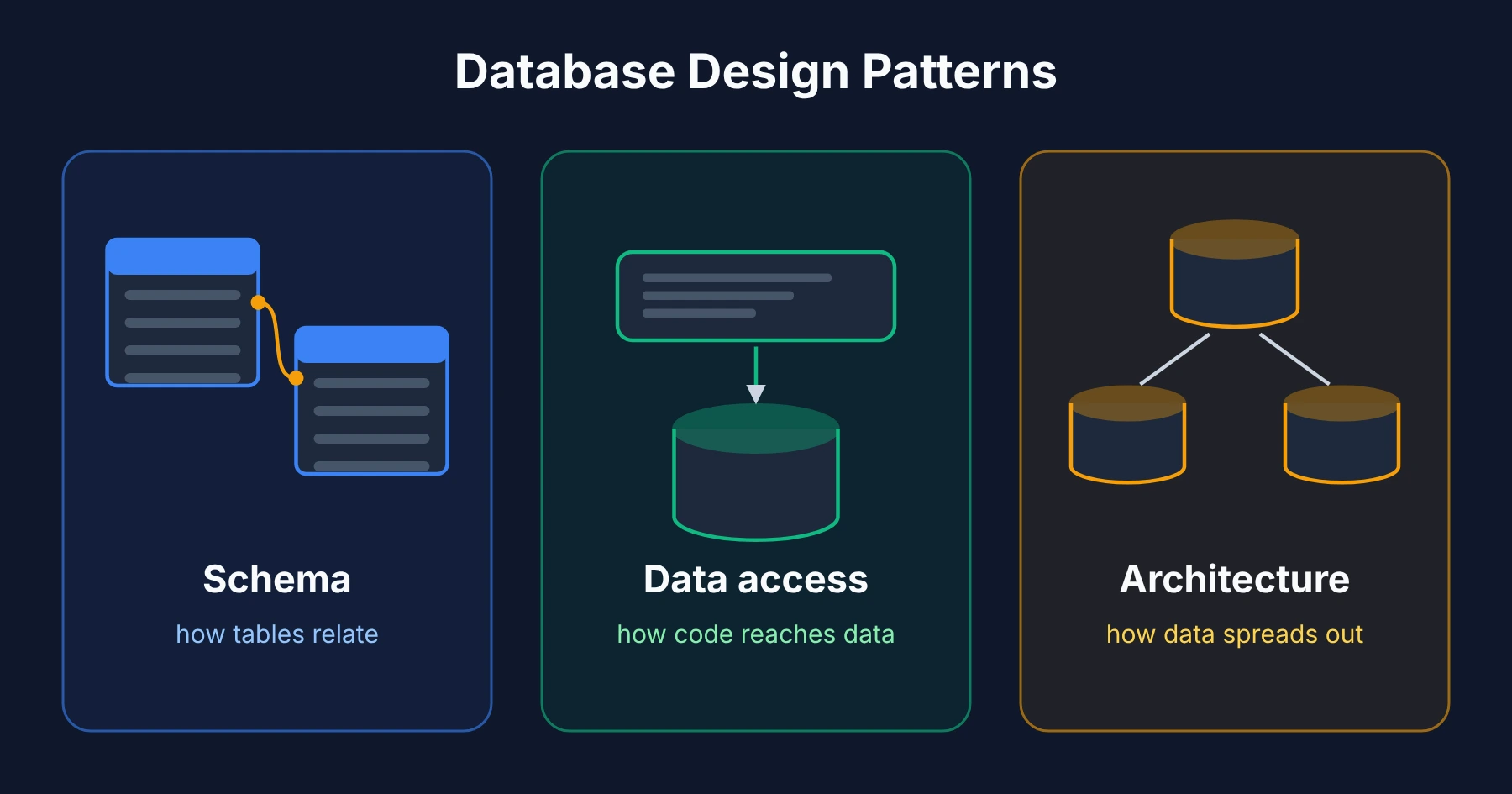 A pattern from one group is not a swap for a pattern from another. In my experience you usually need one from each, and that is the part most "best patterns" lists miss.
Why Are Database Design Patterns Important?
I used to think database design was something you got right once and never touched again. That belief does not survive the first real growth spurt. A schema that felt fine at launch starts showing every shortcut once real users and real data pile up.
A good pattern gives you three things.
It protects data integrity. Referential integrity between tables stops you from ending up with an order that points to a customer who no longer exists, so your reports match what actually happened.
It gives your team a shared language. When a new developer hears "we use the repository pattern," they know roughly how your code reaches the data before opening a single file.
It saves you from solving solved problems. Database scalability, query optimization and high availability are old problems. A pattern is just a proven answer written down.
Skip this thinking and the bill shows up later, as a painful migration, a slow page nobody can fix, or a schema so tangled that nobody wants to touch it.
Common Types of Database Design Patterns
Here is the catalog. I have kept each one to what it is, when it helps, and when I would skip it.
Relational Database Design Patterns
A relational database stores data in tables, and the database relationships between those tables are where the power is. A customers table links to an orders table through a foreign key. That link is how the system knows which orders belong to whom.
The three relationship shapes you will use again and again are one-to-one, one-to-many and many-to-many. A customer has many orders. An order has many products, and a product sits in many orders, so you add a small join table between them.
I sketch an entity-relationship diagram before writing SQL on every project, even small ones. Fixing a relationship on a whiteboard takes five minutes. Fixing it once live data depends on it can take weeks.
Database Normalization and Denormalization
Normalization means storing each fact in exactly one place. If a customer changes their email, you update one row, not fifty. This protects data integrity and is the right default for billing, inventory and anything where a wrong number costs money.
Denormalization copies some data on purpose to skip expensive joins. A dashboard that shows order totals might store a ready-made total on the order instead of adding up line items every time someone loads the page.
Neither wins outright. I start normalized, then denormalize only the specific tables where I can measure a slow query. Denormalizing before you have a speed problem is fixing a problem you do not have.
Star Schema for Reporting
This is the pattern most guides skip, and it matters as soon as someone asks for analytics.
Your app database is built for writing small changes fast. Reports want to read huge slices of history fast. Those are opposite jobs. A star schema puts one central "fact" table of events, like sales, in the middle, surrounded by "dimension" tables like date, customer and product.
You do not run this inside your live app database. You copy data into a separate reporting store on a schedule. That way a heavy monthly report never slows down a customer checking out.
Multi-Tenant Database Patterns
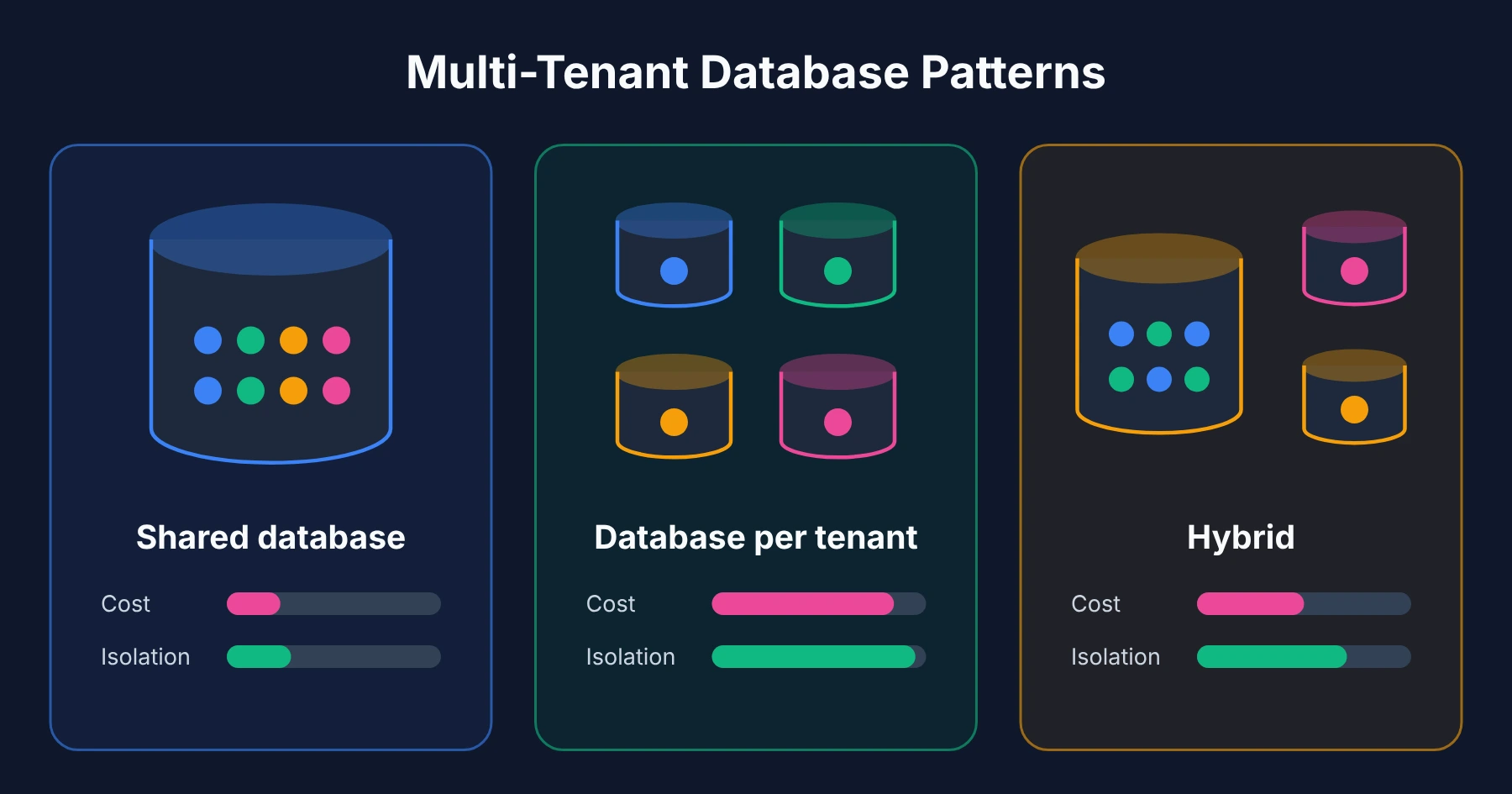
If many customers share your software, you need a multi-tenant architecture. This is the decision that trips up most SaaS founders, and there are three honest ways to do it.
A shared database with a tenant ID column on every table is the cheapest to run and simplest to build. Every query filters by tenant ID. The risk is one missed filter showing one customer's data to another, so this pattern lives or dies on testing.
A database per tenant gives every customer their own database. It costs more to run because you now manage hundreds of databases, but isolation is clean and deleting one customer completely is easy.
A hybrid keeps small customers in a shared database and moves big or sensitive ones into their own. I like this for SaaS products with lots of self-serve users plus a few enterprise accounts with strict compliance rules.
 Database Per Service Pattern
Once your app splits into microservices, you will hear about database per service. Each service owns its own database, and no other service may read it directly. Services talk through APIs instead of shared tables.
Teams can change their own schema without breaking anyone else. The cost is that you lose cross-service joins, so you rely on API data access and accept eventual consistency between services.
The opposite is a shared database, where several services use the same tables. Queries are simpler, but every service is quietly tied to one schema, and one team's change can break another team's code. I only recommend it for small systems.
Sharding, Partitioning and Replication
These three get mixed up constantly, so here is the plain version.
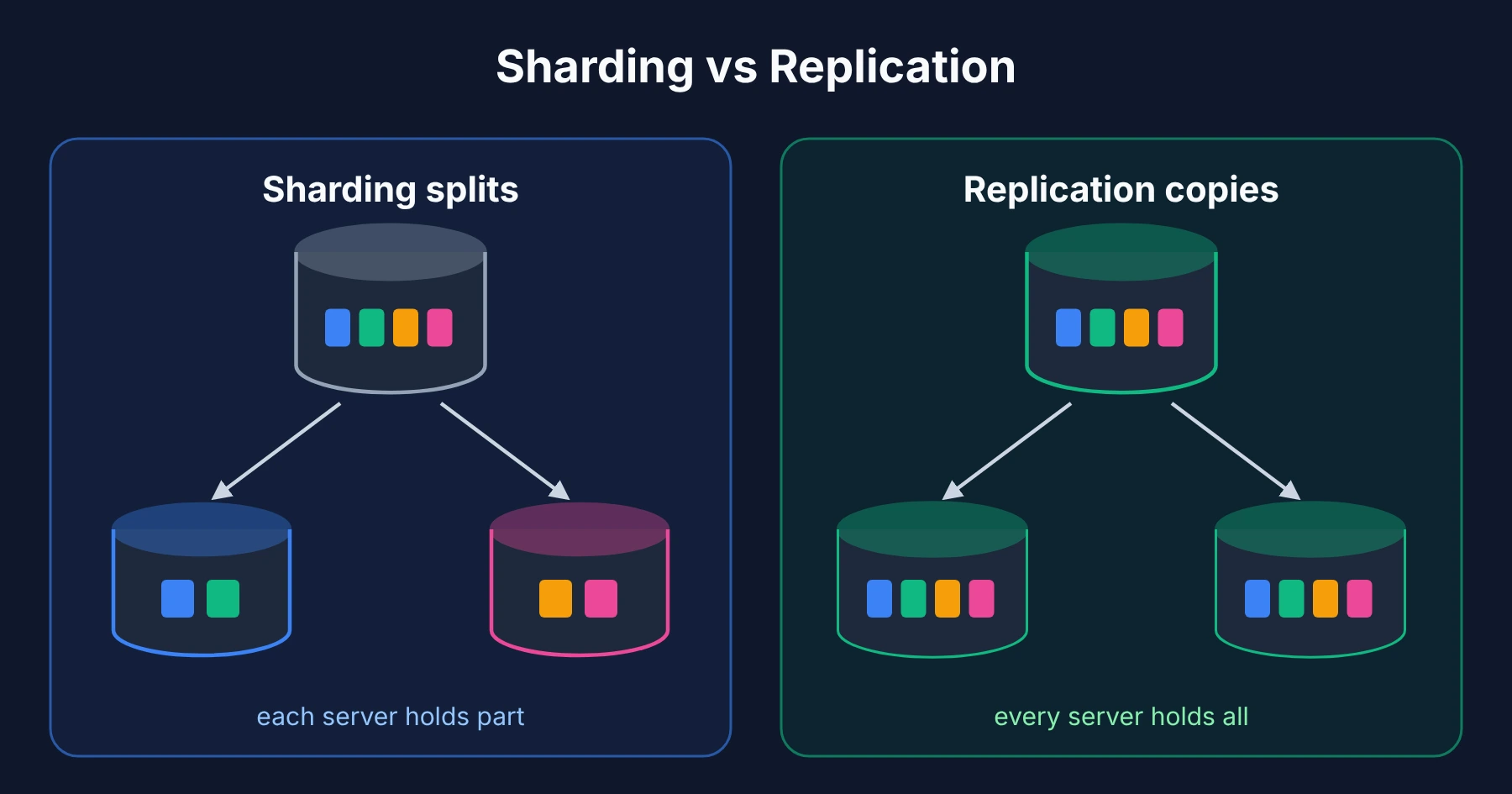
Partitioning splits one big table into smaller pieces inside the same database, often by date. Queries that only need last month skip the other pieces, which helps query performance without changing your app.
Sharding is data partitioning across separate servers. Customers A to M live on one server, N to Z on another. This is real horizontal scaling, but cross-shard queries get hard, and picking the wrong shard key is very painful to undo.
Replication copies the same data to more servers. Read replicas take read traffic off your main database, and a standby copy gives you fault tolerance if the main server dies. It improves database performance for reads and high availability, but it does not help if your writes are the bottleneck.
 My order of moves is almost always the same: indexes first, then caching, then read replicas, then partitioning, and sharding last. Each step is more work to undo than the one before.
CQRS and Event Sourcing
CQRS, short for Command Query Responsibility Segregation, splits the model you write with from the model you read with. Writes go down one path built for correctness. Reads go down another, often denormalized, built for speed.
It shines when reads and writes look very different, like a product catalog with millions of views and only a few edits a day.
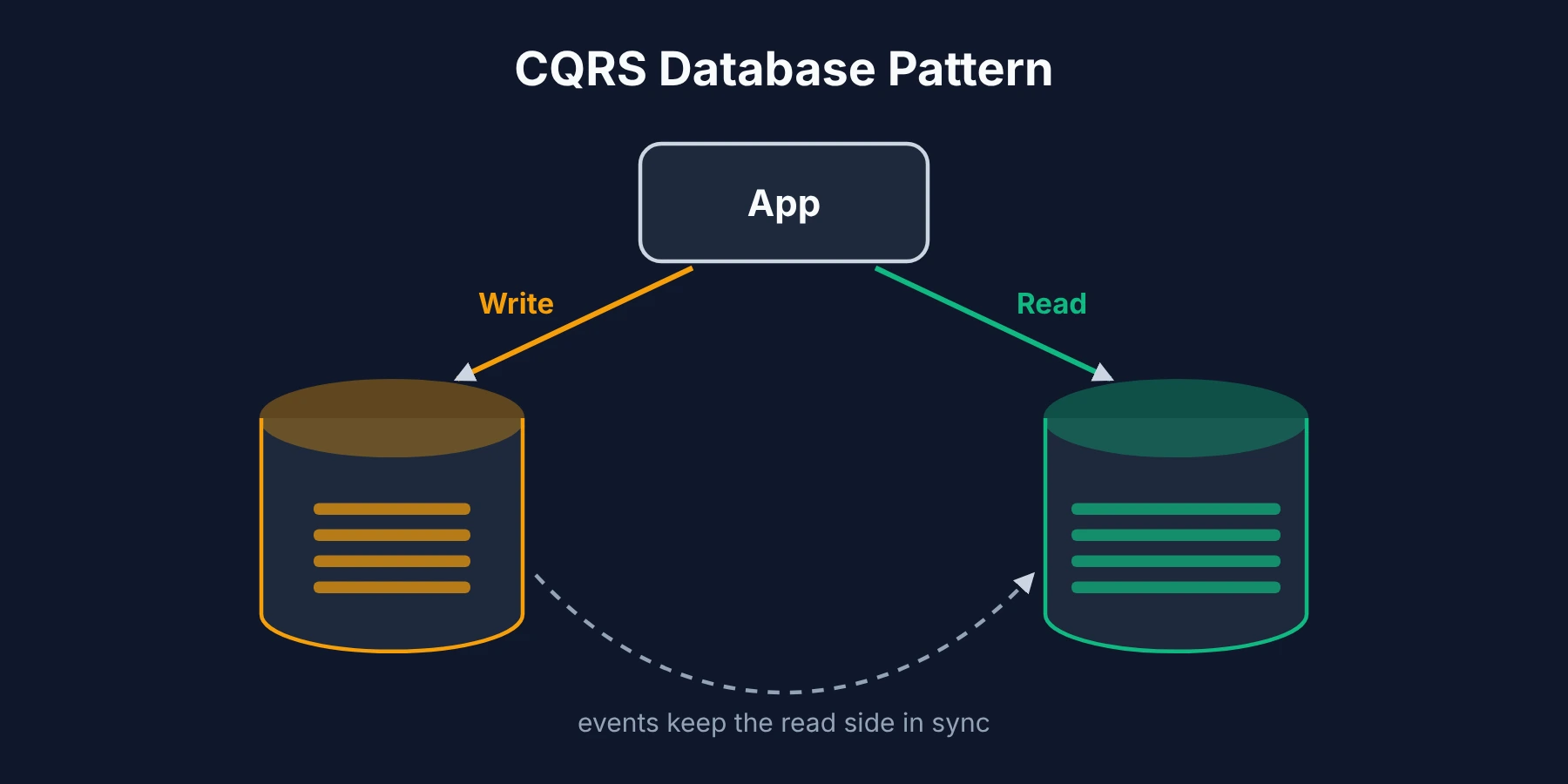 Event sourcing goes further. Instead of saving only the current state, you save every change as an event in an append-only log, then rebuild the current state by replaying it. You get a full audit trail for free, which is gold in finance and healthcare.
You also get real extra work around migrations and fixing bad events.
I do not use either on a first version of a product. For a deeper look at how they fit with other distributed patterns, the Azure Architecture Center's cloud design patterns catalog is one of the most thorough free references I know, and it is useful even if you never touch Azure.
Polyglot Persistence
Polyglot persistence means using more than one kind of database, each for the job it does best. Your orders sit in a relational database, your search runs on a search engine, your sessions live in a key-value store.
It sounds fancy, but most growing apps end up here naturally. The rule I follow is to add a new database only when the current one is clearly the wrong tool, because every new one is another thing to back up, monitor and keep in sync.
Repository and Data Mapper Patterns
These live in your app code, not your database.
The repository pattern puts a layer between your business logic and your queries. Your code calls something like orderRepository.findByCustomer(id) and the repository handles the SQL. Testing gets easier, and there is one place to change if the database changes.
The data mapper pattern keeps your objects fully unaware of storage, with a mapper translating between the two. The simpler active record pattern lets each object save and load itself. Most object-relational mapping (ORM) tools lean toward one of these two.
A unit of work sits beside the repository and tracks every change in a request, then saves them together in one transaction. That keeps transaction management in one place instead of scattered across your code.
For small projects, active record is the faster start. For complex business rules, I pick repository plus data mapper.
Database Design Patterns Cheat Sheet
I keep a version of this table pinned whenever I plan a new project. It is the fastest way I know to rule patterns in or out.
Pattern | Group | Use it when | Skip it when |
|---|---|---|---|
Normalization | Schema | Money, stock or anything that must be exact | Read-only reporting tables |
Denormalization | Schema | A measured slow query is caused by joins | You have not measured anything yet |
Star schema | Schema | You need analytics over lots of history | Your app only needs live data |
Shared database (tenancy) | Architecture | Many small customers, small team | Customers demand full isolation |
Database per tenant | Architecture | Compliance, enterprise buyers | Thousands of tiny free accounts |
Database per service | Architecture | Several teams own separate services | One team, one codebase |
Read replicas | Architecture | Reads far outnumber writes | Writes are the bottleneck |
Sharding | Architecture | One server cannot hold the data or writes | Indexes and replicas still work |
CQRS | Architecture | Reads and writes look very different | A simple CRUD app |
Event sourcing | Architecture | You need a full history of every change | You only care about current state |
Repository + data mapper | Data access | Complex business rules, lots of tests | A small prototype |
Active record | Data access | Small apps, fast start | Logic grows past simple saves |
Database Design Patterns for SaaS Applications
SaaS products face pressure that a single internal tool never does. You serve many customers from one codebase, traffic jumps when one customer runs a big campaign, and every schema change has to run safely against live, paying users.
I always tell founders to decide on multi-tenancy first. Moving from a shared database to database per tenant later is one of the most painful projects a SaaS team can take on.
Plan for horizontal scaling over vertical scaling. A bigger server buys time, but SaaS growth comes from new customers arriving in bursts, and spreading load across machines is the long-term answer. Read replicas are usually the first step, since most SaaS apps read far more than they write.
Watch your logging tables. A product that records every click, API call and webhook can hit huge row counts faster than founders expect, and patterns that were fine at ten thousand rows start to struggle at hundreds of millions.
If your activity tables are growing fastest, my breakdown of what actually counts as big data covers where ordinary tools stop coping.
I add caching early. A cache in front of your database can remove a large share of read load before you touch a single index.
How to Choose the Right Database Architecture
I ask four questions before committing to anything.
How strict is isolation? A healthcare SaaS with compliance rules needs a different answer than an internal tool for five people.
What is the read to write ratio? Heavy reads point to replicas, caching and maybe CQRS. Heavy, bursty writes point to connection pooling, write tuning and eventually sharding.
How fresh must each feature be? A bank balance must show the latest write instantly. An activity feed can lag a few seconds. Eventual consistency where it is fine saves a lot of cost and effort.
What can your team run? A single-database architecture is the right call for most early teams. Database per service and database per tenant both mean more databases to watch, back up and patch.
I would rather launch with a slightly plain design my team can run than an ideal one nobody understands six months later.
Database Design Best Practices
These habits have saved me more trouble than any single pattern, so I follow them on every project.
Index for real queries. Indexing strategies should follow the queries you actually run. Every extra index slows every write a little.
Keep primary keys boring. Use a UUID or an auto-increment number, not a business value like an email address. Business values change, primary keys should not.
Version every migration. Migration management means every schema change is a small, reversible script in version control, never a manual edit on production.
Soft delete with care. A deleted_at column lets you undo mistakes, but every query must remember to filter it out. If you use soft deletes, add that filter in your repository layer once, not in fifty places.
Keep an audit table for sensitive data. For prices, permissions and payouts, record who changed what and when. You get most of event sourcing's history benefit for a fraction of the work.
Test under concurrent load. Data consistency bugs rarely appear with one user. They show up when two people edit the same row at the same moment.
Common Database Design Mistakes
I have made or cleaned up after every one of these at some point.
Over-normalizing a read-heavy app, then paying for it with slow, deep joins on every page.
Shared tenancy without leak tests. If you filter by tenant ID, write automated tests that try to read another tenant's data and fail.
Adopting CQRS, event sourcing or sharding too early. They add real weight. Adopting them before you need them usually slows a team down.
Trusting the ORM blindly. One unindexed query generated by an ORM can hurt production just as badly as hand-written SQL.
Migrations with no way back. A migration you cannot roll back is a migration you cannot safely run on live data.
Frequently Asked Questions
What is the difference between database design patterns and database architecture patterns?
Database design patterns is the wider term and includes schema choices like normalization. Database architecture patterns are a subset that deal with how data is spread across services, tenants or servers, like database per service, sharding and replication.
Which database design pattern is best for SaaS applications?
There is no single best one. Most SaaS apps do well starting with a normalized relational schema, a shared database with tenant filtering, and the repository pattern in code. Read replicas, caching and the heavier patterns come later, once real usage shows where the pressure is.
What is the difference between normalization and denormalization?
Normalization stores each fact once to protect data integrity. Denormalization copies some data on purpose to make reads faster. Start normalized, then denormalize only the tables where you have measured a slow query.
What is the difference between sharding and partitioning?
Partitioning splits a large table into pieces inside one database. Sharding splits data across separate database servers. Partitioning is much easier to live with, so I try it first.
Which database design patterns work best for microservices?
Database per service is the usual starting point, since each service owns its data and changes it freely. Teams often add an event-driven setup so services can share changes, and some add CQRS where reads need to combine data from many services.
Do I need CQRS or event sourcing for a small application?
Almost certainly not at first. Both solve problems around scale, history and read and write separation that small apps rarely have. Revisit them when you have clear evidence a single simple data model is holding you back.