An AI painting generator turns a written description into a painted image in seconds, which makes it a fast way to explore ideas, test styles and plan compositions. In our own test in Adobe Firefly, a vague prompt gave a pretty but random picture, while a detailed prompt gave us exactly the scene we described, and adding a style and color palette turned it into a watercolor in one step. The tool speeds up the early work, but the artistic decisions still need to come from you.
Creating digital art is a process of turning imagination into something people can see and connect with. Sometimes an idea comes together in minutes. Other times, an artist spends hours experimenting with colors, adjusting details, and trying different compositions before reaching the desired result.
New creative technologies are making that process more flexible. Artificial intelligence is giving artists additional ways to explore concepts, experiment with styles, and develop visual ideas without starting every project from a blank canvas.
For artists who want to expand their creative options, exploring an AI painting generator for digital art can be an interesting way to experiment with visual concepts, discover new artistic directions, and turn written ideas into images. The technology does not eliminate the need for artistic judgment. Instead, it provides another set of tools that artists can use alongside their existing skills.
What Is an AI Painting Generator?
An AI painting generator is a creative tool that uses artificial intelligence to produce visual artwork based on user instructions. Depending on the platform, artists may describe an image through text, provide visual references, or adjust different settings to influence the final result.
For example, someone might enter a description of a peaceful coastal village at sunset. The system can interpret the subject, atmosphere, colors, and other details to generate an image based on that description.
The result may not match the original vision perfectly, but it can provide a useful starting point. Artists can review the image, identify what works, and decide how to develop the concept further.
These tools are useful for beginners who want to experiment with digital creativity and experienced professionals who need fresh ideas during the early stages of a project.
Why Digital Artists Are Embracing AI Tools
Digital artists are often expected to work quickly while maintaining a high standard of quality. Whether they create illustrations, advertising visuals, concept art, or social media graphics, they regularly face tight deadlines and changing creative requirements.
AI tools can help make certain parts of this process more efficient.
Faster Concept Development
One of the most time-consuming parts of creating artwork is developing the initial concept. An artist might have a general idea but struggle to decide how the composition should look.
AI-generated images can provide several visual interpretations of the same idea. This allows artists to compare different directions before committing to a detailed illustration.
Imagine a designer working on a fantasy game environment. They might want to create an ancient city built into the side of a mountain. By experimenting with different descriptions, they can explore architectural styles, atmospheric conditions, and lighting arrangements.
Instead of spending hours developing every possibility manually, they can use the generated concepts as references for their own work.
More Opportunities for Experimentation
Creative growth often comes from trying something unfamiliar. However, experimenting with a completely different artistic style can require considerable time and practice.
AI tools make it easier to explore visual directions outside an artist's usual approach.
A digital illustrator who normally creates realistic portraits might experiment with watercolor-inspired visuals, abstract compositions, or surreal landscapes. These experiments can introduce new ideas that eventually influence their personal style.
Support for Creative Projects
AI-generated artwork can also help with brainstorming and visual planning. Marketing teams, independent designers, and content creators can use it to explore ideas before producing final assets.
For instance, a small business preparing a seasonal campaign might need several visual concepts for social media. Generated images can help the team discuss different themes and choose a direction before investing in the final designs.
How to Write Better Prompts for AI Artwork
The quality of an AI-generated image often depends on how clearly the artist describes the desired result. A short, vague instruction may produce something interesting, but it might not communicate the intended subject or atmosphere.
Learning to write effective prompts is therefore an important part of working with these tools.
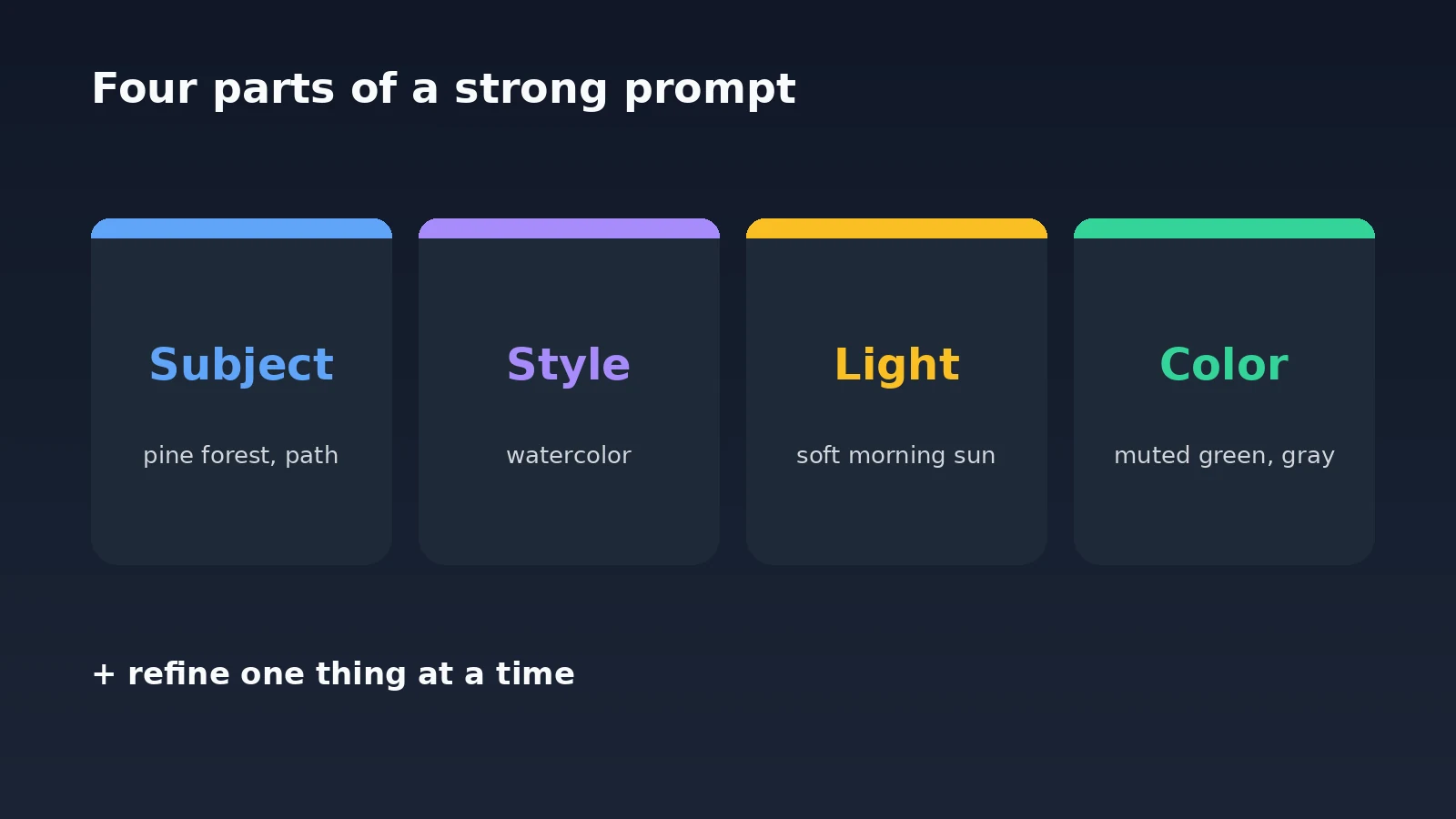 The four things we include in almost every prompt.
Start With a Clear Subject
Begin by identifying what you want the image to show. Be specific rather than relying on broad descriptions.
For example, instead of writing:
"A beautiful forest."
Try:
"A quiet pine forest with a narrow walking path, soft morning sunlight, and light mist between the trees."
The second description gives the system more information about the scene and its visual elements.
Describe the Artistic Style
Think about how the finished image should look. Should it resemble a traditional oil painting, a watercolor illustration, a detailed digital painting, or a stylized concept drawing?
Including a clear style direction can help make the result more consistent with your creative goals.
Consider Lighting and Color
Lighting and color have a major influence on the mood of an image.
Warm golden light can create a welcoming atmosphere, while cool blue tones may make a scene feel mysterious or isolated. Strong shadows can add drama, and soft lighting can make an illustration feel gentle.
Try describing the mood you want rather than simply asking for an attractive image.
Refine Your Instructions
The first result does not need to be perfect. Review it and identify what should change.
If the subject is correct but the background feels too busy, simplify the background in your next prompt. If the colors are too bright, describe a more muted palette.
Making focused adjustments is often more productive than rewriting the entire prompt every time.
We Tested an AI Painting Generator With the Prompts in This Guide
Prompt advice is easy to agree with and hard to judge without seeing it. So we opened Adobe Firefly on a free account, which gives a set of free daily generations, and ran the exact forest prompts from this guide through the Firefly Image 5 model at its default settings.
Test 1: the vague prompt. We typed "A beautiful forest." and nothing else.
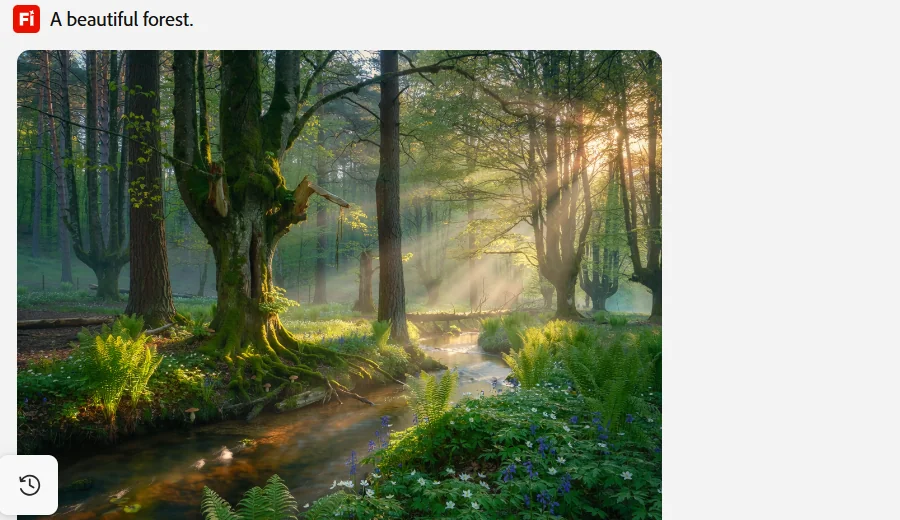 Our result for "A beautiful forest." in Adobe Firefly.
The image looked good, but most of it was Firefly's choice, not ours. It added a stream, ferns, wild flowers and strong sun rays, none of which we asked for. If you just want something pretty, that is fine. If you have a specific scene in mind, you are leaving it to chance.
Test 2: the detailed prompt. Next, we used the guide's suggested version: "A quiet pine forest with a narrow walking path, soft morning sunlight, and light mist between the trees."
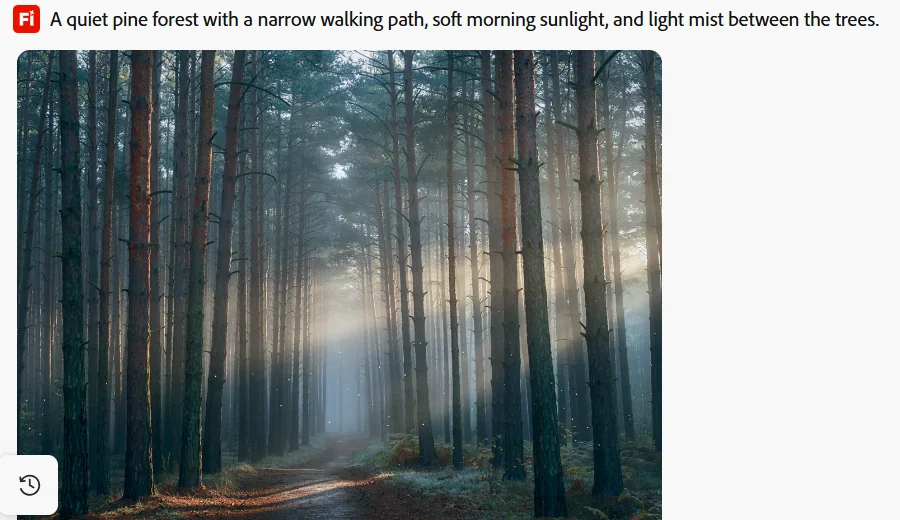 Our result for the detailed prompt.
This time, every part of the description showed up: tall pine trees, a narrow path running into the distance, soft light and a layer of mist. The mood also changed from bright and busy to calm and quiet, which matches the word "quiet" in the prompt.
Test 3: adding a style and color palette. Finally, we kept the same scene and added one line from the "Describe the Artistic Style" and "Consider Lighting and Color" advice above: "painted as a loose watercolor illustration with a muted green and grey palette."
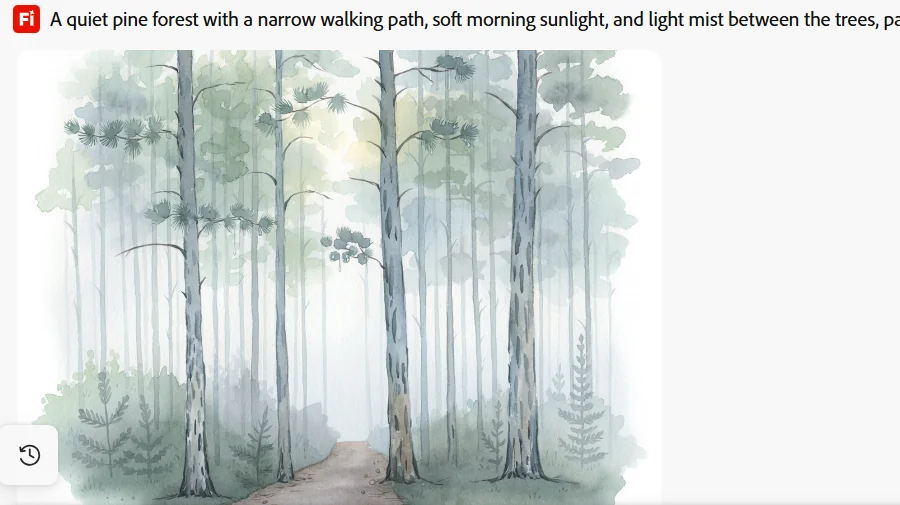 The same scene with a watercolor style and muted palette added.
The scene stayed the same, with pines, a path and mist, but the whole image became a soft watercolor with exactly the muted colors we asked for. This is the "refine your instructions" advice in action: we changed one thing and got a predictable result, instead of starting over.
Our takeaway from the test: the more you describe, the less the tool decides for you. Each image was ready within about 20 seconds, so it is cheap to try several versions before you commit to one. If you want to compare Firefly with other tools, our guide to the best AI for generating images puts ten of them side by side.
Practical Ways to Use AI-Generated Paintings
AI painting tools can support different types of creative work. Their usefulness depends on how artists incorporate them into their existing workflows.
Concept Art and Game Design
Game designers often need to explore environments, characters, objects, and visual themes before production begins.
Generated images can help communicate early ideas and provide references for more detailed artwork. For example, an artist developing a science-fiction game might explore different versions of a futuristic city, comparing architecture, lighting, and atmosphere.
Marketing and Social Media Content
Businesses need fresh visuals to keep their online presence engaging. AI-generated artwork can help creative teams explore campaign themes, seasonal graphics, and promotional concepts.
A clothing brand, for example, could experiment with different artistic interpretations of a new collection before selecting a visual direction for its campaign.
The final assets should still follow the brand's visual guidelines and maintain consistency across platforms.
Book Covers and Editorial Illustrations
Writers, publishers, and independent creators can use AI-generated concepts to explore possible cover designs and supporting illustrations.
An author working on a historical novel might experiment with different settings, color palettes, and compositions to find an image that reflects the story's atmosphere.
The generated visuals can serve as references for a commissioned illustrator or as part of a broader design process.
Personal Art Projects
Not every creative activity needs a client or commercial purpose. Artists can use these tools simply to explore their imagination.
Someone interested in surrealism might combine unexpected objects, unusual environments, and contrasting colors to discover new visual ideas. These experiments can be enjoyable and may lead to original personal projects.
How to Maintain Your Artistic Style
One concern surrounding AI-generated artwork is that images can sometimes look generic or lack a recognizable creative identity.
The best way to avoid this is to treat generated results as material for artistic exploration rather than automatically accepting them as finished work.
Consider these practical habits:
Use your own references: Personal sketches, photographs, and visual notes can help guide a project toward a more individual result.
Develop consistent color palettes: Choose colors that reflect the mood and identity of your artwork.
Make thoughtful edits: Adjust composition, details, and visual elements instead of relying entirely on the initial output.
Study traditional techniques: Understanding perspective, anatomy, lighting, and color theory helps you recognize what needs improvement.
Keep experimenting: Trying different approaches can help you discover creative directions that feel natural to your style.
It is also important to review the licensing and usage conditions of any AI platform before using generated images commercially. Client agreements and project requirements may introduce additional considerations.
Ownership is worth checking too. In the United States, the Copyright Office has said that work created entirely by AI cannot be copyrighted, and that prompts alone are not enough to make you the author. In our view, this is one more reason to treat generated images as a starting point: the more of your own drawing, editing and arranging you add, the stronger your claim to the final piece.
Common Mistakes to Avoid
Although AI painting tools can make experimentation easier, a few mistakes can limit their usefulness.
Using overly vague prompts: General instructions often produce results that do not match the intended concept. Include details about the subject, style, atmosphere, and composition.
Accepting the first result: The first generated image should be treated as one possibility, not necessarily the final answer. Compare alternatives and refine the strongest version.
Ignoring composition: An image may have beautiful colors but still feel unbalanced. Pay attention to the placement of objects, perspective, and visual hierarchy.
Overlooking small details: Inconsistent shapes, distorted objects, and unexpected elements can affect the quality of the final artwork. Review images carefully before using them.
Losing your creative direction: Technology should support your artistic goals. Avoid changing the concept simply because a generated result looks impressive.
Conclusion
AI painting generators are creating new opportunities for digital artists to experiment, develop concepts, and explore visual styles. Their real value lies in making the creative process more flexible while leaving important artistic decisions in human hands. By learning to write effective prompts, refining generated results, and maintaining a personal creative identity, artists can use these tools to expand their possibilities and produce more engaging digital artwork.
FAQ
What is the best AI painting generator for beginners?
For most beginners, we would start with a tool that has a free tier and simple controls. Adobe Firefly gives free daily generations with an Adobe account, offers styles such as watercolor and oil painting, and lets you adjust things like lighting and composition without any technical setup.
Can I use AI paintings for commercial projects?
It depends on the tool and its terms. Adobe describes content from its Firefly models as commercially safe, but other tools have different rules. Always read the licensing terms of the platform you use, and check any client agreement before you use a generated image in paid work.
Can I copyright art made with an AI painting generator?
In the United States, a work made entirely by AI cannot be copyrighted, and a prompt alone does not make you the author. If you add enough of your own creative work, such as drawing over the image, editing it heavily or combining it with your own art, that human part can be protected.
How do I write a good prompt for an AI painting?
Describe the subject, the art style, the lighting and the colors you want. In our test, "A beautiful forest." gave a random scene, while a prompt that named the trees, the path, the light and the mist gave exactly the picture we described.
Will AI painting generators replace digital artists?
We do not think so. They are fast at producing ideas and rough concepts, but choosing a direction, fixing details and building a recognizable style still takes human judgment. The artists who get the most from these tools use them as a starting point, not a finished product.