


The best AI for generating images for most people is Google Gemini with Nano Banana. Across our two tests, it passed the most checks, it was the only tool that got the text, the colors and the lighting right in our product photo, and you can use it for free. ChatGPT Images is the best pick if you want to make and edit images by chatting. Midjourney is the best AI art generator, Adobe Firefly is the safest choice for commercial use, Ideogram is best for images with text, and Stable Diffusion or FLUX are best if you want free, open-source models.
We did not want to write another list that copies feature pages. So we wrote two real prompts, a product photo and a YouTube thumbnail, and ran them through the AI image generators we could reach. Then we checked every free plan, every price and every commercial rights rule ourselves.
Here is what we found.
Quick Comparison of the Best AI Image Generators
Tool | Best for | Free plan | Cheapest paid plan | Commercial use |
|---|---|---|---|---|
ChatGPT Images | Chat-based creation and editing | Yes, limited | Go $8/mo, Plus $20/mo | Yes |
Midjourney | Artistic images and AI art | No | $10/mo | Yes (Pro or Mega if your company earns over $1M a year) |
Google Gemini (Nano Banana) | Best overall and free use | Yes | Google AI Pro $19.99/mo | Yes |
Adobe Firefly | Commercially safe images | Yes, daily limits | $9.99/mo | Yes, built for it |
Ideogram | Text inside images | Yes, weekly credits | $15/mo | Yes |
Leonardo AI | Game assets and characters | Yes, 150 tokens/day | $12/mo | Best on paid plans |
Stable Diffusion | Free open-source control | Yes, free model | $0 to self-host | Yes, under $1M revenue |
Recraft | Logos, vectors and brand assets | Yes, 30 credits/day | $12/mo | Paid plans only |
FLUX | Photorealistic images and APIs | Yes, open models | About $0.03 per image (API) | Depends on model |
Krea AI | Many models in one place | Yes, 100 units/day | $9/mo | Yes, all plans |
Prices are US monthly billing, checked on November 10, 2026.
How They Compare on Quality, Ease and Editing
Tool | Image quality | Ease of use | Text rendering | Editing tools | Customization |
|---|---|---|---|---|---|
ChatGPT Images | Very good | Very easy | Very good | Edit by chat, inpainting | Reference images |
Midjourney | Excellent, artistic | Medium | Good | Vary region, zoom, pan | Style and character references |
Google Gemini | Excellent (we tested) | Very easy | Excellent (we tested) | Edit by chat (we tested) | Reference images, blending |
Adobe Firefly | Very good | Easy | Good | Generative Fill and Expand | Style and structure references |
Ideogram | Very good | Easy | Excellent | Magic Fill and Extend | Style references |
Leonardo AI | Very good | Medium | Good | Canvas, inpainting, upscaler | Model training, character reference |
Stable Diffusion | Very good (we tested) | Hard to self-host | Good (we tested) | Inpainting, outpainting | Negative prompts, LoRAs, ControlNet |
Recraft | Good | Easy | Good | Inpainting, background removal | Brand styles, vectors |
FLUX | Very good (we tested) | Medium | Very good (we tested) | Kontext editing | Reference images |
Krea AI | Depends on model | Easy | Depends on model | Enhancer, upscaler, real-time | Many models, style training |
"(We tested)" marks the results we saw ourselves. The rest come from our own use of these tools and their current feature pages.
How We Tested These AI Image Generators
Test 1: A product photo with a label
Our first prompt was:
A realistic product photo of a matte black coffee bag standing on a light oak kitchen counter, soft morning window light from the left, a small green plant blurred in the background. The bag label says "SAAS ODDS ROAST" in clean white capital letters. Square 1:1 format.
This prompt tests the things that matter for real work: photorealistic images, text inside the image, color accuracy, lighting effects and prompt adherence.
We could run it in three places without paying or creating a new account: Google Gemini (with our own Google account), FLUX.1 schnell and Stable Diffusion 3.5 Large (both through their free public demos). ChatGPT and Ideogram both asked us to sign in first. Midjourney has no free trial at all.
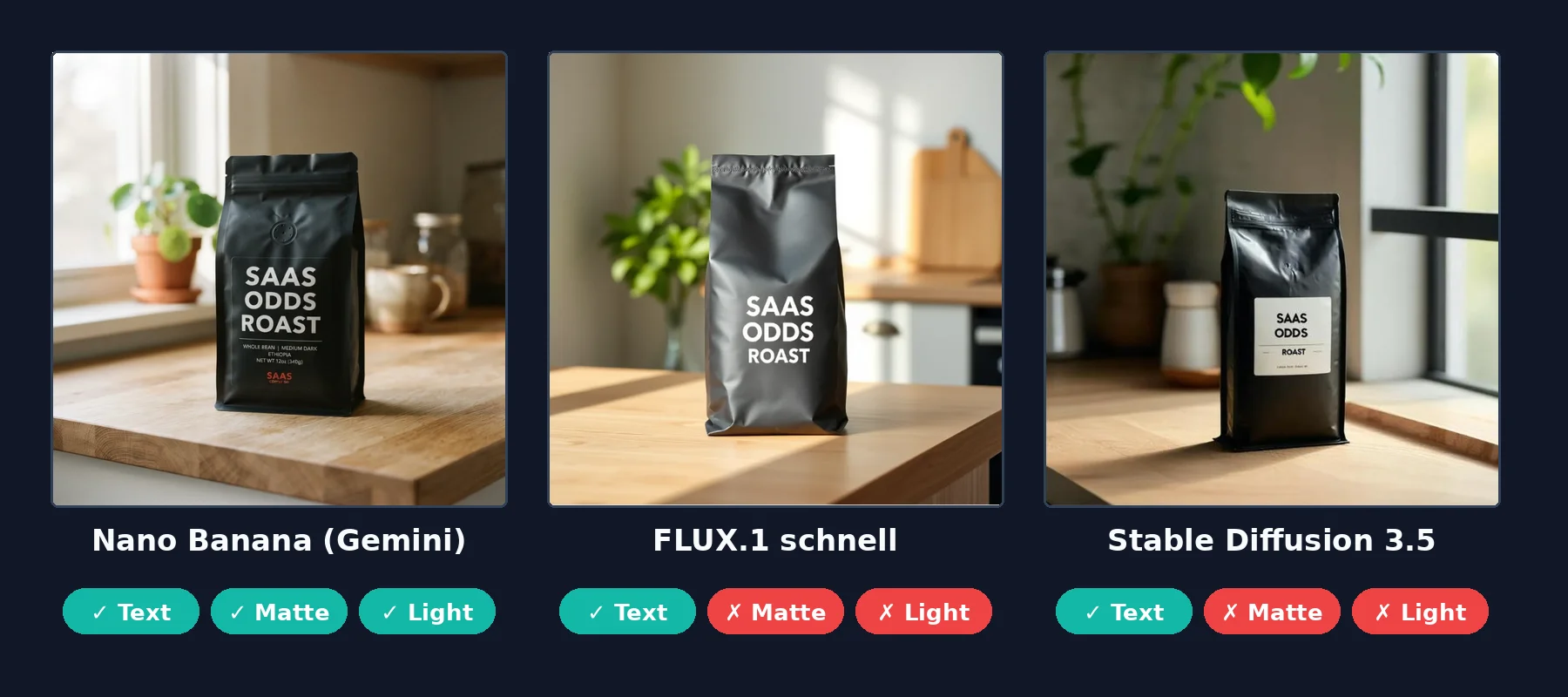 One prompt, three AI image generators
What we saw:
Gemini (Nano Banana) nailed it. Matte black bag, white text spelled correctly, light from the left, plant on the left. It also added extra label text we did not ask for, like "WHOLE BEAN" and a weight. It took about 20 seconds.
FLUX.1 schnell spelled the text correctly and looked clean, but the bag came out dark grey, and the window light came from the right. It was the fastest of the three.
Stable Diffusion 3.5 spelled the text correctly too, but put black letters on a white sticker instead of white letters on the bag. The bag was glossy, not matte, and the light came from the right. It took about 30 seconds.
The big lesson from test 1: every tool can spell now. Two years ago, text inside AI generated images was a mess. Today the real difference is how well a tool follows the small details in your prompt.
We then tested AI image editing. In the same Gemini chat, we asked it to make the bag matte white, turn the text deep red and remove the extra small text.
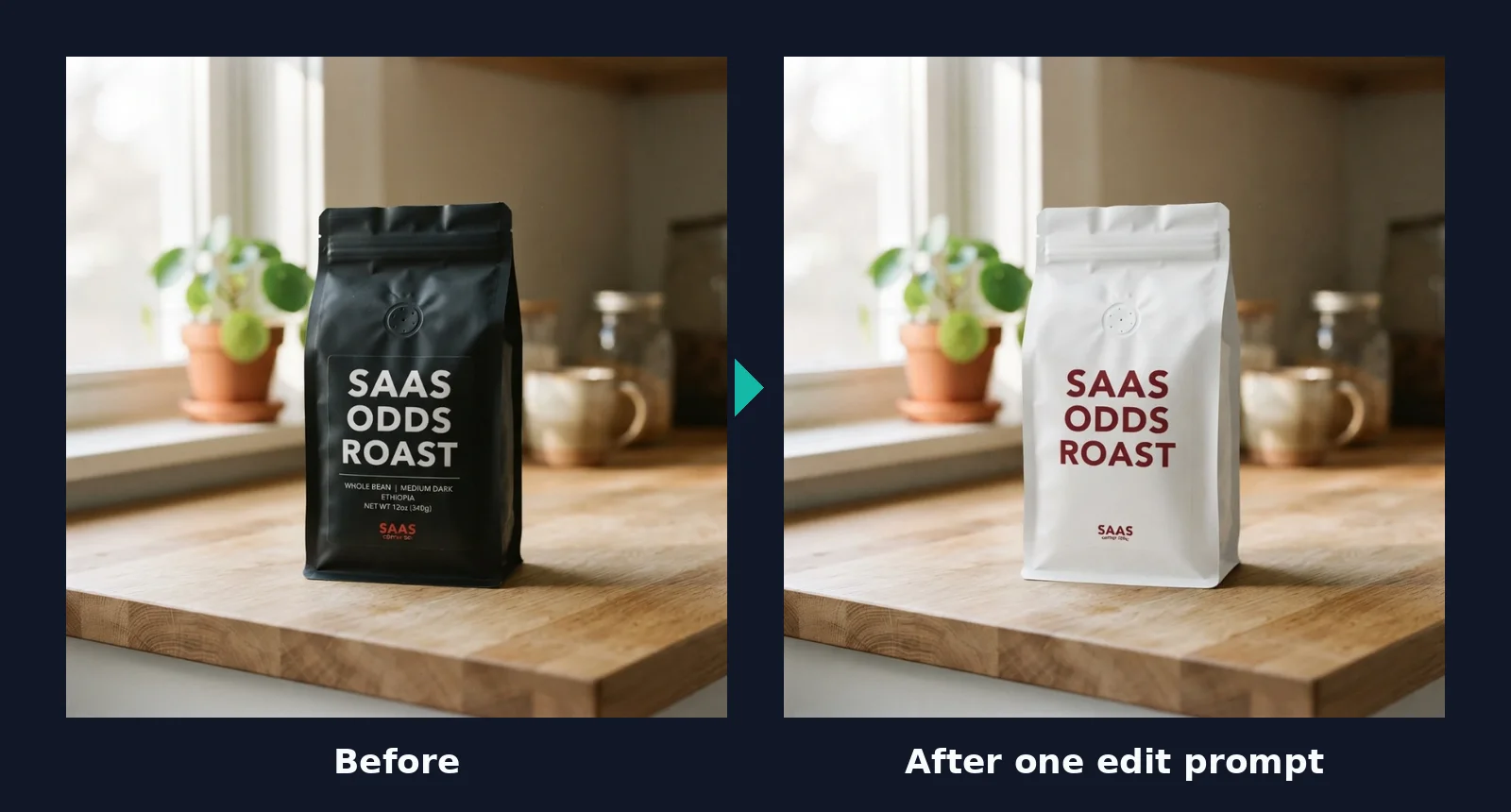 One plain-English edit in Gemini
It changed the bag and the text color and kept the plant, mug and lighting exactly the same. It removed most of the extra text, but a tiny logo stayed at the bottom. That is still impressive for one sentence of instructions, and it is the kind of edit that used to need Photoshop.
Test 2: A YouTube thumbnail with big text
Our second prompt was a 16:9 thumbnail, the kind of social media graphic creators make every week:
A YouTube thumbnail: a surprised young woman pointing at a laptop screen, bright yellow background, big bold black text on the right that says "BEST AI TOOLS 2026". Wide 16:9 format.
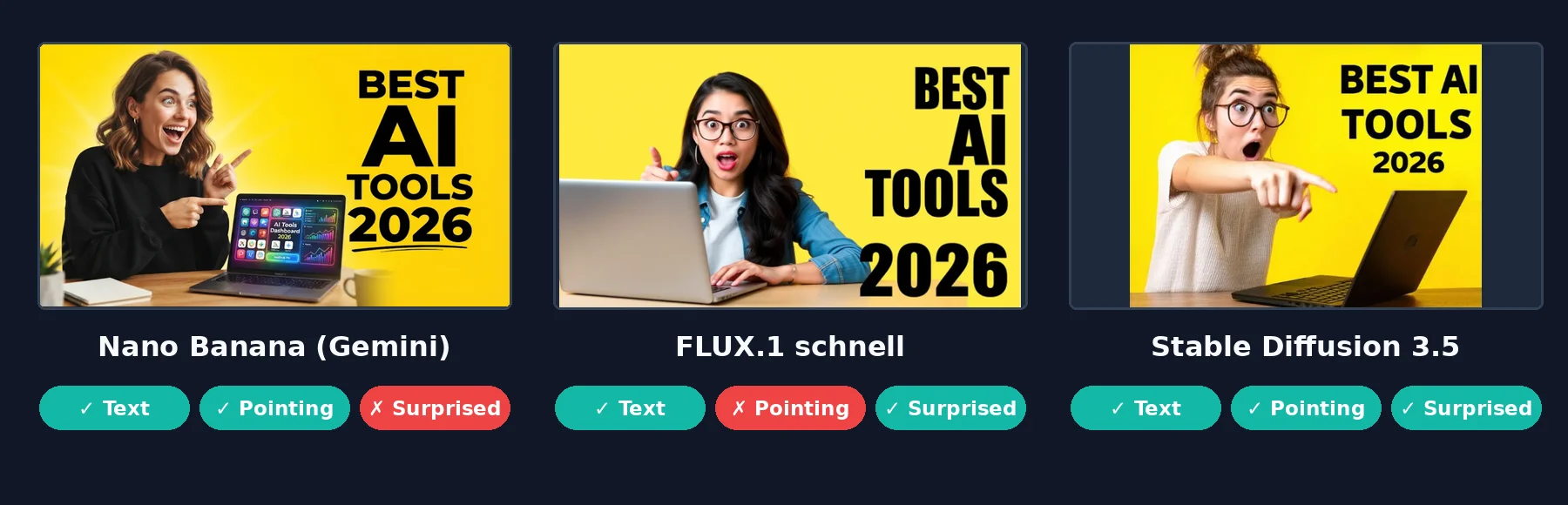 Second test: a YouTube thumbnail with text
Gemini (Nano Banana) made the most polished, ready-to-post thumbnail, in a true 16:9 size. The text was perfect, and she pointed right at the screen. But she looks excited and smiling, not surprised, and Gemini again added extras we did not ask for, like a dashboard on the laptop screen.
FLUX.1 schnell got the text and the shocked face right, but she points up into the air instead of at the laptop.
Stable Diffusion 3.5 followed this prompt best: correct text, a shocked face and a finger pointing at the laptop. The free demo did not keep our 16:9 size setting, so the image came out 4:3. That was the demo's setting, not the model's fault.
Our scorecard across both tests: Gemini passed 5 of 6 checks, Stable Diffusion 4 of 6 and FLUX 3 of 6. All three spelled every word correctly in both tests. The differences were in small details like color, lighting, pose and expression. That is why we always tell people to run their own prompt in two or three tools before paying.
1. ChatGPT Images: Best for Creating and Editing by Chat
ChatGPT now makes images with OpenAI's own image model, which replaced DALL-E inside ChatGPT. You describe what you want, and then you keep talking to change it: "make the background blue," "add our logo," "make it a YouTube thumbnail."
What we like:
Strong prompt adherence and text rendering
Easy image editing and image variations through plain chat
You can upload reference images and ask for a new version
Good for blog featured images, social media graphics and presentation graphics
Pricing: Free (limited image creation), Go $8/month, Plus $20/month, and Pro at $100 or $200/month for the highest limits.
Limits: When we tried to create an image while logged out, ChatGPT replied that image creation is only available when you are logged in. You need a free account at minimum.
Best for: Marketers and small businesses who want one tool for text and images.
2. Midjourney: Best AI Art Generator
Midjourney is still the tool artists and designers talk about most. Its images have a polished, artistic look with rich lighting, textures and composition, even from short prompts.
What we like:
The most beautiful artistic styles of any tool
Style and character references for visual consistency across a series
A web app, so you no longer need Discord
Relax mode on Standard and higher plans for unlimited slower generations
Pricing: Basic $10/month, Standard $30, Pro $60 and Mega $120. Annual billing saves 20%. There is no free plan or free trial.
Commercial use: Paid plans include commercial use, but companies with more than $1 million in yearly revenue need the Pro or Mega plan. Images on lower plans are public unless you use Stealth mode, which comes with Pro and Mega.
Best for: Concept art, digital artwork, mood boards and creative advertising.
3. Google Gemini (Nano Banana): Best Free AI Image Generator
Nano Banana is the nickname for Google's image model inside the Gemini app. It passed the most checks in our two tests, and it is the strongest free AI image generator we have used.
What we like:
Excellent photorealistic images with correct text
Natural-language image editing that keeps the rest of the scene the same
Character consistency when you edit the same image many times
Works inside the Gemini app on web and phone
Pricing: The Gemini app lets you create images for free with daily limits. Google AI Pro ($19.99/month) gives you expanded use of Nano Banana Pro, and Google AI Ultra ($99.99/month) gives the highest limits.
Best for: Anyone who wants great results without paying, plus product photography and quick edits.
4. Adobe Firefly: Best AI Image Generator for Commercial Use
Adobe trained its own Firefly models on licensed and public domain content, and it says the outputs are safe for commercial use. That makes Firefly the easiest pick for brands, agencies and anyone nervous about copyright and usage rights.
What we like:
Commercially safe models, with Content Credentials attached automatically
Generative Fill and Generative Expand (inpainting and outpainting) inside Photoshop
Access to partner models in the Firefly app, so you can compare styles in one place
IP indemnification for eligible enterprise customers
Pricing: Free daily generations. Firefly Standard $9.99/month (2,000 credits), Pro $19.99 (4,000), Pro Plus $49.99 (10,000) and Premium $199.99 (50,000).
Watch out: Adobe says the commercial safety promise covers its own Firefly models. If you use a partner model inside Firefly, you are responsible for checking whether that output fits your project.
Best for: Marketing visuals, advertising creatives and e-commerce product images for brands.
5. Ideogram: Best AI Image Generator for Images With Text
Ideogram built its name on text rendering. Posters, logo concepts, quote graphics and YouTube thumbnails with big words come out clean.
What we like:
Very accurate typography, even with long phrases
Magic Fill and Extend for inpainting and outpainting
Style references and a good range of aspect ratios
You keep the right to use your images commercially
Pricing: Free weekly credits, Plus $15/month (1,000 priority credits), Pro $42/month (3,500 credits and private generation) and Team $20 per user per month (billed yearly).
Watch out: When we tried to generate without an account, Ideogram showed a sign-in screen. Its free credits only come with a Google, Apple or Microsoft sign-in, not a plain email account. Free images are also public by default.
Best for: Social media graphics, posters, logo concepts and thumbnails.
6. Leonardo AI: Best AI Image Creation Software for Game Assets
Leonardo AI is a full AI image creation platform with many models, fine-tuning and tools built for game assets, character design and concept art. Canva owns it, which is why you also see Leonardo's tech inside Canva AI.
What we like:
Strong character consistency and custom image styles
Model customization and training on your own images
A real free plan with 150 tokens every day
Image upscaling, canvas editing and image-to-image generation
Pricing: Free (150 tokens per day, public images), Apprentice $12/month, Artisan $30/month and Maestro $60/month.
Best for: Game developers, illustrators and creators who need consistent characters.
7. Stable Diffusion: Best Open-Source AI Image Generator
Stable Diffusion is the most popular family of open-source image models. You can run it on your own GPU with tools like ComfyUI, or try it free in online demos, as we did.
What we like:
Free to download and run, with full control over every setting
Negative prompts, image inpainting, LoRA styles and huge community add-ons
No per-image cost once it runs on your own computer
Privacy, because your prompts never leave your machine
Pricing and license: Stability AI's Community License is free for people and businesses earning less than $1 million a year, and it includes commercial use. Larger companies need an Enterprise License. You own your outputs.
Our test result: Good realism and correct spelling, but it missed the "white letters" and "light from the left" details.
Best for: Technical users, developers and anyone who wants a free AI image generator without limits.
8. Recraft: Best AI Image Generator for Designers
Recraft is built for design work, not just pictures. It can make vector SVG files, icons, mockups and brand assets that follow your colors and style.
What we like:
Real vector output you can edit in Illustrator or Figma
Brand styles so every image matches your look
Background removal, image upscaling and mockups in one place
Good for website illustrations and logo concepts
Pricing: Free plan with 30 credits per day, Basic $12/month (1,000 credits) and higher plans for teams.
Watch out: This one matters. On the free plan, Recraft owns the images, they are public, and you cannot use them commercially. On paid plans you own them and keep the rights even after you cancel.
Best for: Designers, marketing teams and anyone making brand assets.
9. FLUX: Best Text-to-Image AI for Photorealism and APIs
FLUX comes from Black Forest Labs, a team started by people who built Stable Diffusion. Its models are known for photorealistic images and strong prompt adherence, and many other apps use FLUX behind the scenes.
What we like:
Very realistic textures and lighting
Fast open models, like the FLUX.1 schnell model we tested for free
Image editing and reference image generation with FLUX Kontext
Simple API pricing for developers
Pricing: Through the official API, FLUX.2 [pro] costs $0.03 for the first megapixel, which is roughly one standard image. FLUX.2 [max] costs $0.07. You can also use FLUX inside Krea, Leonardo and other apps.
Our test result: The fastest result, correct text and a clean look, but a grey bag and light from the wrong side.
Best for: Developers, apps that need AI APIs, and photorealistic product shots.
10. Krea AI: Best for AI Image Editing and Many Models in One Place
Krea is a creative hub. Instead of one model, it gives you many, including its own Krea models, FLUX, Nano Banana, GPT Image and more, plus real-time generation, an image enhancer and video tools.
What we like:
Try many AI models without paying for each one separately
Real-time generation, where the image changes as you type or draw
Strong image upscaling and enhancing
A commercial license on every plan, even the free one
Pricing: Free (100 compute units per day, about 18 Krea 1 images), Basic $9/month, Pro $35/month and Max $105/month. Yearly billing takes 40% off.
Best for: Creators who want to compare models and edit images in one workspace.
Other AI Image Tools Worth Knowing
Canva AI: Easy AI image generation inside the design tool many teams already use.
Microsoft Designer: Free AI images and templates with a Microsoft account.
OpenArt: A hub for many open-source models, community styles and character tools.
DALL-E: OpenAI's older image model, now replaced in ChatGPT by its newer image model.
If you also need video, our Akool review covers a tool that does AI images and AI video in one place.
What Each Tool Costs
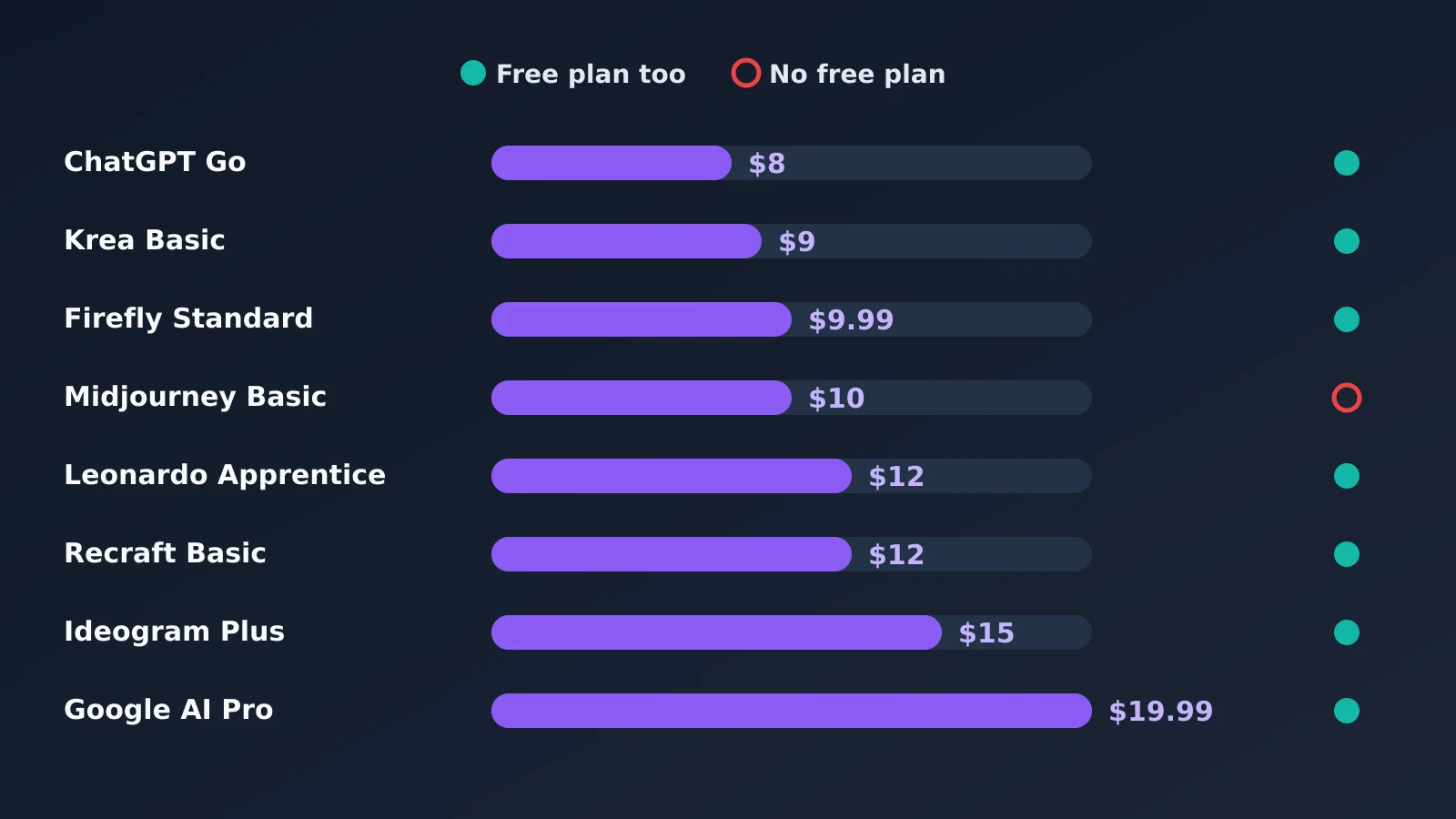 Cheapest paid plan for each tool
The good news is that almost every tool has a free plan. Midjourney is the only big name with none. For paid plans, most tools start between $8 and $15 a month. Stable Diffusion costs nothing if you run it yourself, and FLUX through its API costs a few cents per image.
Free Credits and Watermarks
Most people searching for a free AI image generator want two things: free credits and no ugly watermark. Here is what you get for free:
Tool | Free allowance | Watermark |
|---|---|---|
Google Gemini | Daily image limit in the free Gemini app | Invisible SynthID mark; our Pro account outputs had no visible mark |
ChatGPT Images | Limited images on the free plan (account needed) | No visible mark; C2PA metadata added |
Adobe Firefly | Free daily generations | Content Credentials attached |
Ideogram | Free weekly credits (Google, Apple or Microsoft sign-in) | Free images are public |
Leonardo AI | 150 tokens every day | Free images are public |
Recraft | 30 credits every day | Free images are public and owned by Recraft |
Krea AI | 100 compute units a day, about 18 Krea 1 images | Commercial license even on free |
Stable Diffusion | Unlimited if you run it yourself | None |
FLUX | Free open models like FLUX.1 schnell | None when self-hosted |
Midjourney | No free plan | Not applicable |
If you need an AI image generator without a watermark and with no limits, running Stable Diffusion or an open FLUX model on your own computer is the only truly free option. It does need a decent graphics card, because image rendering is heavy GPU processing.
Best AI Image Generator by Use Case
What you need | Our pick | Why |
|---|---|---|
Free, high-quality images | Google Gemini (Nano Banana) | Won our test and is free |
Editing by chat | ChatGPT Images | Simple back-and-forth changes |
AI art and concept art | Midjourney | Most artistic look |
Commercial-safe marketing visuals | Adobe Firefly | Trained on licensed content |
Text, posters and thumbnails | Ideogram | Best typography |
Product photography | Gemini or FLUX | Realistic lighting and textures |
Realistic portraits | Gemini or Midjourney | Natural skin, light and expressions |
YouTube thumbnails | Gemini or Ideogram | Clean text and bold layouts |
Illustrations and digital artwork | Midjourney or Leonardo AI | Rich artistic styles |
Logos and vectors | Recraft | Real SVG output |
Game assets and characters | Leonardo AI | Character consistency tools |
Full control, no cost | Stable Diffusion | Open-source and private |
Many models in one place | Krea AI | One login for many models |
How AI Image Generators Work, in Plain Words
You do not need to know the tech to use these tools, but a little background helps you write better prompts.
Most modern tools use diffusion models. The AI starts with random noise and slowly cleans it up into an image that matches your words. Many use latent diffusion, which does this work in a compressed space so image synthesis is faster and cheaper. Older tools used generative adversarial networks (GANs), where two neural networks compete with each other, but diffusion has mostly replaced them.
Newer tools like ChatGPT and Gemini are multimodal AI. The same large language models (LLMs) that understand your text also create or edit the image. That is why they are so good at following long instructions and making changes by chat.
Two things follow from this:
Prompt engineering still matters. Be specific about the subject, style, lighting, colors, aspect ratios and any text you want. Our tests showed that tools follow the big ideas well but slip on small details.
Image generation credits cost real compute. Every image runs on cloud-based GPUs, which is why free plans have daily limits.
How to Choose the Best AI for Generating Images
Here is how we would decide:
Start free. Gemini, Firefly, Leonardo, Recraft and Krea all have free plans. Run your real prompt in two or three of them before you pay.
Check commercial rights first. If you sell products or make ads, read the license. Free plans on Recraft and Leonardo do not give you the same rights as paid plans.
Test text if you need it. If your images need words, test the exact phrase. Small details like letter color still go wrong.
Look at editing tools. Image inpainting, image outpainting, background generation, image enhancement and reference images save more time than a slightly prettier first image. They also make creative workflow automation easier, because you can fix an image instead of starting over.
Think about privacy. Free images are public on Midjourney's lower plans, Ideogram, Leonardo and Recraft. If your work is confidential, choose a plan with private generation.
Can You Use AI-Generated Images Commercially?
Usually yes, but there are two separate questions.
The first is the tool's license. Most paid plans let you use images commercially, and some free plans do not. Our table above shows the rules for each tool.
The second is copyright protection. In its report on AI and copyright, the US Copyright Office said that images made purely by AI, without enough human creative input, cannot be protected by copyright. That means you can usually use them, but you may not be able to stop others from copying them. If you need full ownership, add real human design work on top.
We are not lawyers, so for high-stakes brand assets, check with one.
Frequently Asked Questions
What is the best AI for generating images?
For most people, Google Gemini with Nano Banana is the best AI for generating images. It passed the most checks in our two tests and is free. ChatGPT is best for editing by chat, Midjourney for art and Adobe Firefly for commercial use.
Which AI image generator produces the most realistic images?
In our product photo test, Gemini's Nano Banana produced the most realistic and accurate photo, with the best photorealistic rendering of light and texture. FLUX is also very strong for photorealistic images, especially for product shots.
What is the best free AI image generator?
Google Gemini is the best free AI image generator we tested. Krea, Leonardo AI, Recraft and Adobe Firefly also have free plans, and Stable Diffusion is free to run yourself.
Can AI generate images from text prompts?
Yes. All the tools in this list use text-to-image generation. You describe the image in plain words, and the AI model creates it in seconds.
Which AI image generator is best for professional use?
Adobe Firefly is best for professional brand work because it is built to be commercially safe. Midjourney is the favorite for creative professionals, and Recraft suits designers who need vectors.
Is Midjourney better than ChatGPT for image generation?
Midjourney is better for artistic, beautiful images. ChatGPT is better for following detailed instructions, adding text and making quick edits by chat. Many creators use both.
Which AI image generator creates images with text?
Ideogram is known as the best for text inside images. In our two tests, Gemini, FLUX and Stable Diffusion all spelled every word correctly too, but only Gemini got the label color right in the product photo.
Can I use AI-generated images commercially?
On most paid plans, yes. Some free plans, like Recraft's, do not allow commercial use. Also note that purely AI-made images may not be protected by copyright in the US.
What AI image generator offers the highest resolution?
Most tools create images around 1 to 2 megapixels and then use image upscaling for bigger sizes. Krea, Leonardo and Recraft have strong built-in upscalers, and FLUX's API lets you pay for larger images by the megapixel.
Are free AI image generators worth using?
Yes, for testing and personal use. Free plans have daily limits, and some make your images public or block commercial use, so check the rules before using them for business.
Which AI image generator is best for product photography?
Gemini (Nano Banana) and FLUX were the best for product photography in our test. Adobe Firefly is a good choice if you need the images to be commercially safe for ads.
Can AI image generators edit existing pictures?
Yes. Gemini, ChatGPT, Adobe Firefly, Ideogram and Krea can all edit existing images. In our edit test, Gemini changed a black bag to white with one sentence and kept the rest of the photo the same.
Which AI image generator is easiest for beginners?
ChatGPT and Google Gemini are the easiest for beginners. You just type what you want in plain words, and you can ask for changes the same way. There are no settings to learn.
Do AI image generators offer free credits?
Yes. Gemini, ChatGPT, Adobe Firefly, Ideogram, Leonardo AI, Recraft and Krea all give free credits or daily limits. Midjourney is the main tool with no free plan.
Can AI-generated images be used for websites?
Yes. Many people use AI images for blog featured images and website illustrations. Make sure your plan allows commercial use, add short alt text, and compress the files so your pages stay fast.