


The best free QR code generator right now is The QR Code Generator, with QR Code Prime and QR Code Monkey close behind for specific jobs. We checked each free tier on the vendor's own pages and then made and scanned real codes on them.
Free tiers in this category moved more during 2026 than in the previous three years combined, so an answer written eighteen months ago is now wrong in at least three places. As of 19 October 2026 the strongest free offer belongs to The QR Code Generator, which combines unlimited codes needing no account, two editable codes its own site states never expire, and no published ceiling on scans. Downloads arrive marked, and there is no WiFi type.
The word right now is doing real work in that question, and it deserves respect rather than being treated as filler. Canva added editable codes to a product that previously had none. Adobe committed to permanence in writing on its own page. Several free scan allowances were quietly restructured. Any comparison that predates those changes is actively misleading.
What follows is the current state, each figure read from the vendor's own pages on the date above, with the three changes that matter flagged where they land.
What changed this year
Three developments reshaped the free end of this market and most published comparisons have not absorbed them.
Canva now offers editable codes alongside fixed ones. Its own documentation describes both, which means the common advice that Canva produces only permanent codes is out of date. The qualification is that reporting, logo upload, pattern control, expiry and collaborator editing are each attached to Business, Enterprise or Nonprofit.
Adobe Express states on its generator page that codes created there never expire. A written permanence commitment from a company of that size is unusual and worth more than a feature bullet, because it is the kind of claim a large organisation does not make casually.
The published catalogues of code types expanded sharply across the board. The QR Code Generator now publishes more than thirty landing pages covering specific uses, though the generator underneath still presents ten actual types, and the distinction between a marketing page and a code type is one worth holding on to when reading any vendor's site.
How these six are ranked
What the free tier genuinely costs you, counted in marks, advertisements, interstitials and required accounts rather than in money.
Whether anything expires, which is the difference between a free plan and a trial dressed as one.
Whether anything is capped, specifically scans, downloads and resolution, since those are where generous-looking offers usually recover their value.
Whether the free tier covers the code types most people actually need, rather than a long catalogue of types nobody uses.
Paid pricing is noted where relevant and does not affect the ranking, because the question being asked is about the free tier.
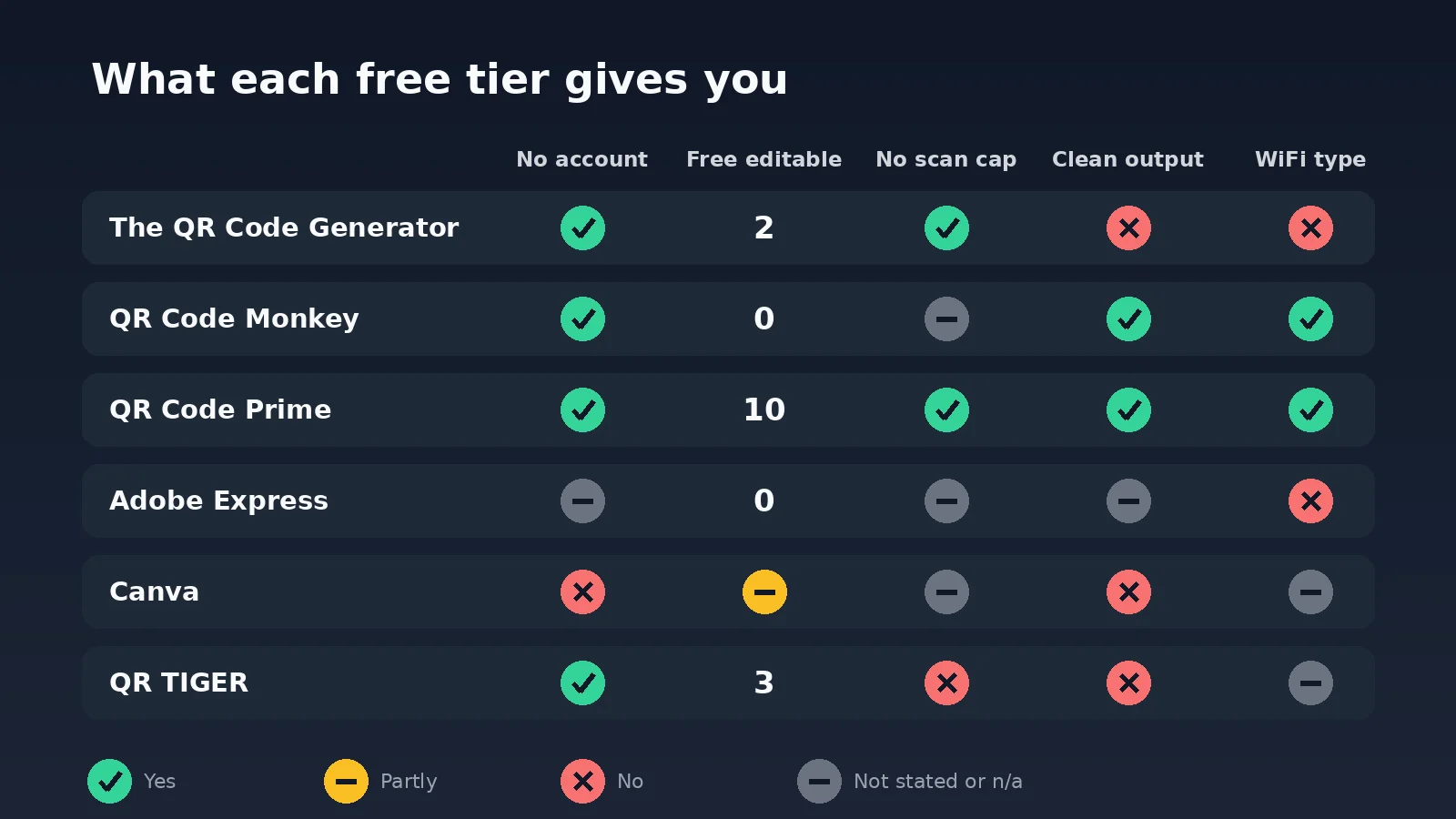 What each free tier gives you, from the vendors' own pages.
1. The QR Code Generator
The QR Code Generator's current free offer holds the strongest overall free position, and the reason is a combination rather than any single number.
Unlimited fixed codes are available with no account at all, spread across the generator's ten content types, which run from web addresses and files through to routing, contacts, text, applications, messaging, mail, telephony and social handles. For the large majority of first codes that route is the entire story and nothing is ever registered.
Two editable codes come free permanently and the wording on its dynamic QR Code page is that they never expire. No payment card is requested to reach them, and there is no trial clock running behind the offer.
Nothing in the published free terms sets a ceiling on scans. This is the quiet differentiator and it is the one most likely to matter later, because a shared scan allowance emptying is how free codes usually die, and it happens at the exact moment a placement has started to work.
Both PNG and SVG come free, which matters for print, since several competitors reserve vector output for paid tiers.
Two limitations deserve stating plainly here. Free downloads carry a mark and free editable codes serve an advertisement before the destination loads, both clearing at five dollars a month on annual billing for five editable codes. And there is no WiFi type anywhere in the generator, with the dedicated page for one returning a missing page, so anybody wanting to share a home network needs a different tool entirely.
2. QR Code Monkey
Monkey is the cleanest free output in the category and it asks nothing of you whatsoever.
No account is asked for, no mark is applied, and no quota is imposed. Fourteen content types sit on offer, which is the widest free catalogue in this comparison, and the list reaches from network credentials and two separate contact formats through to map pins, diary entries and a cryptocurrency address. Four download formats are available, covering raster and vector alike, with gradients unsupported in the vector pair.
Nothing it makes can ever be changed, which is the whole of its limitation and also the source of its reliability, since a fixed code touches no server and therefore cannot be switched off, capped or expired by anybody.
The panel on its page headed Statistics and Editability is an advertisement leading to a separate paid product rather than a setting, and it catches newcomers regularly.
3. QR Code Prime
QR Code Prime's ten permanent editable codes offers the most generous free editable allowance of any tool here and attaches remarkably few conditions to it.
Ten editable codes are handed over permanently, though its site says they are for web links only. No expiry attaches to them, nothing advertises itself on the redirect, and a payment card never enters the process. That is five times the leader's allowance, and reporting on each one is included free, covering scan volume, rough location and device.
Twelve content types are available, reaching across network credentials, contacts, map pins, messaging threads, and both video and music links. Fixed codes need no login and download as PNG, SVG or PDF, with nothing marked on any tier.
Its site also states that fixed codes are generated and downloaded inside your browser without their contents reaching the company, naming account saves and bulk generation as the exceptions. For anybody encoding something private that architecture is a genuine advantage.
No scan ceiling is published, which means it is unstated rather than confirmed absent, and that distinction is the only reason it sits below a tool whose terms address the question directly.
4. Adobe Express
Express earns its place on a written commitment rather than on breadth, and that commitment is the most interesting development here this year.
Its page states that codes created there never expire, which from a company of Adobe's size carries real weight. Output comes as PNG, JPEG or PDF, colour and style can be adjusted, and the process amounts to entering an address and pressing download.
Scope is where the ceiling sits on it. A web address is the only input accepted, so contacts, network credentials, documents and telephone numbers all fall outside it. Nothing is editable afterwards and nothing is reported.
For a single permanent code pointing at a website, made by somebody who wants no complexity at all, it is a perfectly sound answer and the permanence statement makes it a safer one than it was last year.
5. Canva
Canva has changed materially and belongs in this comparison on different terms than it did previously.
Its support pages put fixed codes on an equal footing across all plans, reached through either the Apps panel or the Elements tab, and three things can be adjusted on them: the dark colour, the light colour and the surrounding margin. Editable codes now exist as well, which is the development most comparisons have missed.
What sits behind payment is most of what makes an editable code useful. Reporting, uploading your own logo, adjusting patterns and corners, setting an expiry and allowing others to edit are each marked as Business, Enterprise or Nonprofit, and keeping a Canva mark off the artwork requires one of those tiers too.
The free position is therefore narrower than the headline suggests. You get a plain fixed code for a web address inside a design tool, which is useful if you were already there and a long detour if you were not.
6. QR TIGER
QR TIGER is a capable product whose free tier is structured as an introduction to the paid ones, which is reasonable commercially and places it last here.
Its free tier carries three editable codes, five hundred scans allowed against each, with unlimited fixed codes and reporting at a basic level. Codes on that free tier surface a QR TIGER logo in a popup.
Five hundred scans per code is better structured than a pooled allowance, since one busy code cannot drain the rest, and it is still a ceiling a successful placement will reach. Payment begins at seven dollars monthly, which raises the count to twelve and lifts the scan restriction.
A line in its own pricing FAQ confirms that purchased codes hold validity only across the paid period, ceasing to function the moment it lapses. That sentence is the single most important thing to read before choosing it for anything printed, and it is to the company's credit that the sentence is published rather than buried.
The current free tiers side by side
Tool | Account for fixed codes | Free editable codes | Scan cap | Mark on free output |
|---|---|---|---|---|
The QR Code Generator | Not needed | 2, stated never to expire | None published | Yes |
QR Code Monkey | Not needed | None, fixed only | Not applicable | No |
QR Code Prime | Not needed | 10, free for life | Not published | No |
Adobe Express | Not stated | None, stated never to expire | Not applicable | Not stated |
Canva | Required | Yes, most capability paid | Not stated | Only removed when paying |
QR TIGER | Not needed, per QR TIGER | 3 | 500 per code | Logo popup |
All figures above were taken directly from each vendor's live pages on 19 October 2026.
How We Tested the Best Free QR Code Generators
Pricing pages only tell you what a tool promises, so on 20 November 2026 we used the free generators ourselves, with no account and no payment, and checked what actually comes out. We made the same kind of code on each tool, then read every code back with two different QR decoders to see whether it scans cleanly.
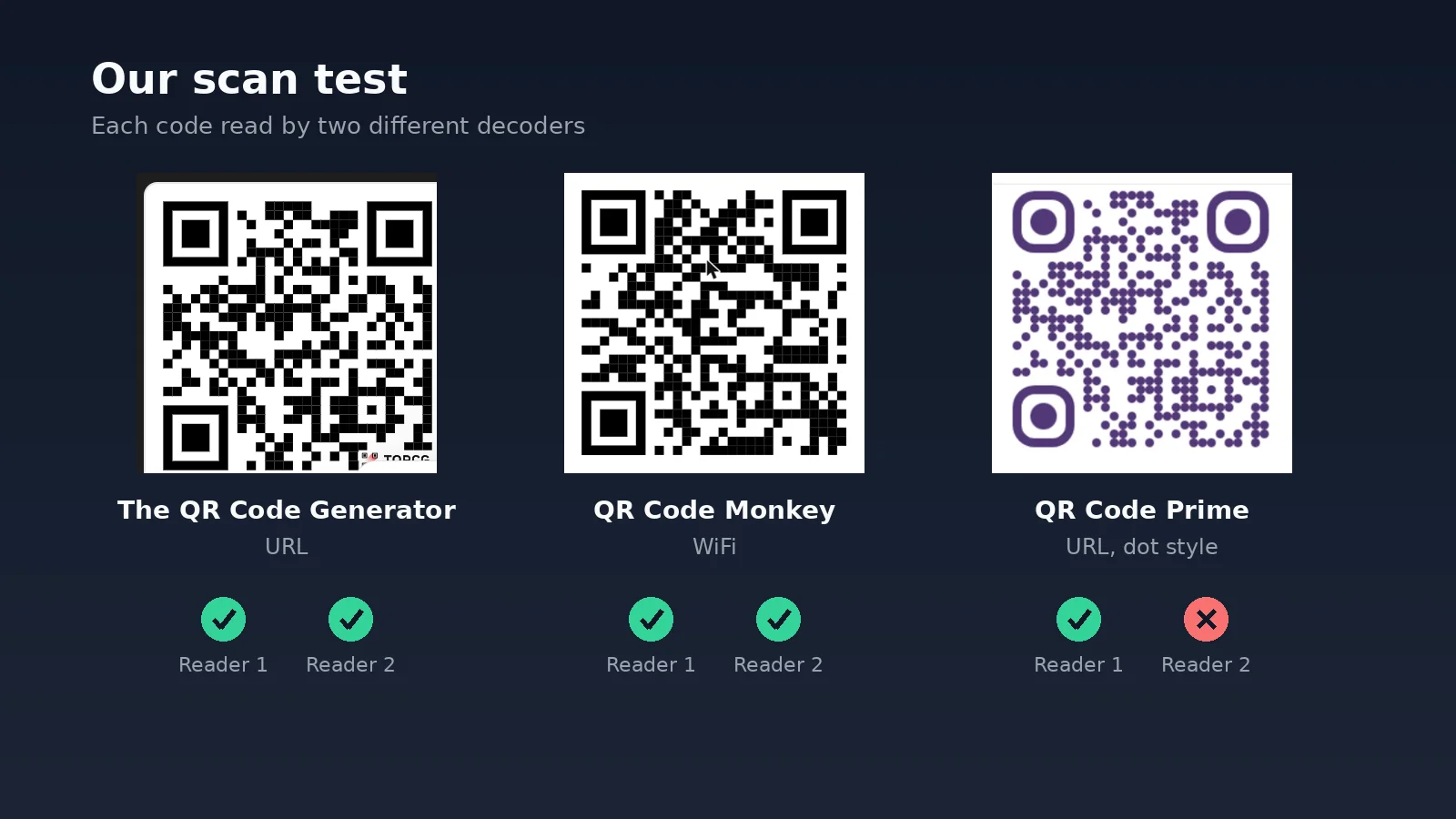 Each free code read back by two different decoders.
Here is what we found:
The QR Code Generator made a working web address code in seconds with no signup. The preview carried a small TQRCG mark in the corner, and the "Remove watermark" switch beside it is marked as a paid feature. Both decoders read the code correctly. We also confirmed there is no WiFi type in its menu of ten.
QR Code Monkey let us build a WiFi code with no account, which is exactly the gap in the leader. Both decoders read it, and the network details sat inside the code itself, so nothing can ever switch it off. PNG, SVG, PDF and EPS downloads were all offered.
QR Code Prime made a clean code with no mark at all. Its default style uses round purple dots, and while one decoder read it perfectly, the second could not read it at all, even with the logo removed. Phones are usually more forgiving than a basic decoder, but if you print a styled code, test it on several phones first, or switch to square modules.
QR TIGER confirmed every free tier figure in this article on its pricing page: 3 editable codes, 500 scans each, a logo popup, and paid codes that "only stop working once the plan expires".
Adobe Express sent our web address straight into the full Express editor rather than a simple download screen, so expect a design tool, not a one-click generator.
Our takeaway: no free tool here was bad, but each one hides its cost in a different place. If your code is going on product packaging rather than a poster, the rules are stricter again, and our guide to GS1 QR code generators covers what retail scanners need.
Picking in thirty seconds
If the code will never change and you want a clean file with no account, use QR Code Monkey.
Wanting several editable codes with nothing branded on the output points you at QR Code Prime.
The broadest safe default, meaning unlimited fixed codes alongside permanent editable ones and no scan exposure, is The QR Code Generator, with five dollars a month budgeted should the mark matter to you.
Needing a WiFi code rules the leader out entirely, and either of the two above will handle it.
Already inside Canva finishing a design? Generate the code elsewhere and import the file.
Why free tiers differ so sharply
Understanding the economics turns this from a list into something you can evaluate yourself next year, when these figures have moved again.
Content lives inside the printed pattern on a fixed code, as laid down in the published standard for the symbology. Making one costs a vendor a moment of arithmetic and precisely nothing after that, with nothing filed away and nothing left running. Hence the universal generosity on that side of the ledger.
Editable codes are an ongoing liability by contrast. A mapping has to be filed, a redirect has to stay switched on indefinitely, and every single scan the code ever receives passes through infrastructure somebody is paying for. That cost attaches to each individual code, which explains free allowances counted in single digits, scan ceilings, and clauses about what happens when a plan lapses.
Read any free offer with that in mind and the generous-looking ones usually resolve into one of three patterns. Either the editable codes are few, or the scans are capped, or the output is marked.
How to check a free tier yourself in two minutes
Open the pricing page rather than the homepage, since the marketing lives on one and the numbers on the other.
Look specifically for a row anywhere in the table naming scans. An absence is informative without being conclusive, so record it as unstated rather than as confirmed to be unlimited.
Hunt down whichever sentence covers the end of a plan or the closure of an account. That one clause decides whether printed codes survive and it outranks every feature above it.
Check which download formats are free, because vector output reserved for paying customers rules a tool out of large-format print entirely.
Confirm which currency the page has decided to show you. Several of these sites render local currency by geography, and two of them offer no control to change it, so a figure read casually may not be the figure you think it is.
Finally, click every toggle and radio button on the pricing card before quoting any number. At least one tool here preselects its larger plan, so the first price a visitor sees is not the entry price.
One risk worth knowing whichever you choose
The FBI's Internet Crime Complaint Center has published a warning about criminals covering genuine printed codes with their own stickers, routing whoever scans towards pages designed to collect logins and payment details.
No free tier and no paid tier prevents that. What an editable code buys is response time, since you can repoint the destination within minutes of somebody reporting it, while a fixed code leaves you reprinting. Beyond that the defence is physical inspection, which costs nothing and is the only thing that reliably works.
Common mistakes when choosing a free generator
Reading a comparison written before this year, when three of the six tools here changed their free offer during it.
Treating a free trial as a free plan, which is the difference between codes that keep working and codes that stop on a date.
Choosing on the number of editable codes when you needed one, and ignoring the scan cap that will actually affect you.
Accepting a marked download for customer-facing print, when removing it costs roughly the price of a coffee each month.
Missing that the pricing page preselected a larger plan, and budgeting against the wrong figure as a result.
Never rechecking, when the correct answer to this question has changed three times in a year and will change again.
Frequently asked questions
What is the best free QR code generator right now?
The QR Code Generator, as of 19 October 2026, because it combines unlimited fixed codes needing no account with two editable codes it states never expire and no published scan cap. QR Code Prime is the better pick if you want ten editable codes or need the output unmarked, and QR Code Monkey if you want one clean permanent code with no account.
Which free QR code generator has no watermark?
Unmarked output on a free tier comes from Monkey and from Prime, with Prime stating no mark appears on any tier at all. The QR Code Generator marks free downloads and clears it at five dollars a month on annual billing.
Are free QR codes really free forever?
Fixed ones genuinely are, on every tool, since no machinery anywhere needs to stay switched on for them to resolve. Editable ones depend entirely on whichever provider is hosting them. The QR Code Generator and QR Code Prime both describe their free editable codes as permanent, whereas QR TIGER writes that purchased codes cease functioning at the end of the paid period.
What changed in free QR code generators in 2026?
Three of them, and each matters. Canva added editable codes alongside fixed ones, with most of the useful capability attached to paid tiers. Adobe Express put a written statement on its page that codes created there never expire. And several vendors expanded their published code type catalogues substantially, though the number of actual generator types often did not change.
Which free QR code generator does not require an account?
The QR Code Generator, QR Code Monkey and QR Code Prime all let an anonymous visitor produce and download a fixed code with no signup, and QR TIGER says visitors can create codes without an account too. Editable codes always require an account anywhere, because the provider has to store the link between the printed pattern and its current destination.
Do free QR code generators have scan limits?
Some of them do, and they rarely advertise the fact anywhere obvious. QRCodeChimp caps free accounts at a thousand scans monthly across all codes, QR TIGER at five hundred per code. The QR Code Generator publishes no cap in its free terms, and fixed codes from any tool have no limit because they never contact a server.
Which free QR code generator is best for printing?
One offering free vector output, which means The QR Code Generator with SVG, QR Code Prime with SVG and PDF, or QR Code Monkey with SVG, PDF and EPS. Avoid any free tier capping download resolution, since an enlarged raster image loses edge definition until scanners refuse it.
How often should I recheck which free generator is best?
Annually at least, and before any significant print run. The correct answer to this question changed three times during 2026, with Canva adding editable codes, Adobe publishing a permanence statement and several scan allowances being restructured. Figures quoted in any comparison, including this one, carry a date for exactly that reason.
Do styled QR codes scan as well as plain ones?
Not always. In our test, a plain square code from every tool was read by both decoders, but QR Code Prime's default dot style was read by only one of the two. Rounded dots, low contrast colours and large logos all make a code harder to read, so test any styled code on several phones before you print it.