


The page sitting at the top of this search is published by Acuity Scheduling, which is owned by Squarespace, and it puts Acuity at number one. There is no disclosure that the publisher is also a contender.
That is worth knowing before you read anybody's list, including mine. So I went to every vendor's own pricing and help pages rather than trusting the roundups, and I have said where each number came from.
What I found is that picking a Calendly alternative is not really a price decision. Calendly's paid tiers are broadly in line with everyone else's. The gap is in what you get for nothing, and it is much wider than the comparisons suggest.
I should say plainly that I have not run these tools myself. Everything below is verified pricing and documented capability, not a hands-on test, and I would rather tell you that than imply otherwise.
Start with what Calendly's free plan actually allows
Most people arrive here because they hit a wall, so it is worth naming the wall precisely.
Calendly's free plan gives you one event type and one connected calendar. That is it. One booking link, one calendar.
If you want a 15 minute intro call and a 45 minute consultation, you have already outgrown it. That is the moment most people start searching.
The rest of the ladder I took from Calendly's own help pages rather than a review. Standard is $12.99 a month billed monthly and lifts you to unlimited event types and six calendar connections. Standard Plus is $19.99 and adds their AI notetaker and an assistant called Callie.
Teams is $16 per seat per month on annual billing and brings round robin and lead routing. Teams Plus is $24 per seat. Enterprise is a conversation.
I would note that most articles on this keyword describe a simpler free, $10, $16 ladder. Those are annual-billing figures and they predate the Plus tiers entirely, which tells you how recently those pages were checked.
The free tiers are where this is actually decided
Here is the comparison that changed how I would answer this question.
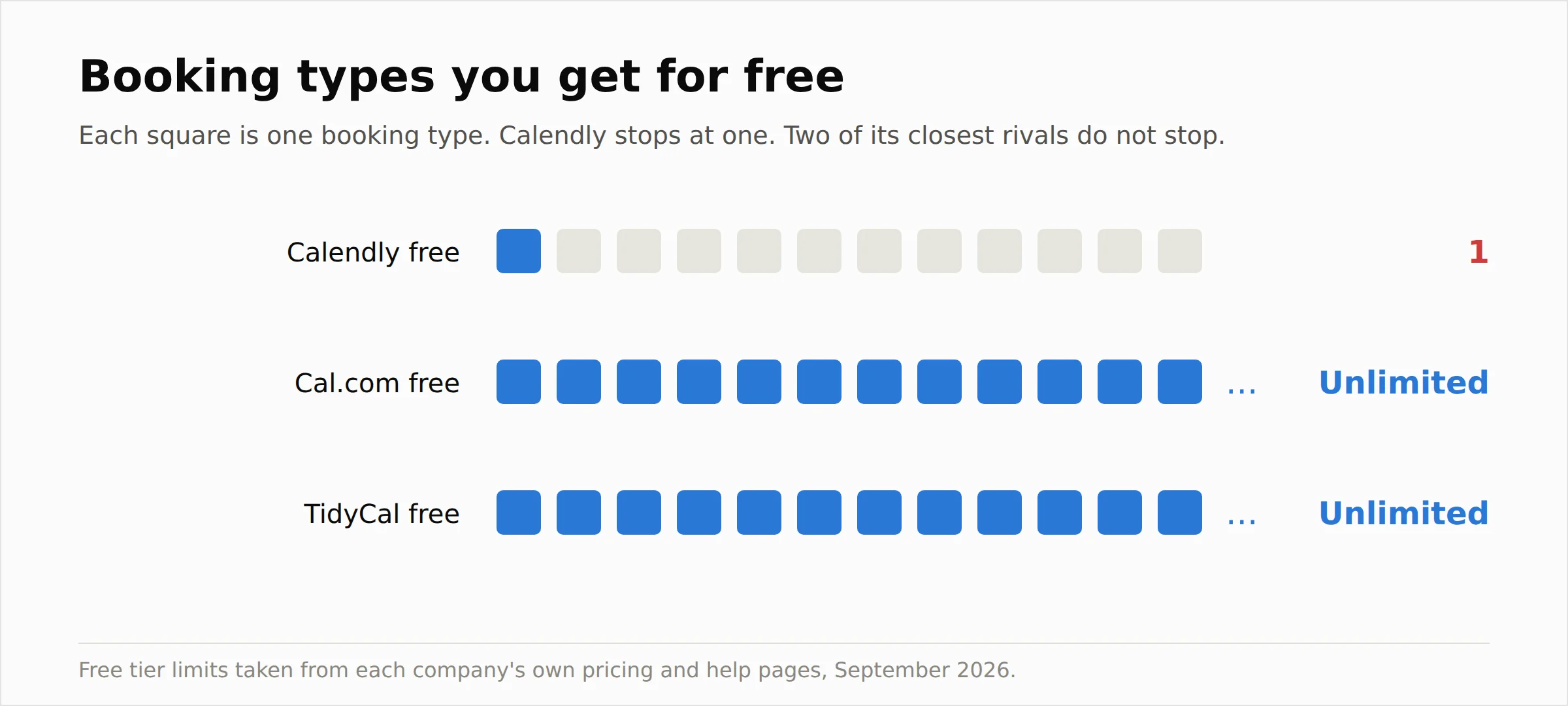 Cal.com's free plan gives one user unlimited event types and unlimited calendar connections, plus more than a hundred integrations and the ability to take payments through Stripe and PayPal. I took that from Cal.com's own pricing page.
TidyCal's free plan gives unlimited bookings and unlimited booking types, with payments through Stripe and PayPal, taking a 1 percent fee on transactions, which is on TidyCal's pricing page.
Calendly's free plan gives you one booking type.
I want to be careful not to oversell this. Calendly's paid product is more polished, its integrations run deeper, and for a sales team routing leads into a CRM it remains the obvious choice. But if you are one person who needs three booking links, Calendly's free tier is the most restrictive of the three by a wide margin, and that is not a small detail buried in a feature table. It is the whole decision.
The best Calendly alternative options, one by one
I have ordered these by who they suit rather than by some overall score, because a solo consultant and a twelve person sales team are not shopping for the same thing.
1. Cal.com
The strongest free plan in the category and the open source answer. Unlimited event types and calendars on the free tier, over a hundred integrations, payments included.
Teams is $12 per user a month billed yearly, and Organizations is $28. The source code is on GitHub and you can self host it, which I will come back to because that deserves its own honesty.
If you want one recommendation from this article and you are not already committed to an ecosystem, start here.
2. TidyCal
The cheapest way to own a scheduler outright. A $29 one-time lifetime licence through AppSumo covers ten calendar connections, group bookings and custom emails, and an Agency lifetime tier at $79 adds round robin, collective meetings and a team booking page.
There is also a $12 a month Pro subscription that removes the platform fee and adds a custom domain and unlimited calendars.
For a freelancer who resents subscriptions, $29 once is hard to argue with.
3. SavvyCal
The one people switch to for the booking experience rather than the price. Its distinguishing idea is letting the person you are inviting overlay their own calendar on your availability, which makes finding a slot faster and feels less like being handed a form.
It suits anyone whose bookings are with peers and clients rather than inbound strangers, where the impression the link makes matters.
4. Acuity Scheduling
The service business option, and yes, the one whose own article ranks first here. Bias noted, but it earns its place. Acuity is built for businesses where the appointment is the product, so intake forms, packages, memberships and staff calendars are first class rather than bolted on.
If you run a clinic, a salon or a studio, this is a better fit than Calendly ever was.
5. Zoho Bookings
Obvious if you already live in Zoho. It plugs into Zoho CRM and the rest of the suite, and the pricing is aggressive compared with standalone tools.
Less obvious if you do not use Zoho, because the value is mostly in the joins.
6. Microsoft Bookings
You may already be paying for this. It ships with many Microsoft 365 business plans, handles staff and services, and syncs with Outlook without any new vendor or invoice.
It is less slick than Calendly and the setup is more corporate, but for an internal team already on 365, adding a separate scheduling subscription is money you did not need to spend.
7. Google Calendar appointment schedules
The same argument on the other side of the fence. Appointment schedules are built into Google Calendar, so if your organisation is on Workspace you have a booking page already.
It is basic. There is no round robin, no CRM routing, no sophisticated intake. For a consultant taking a handful of calls a week it is genuinely enough, and I think a lot of people pay for scheduling software they could replace with a feature they already own.
8. Doodle
Different job, often confused with this one. Doodle is strongest at group polling, finding a time that works across many people, which is the problem Calendly does not really solve.
Use it alongside a booking tool rather than instead of one.
9. YouCanBookMe
Simple, heavily customisable booking pages with a long track record. It suits people who want to brand the page properly and do not need team routing.
10. Setmore
Worth a look if you have staff to schedule and a small budget. Its free tier historically supported multiple users, which is unusual in this category, where free plans are almost always single user.
11. SimplyBook.me
Built for service businesses, with strong international support and a long list of bookable service features. Comparable to Acuity in shape, and often cheaper depending on the modules you need.
Worth a mention beyond the eleven: Chili Piper, if your problem is routing inbound demo requests to the right sales rep instantly. It is enterprise priced and solves a narrow problem very well.
Open source is free, self hosting is not
Cal.com being open source is the answer a lot of people want, and it is a real answer. It is also the one most often described dishonestly.
Self hosting gets you the full feature set with unlimited users and no licence fee. What it also gets you is a server to run, at somewhere between $5 and $50 a month depending on what you put it on, plus updates, backups, and someone who knows what to do when the database needs attention.
If you have a technical team and are deploying for thirty people, I think that maths is overwhelming and you should do it.
If you are one consultant who wanted to stop paying $12 a month, you are about to trade a small bill for a small ongoing job, and in my experience the job is worth more than the bill.
So the version I would give you is that open source removes the licence cost and moves the work to you. Whether that counts as a saving depends entirely on what your time is worth.
Moving your booking links without breaking them
I could not find this covered anywhere on the first page of results, and it causes real damage, because booking links get pasted into email signatures, calendar invites, proposals and website buttons, and they keep getting clicked long after you have moved on.
Here is the order I would work through it in.
Set the new tool up completely before you touch the old one, including availability rules, buffer times, minimum notice and your calendar connections. A booking page that double books you on day one costs more goodwill than the switch saves.
Then find every place your old link lives. Email signature, website buttons, social profiles, proposal templates, automated email sequences, your CRM. There are usually more than you expect.
Keep the old Calendly account alive on the free tier for a month or two after you switch, so that anyone using a stale link still lands somewhere that works while you catch the stragglers.
And check whether existing future bookings live in the old tool or in your actual calendar. Bookings already accepted normally sit in your calendar and are safe, but anything the old tool was going to send, like reminders and follow ups, stops when you stop paying. That is the one I would test before cancelling rather than after.
Frequently asked questions
What is the best Calendly alternative?
Cal.com for most people, because its free plan is genuinely usable and it scales to teams at $12 per user. TidyCal if you want to pay once and own it. Acuity if appointments are your actual business rather than a side effect of it.
Is there a free alternative to Calendly?
Several, and they are more generous than Calendly's own free tier. Cal.com gives unlimited event types and calendars to a single user for nothing. TidyCal gives unlimited booking types free with a small transaction fee.
What are the limits of Calendly's free plan?
One event type and one connected calendar, with basic integrations only. Group events, automations and the paid integrations all sit behind Standard at $12.99 a month.
Is there an open source Calendly alternative?
Yes, Cal.com. The source is on GitHub and can be self hosted with Docker, giving you the full feature set and unlimited users without a licence fee.
Can I self host a scheduling tool?
You can, with Cal.com. Budget for server costs of roughly $5 to $50 a month plus the ongoing maintenance, and be honest about whether you or someone on your team will actually do that work.
Is there a Calendly alternative with a one time payment?
TidyCal, at $29 for an individual lifetime licence or $79 for the agency tier, sold through AppSumo. It is the cleanest escape from monthly billing in this category.
How much does Calendly cost per user?
Standard is $12.99 a month billed monthly, Standard Plus is $19.99, Teams is $16 per seat per month on annual billing and Teams Plus is $24 per seat. Enterprise is quoted individually.
Do I need Calendly if I already have Google Calendar?
Often not. Google Calendar includes appointment schedules, which gives you a bookable page tied to your real availability. It lacks round robin and CRM routing, but for individual bookings it covers the job.
Does Microsoft Bookings replace Calendly?
For teams already on Microsoft 365, largely yes. It handles staff, services and Outlook sync at no extra cost. It is less polished for external-facing personal booking links.
Which Calendly alternative is best for teams?
Cal.com at $12 per user with round robin, or Calendly's own Teams tier if you need its Salesforce and HubSpot lead routing specifically. For inbound sales routing at scale, Chili Piper is the specialist.
Is Cal.com really free?
The cloud free plan genuinely is, for one user, with unlimited event types and Cal.com branding on the page. Teams features start at $12 per user. Self hosting is free of licence fees but not free of infrastructure.
What is the cheapest Calendly alternative?
Free, several ways. Cal.com's free tier, Google Calendar appointment schedules and Microsoft Bookings all cost nothing if you already have the surrounding accounts. TidyCal at $29 once is the cheapest thing you can own outright.
Does TidyCal have a free plan?
Yes, and it is unusually generous, covering unlimited bookings and unlimited booking types with one calendar connection. Free users pay a 1 percent fee on payments taken through the tool.
How do I move my booking links off Calendly?
Build and test the new tool first, then replace the link everywhere it lives, then keep the Calendly account on its free tier for a month so stale links still land somewhere usable.
If you are one of these four people
Rather than a winner, here is where I think each situation actually lands.
You are one person who outgrew the free plan. Go to Cal.com's free tier. It solves the exact problem that sent you searching, at no cost, and you can pay later if you grow into teams.
You hate subscriptions on principle. TidyCal at $29 once, and stop thinking about it.
You are on Workspace or 365 already. Try the scheduler you are already paying for before you add another bill. If Google appointment schedules or Microsoft Bookings covers it, you are done.
Appointments are your business rather than an admin task. Acuity or SimplyBook.me, because intake forms, packages and staff calendars matter more to you than a tidy booking link does.
And if you run inbound sales with lead routing into Salesforce, staying on Calendly Teams is a perfectly respectable answer. It is not the cheapest thing here, but it is the one built for that job.
For a sense of how I work out what these tools really cost rather than what they advertise, I did the same exercise on a different category in my comparison of Tomoson alternatives by real cost, and I looked at fee structures in a booking-adjacent tool in my AllEvents review.