


Chargeflow is a chargeback management company that covers most of the work that happens before and after a chargeback. It can collect evidence automatically, submit disputes, act on pre-dispute alerts, flag risky orders and show you where your losses come from.
So, is Chargeflow chargeback management enough on its own? For day-to-day chargeback work, I think the answer is yes for many ecommerce and SaaS teams. Connect the systems that hold your payment, order and customer data, and Chargeflow can run the dispute process from detection to recovery.
The more useful question is where the platform takes over, what it can automate, and how the rest of your stack makes its evidence stronger. That is what I cover below.
What happens when one payment becomes a chargeback?
The easiest way I've found to understand Chargeflow is to follow one ordinary subscription payment from approval all the way to a bank decision.
Say a customer buys a $200 annual software plan through Stripe. Two months later, the customer disputes it as an unrecognized recurring charge.
Here is what happens at each stage, and where Chargeflow steps in.
Stage | What happens | How Chargeflow contributes |
|---|---|---|
1. Payment | Stripe authorizes and processes the $200 charge | Chargeflow connects to the processor so the dispute can enter the workflow automatically |
2. Risk review | The transaction is checked for stolen-card or abusive behavior | Chargeflow Prevent can score post-purchase risk and approve, verify or cancel based on your rules |
3. Customer contact | The customer asks support about the renewal | Connected helpdesk records can later become evidence if the complaint turns into a dispute |
4. Pre-dispute warning | An issuer or card network signals that a complaint may become a chargeback | Chargeflow Alerts can match the transaction and refund it automatically when that is the cheaper choice |
5. Formal dispute | The chargeback reaches the payment processor | Chargeflow Automation pulls it in from the connected processor |
6. Evidence | Billing history, login activity, terms acceptance and support messages are collected | If the data exists, Chargeflow pulls it from connected systems and builds the evidence package |
7. Representment | The response is submitted before the deadline and tracked | Chargeflow handles representment, the formal process of challenging a chargeback with evidence |
8. Root-cause fix | The business changes renewal reminders, billing descriptors or cancellation flows | Chargeflow Insights surfaces the pattern so product, finance or support teams can act on it |
As you can see, Chargeflow covers or connects into nearly every stage. In my view, its strongest work sits in the expensive middle of the journey: alerts, evidence, submission and recovery.
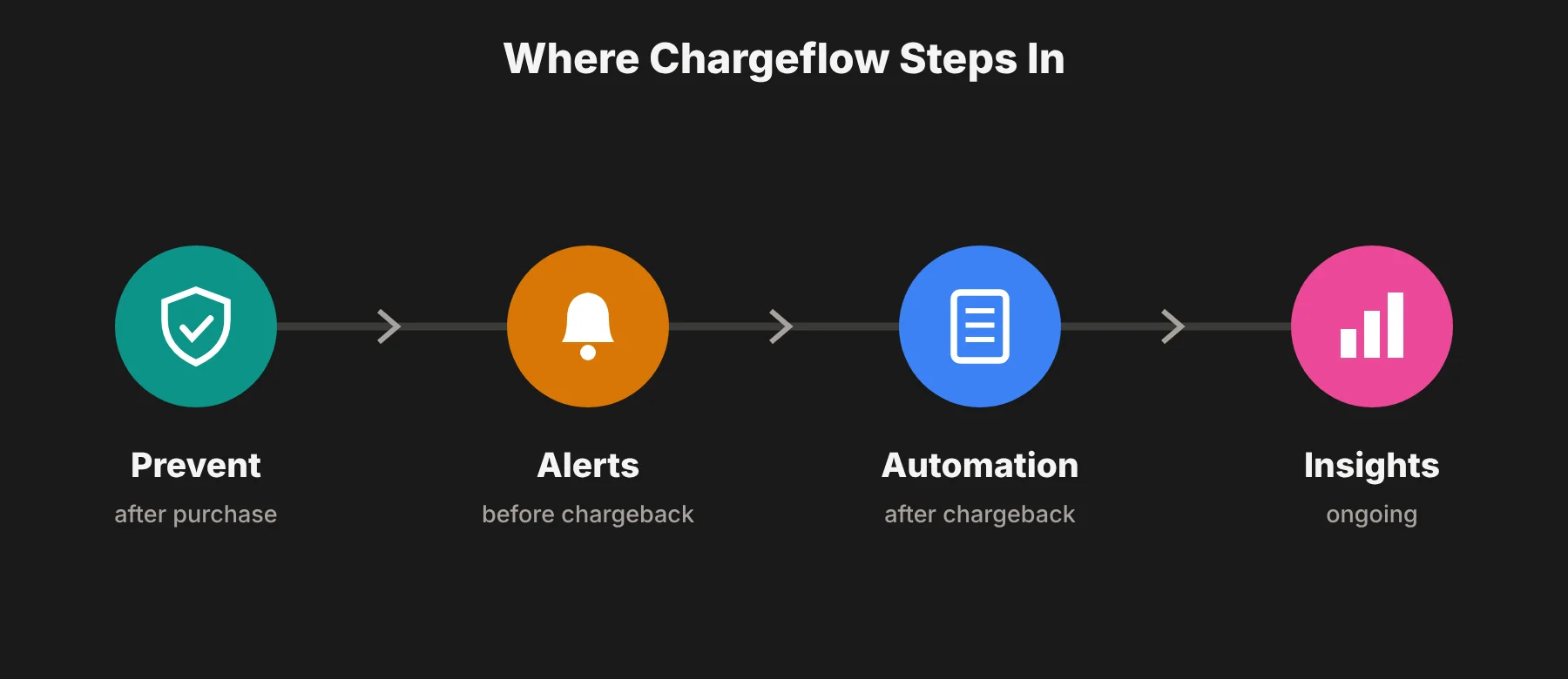 The processor still moves the money, and you still own the customer experience. Chargeflow takes the data from both and turns it into a managed chargeback operation.
Where does Chargeflow earn its place?
Chargeflow earns its place when dispute work has spread across payment dashboards, store platforms, subscription systems and support tools.
Its main advantage is not one AI feature. It is getting the whole case from incoming chargeback to submitted response without someone on your team copying evidence between browser tabs.
The evidence work largely disappears
Chargeflow Automation detects a dispute, collects the right transaction and customer data, builds a response for the reason code and submits it. The company says its evidence engine can collect and enrich more than 1,000 data points.
To me, that number matters less than where the data comes from.
For an ecommerce order, useful proof may live in Shopify, a courier tracking record and a Gorgias conversation. For a SaaS subscription, it may be in Stripe, Chargebee, login history and a Zendesk ticket.
Chargeflow supports more than 100 native integrations across those categories. If you're comparing the platform, you can also read chargeflow reviews covering different use cases and integrations.
When the data exists, Chargeflow removes most of the searching and formatting work. You get a stronger case with far less manual handling.
It works beyond one payment processor
Processor-native dispute tools are handy until a business adds a second processor, a PayPal account or several storefronts. Then each queue has its own deadlines, evidence fields and reports.
Chargeflow supports multi-store and multi-processor setups in one dashboard. For me, this is one of the clearest reasons to use it instead of relying only on the tools inside Stripe, PayPal or Shopify Payments.
It covers more than recovery
Automation is the center of the product, but the wider platform also includes Alerts, Prevent and Insights.
Alerts acts on Visa and Mastercard-linked warnings before eligible complaints become formal chargebacks.
Prevent scores post-purchase risk and can approve, verify or cancel orders based on your rules.
Insights combines dispute data across stores and processors, then shows ratio changes, repeat abusers and problem products.
That scope is why I think Chargeflow can be enough for a lean payments team. You don't have to buy one alert dashboard, another recovery service and a third reporting product just to understand the same dispute.
The pricing follows recovered revenue
Chargeflow charges 25% of each chargeback that Automation recovers. If it loses the case, there is no Automation success fee. There is no long-term contract for that product, and the company advertises a 4x ROI guarantee.
The other products are priced separately. As of October 2026, Chargeflow's pricing page lists Alerts at $29 per deflected chargeback, Prevent at $0.10 per scanned transaction after the first 1,000 free scans, and Insights for free.
I like this model because it is easy to understand and hard to hide inside a budget. It also means the vendor gets paid for a result, not just for opening a case.
What does Chargeflow need from the surrounding stack?
Chargeflow is broad for a chargeback platform, and it works best when it can draw on clean data from the rest of your business. These are the connections I would sort out before buying it.
Strong results start with clean evidence
For a SaaS product, account access, acceptance of terms, renewal notices and cancellation attempts can all strengthen a case. Chargeflow can put those records together and submit them once the right systems are connected.
My advice is simple: connect the systems that hold useful proof, not just the processor that receives the dispute. Shopify, Chargebee, Zendesk and similar tools are where the most convincing context often lives.
It works with the payment processor
Stripe, PayPal, Adyen or another processor authorizes the transaction, moves the money and passes the dispute into Chargeflow. Chargeflow then handles the specialist work of preparing, submitting and tracking the response.
The processor may also charge its own dispute fee. Chargeflow's 25% recovery fee doesn't include that fee, so I'd put both numbers in your cost model. Stripe's dispute docs are a good place to see how processor fees, reason codes and card network monitoring programs work.
Broader fraud tools can complement it
Chargeflow Prevent can identify risky orders and repeat abusers after purchase. That is useful for friendly fraud and for merchants deciding whether to ship an order.
A marketplace dealing with account takeover, fake seller identities, promotion abuse or money laundering may also use a broader fraud and identity layer. Stripe Radar, Sift or Kount cover different parts of that job, while Chargeflow owns chargeback prevention and recovery.
Insights can guide customer-experience fixes
Unclear billing descriptors, weak renewal notices, slow shipping and hard cancellations all create disputes you could have avoided. Chargeflow Insights can reveal those patterns across processors, products and reason codes.
The software gives your product, finance and support teams a clearer starting point. When they act on what the data shows, Chargeflow helps cut incoming disputes as well as recover revenue from the ones that remain.
Success pricing keeps the incentives clear
Paying 25% only on wins is attractive when your dispute volume is uneven or your team doesn't have a mature process yet. You pay when revenue comes back, and Chargeflow has a direct reason to build the strongest case it can.
At high volume, I'd compare the fee with the real cost of internal staff time, tools and missed deadlines. That gives a fairer picture than treating your current process as free.
What does Chargeflow really cost?
The Automation math is simple. Here is how it plays out on the same hypothetical $200 dispute.
Metric | Hypothetical result |
|---|---|
Dispute amount | $200 returned if the issuer rules in your favor |
Chargeflow fee | $50 Chargeflow Automation fee at 25% |
Net before other fees | $150 kept before processor, network or dispute fees |
Lost case | $0 Chargeflow Automation success fee |
The processor's own dispute fee may still apply. Under Stripe's US standard pricing in October 2026, that is a $15 fee when a dispute arrives, which you don't get back. So on a Stripe win, you'd keep about $135.
It helps to compare that with your other options. If you fight the dispute yourself and win, you keep about $185, but you spend your own time gathering evidence. Stripe's built-in Smart Disputes tool charges 30% of a won dispute, so you'd keep about $125.
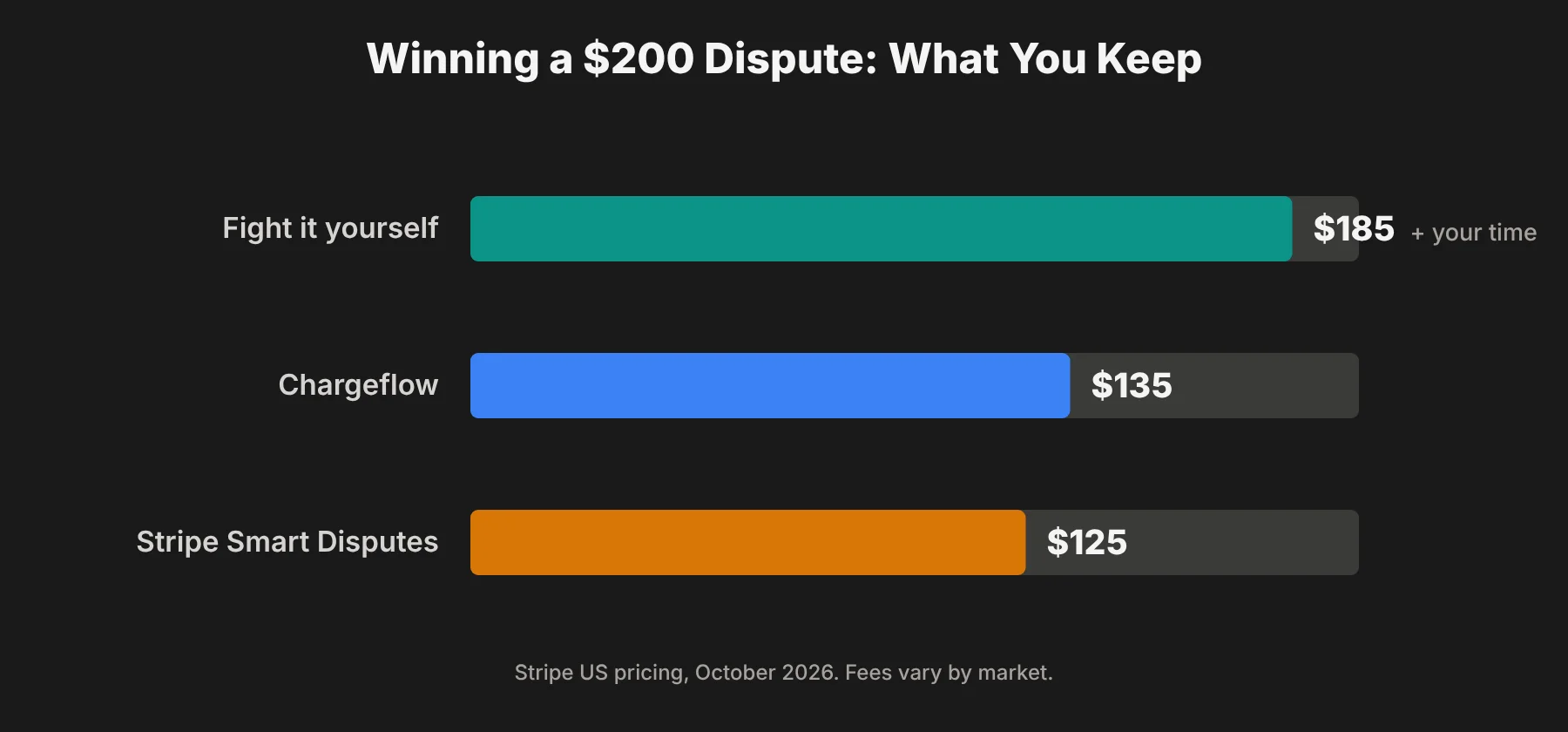 Valid customer claims should also be resolved, not challenged. That is why choosing which cases to fight, and setting your own controls, matters.
During a trial, I would track four numbers:
Dollars recovered
Chargeflow fees
Processor fees
Staff hours saved
Then compare the net result with your previous process.
Win rate is useful, but recovered dollars after fees is the better number to decide on. It shows whether the platform is actually improving the economics of your disputes.
Chargeflow also advertises a 4x ROI guarantee. I'd check the merchant agreement for the exact terms, qualifying cases and measurement period, so you can compare the guarantee with your own volume and dispute mix.
How does Chargeflow chargeback management fit into the rest of the stack?
I see Chargeflow as the chargeback operating layer in a connected stack. Here is how the jobs split up.
Job | Typical system | Why it still matters |
|---|---|---|
Process the payment | Stripe, PayPal, Adyen or another PSP | Authorizes transactions, moves funds and receives the formal dispute |
Store order or subscription data | Shopify, WooCommerce, Chargebee or an internal database | Supplies product, fulfillment and billing evidence |
Record customer conversations | Zendesk, Gorgias, Intercom or Gmail | Shows refund requests, support history and attempts to resolve the issue |
Detect wider fraud and identity risk | Processor tools or a specialist fraud platform | Covers checkout, account takeover, identity and abuse cases outside chargebacks |
Run chargeback operations | Chargeflow | Deflects eligible disputes, builds evidence, submits cases and tracks recovery |
Fix root causes | Product, finance, support and operations teams | Changes descriptors, policies, fulfillment and customer communication |
The integration range is the whole point. Chargeflow needs the systems around it, but it stops your team from running each one as a separate dispute tool.
If you run a Shopify store, chargeback tools are just one line in your monthly software bill. I took the same line-by-line approach in my breakdown of Omnisend pricing, and I'd suggest doing it for your whole stack.
Which businesses are the best fit for Chargeflow?
Chargeflow fits businesses with enough disputes to create recurring work, especially when the evidence is spread across several systems.
Growing ecommerce brands. A Shopify store using Stripe, PayPal, Gorgias and a fulfillment provider has exactly the kind of scattered evidence Chargeflow is built to collect.
Subscription SaaS companies. Recurring-billing disputes depend on proof of product use, renewal emails, cancellation terms and support history. Chargeflow can bring those records into one response.
Multi-store or multi-processor businesses. In my opinion, this is the strongest fit. The value rises when the alternative is checking several dispute portals every day.
Lean finance and operations teams. A company without a dedicated chargeback analyst can automate the work without hiring every time volume goes up.
A small merchant getting only one or two simple disputes a month can still use Chargeflow. But a processor's own dispute workflow may be enough until the manual work becomes repetitive.
A regulated marketplace can use Chargeflow for disputes while keeping identity checks, seller monitoring and anti-money-laundering controls in its wider risk program. The roles work side by side.
What mistakes should you avoid when setting up Chargeflow?
These are the mistakes I'd watch for in the first few weeks.
Connecting only the processor. Add the store, subscription and support systems that hold the evidence. Otherwise the automation starts with one hand tied behind its back.
Treating every dispute as worth fighting. Some claims are valid, and some low-value cases cost more in fees and customer goodwill than they return. Set review rules around reason, value and evidence quality.
Comparing headline win rates. Compare similar reason codes and work out net recovered dollars. A blended win rate hides the cases a vendor accepted, skipped or couldn't support.
Ignoring the alert settings. Automatic refunds can protect your chargeback ratio, but refunding every alert can also reward abuse. Use thresholds and exclusions that match your margins and your monitoring-program risk.
Leaving the root cause alone. If subscription disputes keep rising, look at renewal notices and cancellation. If "item not received" is the top reason, look at fulfillment and delivery proof. Recovery should pay for the fix, not replace it.
Not checking your first invoices. Some merchants report unexpected charges in public reviews, so I'd compare your first month's bill line by line with your dispute and alert list.
Is Chargeflow enough on its own?
Yes. For many ecommerce and SaaS businesses, I think Chargeflow is enough to run the full chargeback operation. It can take a dispute from detection through evidence, submission and recovery, while Alerts and Prevent handle part of the work before a formal chargeback appears.
Your wider stack still supplies the payment rail, the source data and the customer records. That is normal. Chargeflow connects those systems and turns their data into a repeatable recovery process.
That is the reason I would recommend it. Chargeflow solves the part most teams are worst equipped to run: turning scattered transaction history into a complete response before the bank's deadline.
Use Chargeflow when chargebacks have become a regular job, your evidence sits in several places, or your team wants to recover revenue without building a bigger in-house disputes team.
Frequently asked questions
What is Chargeflow?
Chargeflow is an AI-powered chargeback platform for online businesses. Its products cover automated dispute recovery, pre-dispute alerts, post-purchase fraud prevention and chargeback analytics.
How much does Chargeflow cost?
Chargeflow Automation costs 25% of each chargeback it recovers, with no Automation success fee on lost cases. Alerts, Prevent and Insights are priced separately, and processor dispute fees still apply.
Does Chargeflow work with Stripe, Shopify and PayPal?
Yes. Chargeflow lists more than 100 integrations, including Stripe, Shopify, Shopify Payments, PayPal, WooCommerce, Chargebee, Zendesk and Gorgias.
Does Chargeflow prevent chargebacks or only fight them?
It does both. Alerts can stop eligible complaints before they become formal chargebacks, Prevent scores risky orders after purchase, and Automation fights chargebacks that have already been filed.
Is Chargeflow better than Stripe Smart Disputes?
For Stripe-only businesses with simple disputes, Smart Disputes may be enough because it needs no setup. Chargeflow charges a lower success fee (25% vs 30%), works across several processors and can use evidence from tools outside Stripe, like your helpdesk.
Is Chargeflow worth it for a small business?
Yes, when disputes create recurring manual work or your evidence is spread across several tools. A very small merchant can start with its processor's own workflow and move to Chargeflow when volume or complexity grows.