


The best data center temperature monitoring solution depends on where your heat problems start. Butlr is the strongest all-round pick for AI and GPU halls because it watches the power path, leaks and server load in one place. Eaton Exertherm is best for permanent monitoring of switchgear and busway joints. EkkoSense is best for cutting cooling energy, and Vertiv Geist Watchdog is the simple choice for ASHRAE rack inlet reporting. Most facilities run two or three of these together.
A loose busway tap-off, a CRAC unit running harder than it needs to, and a rack inlet drifting past 27°C are all temperature problems. But they show up in different places, develop at different speeds, and no single tool catches all three. Operations teams often find this out the hard way, when the fault that causes an outage turns out to be one their monitoring was never set up to see.
That gap is widening as AI workloads push rack densities higher. Heat loads now shift by row and by hour, liquid cooling adds new failure points, and the power path carries more current than it did a few years ago. A tool that proves ASHRAE compliance will not flag a warming electrical joint, and a tool that watches electrical joints will not tell you whether your cooling set points are wasting energy.
The seven solutions below each focus on a different kind of failure. For each one, we cover its standout features, pros and cons, and the facility it suits best. Most data centers end up running two or three together, so the closing section shows how they combine into monitoring stacks for different types of facilities.
Data Center Temperature Monitoring Solutions Compared
Solution | Approach | Continuous or Periodic | Where It Looks | Install Effort |
|---|---|---|---|---|
Butlr | Thermal sensor arrays + live digital twin | Continuous | Power path, white space, liquid cooling | Low (wireless options) |
Eaton Exertherm | Permanent IR sensors on electrical joints | Continuous | Switchgear, busway joints, tap-off boxes | Moderate to high |
EkkoSense | AI cooling optimization | Continuous | Racks, cooling units, airflow | Low to moderate |
Vertiv Geist Watchdog | Rack environmental monitors | Continuous | Inlet/outlet air, humidity, leaks | Low to moderate |
Schneider EcoStruxure IT | DCIM software | Continuous | Data from connected devices | Software only |
Cadence Reality DC Digital Twin | CFD simulation | Modeled (on demand) | Airflow and cooling across the hall | Software + modeling work |
Fluke Ti480 PRO | Handheld IR camera | Periodic | Whatever the technician scans | None |
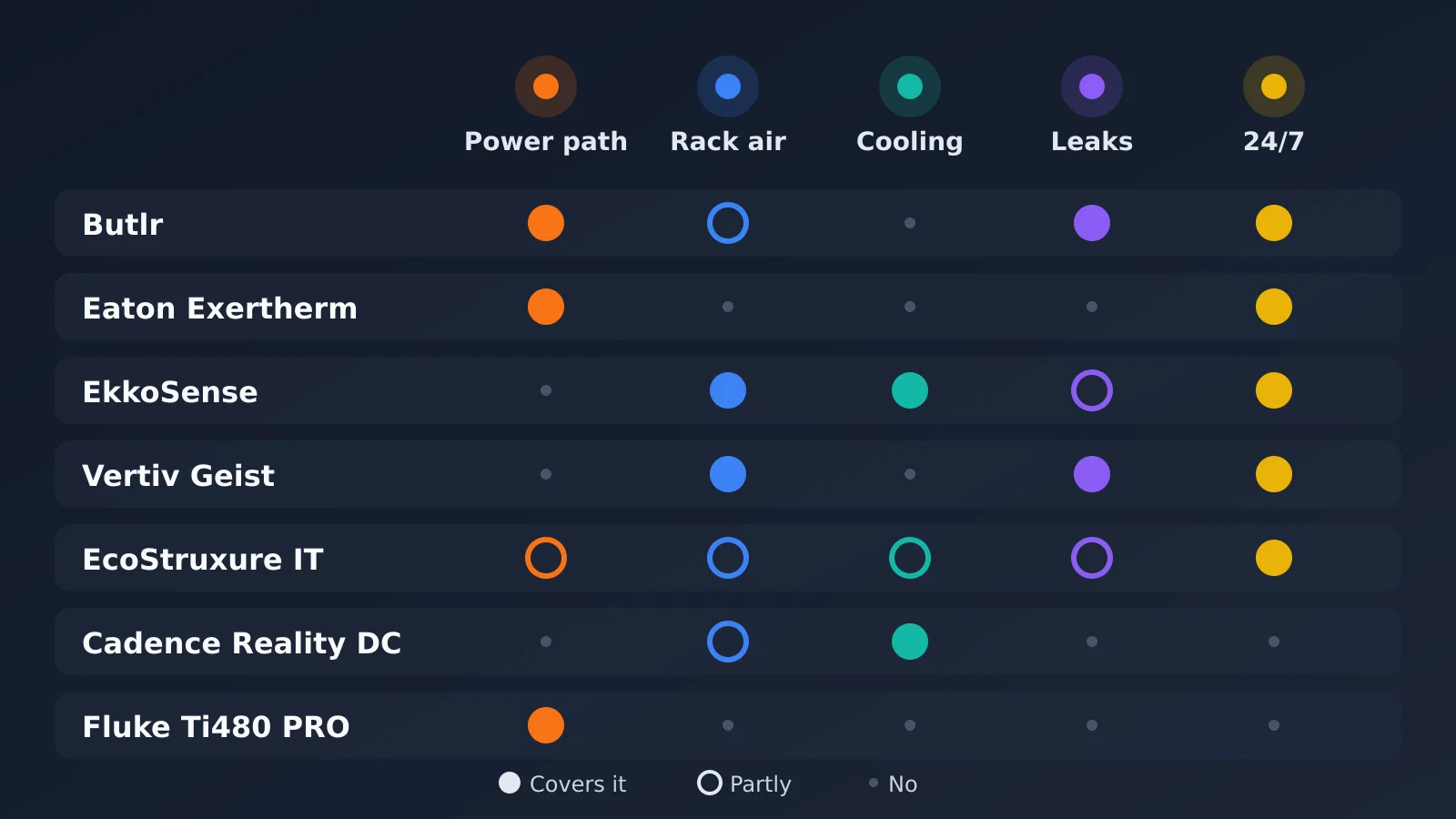 What each solution watches, at a glance
1. Butlr
Butlr builds a thermal digital twin of the data hall from grids of low-resolution thermal sensors. Server chips already report what happens inside the server, so Butlr measures what happens around it, from the power path, liquid cooling, and the people moving through the hall.
It shows thermal sensing, server data, and optional live 360 video in a single view. Because the twin comes from live sensor readings, it shows what is happening in the hall rather than what a model predicts.
Standout features
Heat. Continuous thermal sensing along the full electrical distribution chain, from the remote power panel through overhead busway tap-offs and whips to the rack PDU. It is designed to catch electrical faults before they escalate, which matters because power is the leading cause of impactful outages at 45 percent (Uptime Institute).
Water. Leak detection for liquid-cooled systems runs on the same platform as the heat monitoring, so coolant issues and electrical hotspots show up in one place.
Load. Server data from ASPEED management chips appears beside the thermal readings. When training jobs spread unevenly across racks, operators can see where heat and compute load line up and move workloads or cooling to match.
Access. Anonymous presence sensing covers the hall, and operators who want visual verification can add live 360 video.
Camera-free sensors. The thermal sensors output temperature data only and cannot capture images. Live video is an optional add-on rather than part of the core system.
API-first alerts. Alerts flow into existing NOC dashboards and ticketing tools, and trend-based rules, such as a joint that has risen 3°C in two weeks, flag slow-developing faults sooner than a fixed temperature ceiling would.
Pros
Fills the gap between annual infrared inspections of electrical connections, which NETA sets as the industry standard and which can leave up to 364 days unwatched
Wireless, battery-powered units install without an electrician or a hall shutdown, with wired options for permanent placements
Tiered alerts (logged notice, zone alert, critical page) help keep alert fatigue down
One sensor platform covers several risk types that would otherwise need separate tools
Cons
Newer category, with fewer long-running reference deployments than probes or handheld cameras
Does not replace inlet air sensors for facilities that report against ASHRAE ranges
Sites that restrict imaging hardware can use only the thermal sensors, without the video add-on
Best for: Neocloud and AI data center operators who want continuous visibility into heat, leaks, load, and access around high-value GPU infrastructure.
2. Eaton Exertherm
Eaton's Exertherm continuous thermal monitoring (CTM) places small, permanently installed infrared sensors on specific electrical connections inside switchgear, bus duct, and busway boxes. Each sensor watches one joint around the clock and reports temperature rise to the facility's monitoring systems.
Standout features
Joint-level coverage. Sensors cover medium- and low-voltage switchgear busbar joints, cable terminations, bus duct joints, and busway tap-off and end feed boxes, where power passes to racks and PDUs.
Non-contact, non-powered sensors. The IR sensors read temperature without touching the conductor and need no external power.
Direct system integration. Temperature and alarm data travel over Modbus to EPMS, BMS, or SCADA platforms.
OEM-neutral design. The busway solution is built to fit systems from different manufacturers.
Pros
Monitors exactly the connections most likely to loosen through thermal cycling and vibration
Eaton describes the hardware as fit-and-forget with no routine maintenance, and offers a lifetime guarantee on its sensor hardware
Reduces how often technicians need to open energized gear for inspection
Supports NFPA 70B maintenance programs, according to Eaton
Cons
Coverage is limited to the points where sensors are installed, so teams have to plan placement carefully
Easiest to deploy during new builds or planned outages, since sensors go inside the electrical equipment
No view of white space air, rack conditions, or cooling performance
Best for: Facilities that want permanent, point-by-point monitoring of switchgear and busway connections, especially when specified as part of a new electrical build.
3. EkkoSense
EkkoSense pairs low-cost wireless sensors with EkkoSoft Critical, a SaaS platform that builds a 3D thermal model of the data hall and uses AI to recommend cooling changes. Its focus is on making cooling work more efficiently, alongside detecting thermal risk.
Standout features
Critical Things sensors. Wireless sensors track rack temperature and humidity, and EkkoAir sensors measure real-time cooling duty on each CRAC or AHU unit.
3D visualization. EkkoSoft Critical maps sensor data onto a live 3D model of the room, so teams can see thermal conditions rack by rack.
Cooling Advisor. An AI-driven tool recommends adjustments such as fan speeds, set points, and floor grille placement.
Simulation and reporting. EkkoSIM models scenarios across white space and grey space, and the platform automates ESG reporting.
Pros
Ties thermal data directly to cooling energy use, which helps justify the investment
EkkoSense reports average cooling energy savings of around 30 percent across customers
Wireless sensors with multi-year battery life keep installation light
Automated anomaly alerts flag cooling issues in hybrid air and liquid environments
Cons
Built around air and cooling performance, not electrical connection faults
Recommendations still depend on the operations team acting on them
Savings figures come from the vendor and will vary by facility
Best for: Operators who want to cut cooling energy and free up thermal capacity while monitoring rack conditions.
4. Vertiv Geist Watchdog
Vertiv's Geist Watchdog line is a family of rack-mounted environmental monitors with built-in sensors and ports for add-on probes. It is a simple, proven way to measure the air conditions racks actually experience.
Standout features
On-board sensing. Each unit includes temperature, humidity, and dew point sensors.
Expandable probes. Plug-and-play and dry contact ports support extra sensors for temperature, water leaks, smoke, door position, airflow, and power failure.
Browser-based monitoring. Teams view live readings through a secure web interface and receive alerts by email, SNMP, or SMS.
Shared sensor ecosystem. The same sensors connect to Vertiv Geist rack PDUs, so monitoring can expand without adding standalone units.
Pros
A standard way to document rack inlet temperatures against ASHRAE's recommended 18 to 27°C range
Low entry cost and straightforward setup
Supports common data formats and protocols for integration, including SNMP, JSON, and CSV
Standard three-year warranty, extended to five years with product registration
Cons
Each probe reports only on the air around it, so covering a full hall takes many sensors
Vertiv notes that the on-board sensor can read high in still air because of circuit board heating
Watching many sites usually requires a DCIM layer on top
Best for: Facilities that need dependable rack-level air monitoring for compliance and SLA reporting.
5. Schneider Electric EcoStruxure IT
EcoStruxure IT is Schneider Electric's DCIM suite. It collects data from power, cooling, and environmental equipment across sites and shows it in one place. Rather than measuring temperature directly, it gives teams the context to judge what each reading means.
Standout features
EcoStruxure IT Expert. A cloud-based, vendor-agnostic platform for remote monitoring with real-time alarms across distributed sites.
EcoStruxure IT Advisor. Planning, capacity modeling, and optimization tools for power, cooling, and space.
Native Schneider integration. Works closely with APC UPS systems and NetBotz environmental appliances, while still supporting other vendors' equipment.
Predictive analytics. Flags risk and inefficiency patterns across mixed hardware fleets.
Pros
One view across on-premises, colocation, and edge sites
Supports thresholds tuned by zone, which is more useful than one facility-wide limit
Strong fit for operators already running Schneider power and cooling equipment
Combines monitoring with capacity planning in the same suite
Cons
Only as complete as the sensors and devices connected to it, so unmonitored joints do not appear at all
Integration is deepest with Schneider hardware
Subscriptions are sold by node count, so costs grow with the number of monitored devices
Best for: Multi-site operators who need one monitoring and planning layer across mixed equipment.
6. Cadence Reality DC Digital Twin
Cadence Reality DC uses computational fluid dynamics (CFD) to simulate how air and heat move through a data center. Teams use it to test changes before making them in the physical hall.
Standout features
Physics-based simulation. CFD models airflow, temperatures, and pressure across the room, the raised floor, and inside cabinets.
Design and operations modules. Reality DC Design supports engineers planning new facilities, while Reality DC Insight gives IT and facilities teams a web portal for ongoing optimization.
Large equipment library. Reality DC Elements includes about 14,000 component models from more than 750 manufacturers.
Live data connections. The model can connect to BMS and DCIM systems to stay current.
Pros
Shows how a new high-density deployment or a cooling failure would affect the hall before it happens
Helps validate IT placement and find stranded cooling capacity
Useful in design reviews and pre-sales planning for colocation providers
Integrates with tools like NVIDIA Omniverse for broader digital twin workflows
Cons
A simulation is a prediction, and its accuracy depends on calibration against measured data
Building and maintaining an accurate model takes specialized expertise
Does not detect developing faults on its own
Best for: Design teams and operators planning major changes, such as adding high-density AI racks to an existing hall.
7. Fluke Ti480 PRO
The Fluke Ti480 PRO is a pistol-grip infrared camera built for electrical and mechanical inspection. Handheld thermography is still the standard method for periodic electrical surveys and close investigation of suspected problems.
Standout features
640 x 480 resolution. Detailed thermal images let inspectors work from a safer distance.
LaserSharp and MultiSharp focus. Automatic focusing captures sharp images across the field of view.
IR-Fusion. Blends visible and infrared images for clearer reports.
Fluke Connect. Wireless transfer links images to asset records, and the SmartView desktop software is a free download.
Pros
No installation, and it covers any equipment a technician can reach
The right tool for examining a suspected fault up close or documenting conditions after an incident
Pairs with IR windows on switchgear and PDU panels for repeatable inspections with less disruption
Radiometric video captures temperature changes over time during an inspection
Cons
Each scan is a snapshot, so anything that develops between visits goes unnoticed
Requires a trained thermographer, protective equipment, and sometimes open panels on energized gear
Trending across surveys depends on someone archiving and comparing results
Best for: Periodic electrical surveys, commissioning checks, and troubleshooting.
Three Example Monitoring Stacks
AI or neocloud hall with liquid cooling. Start with Butlr for continuous heat, leak, and load visibility around the GPU racks. Add Eaton Exertherm in the switchgear feeding the hall, and keep a Fluke Ti480 PRO on hand to investigate anything the continuous systems flag.
Colocation facility proving SLA compliance. Use Vertiv Geist Watchdog probes at rack inlets to document ASHRAE ranges for customers, and feed that data into Schneider EcoStruxure IT for multi-site reporting. Cadence Reality DC helps test where new high-density tenants can go without creating hot spots.
Older enterprise hall on a tight budget. EkkoSense gives quick wireless coverage of rack conditions and points to cooling savings that can help pay for the program. Pair it with an annual Fluke survey of electrical connections, and consider adding continuous power path monitoring as budget allows.
Frequently Asked Questions
What is data center temperature monitoring?
Data center temperature monitoring is the practice of tracking heat across the facility, from rack inlet air and cooling units to electrical joints in the power path. The goal is to spot hot spots, wasted cooling and failing connections before they cause downtime.
What temperature should a data center be?
ASHRAE recommends a rack inlet air temperature between 18 and 27°C. Many operators use this range for SLA and compliance reporting, which is why rack inlet sensors like Vertiv Geist Watchdog are still common.
Is one monitoring tool enough for a data center?
Usually not. Rack air sensors, electrical joint sensors, cooling optimization software and handheld cameras each see a different kind of failure. Most facilities combine two or three tools, as shown in the example stacks above.
Is an annual infrared survey enough for electrical connections?
An annual infrared survey is the industry standard set by NETA, but it only shows conditions on the day of the scan. A joint that starts to warm the next week can go unnoticed for months. Continuous tools like Butlr and Eaton Exertherm fill that gap.
Can DCIM software monitor temperature on its own?
No. DCIM software such as Schneider EcoStruxure IT collects and analyzes data from connected sensors and devices. It cannot see anything that is not connected to it, so you still need sensors in the right places. DCIM also watches the facility rather than the servers themselves. For device health, such as CPU, disk space and failing services, IT teams usually add RMM software alongside it.
What is the difference between a live digital twin and a CFD simulation?
A live digital twin, like Butlr's, is built from real sensor readings, so it shows what is happening in the hall right now. A CFD simulation, like Cadence Reality DC, predicts how air and heat will move, which makes it useful for planning changes before you make them.
Which temperature monitoring solution is best for AI data centers?
For AI and GPU halls, Butlr is a strong fit because it watches the power path, liquid cooling leaks and server load together. Pair it with Eaton Exertherm in the switchgear for full power path coverage.