


The way I think about RMM software is this: it is what lets one technician look after two thousand computers without walking to any of them.
RMM stands for remote monitoring and management. You install a small agent on every machine you are responsible for, and that agent reports back to a central console. From there you can watch the device, push patches to it, run scripts on it, take over the screen, and get woken up when its hard drive starts failing.
That is the whole idea. Everything else I cover here is detail hanging off it.
What RMM Software Actually Does
Five jobs, and I have listed them roughly in the order I think people care about them.
Monitoring. The agent watches disk space, CPU, memory, services, event logs, backup status, antivirus status, and whatever else you tell it to. When something crosses a threshold, it raises an alert.
Patch management. Operating system updates and third party software updates, scheduled and pushed centrally, with reporting on which machines took them and which did not. For most teams I would say this is the single feature that justifies the spend, because manual patching does not scale past about thirty machines.
Remote access. Take control of a device, usually without booting the user off, so you can fix something while they watch or while they are at lunch.
Automation and scripting. Run a PowerShell or Bash script against one machine or four hundred. Trigger it on a schedule, or automatically when an alert fires. This is where I have seen the real time savings come from, and it is also where the platforms differ most.
Inventory. A live list of every device, what hardware is in it, what software is installed, what version, what warranty. Boring until an auditor asks, and then the most valuable thing you own. I would not skip it.
Most platforms bolt on more: network device monitoring, mobile management, backup, security tooling, reporting dashboards. I treat those as the upsells. The five above are the category.
Who Uses It
There are two audiences here, and in my experience they want quite different things from the same product.
Managed service providers run RMM across many client organisations at once, so they need multi-tenancy, clean separation between clients, per-client reporting, and something to bill against. They usually pair it with a PSA for tickets and invoicing.
Internal IT teams run it across one organisation. They do not need multi-tenancy and they usually do not need billing. They care more about integrating with what they already have, like Entra ID or Intune, and less about client-facing polish.
Vendors sell to both, and I notice their marketing rarely distinguishes. If you are internal IT reading an RMM comparison, my rough estimate is that a third of the features being praised are things you will never switch on.
RMM Software Pricing: The Decision That Actually Matters
This is where I think most buying goes wrong, and it has nothing to do with features.
There are two pricing models in this category and they behave completely differently as you grow.
Per endpoint. You pay for each device you manage. NinjaOne, Datto RMM, Pulseway, ConnectWise and N-able work this way. Expect roughly $1 to $5 per endpoint per month depending on volume and tier.
Per technician. You pay for each person who logs into the console, and manage as many devices as you like. Atera, Syncro and SuperOps work this way. Expect roughly $99 to $209 per technician per month.
So I ran the arithmetic, because the crossover point turns out to be dramatic.
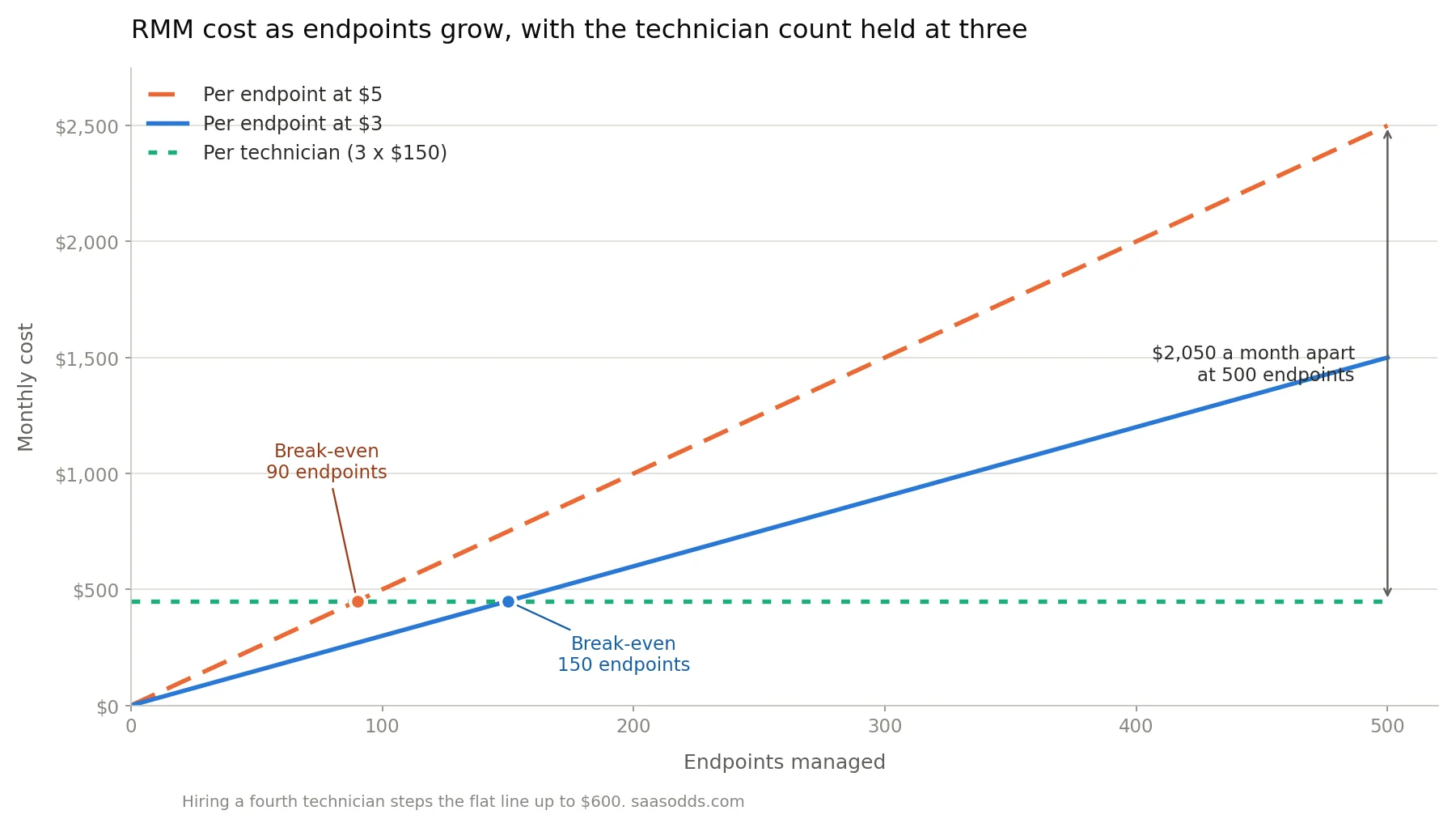
An MSP with three technicians and 500 endpoints pays somewhere around $1,500 to $2,500 a month on a per-endpoint platform at $3 to $5. On a per-technician platform at $150, the same business pays $450. Not a little cheaper. Roughly a fifth of the cost.
Flip it. A small internal IT team with two admins and 60 endpoints pays maybe $180 a month per endpoint at $3, against $300 for two technician seats. Now per-endpoint wins.
The rule I would use is that the more devices each technician handles, the more per-technician pricing favours you. The crossover sits lower than I expected. At $3 per endpoint against $150 per technician, the two models cost exactly the same at 50 endpoints per technician. Across the realistic range of rates, $2 to $5 per endpoint and $129 to $209 per technician, the break-even sits somewhere between 40 and 70 endpoints per tech.
That is not a high bar. By my reckoning a single technician looking after two small client offices is probably already past it.
 Two traps in the per-endpoint model I would check before signing anything. Servers, network devices and virtual machines are frequently billed at a higher rate than workstations, so the advertised per-device price is a floor rather than an average. And inactive agents sometimes keep billing until you remove them properly.
And one trap in the per-technician model I would ask about. Every console login may need a licence, so hiring a junior tech raises your software bill even though your device count has not moved.
Whichever way it falls for you, I would pick the model before picking the product. The model shapes your economics for years, while the feature gaps between the major platforms tend to close within a release cycle or two.
This split is not unique to RMM. It shows up wherever a vendor has to decide whether to charge for seats or for what those seats do, and the vendors who break from the norm usually make it their whole pitch. Acumatica does the same thing in ERP, charging for consumption instead of per user, for the same reason Atera charges per technician instead of per device: it takes the growth penalty out of the bill.
The Platforms Worth Shortlisting
The category has consolidated, so in practice I think you are choosing among these.
NinjaOne is the general-purpose default and consistently scores highest on ease of use and onboarding speed. Per endpoint, roughly $2 to $5. Best if you want breadth and do not mind the bill growing with device count.
Atera built its reputation on per-technician pricing with unlimited endpoints, and has pushed hard into AI features. MSP plans run about $129 to $209 per tech per month. Includes PSA and helpdesk on every plan. Some users report scripting and reporting are shallower than the enterprise options.
Syncro is the pick when a smaller MSP wants RMM, PSA and billing genuinely built together rather than integrated by API. Core is $129 per user per month annually, Team is $179.
SuperOps is the newer per-technician option, priced a little under Atera at roughly $129 to $159 per tech, and unusually transparent about it.
ConnectWise and N-able are the incumbents, deep on automation and strong if you already live in those ecosystems. Both quote privately.
Datto RMM and Kaseya VSA sit in the same enterprise bracket. Kaseya now owns Datto, which matters if you are worried about vendor concentration.
Pulseway is the one people pick when technicians work from their phones, and its mobile console is genuinely better than the rest.
ManageEngine and Auvik are worth a look for internal IT and network-heavy environments respectively.
A note on my sourcing, since it affects how you should read any comparison including this one. Several of the highest-ranking "best RMM software" articles are published by RMM vendors, and they name themselves as the winner. That is disclosed each time and the analysis is often decent, but it is worth knowing whose article you are reading. The per-endpoint versus per-technician framing above, in particular, is a point the per-technician vendors push hardest, and they push it because it favours them, not because it is wrong.
RMM Compared to the Things People Confuse It With
RMM vs PSA. RMM is the technical layer: monitoring, patching, scripting, remote access. PSA is the business layer: tickets, time tracking, contracts, invoicing. Most mature MSPs need both. Atera, Syncro and SuperOps bundle them; NinjaOne and Datto expect you to integrate a separate PSA.
RMM vs MDM. MDM manages phones and tablets through the mobile operating system's own management framework. RMM manages full computers through an installed agent. Overlap is growing but they are not substitutes, and most organisations end up with both.
RMM vs EDR. EDR watches for malicious behaviour on an endpoint and responds to it. RMM keeps the endpoint healthy and patched. An RMM will tell you antivirus is switched off. It will not tell you that something is actively living in memory. Do not treat one as the other.
RMM vs remote access software. Remote access is one feature inside RMM. TeamViewer, AnyDesk and Splashtop do the screen sharing part very well and none of the monitoring, patching or automation. If all you need is to see someone's desktop, you do not need RMM.
RMM vs patch management. Patch management is one of the five jobs RMM does. A standalone patch tool is cheaper and narrower.
Common Questions
What does RMM stand for?
Remote monitoring and management.
How does RMM software work?
A lightweight agent is installed on each managed device. It reports health and inventory data back to a central console over an outbound connection, and it accepts commands from that console, so technicians can patch, script, or take control without being on the same network.
What is RMM used for?
Monitoring device health, applying patches, running scripts and automations, providing remote support, and keeping an inventory of hardware and software.
How much does RMM software cost?
Roughly $1 to $5 per endpoint per month on per-device platforms, or roughly $99 to $209 per technician per month on per-technician platforms. Enterprise products from ConnectWise, N-able and Kaseya are usually custom quoted.
Is there free RMM software?
There are free tiers and open source options such as ManageEngine's free edition for small device counts, and Tactical RMM for self-hosters. They are viable for very small environments. They also mean you are responsible for securing the server yourself, which the last section of this article should give you pause about.
What is the best RMM software?
NinjaOne if you want the broadest general-purpose platform, Atera or Syncro if per-technician pricing suits your device-to-tech ratio, ConnectWise or N-able if you need enterprise automation depth. There is no single answer, because the pricing model decides more than the feature set.
What is the difference between RMM and PSA?
RMM handles the technology. PSA handles the service business around it: tickets, time, billing and contracts.
Do internal IT teams need RMM?
Above roughly thirty managed devices, yes, mostly for patch compliance and inventory. Below that, native tooling and remote access may be enough.
The Part Most Comparisons Leave Out
Everything above is a normal software buying decision. This last part is not, and it is the reason I wanted to write this article at all.
RMM software is, by design, a tool that grants remote code execution across every machine you manage, from a single console, using an agent that security tools are configured to trust. That is exactly what it is for. It is also exactly what a ransomware crew wants.
This is not theoretical and it is not rare. CISA, the FBI and MS-ISAC have issued repeated joint advisories about attackers abusing legitimate RMM tools for persistent access, naming specific products including AnyDesk, Atera, ConnectWise ScreenConnect, Level.io, N-able, Splashtop, Syncro and TeamViewer. The point is not that those products are insecure. It is that attackers deliberately choose legitimate remote management software because it is already trusted on the network, it does not require custom malware, and it looks like an administrator doing their job.
There are two distinct risks here and they need different responses.
The first is your RMM being exploited directly. In June 2025 CISA published an advisory after ransomware actors used an unpatched path traversal flaw in SimpleHelp RMM to reach downstream customers of a utility billing provider, deploying ransomware and stealing data in double extortion attacks. Attackers reached many organisations through one compromised management platform. That is the shape of an MSP breach: the trust relationship is the attack surface.
The second is an attacker installing their own RMM in your environment. Because these tools are legitimate and signed, dropping a copy of a remote access product is often quieter than deploying malware. CISA's advisory on this describes phishing campaigns that led victims to install genuine remote management software which was then used to drain bank accounts. If you want the primary source, CISA's guidance on malicious use of RMM software is the document to read, and it is written for practitioners rather than executives.
So here is what I would add to an evaluation checklist that no vendor comparison chart will include.
Ask how quickly the vendor has patched previously disclosed vulnerabilities, and whether any of their CVEs have landed in CISA's Known Exploited Vulnerabilities catalogue. Insist on enforced multi-factor authentication for every console user, with no exceptions for the owner. Check whether the platform supports proper role-based access, so a helpdesk technician cannot script against every client. Find out whether administrative actions are logged in a way you could hand to an insurer after an incident. And ask what happens if the vendor's own cloud is compromised, because on a hosted RMM their breach is your breach.
Then I would do the one thing almost nobody does: build a detection rule for RMM software you have not authorised. If your own agent is the only remote management tool that should exist on your network, any other one appearing is a signal worth waking up for.
Choosing RMM software on features and price alone is reasonable right up until the moment it is the thing that gets used against you. It is the most powerful tool in the room, and the buying process should treat it that way.
The pricing figures I have used are drawn from vendor pricing pages and third party comparisons as of August 2026, and several of the enterprise platforms quote privately, so treat the ranges as orientation rather than quotes. The security advisories cited are published by CISA and are worth reading in full.