

Every app here offers an email-free sign-in, but they prove different things. iTacit is the pick when you need a signed record that each worker read an update. Connecteam is the cheapest start, Blink has the friendliest feed, and Microsoft Teams makes sense if you already pay for Microsoft 365.
Most frontline workers do not have a company email address, so the shift change, the recalled part or the new lockout procedure often lands in an inbox nobody on the floor will open. The apps below fix that by giving each worker a way to sign in on a phone without a work email, and then putting daily team updates in front of them where they will actually see them. The phone part is already solved: Pew Research Center's mobile data shows 91% of U.S. adults own a smartphone. The harder part is what happens after a worker logs in, which is getting people to read the update and proving that they did.
We compared six apps on exactly that: how a worker without email signs in, how updates reach them, and how a manager can confirm the message landed.
Daily Team Updates Apps At A Glance
App | Best for | How workers sign in without email | Daily update tools | Starting price | Rating |
|---|---|---|---|---|---|
iTacit | Regulated frontline teams that need proof a message was read | Individual iTacit login issued by the employer, or existing workplace login (SSO) where supported | Role-based news, urgent alerts, read receipts, signed policy acknowledgements | Quote-based, per user, by package | 4.6 on Capterra |
Beekeeper | Shift-based operations that want updates plus checklists | Secure mobile login, no corporate email needed | Updates targeted by role, shift or location; automated reminders | $4 per user per month (Essential, as listed on Capterra) | 4.6 on Capterra |
Blink | Teams that want a social feed and shift briefs | Phone number or email with a 6-digit one-time code, or SSO | Feed, chat, story-style shift briefs, hub | $3.75 per user per month (Core, billed annually) | 4.7 on Capterra |
Staffbase | Large employers running a branded employee app | Access code or username plus one-time password set up by an admin | News, push notifications, AI translation, pulse surveys | Quote-based | 4.7 on Capterra |
Connecteam | Small and mid-sized crews on a tight budget | Mobile phone number plus a code sent by text; 4-digit kiosk code on shared devices | Updates feed, chat, "see who read" tracking, auto-translation | Free up to 10 users; $29 per month for the first 30 users (Basic, yearly) | 4.6 on Capterra |
Microsoft Teams (frontline) | Companies already on Microsoft 365 | QR code plus PIN on shared iOS or Android devices | Chat, company news, shift viewing and swaps, push-to-talk | $3.00 per user per month (Microsoft 365 F1, annual) | 4.5 on Capterra |
What An Email-Free Sign-In Actually Means
An email-free sign-in is any way for a worker to log in to a work app without a company email address. It sounds like one feature. In practice it is four different methods, and each one puts the setup work in a different place.
Individual credentials issued by the employer. The company creates a login for each worker (a username, an employee ID or an access code). Nobody needs a personal email or phone number. The admin does the setup once.
One-time code to a phone number. The worker types a mobile number and gets a short code by text. This is fast, but the worker has to be willing to give the company a personal number.
Single sign-on (SSO). SSO lets a worker use a login the company already runs (for example the one they use for payroll or scheduling). It only helps if those workers already have an account in that system.
QR code plus PIN. The worker scans a code printed on a badge and types a PIN. It suits shared tablets and handhelds, but it is usually limited to mobile devices and needs identity-team setup.
Whichever method you choose, check one thing on shared devices: does each worker still get their own login? If three people use the break-room tablet under one account, you cannot prove who read the safety update.
How We Compared These Employee App Options
We looked at each employee app from the side of a supervisor sending the morning update and a worker reading it on a phone between tasks. Each entry was checked against the vendor's own help pages or product pages, published pricing, and its current Capterra rating. We scored five things:
How a worker with no company email signs in the first time, and every day after.
Whether updates can be targeted by role, site or shift instead of sent to everyone.
Whether a manager can see who opened or acknowledged a message.
How shared devices are handled.
Price, and whether the price is published.
We did not count features that sit behind a sales call unless the vendor documents them publicly.
We Opened Each App's Sign-In Screen To See What Workers Are Asked For
Help pages tell you what an app can do once IT sets it up. The first screen tells you what a new worker actually meets on day one. So in November 2026 we opened the real sign-in page of each app and wrote down every field it asked for. We did not create accounts, so this shows the default screen, not every option an admin can switch on.
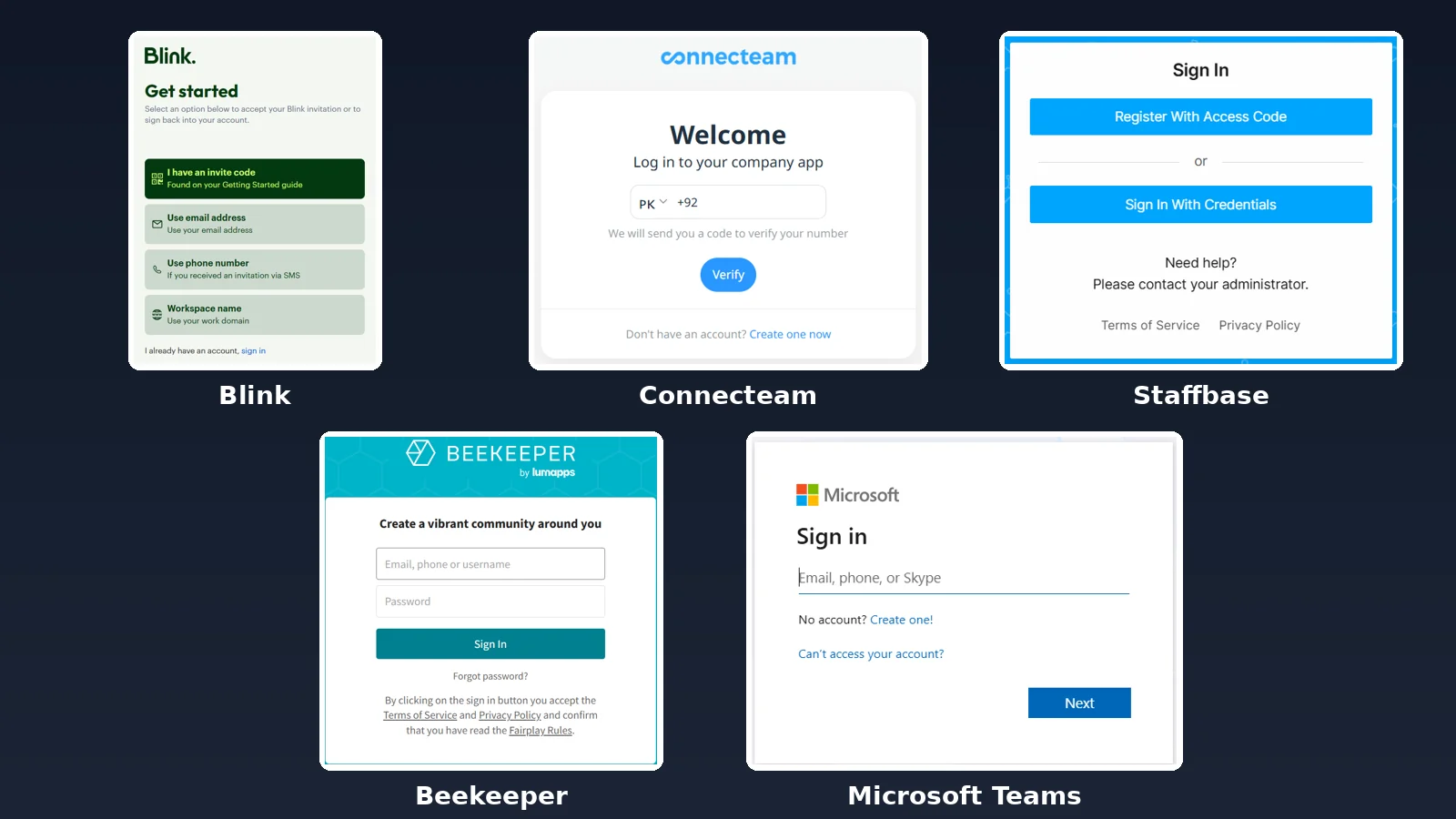 The default sign-in screen for Blink, Connecteam, Staffbase, Beekeeper and Microsoft.
Here is what we saw:
Connecteam asks for one thing only: a mobile number. It then texts a code to verify it. That matches its help pages, and it confirms the phone number is the worker's identity.
Beekeeper has a single box for "email, phone or username" plus a password. The username option matters, because it means a worker can sign in with no email and no phone number at all.
Blink opens with four choices: an invite code from the Getting Started guide, an email address, a phone number, or the company's workspace name. The invite code is a handy route for a worker who will not share a personal number.
Staffbase offers two buttons: register with an access code, or sign in with credentials. There is no email field at all, and the help line simply says to contact your administrator.
Microsoft shows its standard box asking for an "email, phone, or Skype" name. The QR code and PIN sign-in only appears on shared mobile devices after IT turns it on, so on a laptop a worker still needs a Microsoft account name.
iTacit has no public sign-in page to open. Each organization gets its own, and on its site iTacit says workers enter the organization's key and their own login in the My iTacit app.
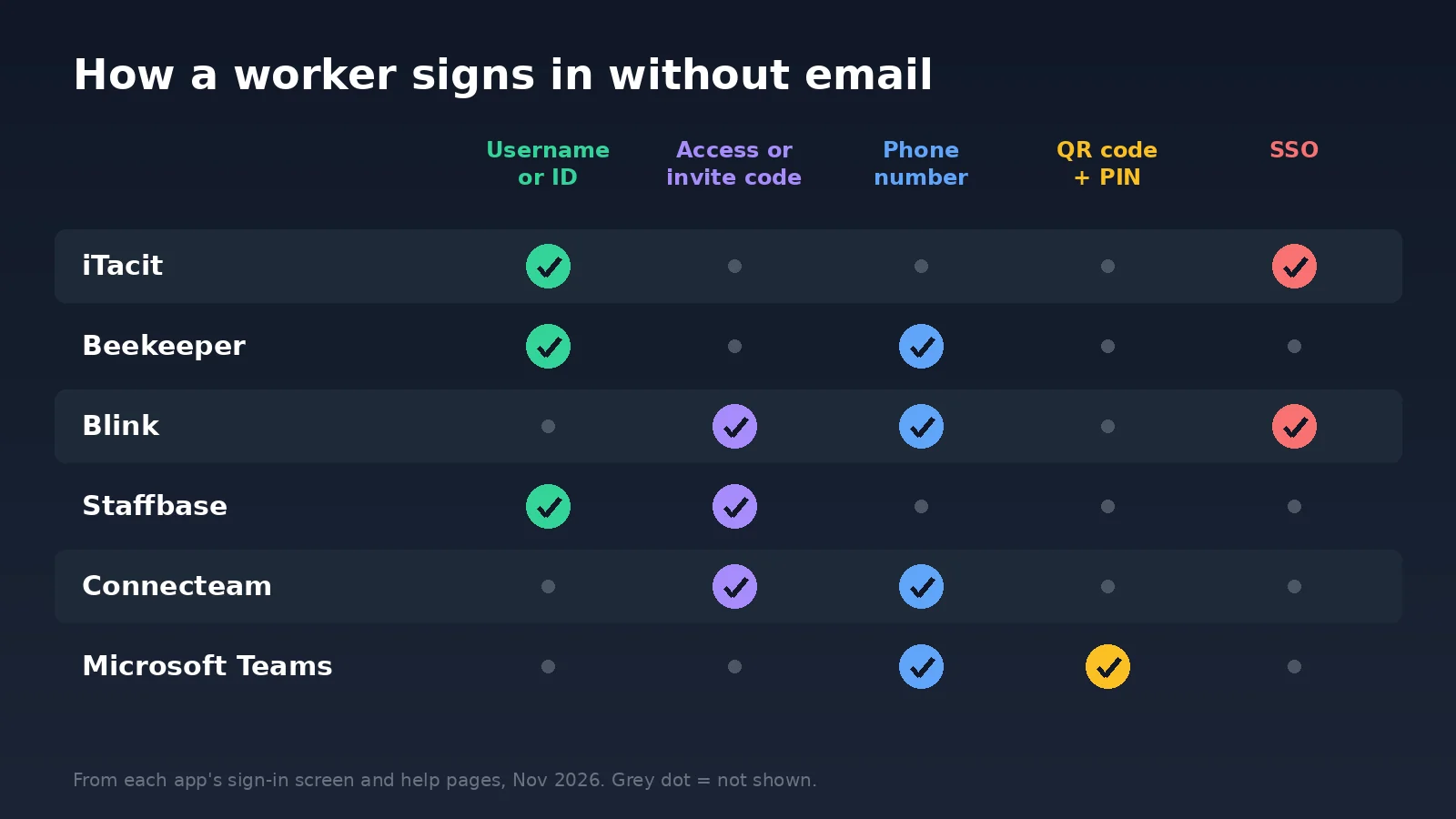 Which sign-in routes each app showed us or documents, November 2026.
The pattern surprised us a little. Only Connecteam depends on a phone number by default. Staffbase, Beekeeper and iTacit can all put a worker on the app with no email and no phone, which is the case most frontline managers worry about. If your HR team already keeps employee IDs in its HR software, an app that signs workers in with an ID or username is usually the quickest rollout.
The 6 Best Mobile Apps For Email-Free Sign-Ins And Daily Team Updates
iTacit
Best for: regulated frontline teams (transport, manufacturing, construction, healthcare) that want one frontline employee app for daily team updates plus a record that each worker read and signed off on them.
iTacit is a frontline employee app and training platform that gives every worker their own login, with no email address required. Workers open the My iTacit app on iOS or Android, or a browser, and see the news, alerts, courses and forms assigned to their role and site.
The useful part for supervisors is what comes back. Messages carry read receipts, and a policy can require a signed acknowledgement, so the record shows who read the new procedure and when. On a shared tablet, each person still signs in individually, so a completion is recorded to the worker and not the device. iTacit also tracks surveys, acknowledgements and approvals in the same place as training, which matters when an auditor asks for evidence rather than a promise.
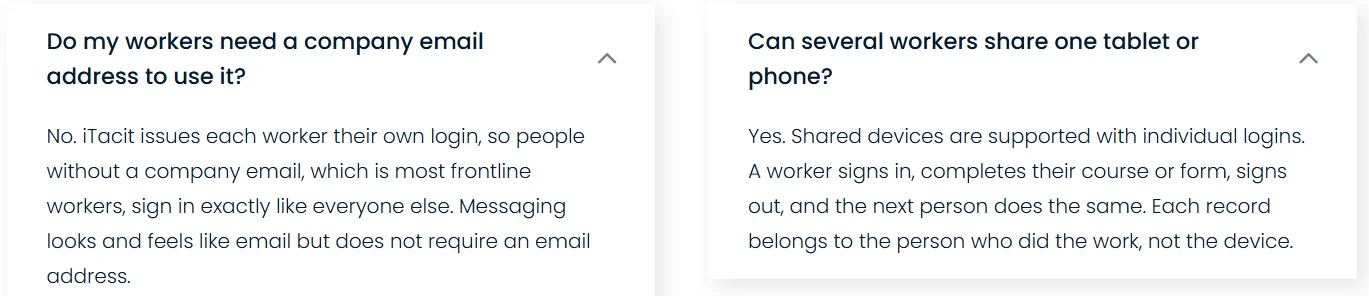 iTacit's own FAQ on company email and shared tablets.
How workers sign in: an individual iTacit login issued by the employer, or their existing workplace login where SSO is supported.
Daily update tools: role-based news and urgent alerts, read receipts, signed policy acknowledgements, surveys targeted to specific roles, an AI assistant that answers questions only from the company's approved documents.
Other features: a full LMS behind the app (SCORM 1.2 and 2004, AICC), certification expiry reminders, a document library, and integrations with more than 180 HR, payroll and identity systems.
Rating: 4.6 on Capterra.
Pricing: quote-based subscription priced per user, across four packages (Connect, Educate, Engage, Operate) where each includes the one before it. Pricing comes from sales after a short conversation.
Where it falls short: iTacit is cloud-based and needs a mobile or wifi connection to open a course or submit a form, so crews who work full shifts with no signal should raise that in the demo.
Beekeeper
Best for: shift-based operations (logistics, hospitality, manufacturing) that want daily team updates and simple checklists in the same app.
Beekeeper is a mobile employee app built for frontline staff, and it is now part of the LumApps AI Employee Hub. Workers get a secure mobile login with no corporate email needed, and supervisors can send updates targeted by role, shift or location.
Beyond messaging, Beekeeper runs digital checklists, forms, incident reports and task assignments. Shift swaps, approvals, onboarding steps and compliance reminders can run automatically, which takes some nagging off the supervisor's plate.
How workers sign in: secure mobile login, no corporate email required.
Daily update tools: targeted updates by role, shift or location; automated compliance reminders; checklists and forms.
Rating: 4.6 on Capterra.
Pricing: Capterra lists a starting price of $4 per user per month for the Essential plan; Beekeeper quotes contracts directly.
Where it falls short: LumApps said in July 2025 that the combined platform would roll out in phases over 12 to 18 months, so buyers signing now should ask which features and logins have changed and which will still change.
Blink
Best for: teams that want a social-style team communication app with short shift briefs instead of long memos.
Blink describes itself as one feed that replaces the bulletin board, the morning huddle and the group text. Workers sign in on their phone with a phone number or email, enter a 6-digit one-time code, and land in a feed, a chat, and a hub of links to the tools they use.
The "story-style shift briefs" are the stand-out for daily updates. A supervisor can push a short, visual brief for the shift instead of a paragraph of text, which suits people reading on a phone during a break.
How workers sign in: phone number or email with a 6-digit one-time code, a password, or SSO.
Daily update tools: feed, chat, shift briefs, hub, shift management.
Rating: 4.7 on Capterra.
Pricing: Core at $3.75 and Pro at $5.00 per user per month, billed annually; Enterprise is quoted.
Where it falls short: the one-time code goes to whichever phone number or email the employer registered, so workers who will not share a personal number need SSO or another workaround set up first.
Staffbase
Best for: large employers that want a branded employee communication app with news, push notifications and translation.
Staffbase is an employee app and intranet used mostly by bigger organizations. A worker without a company email gets an access code, or a username and one-time password, from an administrator. On first launch they set their own password, and after that they can sign in with that password, a fingerprint or face recognition.
For daily updates, Staffbase leans on news posts and company push notifications, with AI-powered translation and pulse surveys. Content is personalized by role and location.
How workers sign in: access code, or username plus one-time password delivered at a private email, in person or by mail.
Daily update tools: news, push notifications, AI translation, chat, pulse surveys.
Rating: 4.7 on Capterra.
Pricing: quote-based; Staffbase does not publish prices.
Where it falls short: credentials for workers without email have to be handed out one by one, so the first rollout at a large site takes real admin time.
Connecteam
Best for: small and mid-sized crews that want a cheap, published price and a team communication app that also does scheduling and time tracking.
Connecteam is an all-in-one app for deskless teams. Workers log in with their mobile phone number and a one-time code sent by text. On a shared device, the Kiosk app lets each person sign in with a 4-digit code from the admin.
Updates go to everyone or to specific teams through a feed, and an admin can see who read an important post. Posts auto-translate into each worker's preferred language, and chat has built-in AI translation.
How workers sign in: mobile phone number plus text code; 4-digit kiosk code on shared devices.
Daily update tools: updates feed, chat, read tracking, surveys and live polls, knowledge base, auto-translation.
Rating: 4.6 on Capterra.
Pricing: free for up to 10 users on the Small Business plan; the Communications Hub Basic plan is $29 per month for the first 30 users on yearly billing.
Where it falls short: a phone number is the unique identifier for every employee, so workers with no mobile number need the kiosk or a landline workaround.
Microsoft Teams (frontline)
Best for: companies already on Microsoft 365 that want daily team updates inside a tool IT already manages.
Microsoft Teams is Microsoft's chat and meetings app, and its frontline plans add shift viewing and swaps, push-to-talk, company news and shared-device support. For email-free sign-ins, Microsoft Entra ID offers QR code authentication: the worker scans a printed QR code and types a PIN on a shared iOS or Android device.
That works well in a store or warehouse with shared handhelds. It does take identity-team setup, and it is a different job from rolling out a standalone app.
How workers sign in: QR code plus PIN on shared mobile devices (through Microsoft Entra ID), or a standard Microsoft account.
Daily update tools: chat, company news, shift viewing and swaps, push-to-talk, targeted townhall invites.
Rating: 4.5 on Capterra.
Pricing: Microsoft 365 F1 at $3.00 per user per month and F3 at $10.00, both on an annual commitment.
Where it falls short: QR code sign-in is off by default, works only on mobile, and a worker must sign in once with another method before their first QR sign-in.
How To Choose A Team Communication App For Frontline Crews
Start with sign-in, because it decides whether anyone shows up. If your workers will not give out a personal phone number (common in unionized sites and among seasonal staff), rule out apps that depend on one, or confirm the workaround first. If you share tablets or handhelds, insist on individual logins on shared devices, or your read data means nothing.
Then decide what "delivered" means for you. A social feed is enough for shout-outs and lunch menus. A safety bulletin or a changed procedure needs read receipts at minimum, and in regulated work, a signed acknowledgement with a date that an inspector can see.
Language is the next filter. Census Bureau language data shows 78.3% of people age 5 and older speak only English at home, which leaves more than one in five who use another language. On a mixed crew, built-in translation is not a nice extra.
Finally, look at what you would be replacing. Teams that also run training, certifications and forms on paper usually get more from one employee app that handles updates and records together. Teams that only need a reliable feed and a group chat can save money with a lighter tool.
A quick way to sort the list:
You need proof of reading for audits: iTacit or Connecteam.
You need updates plus checklists on shift: Beekeeper.
You want a feed people enjoy opening: Blink.
You run a large, branded, multilingual program: Staffbase.
You live in Microsoft 365 already: Teams with frontline licences.
FAQs
Can workers get daily team updates without a company email?
Yes. Every app on this list supports a sign-in that does not need a work email. The methods differ: employer-issued logins, a code sent to a phone, SSO, or a QR code with a PIN.
What is the cheapest app for email-free sign-ins?
Connecteam is free for up to 10 users, and Blink's Core plan starts at $3.75 per user per month. Microsoft 365 F1 is $3.00 per user per month, but it assumes you already manage Microsoft accounts.
Do read receipts matter if workers already open the app?
Opening the app is not the same as reading the update. Gallup's research on on-site employees found that fully on-site, non-remote-capable employees have far lower engagement (29%). With that group, a visible read record is the only way to know a safety message got through.
Can several workers share one tablet?
Yes, as long as each worker signs in under their own login. iTacit, Connecteam (through its Kiosk app) and Microsoft Teams (through QR codes on shared devices) all support this.
Which apps work if a worker has no email and no phone number?
In our sign-in check, Staffbase, Beekeeper and iTacit could all sign a worker in without either one. Staffbase uses an access code or admin-issued credentials, Beekeeper accepts a username, and iTacit uses the organization key plus a personal login. Connecteam needs a phone number unless the worker uses its kiosk on a shared device.
How do we stop old logins after a worker leaves?
Pick an app where every worker has their own login, then switch off that one account on their last day. Shared logins make this impossible, because changing the password locks out everyone else on the crew. If the app connects to your HR or identity system, check whether a leaver is switched off automatically.
Bottom Line
The choice comes down to what you need to prove after the update goes out. If a group chat and a feed are enough, Blink and Connecteam are the low-cost picks, and Teams makes sense when Microsoft 365 is already in place. When an inspector, a union or your own safety lead will ask who read the new procedure and when, the record matters as much as the message.
For safety, HR and operations leaders who want one frontline employee app for daily team updates, with read-receipt messaging, signed policy acknowledgements and individual logins that need no company email, iTacit offers its Connect package and up on a quote-based, per-user subscription.