


The best expense management software for small business depends on how your team spends money. Zoho Expense is the best budget pick, with a free plan for up to 3 users and paid plans from $3 per user per month. Expensify is best when people pay first and claim later. Ramp is best if you want company cards that stop bad spending before it happens. Dext suits teams whose bookkeeper lives in Xero or QuickBooks, Shoeboxed is for paper-heavy owners, Envoice handles supplier invoices and receipts together, and Rydoo fits teams that travel across countries.
Believe it or not, there are still companies that will take your pile of paper receipts, scan every single one, and ship you back a digital folder. Yes, that is a real service. If anything, it shows how stubborn the receipt problem is.
Small businesses know this pain all too well. Someone loses a claim. Someone else picks up lunch on their personal card and forgets for a month. Two managers read the company travel rules differently and suddenly finance is stuck playing referee.
Nothing huge, just a slow, quiet drain. Most owners do not realize how much time slips away, at least not until tax season hits and those missing records start to show up. The bigger your team, the more effort leaks out, just because no one really owns "chasing paper."
Let us talk about which tool can patch the holes in your process.
What Should You Compare in Expense Management Software?
Not every tool here does the same thing. That is the first step: figure out what you actually need. Expense management platforms track a claim from receipt to approval to repaying your team. Spend tools kick in earlier, with company cards that set rules before anyone spends a dime.
Receipt storage is just about keeping documents on file, nothing else. It is easy to buy a tool that files papers when what you really need is a system for routing expenses.
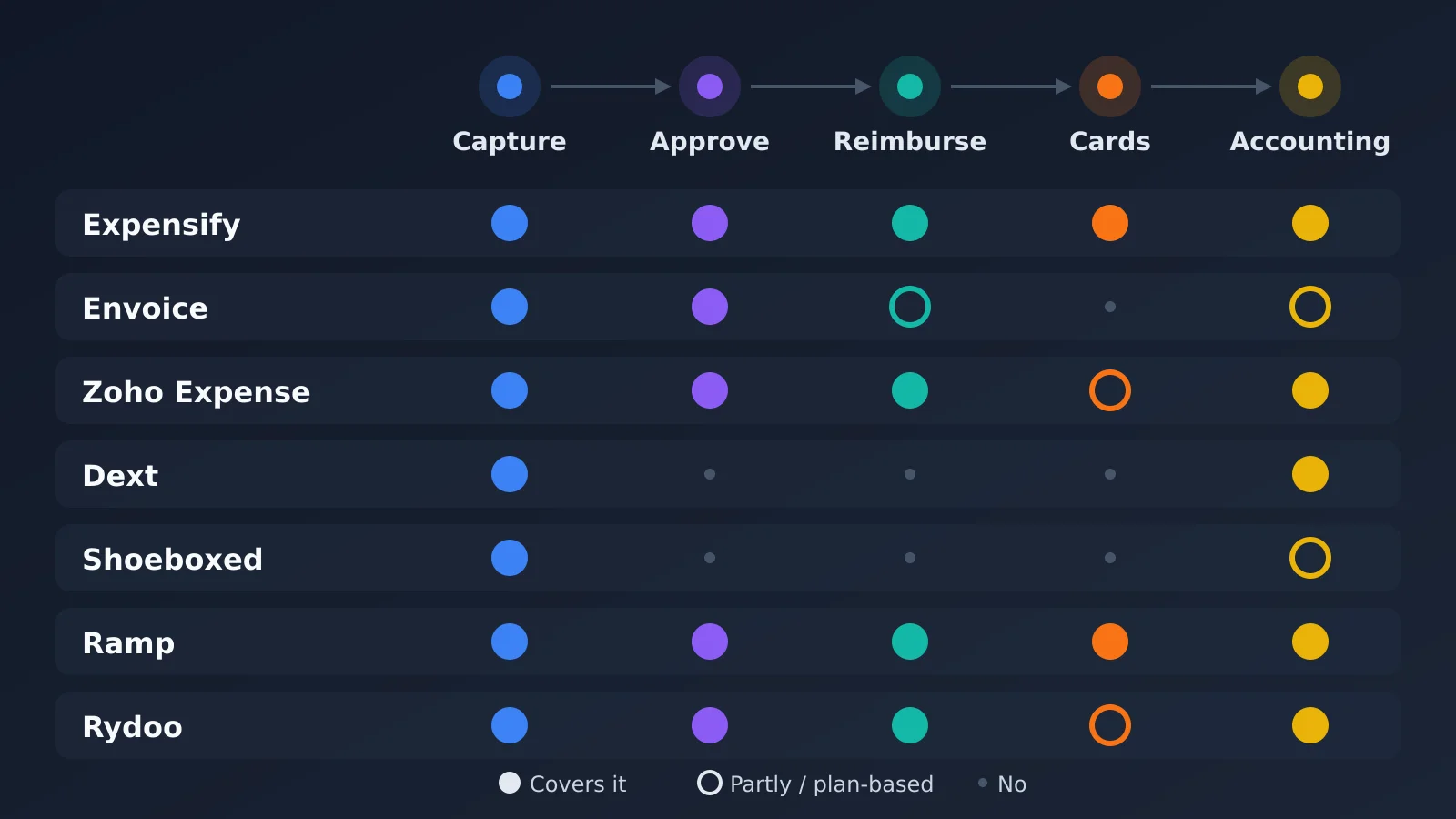 Which tools cover each step, from receipt to books
Once you know what kind of tool you are looking at, focus on four things:
Pricing: do you pay per user, per receipt, per card?
Approval process: how does a claim get green-lit?
Security: who gets to see what? Where is your data stored? Who holds the admin keys?
Integrations: which accounting software can you export to?
None of this is based on hands-on testing, only vendor info and public reviews. So double-check pricing and features yourself.
Pricing at a Glance
We checked current pricing for all seven tools in November 2026. Prices are in USD unless the vendor only lists another currency.
Tool | Free plan | Starting price | Pricing model | Best for |
|---|---|---|---|---|
Expensify | Limited free option | $5 per member per month (Collect) | Per member | Pay first, claim later |
Envoice | 14-day trial | £5 per month (Essential); approvals on Business at £10 | Flat monthly | Invoices and receipts together |
Zoho Expense | Yes, up to 3 users | $3 per user per month (billed yearly) | Per user | Policy rules on a budget |
Dext | Free trial | About $31.50 per month (5 users, 250 documents) | Per plan | Bookkeeping handoff |
Shoeboxed | Free trial | About $9 per month (Starter) | Per plan, by scan volume | Paper-heavy owners |
Ramp | Yes | $0; Plus is $15 per user per month | Per user | Card controls |
Rydoo | Free trial | About $10 per user per month (billed yearly, from 5 users) | Per user | Multi-country travel |
1. Expensify
Expensify is probably the name you have heard already. It is well-known for handling reimbursements. Snap a photo of your receipt, and the SmartScan feature grabs the date, amount, and merchant.
Once a report gets approved, you can pay people directly. But here is the catch: reading a receipt is not the same as reading it right. Someone still needs to check categories, currencies, and tax.
Pricing is per member and depends on your plan and whether you use their card, so price it for your real headcount. There are two business plans: Collect (smaller teams) and Control (bigger ones). Collect is a flat $5 per member per month. Control starts at $9 per active member per month, but only with an annual commitment and heavy use of the Expensify Card. Without the card, Control can run up to $36 per member on pay-per-use billing.
It is a solid choice if people buy stuff and then claim later.
2. Envoice
Envoice keeps both supplier invoices and employee receipts in one place, then lets you add approvals on top. (Just to clarify, this is not for sending bills to your customers; it is for handling what you owe others.)
Its SmartExtract tool pulls data from receipts, and according to their site, a real person double-checks it.
When reviewing expense management options for small businesses, consider how each solution handles receipts, approvals, accounting exports and the practical workload of finance staff.
One limit: Capterra lists just six integrations, so confirm your accounting software is covered, and ask which plan includes approvals. Based on Envoice's public plans, approvals and travel requests sit on the Business plan, not the cheaper Essential plan. Worth a look if invoices and receipts both land on one desk.
3. Zoho Expense
Zoho Expense is made for companies that want the system to enforce the rules, not just write them down. It will flag claims that break your policy as soon as someone submits them, and it supports multi-stage approvals.
You even get a free plan for up to three users. The free plan includes 20 receipt autoscans per user each month and 5GB of receipt storage, so it is really best for trying it out or for a very small team. Paid plans start at $3 per user per month on Standard and $5 on Premium when billed yearly. If your team travels, Zoho covers mileage and handles multiple currencies.
There is a learning curve if you are new to Zoho, but if you already use its apps, it is a natural next step.
4. Dext
Dext is all about the pipe between your books and your receipts. It grabs receipts and invoices, pulls out the details, and passes the data into accounting software like Xero, QuickBooks, or Sage.
You get audit trails and a mobile app, plus easy uploads by email or drag-and-drop. The catch? Dext is only as useful as your accounting connections, so make sure it supports your setup before you sign up. In the US, the Business plan covers 5 users and 250 documents a month, and you pay more if you go over either limit.
Works best if your bookkeeper already lives in your accounting software.
5. Shoeboxed
Shoeboxed is for people who still have piles of paper. You can mail them a big envelope full of receipts, or just snap photos with the app. Their staff checks each one, so the data that lands in your account is double-checked by humans.
But approvals and reimbursements? That is not what this tool is for. Think of it mainly as a big digital filing cabinet.
Plan limits vary by how many scans you need each month, so count your receipts before you choose. The cheapest plan is built for very low volume, and the paper-heavy plans cost much more. There is also a Gmail receipts sync, but only on certain plans. If paper is still your enemy, start here.
6. Ramp
Ramp turns everything around; here, you give out company cards with spending limits, so receipts are not nearly as important. Their free plan combines cards, expense tracking, bill payments, and accounting integrations, with the system matching receipts automatically.
Cards earn cash back, but always read the details before you get too excited. Ramp started as a US-only product. Its pricing page now mentions card issuing in the US, Canada, the UK and the EEA, so check eligibility for your country before you plan around it. If you need more control, the Plus plan costs $15 per user per month plus a platform fee.
If you would rather prevent a bad purchase than sort it out later, Ramp could be the answer.
7. Rydoo
Rydoo is built for teams that travel, especially across multiple countries. It has mobile receipt capture, tracks mileage, and even calculates per diems. It mostly targets mid-sized and larger businesses, and its self-service plans start at 5 users.
You can snap receipt photos on the go, but not every feature on the app matches the web version.
Some perks (like per diems and deep policy controls) live on higher-priced plans, so check what is actually included on your tier. On Rydoo's public plans, per diems and online accounting integrations start on Pro, not Essentials. Still, if you have a small team with big travel needs, it is worth a look.
Storage vs. Workflow
This is where a lot of buyers get tripped up. Something like Shoeboxed organizes your documents; that is valuable if you are a one-person shop with just a handful of receipts each month.
But do not confuse filing with managing. True expense management systems handle approvals, reimbursements, and policy checks; that is a whole other job.
Let us say you run an eight-person studio. Scanning receipts solves the box-of-paper problem. But if you are still approving claims over chat and writing out checks by hand, you have only made the mess neater, not fixed it.
Ask yourself: who takes care of an expense after it is scanned? If the answer is "still a person, by hand," then that is the gap.
Companies looking at alternatives to manual receipt filing should distinguish simple document storage from systems offering categorization, review and broader expense workflows.
And keep in mind: reimbursing someone is not accounting. Even a great claims tool has to pass the data to your ledger at the end of the day. Keep those pieces straight and it is easier to build a shortlist. If you are planning the rest of your tools too, our guide to a small business software stack shows how to connect them around one record.
Which Expense Management Software Fits Your Team?
If your situation is... | Start with |
|---|---|
Fewer than 4 people and a tight budget | Zoho Expense (free plan) |
Staff pay with personal cards and claim later | Expensify |
You want to control spending before it happens | Ramp |
Your bookkeeper works in Xero, QuickBooks or Sage | Dext |
You still have boxes of paper receipts | Shoeboxed |
Supplier invoices and staff receipts land on one desk | Envoice |
Your team travels across countries | Rydoo |
Before You Buy
Always start with a pilot. Run real receipts through the system, including the stained, barely-readable ones, since demo data always looks perfect. Then check this quick list:
Actual cost: figure out your real headcount and document volume, not the lowest advertised rate.
Accounting connection: test the live integration with your books.
Admin roles: decide who can approve, export, and access everything.
Training: block out time to actually show people how it works. Unused software does not do anyone any good.
There is not a single "winner" among these seven; the right app is the one your team will actually use. A decent system everyone adopts beats a perfect tool that just collects dust. Start small, test honestly, and see what really fits. Let those ugly little receipts be the judge.
Frequently Asked Questions
What is the best expense management software for small business?
It depends on how your team spends. Zoho Expense is the best budget choice, Expensify is best for reimbursing staff who pay first, and Ramp is best for company cards with spending limits.
Is there free expense management software?
Yes. Zoho Expense has a free plan for up to 3 users, and Ramp has a free plan that includes cards, expense tracking and accounting integrations. Free plans have limits, such as Zoho's 20 receipt autoscans per user each month.
What is the difference between expense management and receipt storage?
Receipt storage keeps a digital copy of each receipt. Expense management goes further, with approvals, policy checks, reimbursements and accounting exports. Shoeboxed is mainly storage, while Expensify, Zoho Expense, Ramp and Rydoo handle the full workflow.
Do I still need receipts if I use company cards?
Usually yes. Cards like Ramp's reduce the paperwork, and the system can match receipts automatically, but you still need records for tax and audits.
Which expense tools work with QuickBooks and Xero?
Dext, Expensify, Zoho Expense, Ramp and Rydoo all connect with major accounting software, including QuickBooks and Xero on many plans. Envoice has a shorter integration list, so confirm your software before you sign up.
How much does expense management software cost for a small team?
For a 10-person team, expect roughly $30 to $150 a month. Zoho Expense Standard costs about $30 a month on yearly billing, Expensify Collect about $50, and Rydoo about $100 or more. Ramp's free plan costs nothing, though card eligibility rules apply.