


The best way to build a software stack for a made-to-order business is to start with one job record that holds every order's specs, price, schedule and costs. Then add tools in the order the work flows: production, quoting, connections, job costing and customer updates. Every tool should read from that record instead of keeping its own copy.
A shop that sells from stock can run on a storefront, an inventory app and accounting software, because every product unit is the same. A made-to-order business breaks that setup on its first sale.
The jersey needs a name and number printed on the back. The shower door needs glass cut for a wall that sits 4 mm off plumb. The kitchen remodel needs its own budget before anyone orders a cabinet.
Each order behaves like a small project, with its own specs, price and finish date.
Most software is built for the stock-based shop. So owners keep bolting tools together until an order's details live in five places and agree in none of them.
In my view, the fix is simple: buy software in the order the work actually flows, starting with the record every other tool reads from.
6 steps to build a software stack for a made-to-order business
Shops that skip ahead usually buy tools they rip out within a year, after paying staff to work around them the whole time. Here are the six steps I'd follow, in order.
1. Let production wait for the order
Apparel sellers who offer custom jerseys with player names and numbers often hand production to print-on-demand platforms like Printify. These platforms make each product only after a customer orders it.
I think this setup is worth studying even if you never print a shirt. It shows what a made-to-order stack looks like without a warehouse.
Here is how it works:
The seller designs a jersey in the platform's product creator.
They publish it to a connected storefront on Shopify, Etsy, Amazon or Wix.
A customer picks a size, types a name and a number, and pays.
The order goes automatically to a print provider in the platform's network, which prints, packs and ships it.
The seller pays the production cost for that single item after the sale. So cash never sits in boxes of jerseys printed with last season's roster.
There are no order minimums either. A youth team of 12 and a fan base of 900 run through the same flow.
The seller still owns the data, though. The personalization fields have to reach the printer exactly as the customer typed them. That's why I'd look harder at the connection between your storefront and production than at your storefront theme.
What to take from this: whatever you sell, aim for a setup where production starts from a confirmed order with complete specs, not from a guess about demand.
2. Make the job record the center of the stack
Before you compare storefronts or accounting apps, decide where a single order lives, from first inquiry to final invoice.
Residential builders settled this with construction management software such as Ressio. It treats every build as a one-off project with its own budget, schedule, selections and documents. A made-to-order shop needs the same structure on a smaller scale.
When specs sit in email, prices in a spreadsheet and dates on a whiteboard, people spend their days hunting for information.
Procore's 2025 Future State of Construction Report surveyed more than 1,200 construction decision-makers in 8 countries. It found that 18% of project time is lost searching for data. That's almost one day in every working week.
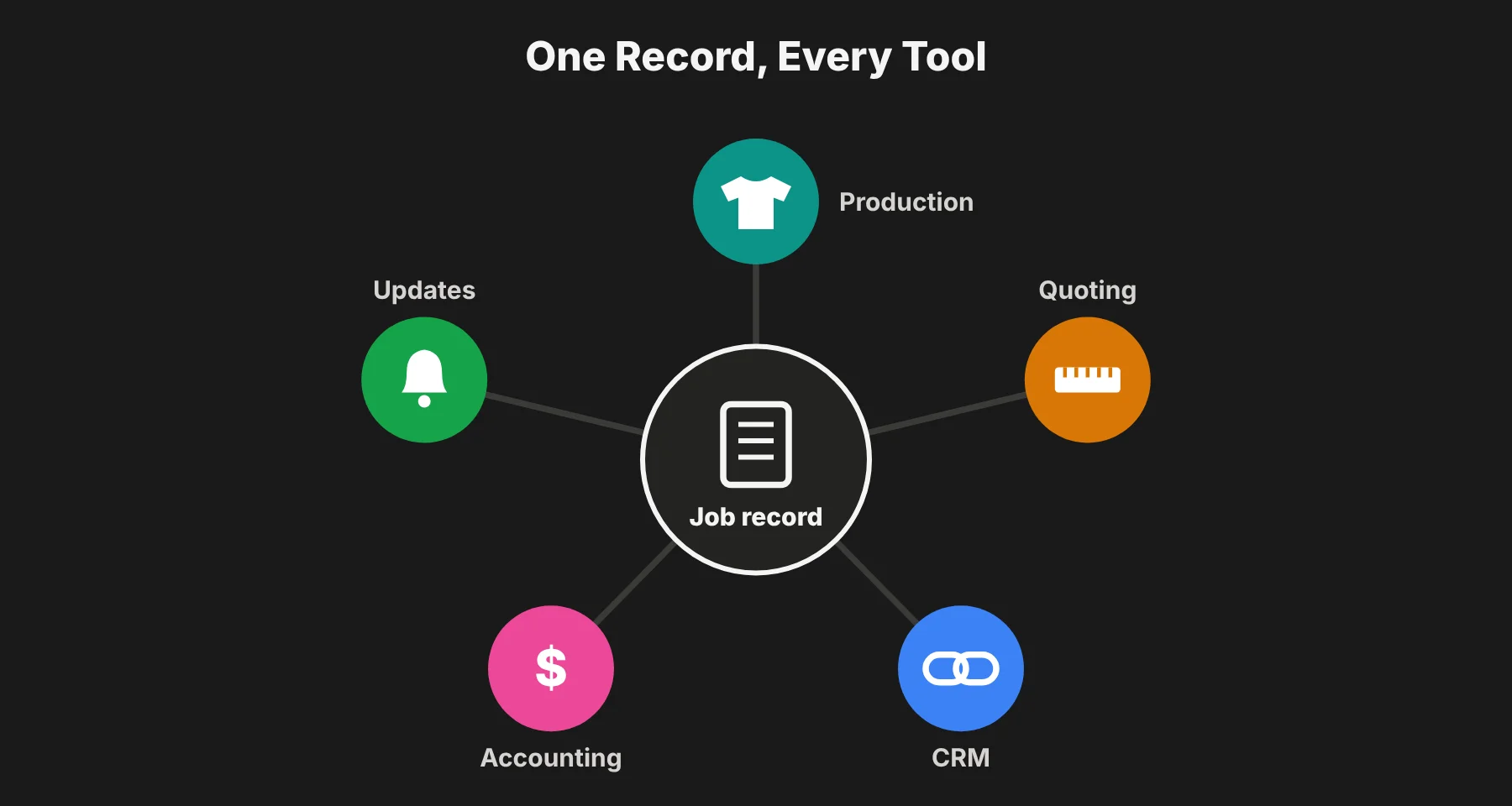 My advice is to choose a single system to hold the record. Let each order move through stages the way a ticket moves across a board in a work tracking tool: inquiry, quoted, approved, in production, shipped, invoiced.
Every tool you add later should read from that record instead of keeping a private copy.
What a good job record holds:
Customer details and the original request
Specs, measurements and any personalization
The approved quote and any change orders
Materials, suppliers and purchase orders
Schedule and current stage
Labor hours and actual costs
Files, photos and approvals
3. Quote from measurements instead of a price list
Custom pricing starts from the spec. So your quoting tool has to calculate from dimensions, materials and labor, not look up a fixed SKU price.
Glazing is a good example. Commercial glass software like Glazier pulls dimensions from drawings and quotes glass cut to each job's exact measurements. The estimate then feeds the purchase order, so you order the glass you priced.
Speed counts, because your quote rarely arrives alone. In Roofing Contractor's 2026 homeowner survey, 66% of respondents said they would collect 3 quotes before hiring a roofer.
The shop that turns a tape measure reading into an accurate price the same day gets taken seriously. The shop that prices from memory tends to win exactly the jobs it underbid.
What I'd look for in a quoting tool:
Prices built from dimensions, materials and labor rates
Saved templates for your common job types
Margin shown on every quote before it goes out
One-click conversion from approved quote to job record and purchase order
4. Connect the tools so orders move without retyping
Every handoff where someone copies fields from one app to another is a chance for a size, a measurement or a price to quietly change.
Intuit QuickBooks' 2024 Business Solutions Survey asked 630 owners and executives at US businesses with 10 to 99 employees about this. On average, their companies spent 25 hours a week on manual data entry or reconciling data across apps. That's more than half of one full-time job.
Before you buy anything, I'd check what it sends to and receives from the job record. Then test it with a real order, not a demo one.
Sales platforms are the usual weak spot. A CRM can win customers but still have no way to run crews in the field, so jobs fall into a gap between sales and delivery.
If two tools can't pass an order between them through a native connection, I'd replace the weaker one before someone builds a spreadsheet to bridge the gap. Those bridge spreadsheets tend to become permanent.
5. Cost every job before it closes
A monthly profit-and-loss report tells you March lost money. It won't tell you the loss came from the curved glass job with the extra site visit, or the jersey order that needed three reprints.
Margins in custom work are thin enough for one bad job to hide inside a decent month. NAHB's 2026 Remodelers' Cost of Doing Business Study reports an average net profit margin of 6.3% for US residential remodelers in 2024.
Here's what that means in practice. Say you run six $10,000 jobs at a 6.3% margin, so each one should earn about $630.
If one job's costs run 20% over the estimate, that's roughly $1,870 extra. That single job now loses about $1,240, which wipes out the profit from two of the others.
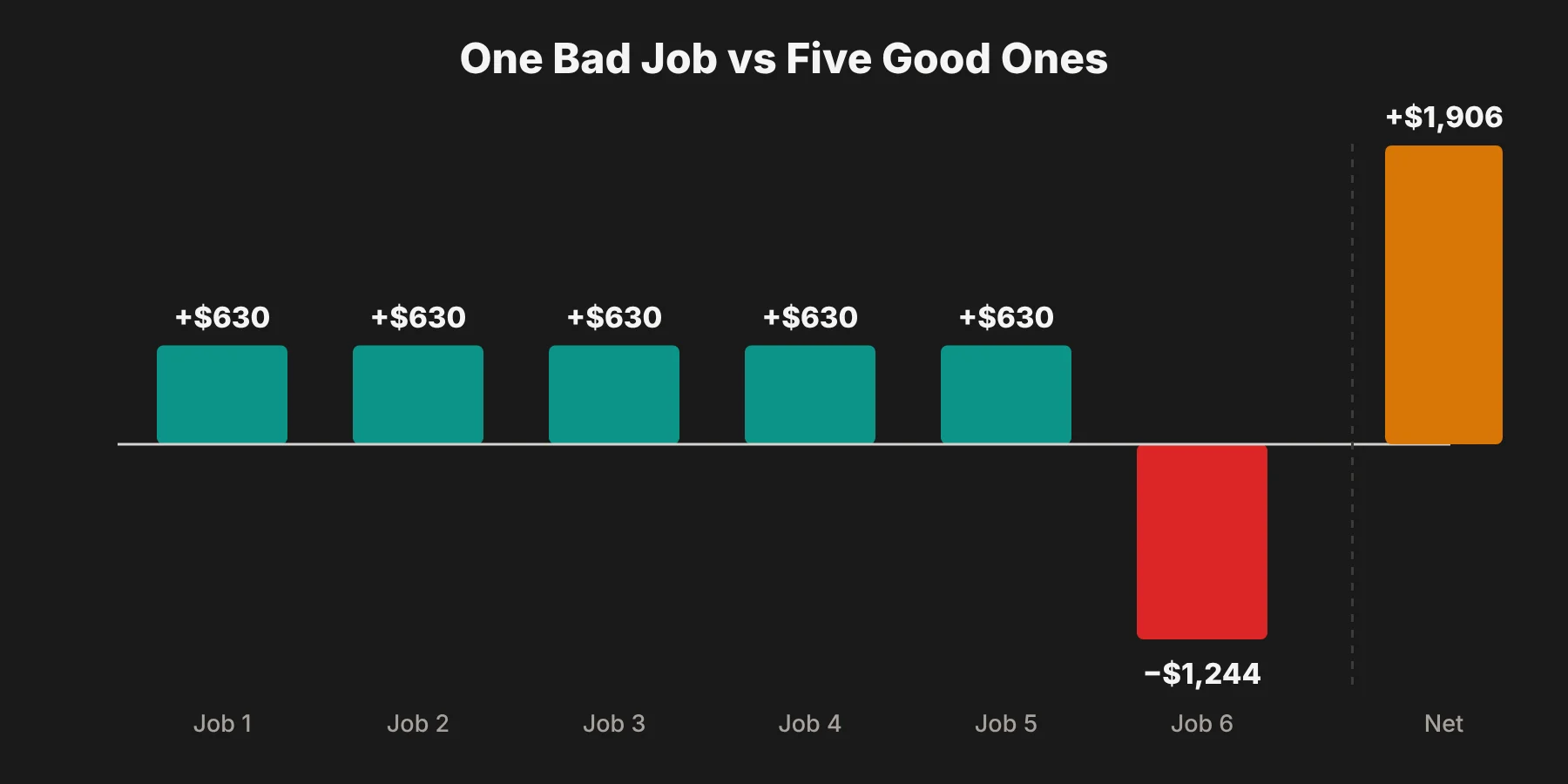 That's why I'd set up your accounting software to pull committed costs from purchase orders and labor hours from the job record. Then the estimate and the actual cost sit side by side while there's still time to bill a change order.
The job costing numbers I'd watch on every order:
Quoted price vs. final invoiced price
Estimated vs. actual materials
Estimated vs. actual labor hours
Reprints, remakes and extra site visits
Final margin per job
6. Tell customers where their order stands before they ask
Made-to-order means longer waits, and silence during a wait looks like a problem.
When something goes wrong, 45% of US online shoppers want real-time updates before they have to ask. That's according to Narvar's 2025 State of Post-Purchase Report, which surveyed 3,461 shoppers in August 2025.
The cheapest way to deliver that is to send status changes straight from the job record:
Design approved
Materials ordered
In production
Shipped
In my view, most customers will accept a three-week lead time. A week of silence in the middle of it is not.
The made-to-order software stack at a glance
Here's how I'd sum up the stack, step by step.
Step | Job it does | What to look for | Example from this guide |
|---|---|---|---|
1. Production | Makes the item only after the order | Personalization fields passed through exactly | Printify for custom jerseys |
2. Job record | Holds every order from inquiry to invoice | Stages, budgets, schedules, documents in one place | Ressio for residential builders |
3. Quoting | Prices from the spec | Dimension and material-based pricing | Glazier for glass |
4. Connections | Moves orders between tools | Native integrations, no retyping | Your CRM, job record and accounting |
5. Job costing | Compares estimate with actual | Costs pulled from POs and labor hours | Your accounting software |
6. Customer updates | Shares order status | Automatic messages from job stages | Status emails or texts |
You won't always need a separate tool for every row. In many small shops, one good job management system covers steps 2, 3 and 6, and accounting covers step 5.
Mistakes I'd avoid when building the stack
Buying the storefront first. Customers see the storefront, so it's tempting to start there. But a pretty storefront on top of a messy back office just moves the chaos out of sight.
Choosing tools by feature list. A tool with 200 features that can't read your job record will cost you more than a simpler one that can.
Testing with easy orders. Every tool handles a standard order well. Test with your most awkward one.
Keeping "temporary" spreadsheets. If staff build a spreadsheet to connect two tools, treat it as a warning sign, not a solution.
Ignoring job costing until tax time. By then it's too late to bill a change order or fix the quote template that caused the loss.
What to fix first
Start with the job record, even if it means living with a clumsy storefront for another quarter.
Most owners do the reverse because customers see the storefront. Then they spend a year reconciling everything behind it by hand.
Pick the system that will hold each order's specs, price, schedule and costs. Then judge every later purchase by whether it reads from and writes back to that record.
After that, test before you commit. I'd run the strangest order you filled last month through each free trial, from quote to invoice, and keep the tool that handles it without a workaround.
On SaaS Odds, I compare software side by side on features, pricing and fit for your team size. It's a good place to start a shortlist of two candidates for your job record.
Made-to-order software stack FAQs
What software does a made-to-order business need?
At minimum, a made-to-order business needs a job record (job or project management software), a quoting tool that prices from specs, accounting software that supports job costing, and a way to update customers on order status. Depending on what you sell, you may also need a storefront and a production partner such as a print-on-demand platform.
What is a job record?
A job record is the single place where one order lives, from first inquiry to final invoice. It holds the customer's request, specs, quote, materials, schedule, labor, costs and files. Every other tool should read from it instead of keeping its own copy.
Why doesn't regular inventory software work for custom orders?
Inventory software assumes every unit of a product is identical and priced the same. Made-to-order products have unique specs and prices, so each order behaves more like a small project than a stock item.
What is job costing?
Job costing means tracking the actual materials, labor and extra costs of each individual order and comparing them with what you quoted. It shows which jobs make money and which ones quietly lose it.
How do I test software before buying it?
Use the free trial with a real order, ideally the most unusual one you filled recently. Run it from quote to invoice and see whether the tool handles it without workarounds, extra spreadsheets or retyping.