


No, GoHighLevel on its own is not a complete field service management tool. GoHighLevel field service management covers the customer side very well: capturing leads, instant replies, booking, follow-ups and reviews.
What it does not do is run your crews. There is no live dispatch board, no route optimization, no "nearest technician" assignment, no geofenced time clock and no payroll from field hours.
So most home service businesses that love GHL end up pairing it with a field service tool. The real question is which way to pair it, and that is what this article is about.
I will walk you through where GHL stops, five honest ways to fill the gap, what each one costs you in money and effort, and which fits a solo operator versus a crew of twenty.
Follow One Job From Phone Call to Payday
The easiest way I know to see GHL's limits is to follow one ordinary job from start to finish. Say a homeowner has a leaking water heater.
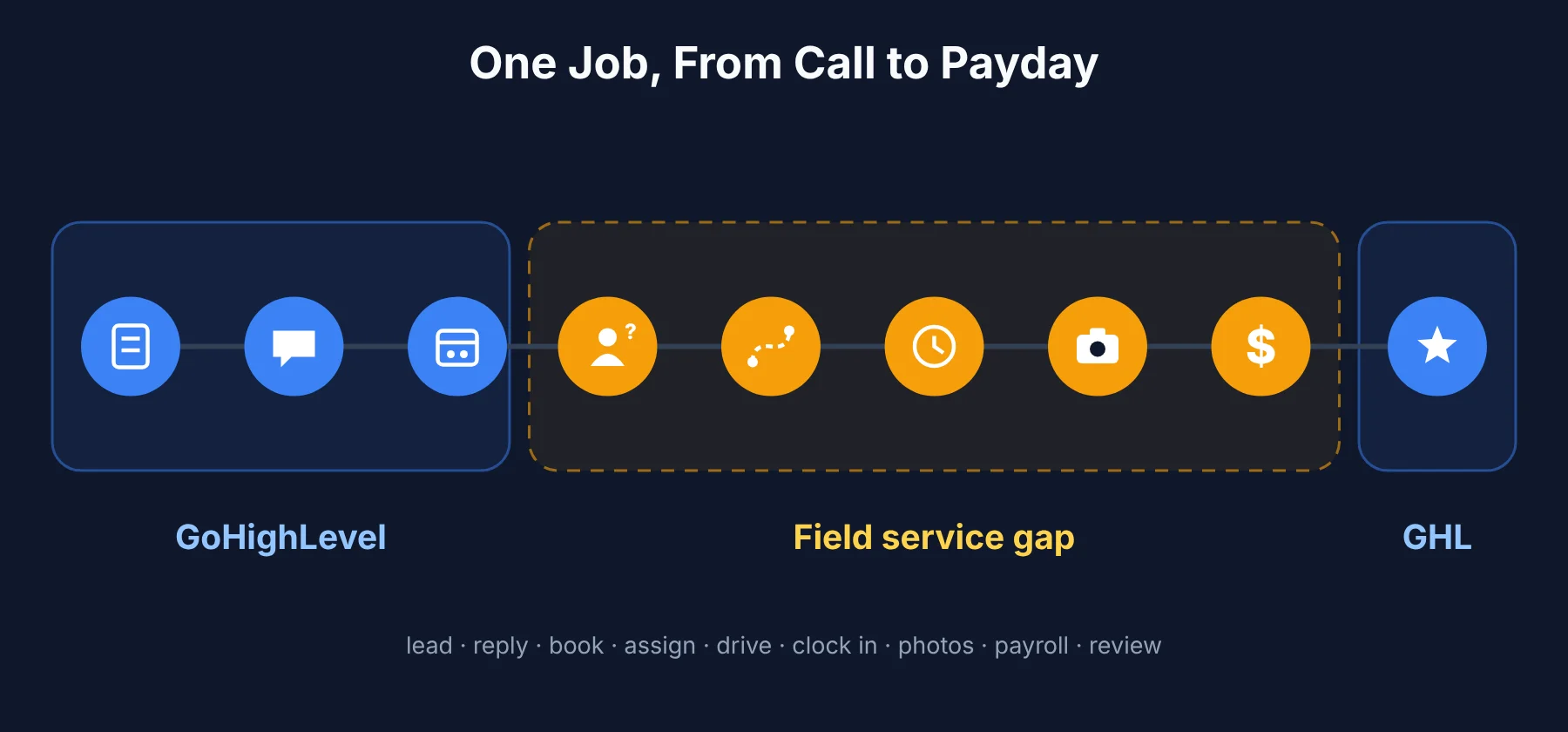 The homeowner fills in a form or calls. GHL captures the lead. Covered.
They get an instant text back. GHL's automations handle this well. Covered.
They book a time slot. GHL's calendar books it. Covered.
Someone decides which plumber goes. GHL can assign the appointment to a user, but it cannot show who is free, where everyone is, or who is closest. Gap.
The plumber drives there. GHL does not plan the route or order the day's stops. Gap.
The plumber clocks in and does the work. No field time clock, no geofence, no job checklist built for technicians. Gap.
Photos and notes get saved to the job. Usually they end up in a phone's camera roll. Gap.
The crew gets paid for the hours. No timesheets from field hours, so payroll becomes a spreadsheet. Gap.
The customer gets a review request and a follow-up. GHL is great at this. Covered.
So GHL owns the first three steps and the last one. The five in the middle are field operations, and that is where every GHL-only service business starts to feel the strain.
Where GoHighLevel Earns Its Place
Before we get to the gaps, I want to be fair. For the customer-facing side of a service business, I think GHL is one of the strongest tools available.
Lead capture. Forms, funnels, missed-call text-back and ad tracking all land in one CRM.
Speed to lead. Automated texts and emails reply in seconds, which matters a lot in home services, where the first business to answer often wins the job.
Booking. Online calendars let customers pick a slot without a phone call.
Follow-up and reactivation. Pipelines and workflows chase quotes, remind customers about seasonal service and win back old clients.
Reviews and reputation. Review requests and replies are built in.
Payments. GHL can send estimates and invoices and take payments, which covers simple billing.
This is why many owners do not want to leave GHL. Their marketing runs on it. The goal is to add field operations without breaking what already works.
Where GoHighLevel Field Service Management Falls Short
Here are the specific gaps, in the order I think they usually start to hurt.
No Live Dispatch Board
GHL calendars show appointments and who they are assigned to. They do not give a dispatcher a live board with every technician's status, current job and workload. In practice, the office ends up calling or texting techs to ask where they are before assigning new work.
No Route Planning or Optimization
GHL does not plan driving routes. Techs often work through stops in the order they were booked, even if that means crossing town twice. For businesses with many short visits a day, like cleaning, lawn care or pest control, those wasted miles add up fast.
No "Nearest Technician" Assignment
When an emergency call comes in, GHL cannot tell you which tech is closest. The job goes to whoever answers first, which is not always the person ten minutes away.
No Technician-First Mobile Workflow
GHL's mobile app is built for conversations and office work. It is not designed around a technician's day: a job list, directions, status updates, checklists and on-site notes in one place.
No Job-Linked Photos and Checklists
Before and after photos protect you in disputes and make great marketing content. In a GHL-only setup they usually live in someone's phone, not on the job record.
No Field Time Clock, Geofencing or Payroll
There is no geofence to confirm arrival, no clock-in tied to a job, and no timesheets built from field hours. Payroll turns into a weekly spreadsheet job, and overtime makes it worse.
No Job Costing
GHL can invoice, but it cannot tell you whether a job made money once labor hours, drive time and materials are counted. For growing businesses, that is often the gap that matters most and gets noticed last.
5 Ways to Fill the Field Service Gap in GoHighLevel
There is no single right answer here. Each path below trades money, setup effort and reliability differently.
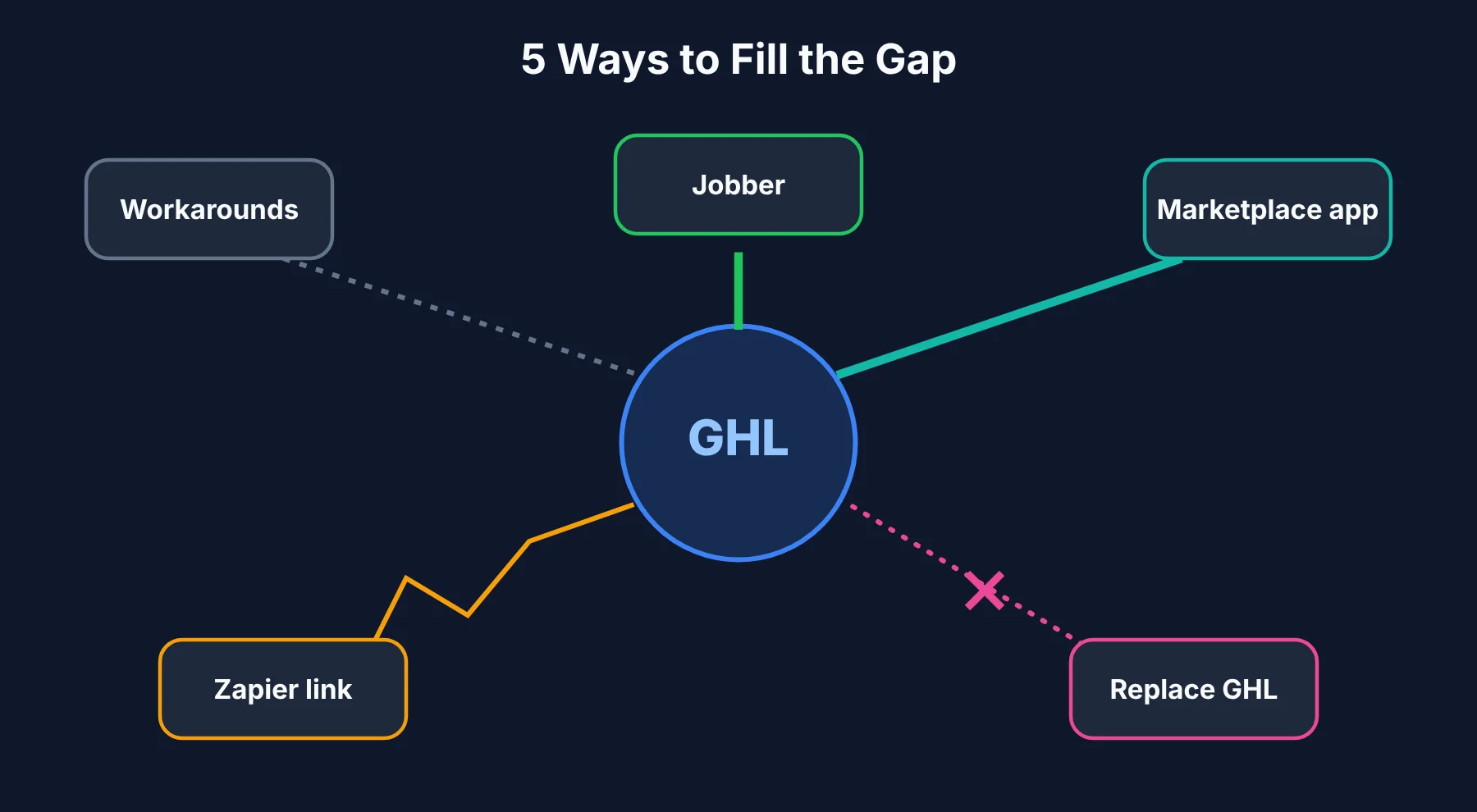 1. Stay GHL-Only and Patch With Workarounds
How it works: Group chats for dispatch, Google Maps for routes, a shared spreadsheet for hours and a separate time clock app.
Good for: Solo operators and two-person teams with a handful of jobs a day.
Watch out for: Data ends up in five places. Every handoff is a chance for a wrong address, a lost photo or a missed hour. It is cheap in money and expensive in attention.
2. Connect Jobber With the Native Integration
How it works: In September 2025, HighLevel and Jobber launched a native integration.
According to the HighLevel and Jobber integration announcement, contacts, job notes and statuses sync between the two, GHL's Voice AI can book using Jobber's schedule, and job details flow back to GHL to trigger review requests. The announcement says it comes at no extra cost and is set up with an API key.
Good for: Businesses that want a well-known, full field service platform for quotes, scheduling, dispatch, invoicing and crew apps, while keeping GHL for marketing.
Watch out for: You now pay for and run two full platforms, and your team has to learn both. Decide clearly which system owns invoicing so you do not bill customers twice.
3. Add a Field Service App From the HighLevel Marketplace
How it works: Instead of a separate platform, you install a field service app that runs inside your HighLevel account. FieldTask is the best-known example.
It installs from the HighLevel App Marketplace and says it turns GHL bookings into dispatched jobs, with dispatch, scheduling, route optimization, job photos, GPS time tracking, invoicing and syncing back to GHL. Its pricing is tier-based by number of users and listed in the marketplace, with a 10-day free trial.
Good for: Owners and agencies who want everything to stay in the GHL environment, and agencies who want to roll one setup out across many client sub-accounts.
Watch out for: Marketplace apps are usually younger and smaller than long-standing platforms like Jobber or ServiceTitan. FieldTask makes strong claims about itself, such as being the most integrated option, which I could not verify independently. Use the free trial on real jobs before committing, and check how support and updates work.
4. Connect Housecall Pro or ServiceTitan Through Zapier
How it works: Housecall Pro and ServiceTitan do not have a native GHL connection that I could find at the time of writing, so most setups use Zapier or a similar tool to push new bookings into the field service app and send completed jobs back.
Good for: Businesses already running Housecall Pro or ServiceTitan that want to add GHL's marketing on top.
Watch out for: Zapier chains need maintenance. They can fail quietly after an app update, and you often find out only when a customer complains about a missed visit. Budget for the Zapier plan and for someone to watch the connection.
5. Replace GHL With an All-in-One Field Service Platform
How it works: Some field service tools now include their own marketing, such as review requests, follow-up texts and online booking. Housecall Pro's higher plans bundle a marketing suite, for example.
Good for: Businesses that only use GHL lightly and would rather run one system than two.
Watch out for: No field service tool I know of matches GHL's depth in funnels, pipelines and automation. If marketing drives your growth, replacing GHL usually means giving up more than you gain.
The Five Options Side by Side
Here is how I would sum up the five paths at a glance.
Option | How it connects to GHL | Setup effort | Best for | Main risk |
|---|---|---|---|---|
GHL + workarounds | Manual | Low | 1 to 2 people | Data scattered everywhere |
GHL + Jobber | Native integration | Medium | Growing crews wanting a proven FSM | Running two full platforms |
GHL + marketplace app (e.g. FieldTask) | Installs inside GHL | Low to medium | Owners and agencies staying inside GHL | Younger vendors, verify on a trial |
GHL + Housecall Pro or ServiceTitan | Zapier or custom API | Medium to high | Teams already on those tools | Fragile sync |
Replace GHL | Not needed | High | Light GHL users | Losing marketing depth |
What It Costs to Run GHL Plus a Field Service Tool
Pricing changes often, so treat these as starting points and check each vendor before you buy.
GHL's published plans start at $97 a month for Starter and $297 for Unlimited, with usage-based charges for SMS, calls and AI on top. Those usage fees catch a lot of owners off guard.
I have written about how SMS pricing adds up on marketing platforms, and the same logic applies here: check what you will send per month, not just the plan price.
On the field service side, at the time of writing, Housecall Pro's plans started at $59 a month, Jobber's entry plan sat in a similar range, and ServiceTitan was priced per technician for larger operations. Marketplace apps like FieldTask price by number of users inside the HighLevel marketplace.
Add a Zapier plan if you go that route, and a few hours of setup time either way.
The way I think about it: if a field service tool saves each tech even 30 minutes of driving or admin a day, it usually pays for itself quickly. If it does not, you have picked the wrong one or set it up badly.
Which Setup Fits Your Business
This is the part I would focus on, because team size changes the answer more than anything else.
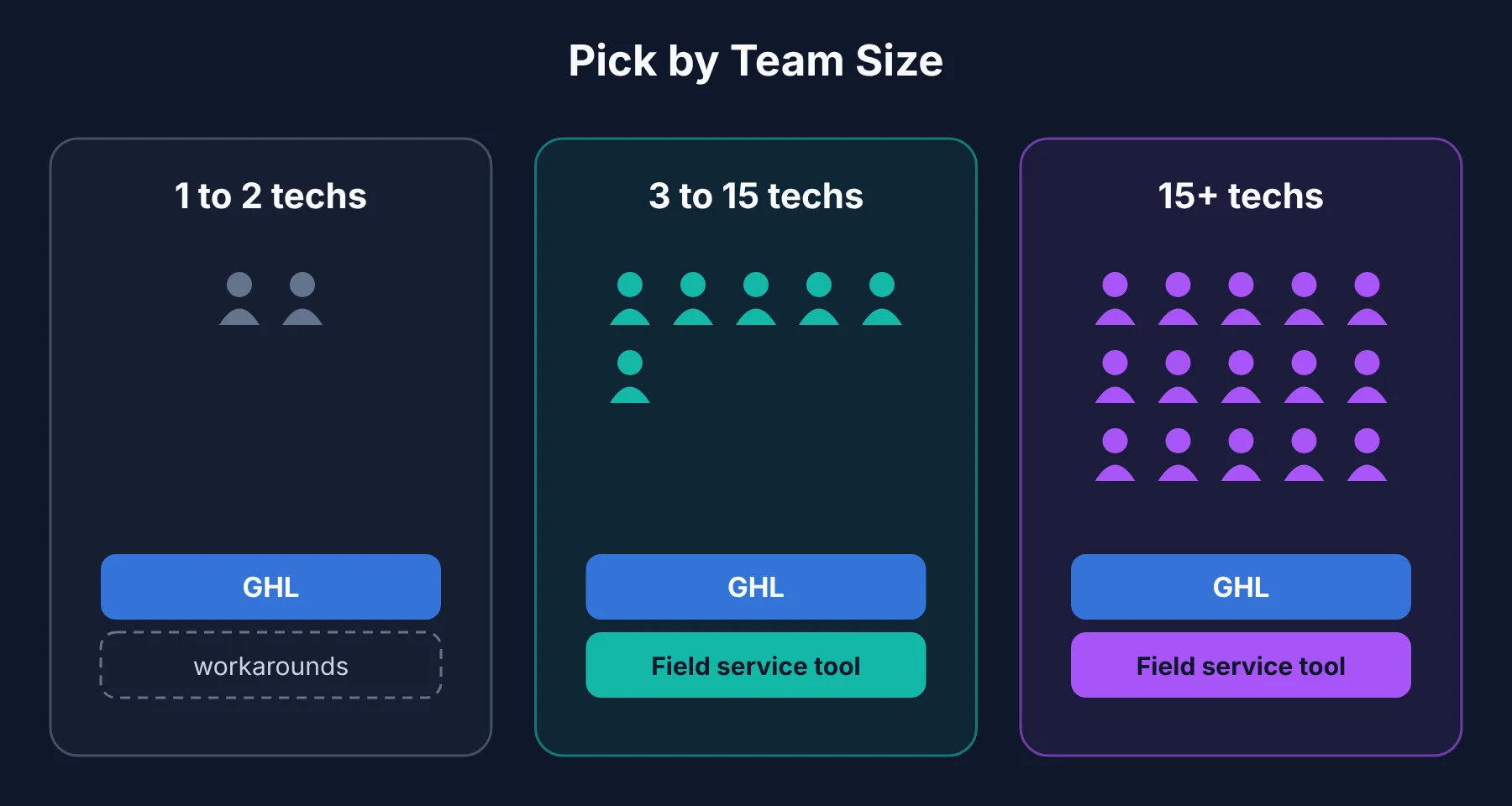 Solo operator or two people. GHL alone with simple workarounds is fine for now. You know where you are, and payroll is simple. Start adding a field service tool once you hire your second or third tech.
Small crew, roughly 3 to 15 techs. This is where the gaps start costing real money.
A native Jobber connection or a marketplace app like FieldTask both make sense. Pick Jobber if you want a long-established platform and do not mind running two systems. Pick a marketplace app if you want everything to stay inside GHL.
Larger team, 15+ techs or multiple locations. Look seriously at ServiceTitan or Jobber's higher plans, with GHL for marketing on top. At this size, reporting, job costing and dispatch depth matter more than having everything in one screen.
Agencies running GHL for many service clients. A marketplace app you can roll out across sub-accounts is the simplest to manage, but test it on one client before rolling it out to all of them.
Mistakes I Would Avoid When Adding Field Service to GHL
Letting two systems both "own" the customer. Decide which tool is the source of truth for contacts, jobs and invoices. Otherwise you get duplicates and double billing.
Building a Zapier chain nobody monitors. If you use Zapier, set up error alerts and check them weekly.
Skipping the trial with real jobs. A demo always looks smooth. Run a real week of jobs through any tool before you commit.
Forgetting the technicians. The best dispatch board fails if the tech app is clumsy. Ask two of your techs to test the mobile app before you buy.
Losing the marketing loop. The whole point of keeping GHL is that finished jobs trigger reviews and follow-ups. Make sure "job completed" actually flows back into GHL.
Common Questions About GoHighLevel for Field Service
Can GoHighLevel be used as a field service management tool?
Only partly. GHL handles leads, booking, messaging, invoices and reviews, but it lacks dispatch, route optimization, field time clocks, payroll and job costing. Most service businesses pair it with a dedicated field service tool once they have more than a couple of technicians.
Does GoHighLevel integrate with Jobber?
Yes. HighLevel and Jobber announced a native integration in September 2025. It syncs contacts, job notes and statuses, lets GHL's Voice AI book using Jobber's schedule, and sends job details back to GHL for reviews and follow-ups.
What is FieldTask?
FieldTask is a field service app installed from the HighLevel App Marketplace. It adds dispatch, scheduling, route optimization, job photos, GPS time tracking and invoicing inside a HighLevel account, priced by number of users with a free trial.
Do I need to leave GHL to get field service features?
No. All of the main options keep GHL for marketing and add field operations alongside it, through a native integration, a marketplace app or Zapier.
Is GoHighLevel good for home service businesses?
Yes, for marketing and customer communication. For running crews in the field, it needs a partner tool. The best GHL setup for a home service business is usually GHL for winning and keeping customers, plus a field service tool for doing the work.