


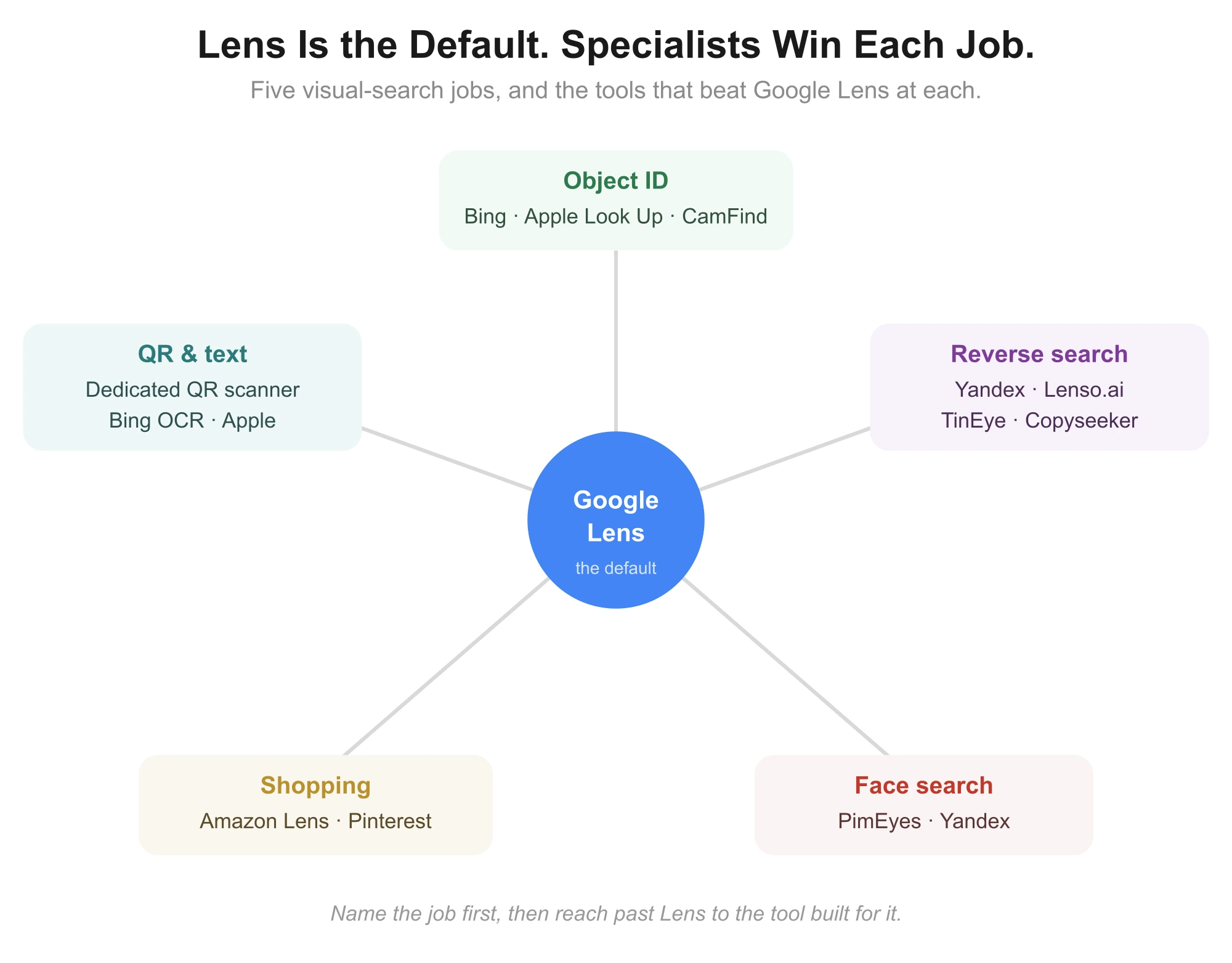
Google Lens is brilliant at one thing: point your camera at an object and learn what it is. But "visual search" is really five different jobs, and Lens is not the best at all of them.
If you want to find who stole your photo, trace an image to its source, search a face, or shop from a picture, there are tools that beat Lens at each.
The trick is knowing which job you are doing, because the best alternative for identifying a plant is useless for catching image theft.
So this guide skips the flat ranking. It groups twelve real alternatives by the job they do best: object identification, reverse image search, face search, and shopping.
That way you can jump to your task and pick the right tool, all verified for what they actually do in 2026.
 What Google Lens Actually Does, and Where It Falls Short
A quick grounding, because knowing Lens's limits is how you choose a replacement.
Google Lens identifies objects, plants, animals and landmarks from your camera, reads and translates text, scans QR codes, and finds similar products to shop. It is fast, free and excellent for everyday "what is this" moments.
Where it falls short is precision work. It does not do true reverse image search well, finding every place a specific image appears online, and it has no facial recognition.
On desktop it is also less seamless than on a phone. Those gaps are exactly what the alternatives fill.
The Best Google Lens Alternatives at a Glance
A quick map of all twelve and the job each wins.
Tool | Best job | Platform | Price |
|---|---|---|---|
Bing Visual Search | Object ID, desktop | Web, Windows, apps | Free |
Apple Visual Look Up | Object ID on iPhone | iOS | Free |
CamFind | Object ID, saved history | iOS, Android | Free |
Pinterest Lens | Style and product ideas | iOS, Android | Free |
TinEye | Reverse search, image theft | Web, extension | Free / paid |
Yandex Images | Reverse search, faces | Web | Free |
Lenso.ai | AI reverse search | Web | Free / paid |
Copyseeker | Duplicate detection | Web | Free |
Google Images | Basic reverse search | Web | Free |
Search by Image | Multi-engine on mobile | Android | Free |
Amazon Lens | Shopping from a photo | iOS, Android | Free |
PimEyes | Face search | Web | Paid |
Every tool here is free to try, though a few gate their deepest features behind paid tiers.
For Identifying Objects, Plants and Places
If your job is the classic "what is this," these match or beat Lens, especially outside Android. Many also read QR codes in passing, though for that a dedicated approach like scanning a QR code properly is more reliable.
1. Bing Visual Search
Microsoft's answer to Lens is the strongest all-round object-ID alternative, and the best option on a Windows PC. It identifies objects, landmarks and products, reads text, and is built into Microsoft Edge and Windows photo tools.
Because it works cleanly on desktop, not just mobile, it fills Lens's biggest platform gap. It also offers a visual search API for developers, which none of the consumer-only tools do.
Best for: Windows users and anyone wanting Lens-style identification on desktop.
2. Apple Visual Look Up
If you are on an iPhone, this is the native, no-download answer. Built into iOS Photos, it identifies plants, animals, landmarks, food and more directly from your pictures, marked by a small star icon on any photo it can analyze.
It is seamless and private because it is baked into the operating system, though it is iOS-only and narrower than Lens on shopping and text.
Best for: iPhone users who want instant identification with nothing to install.
3. CamFind
CamFind is a long-standing mobile visual search app that identifies objects from your camera and, usefully, keeps a searchable history of everything you have looked up, turning it into a personal repository of your finds.
It is a genuine cross-platform alternative on both iOS and Android, though its index is smaller than the search-giant tools.
Best for: people who want object ID plus a saved log of past searches.
4. Pinterest Lens
Pinterest Lens is object ID with a creative twist. Point it at furniture, fashion or food and it surfaces visually similar ideas, products and inspiration from Pinterest's vast pinboard of images.
It is less an identifier and more a discovery engine, so it shines for style and decor rather than precise facts.
Best for: shopping inspiration and style ideas rather than exact identification.
For Reverse Image Search and Catching Image Theft
This is Lens's weakest area and where dedicated tools pull far ahead. If you need to find every place an image appears, use these.
Results improve if you prep the image first, cropping out clutter, so it helps to know how to replace an image or edit one cleanly.
5. TinEye
TinEye is the original reverse image search engine, built specifically to find where an exact image appears online and how it has been altered.
It is the go-to for tracing an image's earliest appearance, which matters for verifying sources or debunking fakes.
Its index favors exact and modified copies over loosely similar images, and it is especially good for older content. A browser extension makes it a one-click tool.
Best for: photographers and researchers tracking exact copies and image origins.
6. Yandex Images
Yandex is widely considered one of the most powerful reverse image tools available, often returning matches Google misses, particularly for faces and Eastern European or foreign-language sources.
It has no formal facial recognition, but in practice it surfaces more face matches than Google, making it a favorite for verifying whether a photo is real. The trade-off is a clunkier interface.
Best for: thorough reverse searches and informal face-matching, free and no account.
7. Lenso.ai
Lenso.ai is a newer AI-powered reverse image engine that sorts results into categories, people, places, duplicates and similar images, making a messy search far easier to navigate.
It adds keyword and domain filters, plus an alert feature that emails you when new matches appear.
Its index is smaller than the giants, so it suits quick, well-organized checks more than exhaustive sweeps.
Best for: clean, AI-sorted reverse searches with ongoing monitoring alerts.
8. Copyseeker
Copyseeker is a free, no-frills tool focused on one job: finding exact duplicates and altered versions of your images across the web, even ones cropped, resized or filtered. For each hit it returns the URL, page title and site ranking.
It has no face search and lighter filtering than the power tools, but for content creators checking if their work was reposted, it is fast and effective.
Best for: bloggers and creators checking if their images were republished without credit.
9. Google Images
Google's own reverse image search, separate from Lens, remains a solid free baseline for general reverse searches and finding visibly similar images with useful context.
It lacks facial recognition and the depth of the specialist tools, but as a first, free check it is always worth a look before reaching for something heavier.
Best for: a quick, free first-pass reverse search with broad context.
For Mobile Multi-Engine and Shopping
Two more specific jobs, searching across engines on a phone, and buying from a picture.
10. Search by Image
Search by Image is an Android app that lets you run one saved photo through multiple engines, Google, Bing, Yandex and TinEye, from a single interface, with basic crop and rotate editing first.
Working from a saved image is also how scanning a saved QR code works.
Running several engines at once catches matches any single tool would miss, which is the whole point of a multi-engine approach.
Best for: Android users who want to hit several search engines in one tap.
11. Amazon Lens
If your visual search is really a shopping search, Amazon's in-app camera lets you photograph an item and find it, or close matches, to buy immediately. For product hunting it is more direct than Lens routing you through general web results.
It is limited to Amazon's catalog, so it is a shopping tool, not a general identifier.
Best for: shoppers who want to photograph an item and buy it or its match fast.
12. PimEyes
PimEyes is a dedicated facial recognition search that crawls public web pages to find where a specific face appears online. It is the specialist for the one thing Lens flatly cannot do.
It is a paid tool and raises real privacy considerations, so it suits deliberate identity checks rather than casual use, but for face search it is purpose-built.
Best for: finding where a specific face appears online, for identity or reputation checks.
For QR Codes and Text
One practical note the shopping and reverse tools miss. If your real task is scanning a QR code or pulling text from an image, a general visual-search tool is overkill.
For QR codes specifically, a dedicated scanner is faster and more reliable than any visual-search app, and it works the same across devices. I covered the best options in this guide to the right QR code scanner for your phone or desktop.
For text, most tools above include OCR, but Bing Visual Search and Apple Visual Look Up handle everyday text capture and translation well without extra apps.
How to Choose the Right One
The decision is quick once you name your task.
For everyday object ID, match the tool to your device: Bing Visual Search on Windows, Apple Visual Look Up on iPhone, CamFind on either.
For reverse image search, start with Yandex or Lenso.ai for thoroughness, TinEye or Copyseeker for catching theft of your own images.
For faces, PimEyes is the specialist, with Yandex a free informal option.
For shopping, Amazon Lens to buy directly, Pinterest Lens for style ideas.
The mistake is using one tool for everything. Lens is a fine default, but for the job it does poorly, and reverse search and face search top that list, a specialist wins easily.
Frequently Asked Questions
What is the best Google Lens alternative?
It depends on the job. Bing Visual Search is the best all-round object identifier, Yandex and Lenso.ai lead on reverse search, and PimEyes on face search.
Are there free Google Lens alternatives?
Yes, most are free. Bing Visual Search, Apple Visual Look Up, Yandex, Google Images, Copyseeker and CamFind all cost nothing to use.
What is the iPhone equivalent of Google Lens?
Apple Visual Look Up, built into iOS Photos, identifies objects, plants, landmarks and more with no download. Google Lens itself is also available in the Google app.
Can I use Google Lens on a PC?
Lens is limited on desktop. Bing Visual Search is the better PC option, built into Microsoft Edge and Windows, with full desktop functionality.
What is the best reverse image search app?
For thoroughness, Yandex or Lenso.ai. For finding exact copies and image theft, TinEye or Copyseeker. Google Images is a solid free first check.
Which app identifies plants and animals?
Apple Visual Look Up, CamFind and Bing Visual Search all identify plants and animals well, as does Google Lens itself.
What app scans QR codes like Google Lens?
A dedicated QR scanner is faster and more reliable than a visual-search app, and works consistently across phones and desktops.
Which visual search app is the most accurate?
For reverse image accuracy, Lenso.ai and Yandex are often rated highest. For object identification, Google Lens and Bing Visual Search lead.
The Bottom Line
Google Lens is an excellent default, but it is not the best tool for every visual-search job, and pretending otherwise costs you accuracy.
For object identification, match the tool to your device with Bing Visual Search or Apple Visual Look Up. For faces, PimEyes, and for shopping, Amazon or Pinterest Lens.
For reverse image search and image theft, the real gap in Lens, turn to Yandex, Lenso.ai, TinEye or Copyseeker.
Name the job first, then pick the tool built for it. That simple habit turns visual search from "pretty good" into exactly the answer you needed.