


Hard drive shredding is the safest way to retire most old business drives. Deleting, formatting and even a wipe that stops partway can leave data readable, and a dead drive cannot be wiped at all. Shredding works on every drive, you can see the result, and a serial-level certificate proves it was done.
When was the last time you checked what actually happened to the hard drives your business pulled out of old laptops, desktops and servers? If the honest answer is that they went into a box in a storage room, or that somebody "wiped them" and nobody wrote anything down, you are in the same position as a lot of small and mid-size companies. The drives are out of sight, and in most cases the data on them is still there.
I have covered information security for smaller businesses for a long time, and my view on this has not changed much: for most retired hard drives, physical shredding is the better default. Wiping has its place, but once a drive has reached the end of its working life, the shredder leaves you with the fewest unanswered questions. Below are seven reasons why, followed by a short section on how to do hard drive shredding properly.
Deleting and Formatting Do Not Remove the Data
When you delete a file, the computer normally removes the entry that points to where the file sits on the disk and marks that space as free. The file itself stays on the disk until something else happens to be written over it. A quick format works in a similar way, as it builds a new, empty file index (the table the computer uses to find files) on top of the old data.
A factory reset is often not much better, as it may reinstall the operating system and leave large areas of the old disk untouched. Free recovery tools that anyone can download are built to find exactly this leftover data, so a drive that looks empty when you plug it in is not the same thing as a drive that is empty.
I tested this myself on a small test disk holding 500 fake payroll records with bank account numbers. All 500 records were still on the disk after deleting the file, after a quick format, and after a wipe that stopped at 25%. Only a full, finished overwrite brought the count to zero.
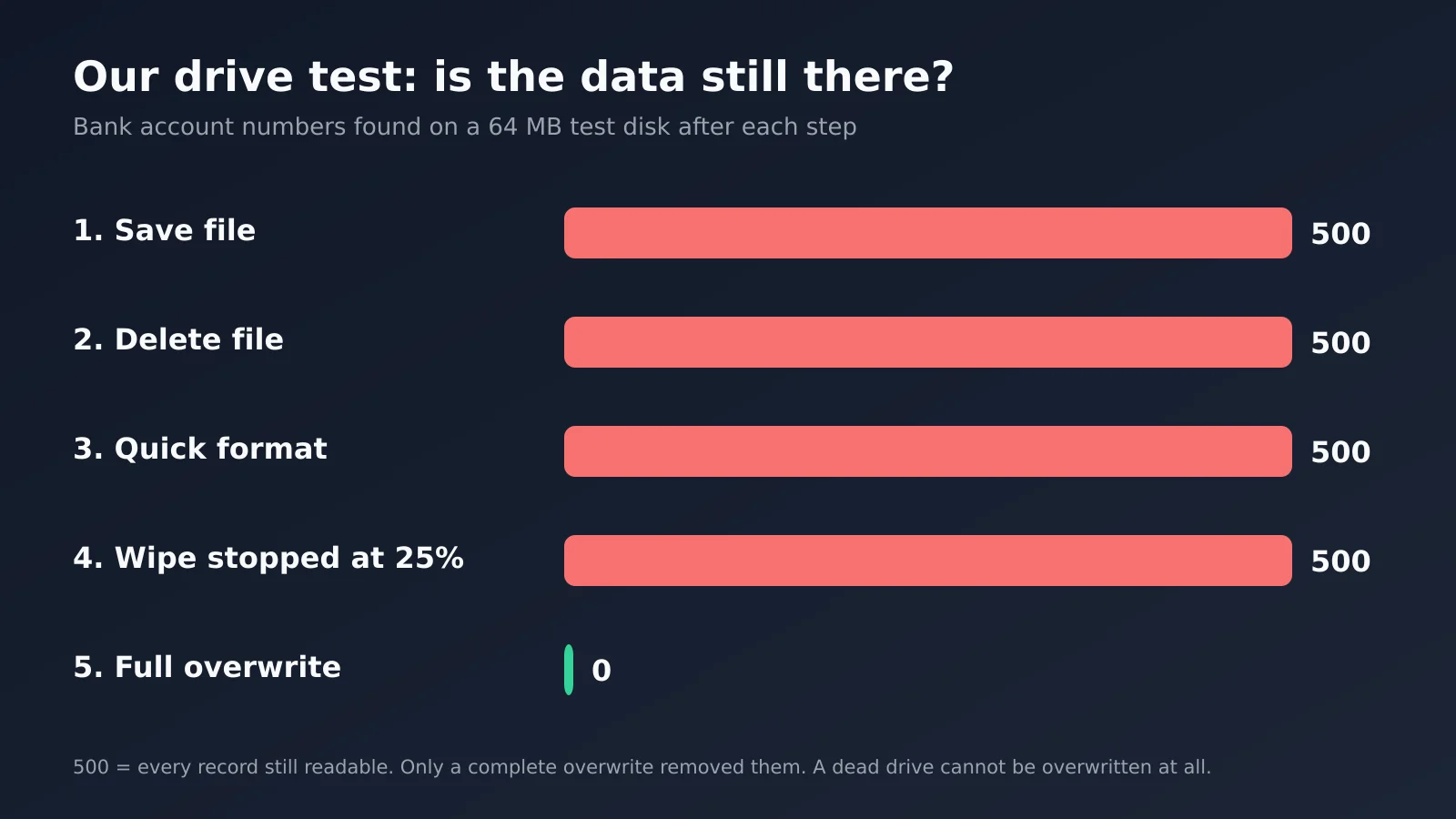 Bank account numbers left on a test disk after each step.
A Wipe Can Fail Without Telling You
Proper wiping software overwrites the whole drive with new data, and when it works, it works well. The problem is that it does not always reach every part of the drive, or tell you when it has missed something.
Bad sectors. A sector is a small block of storage on the disk. When a sector starts to fail, the drive moves its contents to a spare area and stops using the original location, but the damaged sector can still hold readable fragments that ordinary overwriting software cannot get to.
Hidden and spare areas. Drives, and especially solid state drives (SSDs), keep reserved space the computer cannot see directly. On an SSD this extra space is used to spread wear across the memory chips, and copies of old data can sit there after a normal overwrite.
Interrupted jobs. A wipe that stops partway because of a power cut, a loose cable or an impatient technician can leave most of the drive intact, and unless someone reads the log, nobody will know.
Wiping can still be a reasonable choice for some equipment, but a wipe is only as good as the check that is done afterward, and in a small office that checking step is the one that is most often skipped.
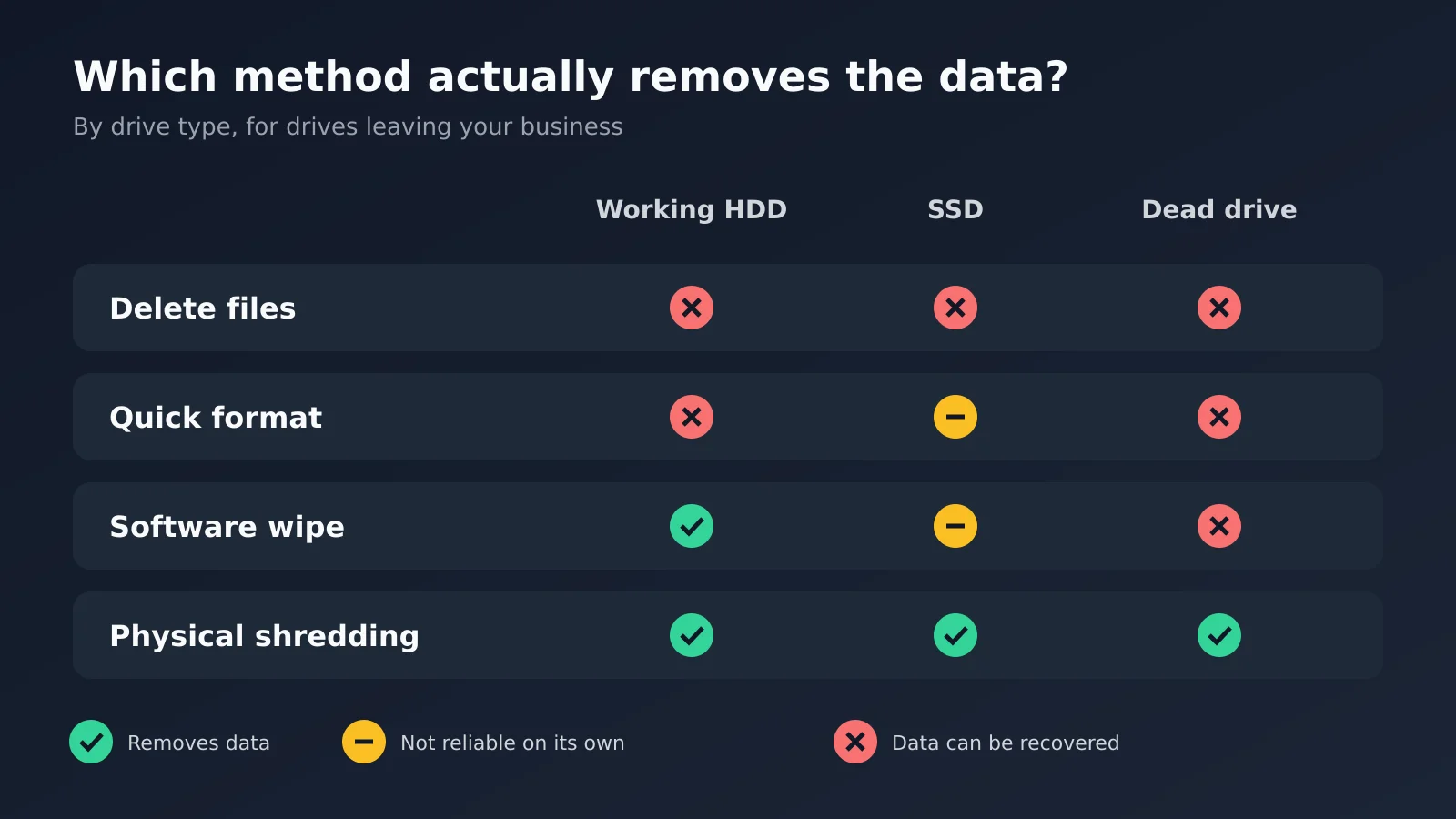 Which method removes data on each type of drive.
Some Drives Will Not Power On at All
You cannot wipe a drive that will not spin up or connect. Dead drives are common in any stack of retired equipment, since failure is often why the drive was pulled. A failed drive is not a safe drive, though. The platters inside (the thin metal discs that actually hold the data) are often in perfectly good condition, and a recovery lab can read them even when the electronics on the outside are broken. For these drives, hard drive destruction is really the only method that deals with the data, since there is no working drive left for software to talk to.
You Can See Whether Shredding Worked
This is the reason I find most convincing. If you look at a wiped drive, it looks exactly the same as it did before, and you have to trust a software report to know whether the job was done. If you look at a shredded drive, you see a pile of torn metal and circuit board, and it is obvious to anyone, including a person with no technical background, that it cannot be plugged in again.
A shredded drive is the one kind of retired drive that proves its own condition just by being looked at.
When an auditor or a client asks how you know the data is gone, "we watched it go through the shredder, and here are the serial numbers" is a much easier answer than "the software said it passed."
Privacy Rules Expect Real Destruction
Privacy rules in many countries require businesses to get rid of personal information once it is no longer needed, and they are fairly specific that "gone" has to mean unrecoverable. The Australian privacy regulator, for example, says in its guidance on the security of personal information that personal information is destroyed when it can no longer be retrieved, and that for hardware that cannot be sanitised, reasonable steps must be taken to destroy the information, for example by destroying it irretrievably. Health and financial privacy rules in the US and Europe set similar expectations, and shredding backed by a record of which drives were destroyed is one of the clearest ways to show you met them.
The Weak Point Is the Time Before Destruction
Many exposures from old equipment come from drives that sit around, untracked, between the day they are removed and the day someone deals with them. A 2025 report from the inspector general of the NCUA, the federal agency that oversees US credit unions, is a useful example. Its audit of the agency's IT asset sanitization process found that devices were in fact sanitized properly, but that returned equipment had been left in an unlocked office, unattended and unaccounted for over an unknown period, and that the process lacked a clear chain of custody (a written record of who had each device, and when).
If a federal agency with its own IT office can have that gap, a 40-person company very likely has it too. A regular hard drive shredding schedule, with drives logged as they come out of service, shortens the time a loose drive spends in a closet.
Certain Drives Should Never Be Reused
Even companies that prefer to wipe and reuse equipment should keep a short written list of drives that always go to the shredder. In my experience that list usually includes:
Any drive that has failed, will not power on, or has shown errors during a wipe.
Drives that held health records, payment or banking details, legal files, or HR and payroll data.
Drives from servers and storage arrays, where it is often hard to be sure which disks held which data.
Drives that turn up without a matching entry in your asset list, since you cannot be sure what is on them or where they have been.
SSDs where you cannot confirm that the built-in erase command ran and completed.
Writing this into your equipment-retirement steps removes most of the judgment calls that go wrong.
How to Shred Hard Drives Properly
Hard drive shredding is only as useful as the record that goes with it. Whether you hire a service or set up your own process, these are the points that matter most:
Log every drive by serial number before anything leaves your control. The serial number is the unique ID on the drive label, and it is the only reliable way to match a destroyed drive to the machine it came from.
Decide where the shredding happens. On-site shredding means the provider comes to your building and your own staff can watch each drive go in. Off-site shredding means the drives are transported under a documented chain of custody, which is usually more practical for larger volumes.
Ask for a certificate of destruction that lists each drive by serial number, the method used, the date, and the chain of custody. A certificate that only says "45 drives destroyed" is far weaker if you are ever asked about one specific drive.
Some specialist providers build their hard drive shredding services around exactly these steps. Big Data Supply, for instance, offers on-site hard drive destruction where your team can witness the shredding, logs each drive by serial number as it is destroyed, and issues a certificate of destruction at the end, with an off-site option at its R2v3 and RIOS certified facility for businesses retiring larger numbers of drives. Witnessed shredding plus a serial-level certificate is the standard you should hold any hard drive destruction vendor to.
The Honest Limits of Shredding
Shredding does have costs. A shredded drive can never be reused, so a working, recent drive that held nothing sensitive may be a better candidate for a verified wipe and a second life. Shredding also produces a pile of mixed metal, plastic and circuit board that should not end up in a landfill. The US Environmental Protection Agency points businesses toward certified electronics recyclers that are audited by an independent third party under the R2 or e-Stewards standards, so it is worth asking any shredding provider where the shredded material goes next.
Even so, for a failed drive, a drive that held sensitive data, or a drive whose history you cannot fully account for, physical shredding with a serial-level record is the safest way to retire it, and it is the one method where you can check the result with your own eyes.
Hard Drive Shredding FAQ
Does formatting a hard drive delete everything?
No. A quick format builds a new, empty file index on top of the old data. In our test, all 500 payroll records were still readable after a quick format, even though the disk looked empty.
How much does it cost to shred a hard drive?
Published US pricing guides put off-site shredding at about $4 to $15 per drive and on-site, witnessed shredding at about $10 to $40 per drive. Prices drop as volume goes up, and small jobs may have trip fees or minimums.
What is a certificate of destruction?
It is a document from the shredding provider that proves your drives were destroyed. A good certificate lists each drive by serial number, the method used, the date and the chain of custody, not just a total count.
Should SSDs be shredded too?
Yes, especially when you cannot confirm that the drive's built-in erase command ran and finished. SSDs keep hidden spare space that normal overwriting cannot reach.
Should I back up a drive before shredding it?
Yes, if the business still needs anything on it. Most company files now live in the cloud, and if yours sit in Microsoft 365, our guide to Microsoft 365 backup explains how to keep a copy you control.
Is on-site or off-site hard drive shredding better?
On-site shredding lets your own staff watch each drive being destroyed, which helps with audits and sensitive data. Off-site shredding is usually cheaper for large volumes, as long as the drives travel under a documented chain of custody.