


In this iGradePlus review, my short answer is yes: iGradePlus is worth it for individual teachers who want a free online gradebook, and for small schools that need an affordable school management system. The teacher gradebook is free with no expiration.
The Enterprise School Management System costs from $65 a year for 5 students to $6,630 a year for 1,000 students, with unlimited teachers and admins included.
The trade-off is that it looks and feels older than newer tools. There's no native mobile app, and some features (like built-in messaging and rubrics) are still coming in Version 12, planned for early 2027.
iGradePlus has been around since 2011, and it's popular with K-12 teachers, college professors, homeschool co-ops and small private schools. It sells two very different products under one name, which confuses a lot of people.
So in this review, I separate the two clearly. I cover what each one includes, what I found when I went through the site and help center myself, what it really costs, and which alternatives to consider.
What is iGradePlus?
iGradePlus is a web-based online gradebook and school management system. It's owned by Corvus Education Systems, based in Maryland, USA.
It comes in two versions:
Free Online Gradebook for individual teachers. One teacher account, unlimited students and classes, plus student and parent portals. It's always free with no expiration.
Enterprise School Management System for schools and districts. It adds multiple teacher accounts, unlimited administrators, school-wide reports, transcripts and multi-school management. It has a 14-day free trial, then an annual fee based on student numbers.
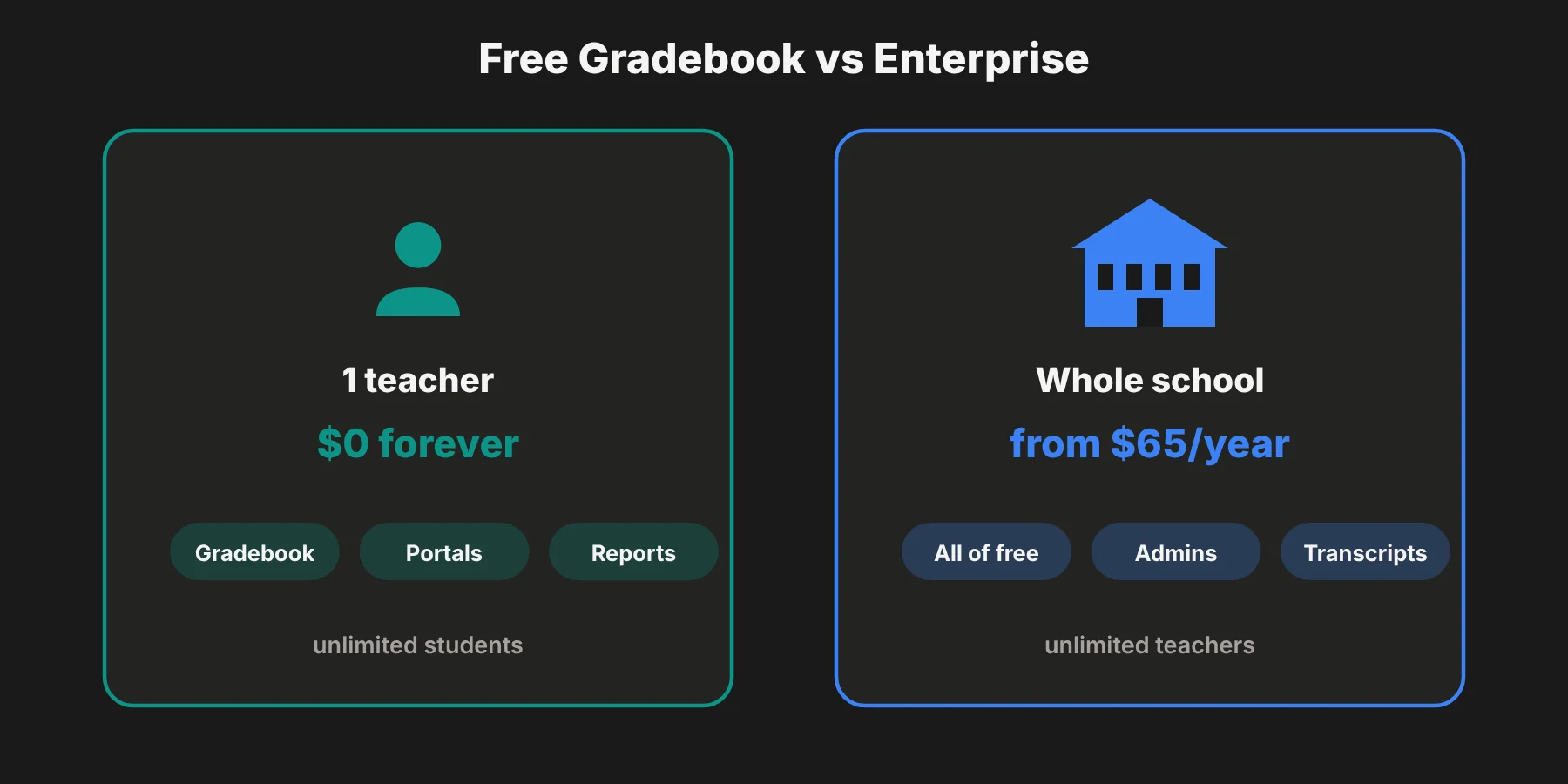 Both versions run in a web browser on Windows, Mac or Linux. You don't install anything.
How I tested iGradePlus
I went through iGradePlus myself on October 30, 2026. Here's exactly what I did, and what I couldn't do.
What I tested:
The free gradebook sign-up flow. I opened the sign-up page and checked every field it asks for.
The "Take a Tour" page, to see if there's a demo you can try without signing up.
The help center, including the full Getting Started tutorial for the free gradebook, which walks through every screen.
The Enterprise pricing page, where I worked out the cost per student at each size.
The Version 12 roadmap that iGradePlus published in 2026.
What I couldn't test: I didn't create an account, so I haven't entered real grades or used the student and parent portals myself. My feature notes come from iGradePlus's own help pages and feature list, plus user reviews.
Here's what I found.
Finding 1: Sign-up is quick and needs no credit card
The free gradebook sign-up page promises "Always Free. No Expiration." The form asks for:
A username and password
Your email address
Your title and first and last name
Your school or organization type
Your role
How you heard about iGradePlus
 There's no credit card field. I also liked that the organization types include homeschool co-ops, trade schools, tutoring centers, adult education and colleges, not just K-12 schools. That matches who actually uses it.
Finding 2: The "Take a Tour" page has no tour
The main menu has a "Take a Tour" link that promises to let you "Explore Administrator, Teacher, Student, And Parent Web Apps." But when I opened it, there was no interactive demo, video or screenshots. It only said to contact sales to schedule a personal demo.
That's a small thing, but it means you can't see the product before signing up. Since the free gradebook takes a minute to create, I'd just sign up rather than book a sales call.
Finding 3: The help center is detailed but dated
The Getting Started tutorial for the free gradebook is thorough. It walks through creating a gradebook, adding students and classes, grade scales, assignment categories, grade weighting, drop scores, attendance, behavior logs and portal accounts.
Here's the basic setup it describes:
Create a gradebook (one per school year, or one per semester for college).
Add your classes.
Add your students.
Assign students to classes.
Create assignments and enter scores.
But some parts are clearly old. The tutorial suggests naming your gradebook "Gradebook 2015 - 2016," and the feature page still says email templates are coming "In 2018." A few icons in the help text also seem to be missing. It's usable, but it shows the product's age.
Finding 4: A big update is coming in 2027
iGradePlus published a long roadmap for Version 12, planned for early 2027. It says the team has been working on it for nearly two years.
Planned features include:
A full built-in messaging system and notifications
Rubrics and narrative comments
A master class scheduler with conflict detection
Student billing and online registration
At-risk student flags, honor roll and class rankings
IEP, 504 and other support program tracking
An audit log and recycle bin for deleted data
A new, modern user interface and branding
This tells me two things. First, iGradePlus is actively developed, which is good for a product this old. Second, several features you might expect today, like messaging and rubrics, aren't there yet.
iGradePlus key features
Here's what iGradePlus includes today, based on its feature list. Unless I say otherwise, each feature is in both the free gradebook and Enterprise.
Online gradebook and grade tracking
This is the core of iGradePlus, and it's flexible:
Unlimited students, classes and assignments
Up to 12 grading periods per year
User-defined grade scales with up to 25 grade points
Assignment categories and grade weighting
A drop scores policy, to drop each student's lowest scores
GPA calculation
Assignment statuses, like completed on time or late
Online student submission of assignments
Class roster management and a lesson planner
Grade weighting works the way you'd expect. For example, you can make exams 50% of the grade, classwork 25% and homework 25%. The help center says weights must add up to 100%.
Grading standards support is marked "coming soon," so standards-based grading schools should check before committing.
Student information management
Each student has a profile with custom fields, up to 4 parents or guardians, schedules, assessments, journals, documents and a parent contact log. Sensitive profile data is encrypted, according to iGradePlus.
Student transcripts are Enterprise-only.
Attendance and behavior tracking
You can track attendance by gradebook or by class, in "strict" mode (present and absent) or "ad-hoc" mode (absences only). The default statuses are Present, Absent, Tardy, Nurse and Excused, and you can add your own.
Behavior tracking works the same way, with Major and Minor Incident statuses by default and room for your own.
Student and parent portals
Students and parents get their own web portal logins. Each student can have up to 4 parent accounts, and one parent account can see all their linked children.
Through the portals, teachers can share grades, reports, assignment documents, calendars and bulletins.
Custom reports and communication tools
You can build custom report templates, then generate report cards or progress reports for one, some or all students. You can print them, email them or share them through the portals.
Enterprise adds school letterhead on reports and reports that combine data from multiple teachers.
For communication, there's bulk email with attachments, class discussions, a teacher blog, an event calendar, a bulletin board and Zoom video meetings, where students don't need their own Zoom account. A full student-teacher messaging system is listed as "coming soon."
iGradePlus also offers extensive data exporting and printing options, so you can keep your own copies of grades and records.
School administration (Enterprise only)
Enterprise adds staff profiles and privileges, unlimited administrator accounts, administrator access to teachers' gradebooks, a school year calendar and the ability to manage one school, several schools or a district.
iGradePlus pricing and plans
Free online gradebook
The teacher gradebook is free forever, with no expiration and no credit card. It includes one teacher account, unlimited students and classes, and student and parent portals.
Enterprise School Management System
For schools and districts, iGradePlus charges one annual fee based on the number of active students. Teacher, administrator and parent accounts are all included. There are no setup fees, module charges or add-ons, and every school starts with a 14-day free trial.
Here are the sample annual fees from iGradePlus's pricing page, with my cost-per-student math:
Active students | Annual fee | Cost per student per year |
|---|---|---|
5 | $65 | $13.00 |
20 | $260 | $13.00 |
50 | $618 | $12.36 |
100 | $1,105 | $11.05 |
200 | $1,755 | $8.78 |
300 | $2,405 | $8.02 |
500 | $3,705 | $7.41 |
750 | $5,168 | $6.89 |
1,000 | $6,630 | $6.63 |
1,000+ | Request a quote | n/a |
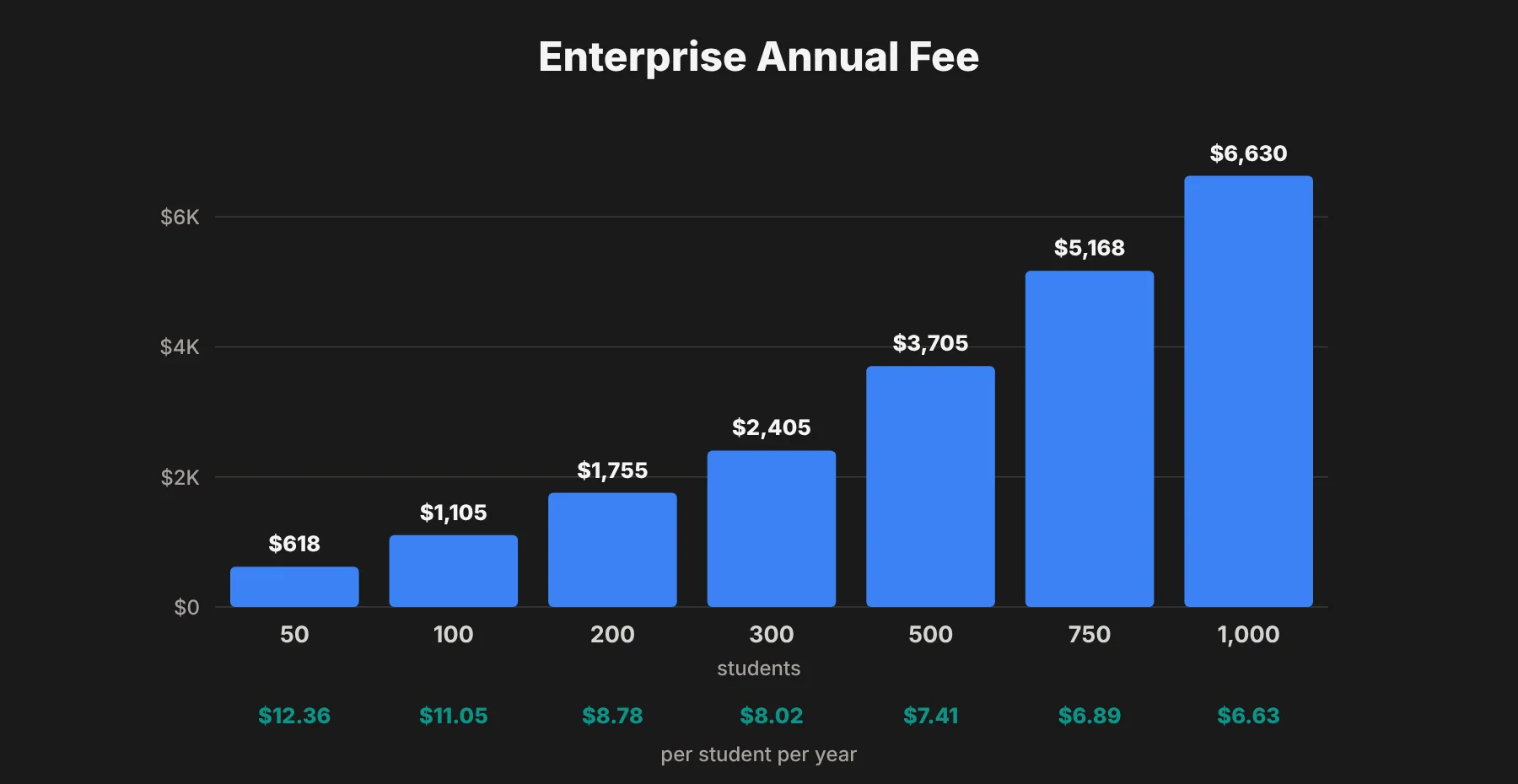 The cost per student drops as you grow, from $13 a year for very small schools to about $6.63 for 1,000 students. For a 200-student school, that's about $146 a month, with unlimited teachers.
To put that in context, Gradelink lists $121 a month for up to 50 students on Capterra. iGradePlus would charge a 50-student school $618 a year, or about $52 a month. For small private schools and co-ops, that's a big difference.
How does iGradePlus work for a school?
For an Enterprise school, the setup usually looks like this:
Start the 14-day trial and set up your school profile and school year calendar.
Add staff accounts and set each person's privileges.
Add students, classes and schedules.
Teachers set up grading options, like grade scales, categories and weights.
Turn on student and parent portals so families can see grades and assignments.
Generate report cards at the end of each grading period, with your school letterhead.
Is iGradePlus safe and FERPA compliant?
iGradePlus says it operates in line with FERPA, the US law that protects student education records. According to its security page, it offers:
Encrypted data transfer (SSL) and encrypted student profile data
Nightly backups to onsite and offsite servers, kept for 30 days
A 30-day account activity log
Account lockdown after repeated failed logins
Automatic logout after inactivity
Optional email-based identity verification
iGradePlus also says its service has been available around the clock since 2011, with only two disruptions, both caused by widespread power outages. I can't verify that claim, but it's a strong statement for a small company.
Who should use iGradePlus?
Individual teachers. If your school doesn't provide a gradebook, the free version gives you almost everything you need at no cost.
College professors. The help center specifically recommends one gradebook per semester for college classes, and the grade weighting and drop scores tools suit university grading.
Homeschool co-ops and tutoring centers. The low per-student price and flexible setup suit small groups. Several Capterra reviewers mention homeschool co-ops.
Small private, charter and trade schools. Enterprise is far cheaper than most full student information systems, with unlimited staff accounts.
Who might skip it: large districts that need state reporting, student billing, master scheduling or a native mobile app. Those features either don't exist yet or are coming in Version 12.
iGradePlus pros and cons
Pros
A truly free gradebook. No expiration, no credit card, and unlimited students and classes.
Very affordable for schools. From $65 a year, with unlimited teachers and admins.
Flexible grading. Custom grade scales, categories, weights, drop scores and up to 12 grading periods.
Student and parent portals, even on the free plan.
Good reputation. It has a 4.7 out of 5 rating on Capterra from 429 reviews, with 4.8 for customer service and 4.8 for value.
Active development. Version 12 brings a long list of new features in 2027.
Cons
Dated design and documentation. The interface and help center show their age.
No native mobile app. You use it in a mobile browser.
No self-serve demo. The "Take a Tour" page just asks you to contact sales.
Some features are still "coming soon," including messaging, notifications, standards-based grading and a parent-teacher conference scheduler.
Not built for large districts. There's no student billing, online registration or master scheduling yet.
iGradePlus alternatives
The right alternative depends on whether you're a single teacher or a whole school.
Tool | Best for | Pricing |
|---|---|---|
ThinkWave | Teachers and small schools | Free version; premium gradebook about $32/year; schools from about $17/month |
Gradelink | Small and mid-size private schools | From $121/month for up to 50 students |
TeacherEase | Standards-based grading | Quote-based |
QuickSchools | Small schools wanting simple SIS tools | Quote-based |
PowerSchool | Large districts | Enterprise quotes |
Skyward / Infinite Campus | Large public school districts | Enterprise quotes |
For individual teachers: ThinkWave is the closest match, with a free version and a cheap premium gradebook. But I think iGradePlus's free plan is more generous, since it includes student and parent portals.
For small schools: Gradelink is a polished, well-supported option, but it costs much more. If budget is tight, iGradePlus is hard to beat.
For standards-based grading: TeacherEase is built around it, while iGradePlus still lists grading standards as "coming soon."
For large districts: PowerSchool, Skyward and Infinite Campus offer state reporting, scheduling and billing that iGradePlus doesn't yet have.
If you're a student rather than a teacher and want a tool for studying, my RemNote review covers a popular notes and flashcards app.
iGradePlus review verdict: is iGradePlus worth it?
I think iGradePlus is one of the best-value gradebooks available. For individual teachers, the free plan is genuinely free and covers grades, attendance, behavior, reports and portals. For small schools, the Enterprise plan costs a fraction of most school management systems.
It isn't flashy, and some modern features are still a year away. But if you care more about price and reliable grade tracking than a modern look, it's a strong choice.
My advice: if you're a teacher, just sign up for the free gradebook and set up one class to see if it fits. If you run a school, use the 14-day trial with real data from one grade level, and check the iGradePlus pricing page for your exact student count.
iGradePlus FAQs
Is iGradePlus free?
Yes, for individual teachers. The Free Online Gradebook is always free with no expiration and no credit card. Schools and districts pay an annual fee for the Enterprise School Management System after a 14-day free trial.
How much does iGradePlus cost for schools?
The Enterprise plan costs one annual fee based on active students. Sample fees run from $65 a year for 5 students to $3,705 for 500 students and $6,630 for 1,000 students. Schools with more than 1,000 students need a custom quote.
Does iGradePlus have a mobile app?
No. iGradePlus is web-based and works in browsers like Chrome, Safari, Firefox and Edge on any device, but there's no native mobile app.
Is iGradePlus FERPA compliant?
iGradePlus says it operates in accordance with FERPA and that its service helps schools meet their FERPA obligations. It uses encrypted data transfer, encrypted student profile data and nightly backups.
Can parents see grades in iGradePlus?
Yes. Teachers can set up parent portal accounts, with up to 4 parents per student. One parent account can view all their linked children's grades, assignments and reports.
Is iGradePlus good for college professors?
Yes. iGradePlus is used by college professors as well as K-12 teachers, and its help center recommends creating one gradebook per semester for college classes.
What is iGradePlus Version 12?
Version 12 is a major update planned for early 2027. It's set to add built-in messaging, rubrics, a master scheduler, student billing, online registration, an audit log and a redesigned interface.