


Kajabi pricing starts at $179 a month for Basic, $249 for Growth and $499 for Pro. Paying yearly drops that to $143, $199 and $399 a month. On top of that, you pay card processing fees, plus an extra 0.5% to 2% fee if you use your own payment processor. For creators who use everything Kajabi includes (website, email, courses, community and funnels), the price can be fair. If you mainly need checkout pages and course delivery, ThriveCart starts at $47 a month or $495 one time, which is far cheaper over a year.
Kajabi is a popular course platform, but its monthly cost makes many creators pause. The question is not whether Kajabi is useful. The real concern is whether you will use enough of it to make the price worth it.
Many creators want an all-in-one platform because it sounds simple. However, simplicity can become expensive if you only need a sales page, checkout pages, and a clean way to deliver digital products. That is why so many business owners compare platforms before they commit. They want to know what each Kajabi pricing plan includes, which fees may apply, and whether separate tools could offer more value.
We checked both pricing pages on November 10, 2026, so every number below is current.
What Does Kajabi Pricing Look Like in 2026?
Kajabi pricing plans are built around three main tiers:
Basic plan ($179/mo): Best for a few courses, one website, and a smaller contact list.
Growth plan ($249/mo): Built for more products, more contacts, and stronger marketing tools.
Kajabi Pro plan ($499/mo): Built for larger businesses that need more websites, more admin users, and unlimited products.
 Kajabi's three plans on monthly billing
Annual billing lowers the effective monthly price, but it also requires a larger upfront commitment. Monthly billing gives you more flexibility, but it usually costs more over the year.
Here is what each plan actually includes:
Basic | Growth | Pro | |
|---|---|---|---|
Monthly billing | $179/mo | $249/mo | $499/mo |
Annual billing | $143/mo ($1,716/yr) | $199/mo ($2,388/yr) | $399/mo ($4,788/yr) |
Products | 5 | 50 | Unlimited |
Contacts | 2,500 | 25,000 | 100,000 |
Websites | 1 | 1 | 3 |
Admin users | 2 | 11 | 26 |
Communities | 1 | 1 | 3 |
Affiliate program | No | Yes | Yes |
Kajabi branding | "Powered by Kajabi" footer | Removed | Removed |
Branded mobile app | No | No | Yes |
Every plan comes with a 14-day free trial and a 30-day money-back guarantee. Kajabi also says it takes a 0% revenue share on your sales.
What you may get with Kajabi
Course delivery for a course idea or a few courses
Landing pages and sales page tools
Unlimited sales funnels and email marketing with unlimited sends
Membership sites and a community platform
Coaching tools on every plan
Payment options through PayPal and Kajabi Payments
Checkout pages for selling digital products
A branded mobile app, but only on the Pro plan
Add-ons such as extra contacts and AI credits
Kajabi can be a strong fit if you truly need the full stack. However, if you already have a WordPress site, an email platform, or a favorite payment provider, you may not need every feature inside the Kajabi plan. In our guide to a one-person consulting stack, we found that many small businesses run well on a few cheap, separate tools instead of one big subscription.
Where Can Extra Kajabi Costs Appear?
The listed subscription is only one part of the full cost. Payment processing, sales tax settings, third-party tools, and add-ons can change what you actually pay.
Kajabi Payments and PayPal help creators collect money online. But a payment processor still charges its own processing fees. If you use another payment provider, Kajabi adds its own fee on top. These are the rates Kajabi lists for US businesses:
Basic | Growth | Pro | |
|---|---|---|---|
Kajabi Payments card rate | 2.9% + 30¢ | 2.8% + 30¢ | 2.7% + 30¢ |
Extra fee with an outside processor | 2% | 1% | 0.5% |
The outside processor fee does not apply to PayPal or Kajabi Payments. Card rates can be different outside the US.
Here is a simple example. If you sell $5,000 a month on the Basic plan through your own Stripe account, that extra 2% adds $100 a month. That is more than half the price of the plan itself.
You should also check how tax-inclusive pricing, sales tax, split pay, and payment plans affect your margins. These details matter more when you sell higher-ticket offers or depend on recurring revenue.
Costs to review before choosing Kajabi
Monthly or annual billing
Own processing fees from your payment processor
Kajabi's 0.5% to 2% fee if you use an outside processor
Payment processing fees for cards, wallets, or buy now pay later options
Fees tied to PayPal and Kajabi Payments
Add-ons, such as extra contacts at $125 a month for each block of 25,000, or more AI credits at $15 a month for 500
Extra tools you still need outside Kajabi
The cost of switching from separate tools to a connected system
A low entry price can still become serious money if the platform does not match how you sell. That is why the cheapest Kajabi plan is not always the cheapest option for your online business.
What Kajabi Costs Over One Year
Monthly prices can hide the real number. So we added up what each plan costs over 12 months, and put ThriveCart's plans next to it.
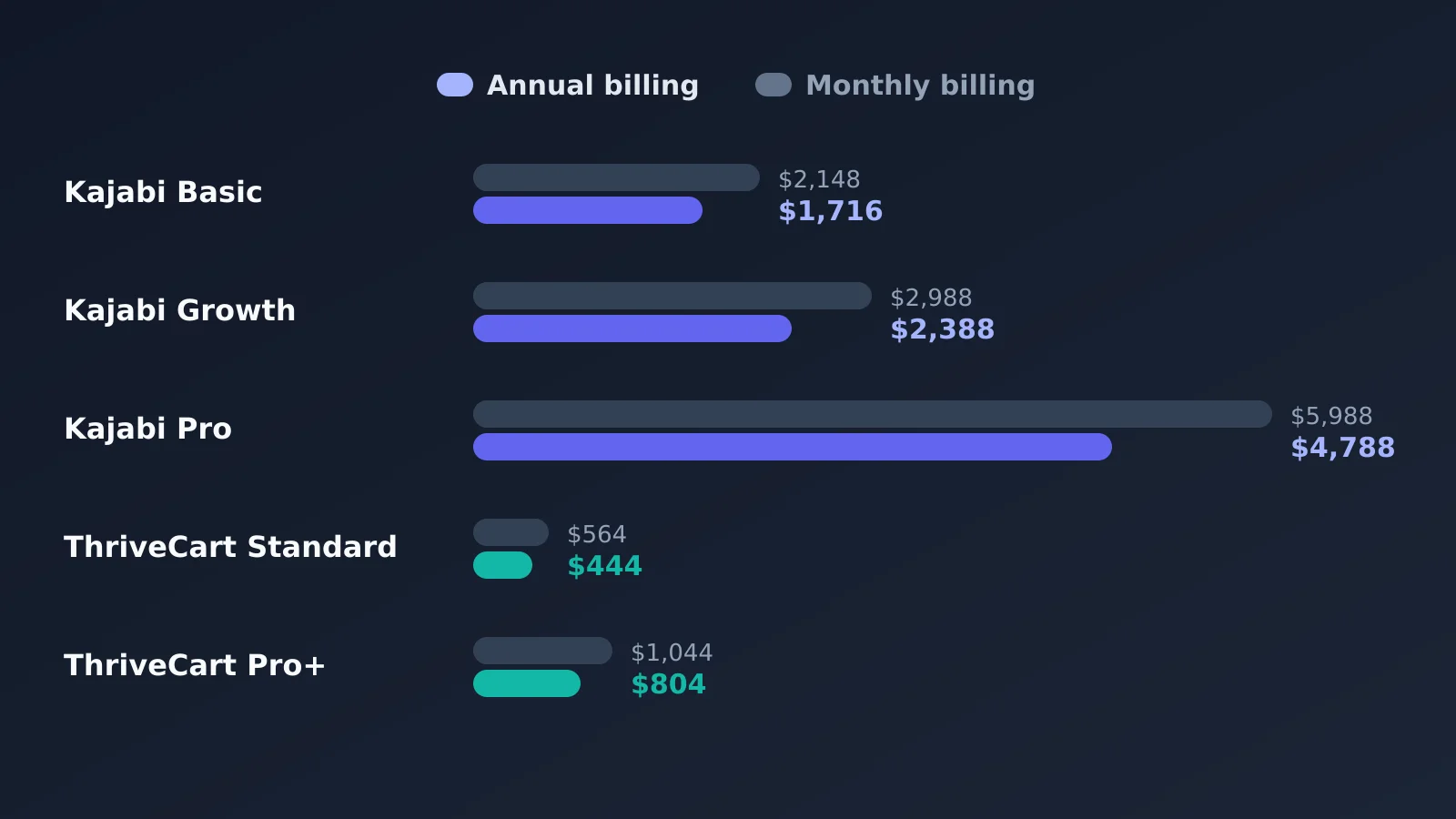 What each plan costs over one year
Plan | Paid monthly for a year | Paid yearly |
|---|---|---|
Kajabi Basic | $2,148 | $1,716 |
Kajabi Growth | $2,988 | $2,388 |
Kajabi Pro | $5,988 | $4,788 |
ThriveCart Standard | $564 | $444 |
ThriveCart Pro+ | $1,044 | $804 |
These numbers do not include card fees, which you pay on both platforms. The gap is still large. Even Kajabi's cheapest yearly plan costs almost four times as much as ThriveCart Standard.
Why Are Creators Comparing ThriveCart?
ThriveCart is often compared with Kajabi because it focuses on the sales path. It helps creators sell digital and physical products, courses, memberships, subscriptions, and communities through high-converting checkout pages and funnels.
ThriveCart gives creators a focused, connected system for checkout pages, order bumps, upsells, downsells, A/B testing, cart abandonment recovery, subscription tools, split pay, buy now pay later, customization options, and sales tax automation. It also includes ThriveCart Academy, which supports courses and communities.
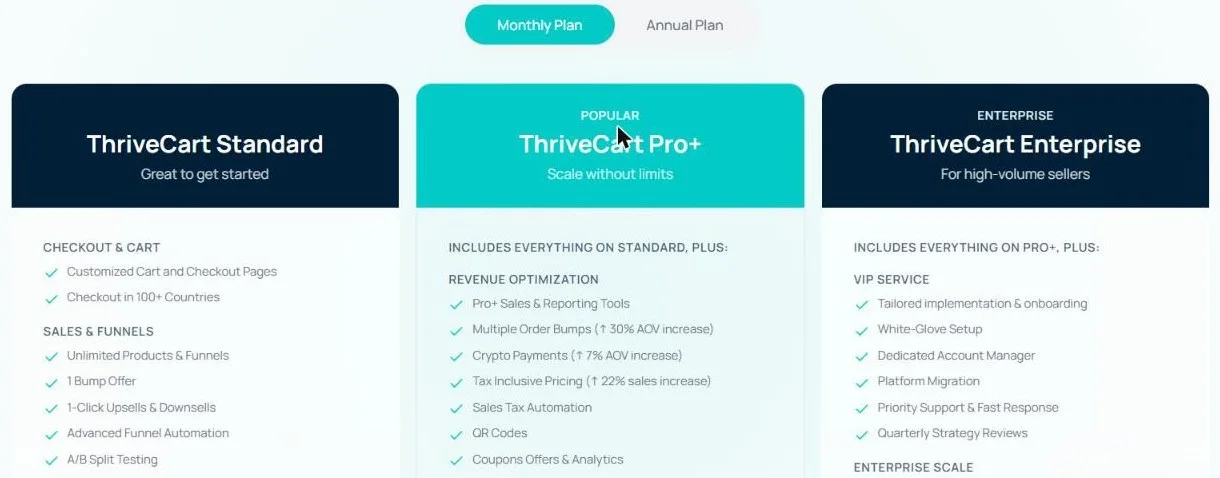 ThriveCart Standard, Pro+ and Enterprise
ThriveCart offers flexible pricing to suit your business model: choose a monthly plan starting at $47/month, or secure long-term value with a one-time payment of $495. Here is the full picture:
Standard | Pro+ | Enterprise | |
|---|---|---|---|
Monthly billing | $47/mo | $87/mo | Custom |
Annual billing | $37/mo ($444/yr) | $67/mo ($804/yr) | Custom |
Lifetime option | $495 one time | Not listed | Not listed |
Order bumps | 1 | Multiple | Multiple |
Tax-inclusive pricing | No | Yes | Yes |
Coupon offers and analytics | No | Yes | Yes |
Affiliate center and payouts | No | Yes | Yes |
ThriveCart Academy | Starter plan | Growth plan | Scale plan |
Free trial | 30 days | 30 days | Talk to sales |
Every plan charges 0% platform fees on sales. You only pay your payment processor's fees.
One thing to watch: tax-inclusive pricing, multiple order bumps, coupon analytics, and the affiliate center are Pro+ features. If you need those, budget for $87 a month, not $47.
The Standard plan's ThriveCart Academy Starter includes unlimited courses and students, up to 2,000 community members, up to 10 communities, and 100 GB of video storage. That is enough for most solo course creators.
This matters because small checkout improvements can increase customer lifetime value. If you sell digital products, coaching programs, membership sites, or physical products, a high-converting checkout can affect revenue more directly than another page in a large website builder.
Kajabi vs ThriveCart at a Glance
Kajabi | ThriveCart | |
|---|---|---|
Starting price | $179/mo ($143/mo yearly) | $47/mo ($37/mo yearly) or $495 one time |
Platform fee on sales | 0% with Kajabi Payments or PayPal; 0.5% to 2% with other processors | 0% |
Website builder | Yes | Funnel pages only |
Email marketing | Yes, built in | Connect your own tool |
Courses and communities | Yes | Yes, through ThriveCart Academy |
Checkout upsells and bumps | Yes | Yes, with more options |
Branded mobile app | Pro only | No |
Free trial | 14 days | 30 days |
When Kajabi Is Still the Better Choice
We do not think Kajabi is a bad deal for everyone. It makes sense if you:
Want your website, email list, courses, community, and checkout in one login
Do not want to pay for and connect a separate email tool
Need a branded mobile app for your members (Pro plan)
Have a team that needs several admin users
In those cases, the monthly cost can be lower than paying for four or five separate tools.
When ThriveCart Makes More Sense
ThriveCart is usually the better value if you:
Already have a website and an email tool you like
Mainly need checkout pages, upsells, and payment plans
Sell through your own Stripe account and do not want Kajabi's extra fee
Want to keep yearly software costs under $1,000
How to Lower Your Kajabi Bill
If you decide Kajabi is the right fit, these simple moves keep the cost down:
Pay yearly. Kajabi says this saves 20%. On Basic, that is $432 a year. On Growth, it is $600.
Use Kajabi Payments or PayPal. This avoids the extra 0.5% to 2% fee you pay with an outside processor.
Clean your email list. Removing inactive contacts can keep you under your plan limit, so you do not pay $125 a month for another block of 25,000.
Start on Basic. Move up to Growth only when you pass 5 products or need the affiliate program.
Use the trial fully. Build your real offer during the 14 days, so you know which plan you need before you pay.
Final Thoughts
Kajabi can be a good choice for creators who want a broad, all-in-one platform. But many creators are searching for alternatives because pricing matters. If you only need a stronger checkout, flexible payment options, sales funnels, and a course delivery layer, ThriveCart may give you more value without making you pay for a larger system than you need.
Our advice is simple: use the free trials first. Kajabi gives you 14 days and ThriveCart gives you 30. Build one real offer on each, and check what you would actually use before you commit to a year.
Frequently Asked Questions
How much does Kajabi cost per month?
Kajabi costs $179 a month on Basic, $249 on Growth and $499 on Pro with monthly billing. With yearly billing, the prices drop to $143, $199 and $399 a month.
Does Kajabi charge transaction fees?
Kajabi takes no revenue share when you use Kajabi Payments or PayPal, but you still pay card processing fees of 2.7% to 2.9% plus 30¢ in the US. If you use another payment processor, Kajabi adds a fee of 2% on Basic, 1% on Growth or 0.5% on Pro.
Does Kajabi have a free trial?
Yes. Every Kajabi plan has a 14-day free trial and a 30-day money-back guarantee.
Which Kajabi plan is best for beginners?
Basic is the cheapest plan and covers 5 products, 2,500 contacts and one website. Kajabi itself pitches it at creators making their first $10,000 a year.
Is ThriveCart cheaper than Kajabi?
Yes. ThriveCart Standard costs $47 a month, $444 a year, or $495 one time. Kajabi's cheapest plan costs $1,716 a year on yearly billing. ThriveCart does not include a website builder or email marketing, though, so add those costs if you need them.
Does ThriveCart charge transaction fees?
No. ThriveCart charges 0% platform fees on sales. You only pay your payment processor's fees.
Can I use ThriveCart with Kajabi?
Yes. Some creators keep Kajabi for course delivery and use ThriveCart for checkout, linking the two through automation tools such as Zapier.
Is Kajabi worth the price?
Kajabi is worth it if you use most of its features, such as the website, email marketing, communities and courses. If you only use it for checkout and course hosting, you are likely paying for features you do not need.