


The best knowledge base for banks is the one that gets one approved answer to every employee and customer the moment something changes. Of the five knowledge base platforms for banks I compare here, Stonly is the strongest all-round pick for banks that want guided answers for both staff and customers.
Knowmax suits large scripted contact centers, Shelf suits messy multi-system knowledge, Salesforce Knowledge suits banks already on Salesforce, and eGain suits large institutions that want a long-established vendor.
A rate changes on Monday. By Wednesday, one branch is quoting the new number, another is still quoting the old one, and a contact center rep is reading from a PDF that was replaced last quarter.
For a bank or credit union, that kind of inconsistency is a compliance risk as much as a service problem.
Financial institutions manage knowledge under pressure from several directions at once:
Regulations shift.
Products come with fine print that has to be explained correctly every time.
Staff are spread across branches, contact centers and back-office teams.
Customers try to complete loan applications, account setups and digital banking tasks without knowing the terminology.
The right knowledge base puts current, approved information in front of employees and customers at the moment they need it. It controls who can change that information, and it keeps a record of what changed.
Below, I compare five platforms on how well they handle that job, where each one shines and where each one falls short. I checked each vendor's pricing page, security claims and G2 listing in October 2026.
What to look for in a knowledge base for banks
Here are the five things I'd check first.
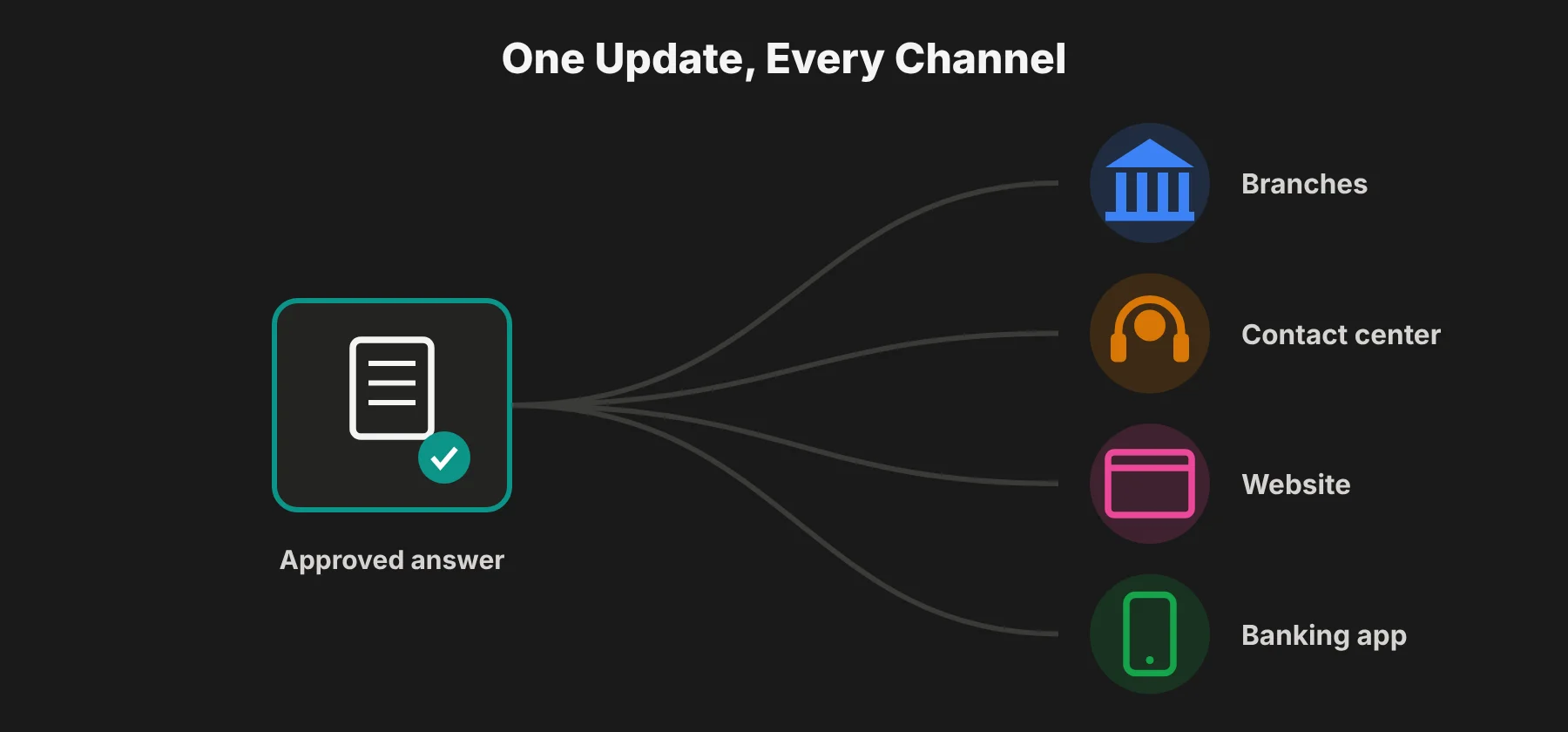
Instant, centralized updates. When a regulation or procedure changes, the update should reach every rep, branch and customer channel at once, with no older versions left in circulation.
 Guided procedures for regulated processes. Decision trees and scripts help reps handle disclosures, identity checks, disputes and loan questions the same way every time.
Content governance. Version history, approval workflows and role-based editing rights control who can change what, and they show what changed and when.
Security credentials your vendor risk team will ask about. Banks and other regulated firms commonly ask for SOC 2 Type II reports as part of third-party risk management and vendor due diligence.
Help for customers as well as staff. Guided walkthroughs for applications, forms and digital banking tools reduce calls about products customers find confusing.
Knowledge base platforms for banks at a glance
Platform | Scripted agent guidance | Version control and permissions | Security certifications | Customer self-service | G2 rating |
|---|---|---|---|---|---|
Stonly | Interactive scripts and decision trees | Versioning and rights management | SOC 2 Type II, GDPR, HIPAA | Guides, help centers, in-app help | 4.8/5 (132) |
Knowmax | No-code decision trees | Approvals, versioning, audit logs | SOC 2, ISO 27001, GDPR, HIPAA | Self-service portal and guided flows | 4.6/5 (34) |
Shelf | Real-time agent assist | Automated auditing, audit trails | SOC 2 Type II, GDPR | Answer snippets for self-service | 4.7/5 (141) |
Salesforce Knowledge | Article suggestions in case context | Article versioning | SOC 2, ISO 27001, PCI DSS | Help center | 4.4/5 (8,431)* |
eGain | Real-time guided interactions | Governed content workflows | SOC 2 Type II, ISO 27001, PCI DSS, FedRAMP | AI agent and self-service portal | 4.1/5 (68)* |
*Salesforce's rating covers Agentforce Service (formerly Service Cloud) as a whole. eGain's rating is the G2 average across all eGain products, because its knowledge product has too few standalone reviews for G2 to show a score.
1. Stonly
Best for: Banks and financial institutions that want employees and customers to get relevant, approved information to handle high ticket volumes.
Stonly is a knowledge platform that serves both sides of a bank's service operation: the employees answering questions and the customers asking them.
Content is built as step-by-step guides that adapt to the situation. So a rep handling a loan question, or a customer opening an account, sees only the steps that apply to them.
That guidance shows up wherever people already are. For staff, that's the help desk or internal tools they work in. For customers, it's the website, web app or mobile app.
Where Stonly shines
Answers at the moment of need. Reps get reliable information inside the tools they use every day, which helps them answer customers more consistently. On the customer side, contextual help, walkthroughs and AI answers appear inside digital banking products, matched to what the user is doing.
Consistent, compliant rep guidance. Interactive decision trees, scripts and guides help teams enforce and track compliance across processes and communications. Checklists add a way to confirm each procedure was followed.
Fast updates when rules change. When regulations, products or procedures change, teams can push new content to reps and customers from one place, which removes outdated versions. Knowledge Agents also watch the knowledge base for outdated or missing information and draft fixes for review.
Controlled editing without developers. Versioning and rights management let teams track updates and decide who can change content. Subject matter experts in each department can publish on their own, without code.
Guidance for complex financial products. Walkthroughs, tooltips, guided tours and banners help customers get through applications, forms and new features. Contact forms can pass qualifying and routing details to reps when a customer still needs a person.
Visibility into performance. Analytics by content, step and person show what's working, what people use and where content needs work.
Where Stonly falls short
Stonly doesn't include ticketing. It connects to help desks like Zendesk, Salesforce, Freshdesk and ServiceNow, so it runs alongside one of those systems.
Help desk integrations, AI Agents, SSO and private knowledge bases are only on the Enterprise plan. So regulated teams should plan to scope that tier from the start.
Security and pricing
Security: SOC 2 Type II, GDPR and HIPAA.
Pricing: Custom quote. Stonly has a Small Business plan for companies with fewer than 100 employees and a custom Enterprise plan, and neither has a published price. There's a 14-day trial of the Small Business plan.
2. Knowmax
Best for: Large bank contact centers and outsourcing providers that need standardized, scripted guidance across many agents and channels.
Knowmax is a knowledge management platform built for high-volume customer service. It turns dense SOPs and policy documents into clickable decision trees that agents and customers can follow step by step. Its industry setups include banking-specific workflows, like KYC guidance.
Where Knowmax shines
Decision trees for regulated procedures. Knowmax turns SOPs, scripts and regulated procedures into guided decision trees, which suits banking, insurance and payments teams where accuracy matters.
Governance controls. The platform supports compliance through role-based access, content approvals, version control and audit-ready processes.
Built-in training. An integrated learning management system handles training, progress tracking and compliance tracking.
Where Knowmax falls short
The admin side for building complex decision trees takes time to learn, even though the agent-facing side is clean. G2 reviewers also mention limited customization and search that isn't always efficient.
AI features may need to clear your own internal review. At least one G2 reviewer said their organization's security rules kept them from using Knowmax's AI tools.
It's built for large operations, so smaller teams may find it more platform than they need.
Security and pricing
Security: GDPR, ISO 27001, SOC 2 and HIPAA. The company also says it doesn't store personally identifiable information.
Pricing: Custom.
3. Shelf
Best for: Large institutions with knowledge scattered across many systems that need to catch quality and compliance problems before they reach customers.
Shelf focuses on the quality of the knowledge that agents and AI tools depend on. It pulls content from disconnected repositories, scans it for duplication, staleness and gaps, and delivers targeted answer snippets rather than full articles.
Shelf pitches this directly at regulated industries, where one wrong answer can carry compliance and financial risk.
Where Shelf shines
Automated content auditing. Continuous scanning flags outdated, duplicate and risky content and ranks what needs attention first.
Guardrails and audit trails. Shelf grounds AI agents in governed knowledge, with guardrails, monitoring and audit trails.
Guidance inside existing tools. Agent Assist shows answers in the contact center, CRM or ticketing system an agent already uses.
Analyst recognition. Shelf was named a Leader in Gartner's first Magic Quadrant for Customer Service Knowledge Management Systems in 2026, alongside eGain and Salesforce, according to CX Today's rundown of the report.
Where Shelf falls short
There's no published pricing, and much of the product isn't visible publicly, so you'll need a sales conversation to evaluate it.
Design options for the customer-facing self-service portal are more limited than on design-focused knowledge base tools.
Its focus on company-wide AI readiness may be more than you need if you just want a well-run knowledge base.
Security and pricing
Security: SOC 2 Type II and GDPR.
Pricing: Custom.
4. Salesforce Knowledge
Best for: Banks and credit unions that already run customer service on Salesforce, including its Financial Services editions.
Salesforce Knowledge is the knowledge module inside Service Cloud, now sold as Agentforce Service. Agents see relevant articles next to the case and customer record they're working on, and Agentforce adds AI article suggestions and reply drafts.
Where Salesforce Knowledge shines
Knowledge next to the customer record. Account history, case details and approved answers live in one workspace, so reps don't switch screens mid-conversation.
Industry-specific editions. Financial Services Cloud adds banking and wealth workflows on top of Service Cloud.
AI built into the agent workflow. Agentforce suggests articles based on the case and drafts responses.
A vendor many banks have already vetted. Salesforce's compliance program is familiar to bank security and procurement teams, which can shorten vendor review. It was also named a Leader in Gartner's 2026 knowledge management Magic Quadrant.
Where Salesforce Knowledge falls short
It only works inside the Salesforce ecosystem.
Full knowledge editing and AI can cost extra. Third-party pricing guides list read/write Knowledge as an add-on of about $75 per user per month on some editions. Every edition now includes some Agentforce usage through Flex Credits, but Salesforce only bundles the full AI suite in its top Max edition.
Setup usually needs Salesforce admins or an implementation partner.
Security and pricing
Security: Salesforce's SOC 2 reporting covers Sales Cloud, Service Cloud and Industries. It also holds ISO 27001 certification and PCI DSS compliance.
Pricing: Service Cloud (Agentforce Service) costs $195 per user per month for Core, $395 for Advanced and $550 for Max, billed annually. Financial Services Cloud Service editions cost $325 for Core, $500 for Advanced and $700 for Max per user per month, billed annually.
5. eGain
Best for: Large financial institutions that want a long-established, governed knowledge platform with AI guidance for agents and customers.
eGain is a veteran knowledge management vendor with more than 25 years in the space. It was named a Leader in Gartner's first Magic Quadrant for Customer Service Knowledge Management Systems. Its AI Knowledge Hub is the governed knowledge layer, and its AI Agent product handles real-time agent guidance and customer self-service.
Where eGain shines
Real-time guidance during conversations. eGain detects what the customer wants, follows the conversation and takes agents through complex interactions step by step, with checks along the way.
Published pricing. That's rare at the enterprise end of this market, and it makes budgeting easier.
Contact center integrations. It connects with Microsoft Teams, Salesforce, ServiceNow, Talkdesk, Five9 and others.
Where eGain falls short
Independent reviews of eGain's newer AI products are hard to find on major review sites, so I'd ask for reference customers.
Connectors to contact center, CRM and AI platforms are priced separately, at a list price of $249 per month, so integrations can become a big cost line.
Deployments are enterprise-scale, so setup is more involved than with lighter tools.
Security and pricing
Security: SOC 2 Type II, ISO 27001, FedRAMP authorization, GDPR, HIPAA and a PCI DSS Attestation of Compliance.
Pricing: AI Knowledge Hub is $25 per user per month. AI Agent is $0.50 per resolution or $25 per user per month. Connectors are $249 per month. All are eGain's suggested list prices, and it offers a free 30-day guided pilot.
How the pricing compares
Only two of the five vendors publish prices, and they sit at very different points.
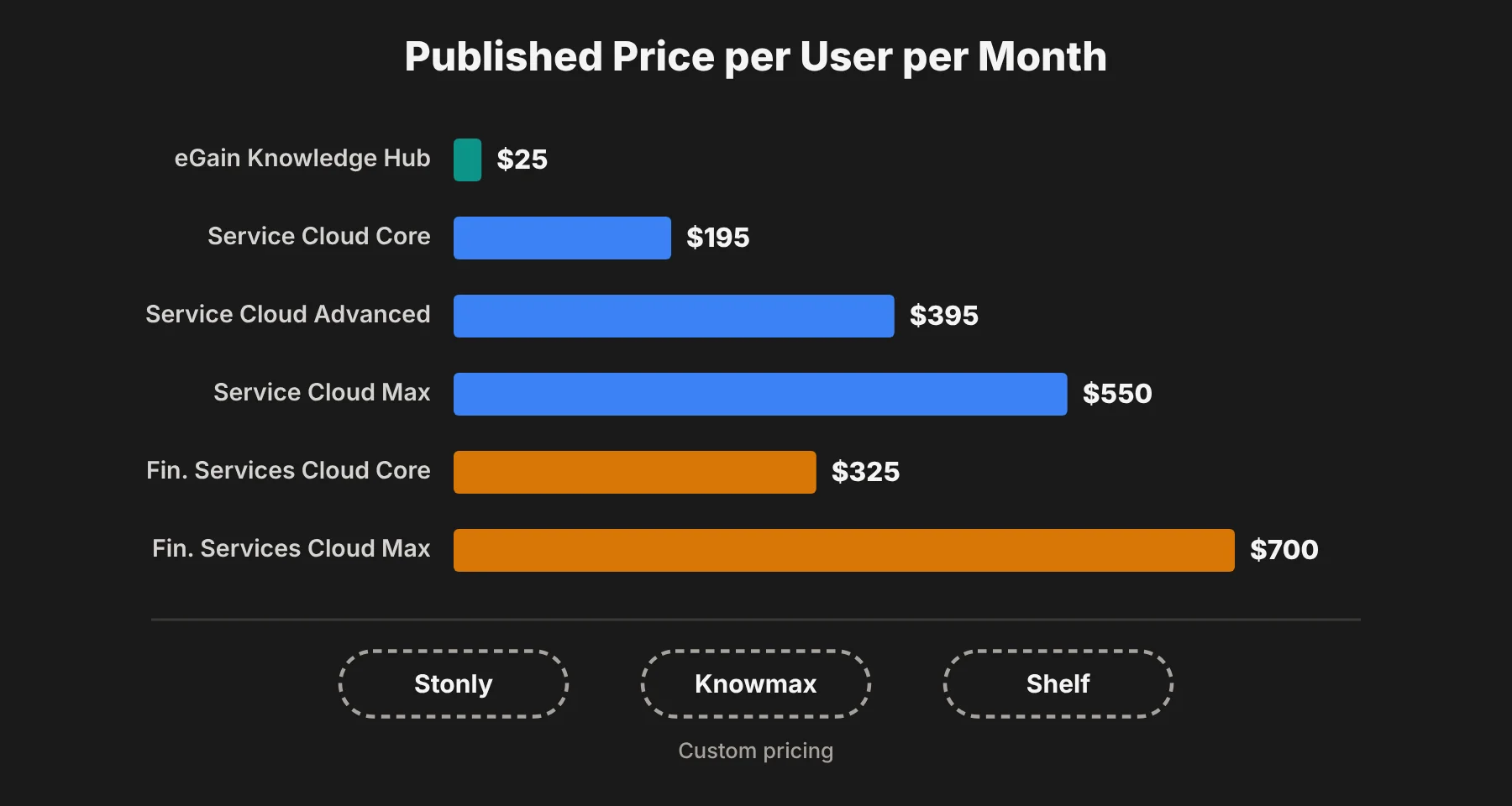 eGain's knowledge hub starts at $25 per user per month, though connectors add more. Salesforce's per-user prices are much higher, but they cover a full customer service platform, not just knowledge.
Stonly, Knowmax and Shelf all use custom quotes. That usually means pricing depends on users, guide views or content volume, so I'd ask each vendor for a quote based on the same number of agents and customer sessions.
If your team is also weighing AI tools that search across all company apps, not just a knowledge base, my guide to enterprise search platforms with AI agents covers that side of the market.
Matching the platform to your situation
Your reps and customers need the right answer in the moment, inside the tools they already use. Stonly is built for this. It delivers adaptive guidance to employees in their help desk and internal tools, and to customers inside your website and apps, from one source that updates everywhere at once.
Your contact center runs on scripted procedures across hundreds of agents. Knowmax's decision trees and built-in training are designed to standardize high-volume operations.
Your knowledge is spread across many systems, and you don't know what's outdated or risky. Shelf's automated auditing is built to find and fix those problems at scale.
Your service operation already runs on Salesforce. Salesforce Knowledge keeps everything in one ecosystem, as long as you budget for the editions and add-ons that unlock editing and AI.
You want an established enterprise vendor with a long certification list. eGain brings decades of knowledge management experience and security credentials that reach public-sector standards.
Knowledge base for banks: FAQs
What is a knowledge base for banks?
A knowledge base for banks is a central, approved library of policies, procedures, product details and answers that staff and customers use. In banking, it usually adds governance features like approval workflows, version history and audit trails, so the institution can prove which answer was live at any time.
Why do banks need a dedicated knowledge base?
Banks deal with frequent rate, product and regulation changes, and wrong answers can create compliance risk. A dedicated knowledge base makes sure every branch, agent and customer channel sees the same current answer, and keeps a record of what changed.
What security certifications should a bank knowledge base have?
Most banks ask vendors for a SOC 2 Type II report as part of third-party risk management. ISO 27001, PCI DSS and, for some public-sector work, FedRAMP are also common. All five platforms in this guide list SOC 2.
Can a knowledge base help customers as well as staff?
Yes. Platforms like Stonly, Knowmax and eGain offer customer-facing help centers, guided walkthroughs and AI answers inside websites and banking apps. That can reduce calls about loan applications, account setup and digital banking features.
How much does a knowledge base for a bank cost?
It varies widely. eGain's AI Knowledge Hub lists at $25 per user per month, while Salesforce Service Cloud starts at $195 per user per month. Stonly, Knowmax and Shelf use custom pricing, so you'll need a quote.
What's the difference between a knowledge base and a help desk?
A help desk manages tickets and conversations. A knowledge base stores the approved answers and procedures that agents and customers use to resolve them. Some tools, like Stonly, focus on knowledge and connect to a separate help desk like Zendesk or Salesforce.