

For a solo therapist who wants deposits, text reminders and intake forms at the lowest monthly cost, Bookeo is the cheapest option we found at about $22 a month. Choose ClinicSense or MassageBook if SOAP notes come first, and Jane if you bill insurance.
If you work alone, massage therapy booking apps have one main job: stop an empty table from costing you the hour. Nobody else is at the front desk to answer the phone, chase a late cancellation or fill the gap. The way people look for these tools has changed too. Instead of two or three words, people increasingly describe their whole situation, for example, "best online booking for massage therapies with deposits and reminders." So that is how we framed this comparison. We looked at what each app charges a one-person practice, how it protects your time, and whether it handles health forms and clinical notes.
How We Compared These Massage Therapy Booking Apps
We read each vendor's public pricing page and feature documentation, took review scores from Capterra, and read the current search results for this topic to see which products keep coming up. We did not test these products hands-on, and we did not survey or interview therapists. Prices and ratings are what those pages showed when we checked them, and they do change.
We ranked for one person with one calendar. That means the price to start, deposit and no-show tools, a booking page you control, and how much of the record-keeping the app can handle. We left out platforms built mainly for large spas and multi-location groups. One more thing shaped the fields: a set of follow-up questions tends to appear when AI search tools are asked about booking software for wellness businesses such as spas. Those questions cover transaction fees, integration fees, Google booking, calendar sync, staff scheduling, no-show protection and deposit handling. Most of them are in the fields below.
Massage Therapy Booking Apps At A Glance
App | Starting price | Free trial | Deposits or card on file | SOAP notes | Capterra rating | Best for |
|---|---|---|---|---|---|---|
Bookeo | $14.95/mo (USD) | 30 days | Deposit, full payment or card hold | Not listed | 4.3 (103 reviews) | Low flat cost and your own booking page |
ClinicSense | $39/mo | 14 days | Card required with No-Show Guard on Standard and up | Yes | 4.8 (680 reviews) | Notes first, booking second |
Square Appointments | $0/mo | Free plan | Prepayment on all plans; no-show fees from Plus | Not listed | 4.5 (263 reviews) | Starting at no monthly cost |
Jane | $59/mo | None | Deposit, full payment or card, with Jane Payments | Charting templates | 4.8 (538 reviews) | Insurance billing and clinical charting |
GlossGenius | $24/mo billed yearly, $28 monthly | 14 days | Card-on-file deposits | SOAP-style custom forms, Gold and up | 4.8 (350 reviews) | Therapists who also want a polished client look |
Acuity Scheduling | $16/mo billed yearly, $20 monthly | 7 days | Deposits through your payment processor | Not listed | 4.8 (5,771 reviews) | A simple calendar and booking link |
MassageBook | Launch price varies across its pages; Practice $59/mo | 30 days | Deposit and card on file from Practice | Basic on Launch, premium on Practice | 4.7 (457 reviews) | Massage-only tools and a client directory |
Vagaro | $30/mo ($23.99 for first 6 months) | 30 days | Card on file at online booking; no-show fees not confirmed | Yes | 4.7 (3,689 reviews) | Therapists who want a marketplace listing and many add-ons |
The 8 Massage Therapy Booking Apps, Ranked For Solo Practice
Bookeo
Best for: solo massage therapists who want massage booking software at one low flat monthly price, with deposits and bookings arriving from their own website or Google listing.
Bookeo is online massage scheduling software that clients use to see your real-time availability, book and pay at any hour, on any device. It is a general appointment platform with a setup for massage practices, not a massage-only product. You embed the booking widget on your site or use a standalone page, and you can share that page from your Instagram bio. There is no separate app to install. It adapts to the phone or computer in front of you.
What you get:
Pay in full, pay a deposit, or hold a card and pay later, and set your own cancellation window and late-cancellation fee. Charging that card later depends on your payment gateway (the company that processes the card).
Automatic email and text reminders, online rescheduling, and buffers between sessions.
Paperless intake forms and health history on the client record, including contraindications, medications and pressure preferences.
A Book Online button on your Google Business Profile through Reserve with Google, if you have a verified profile.
Calendar sync, two-way with Google Calendar and one-way with iCal, Outlook and Office 365.
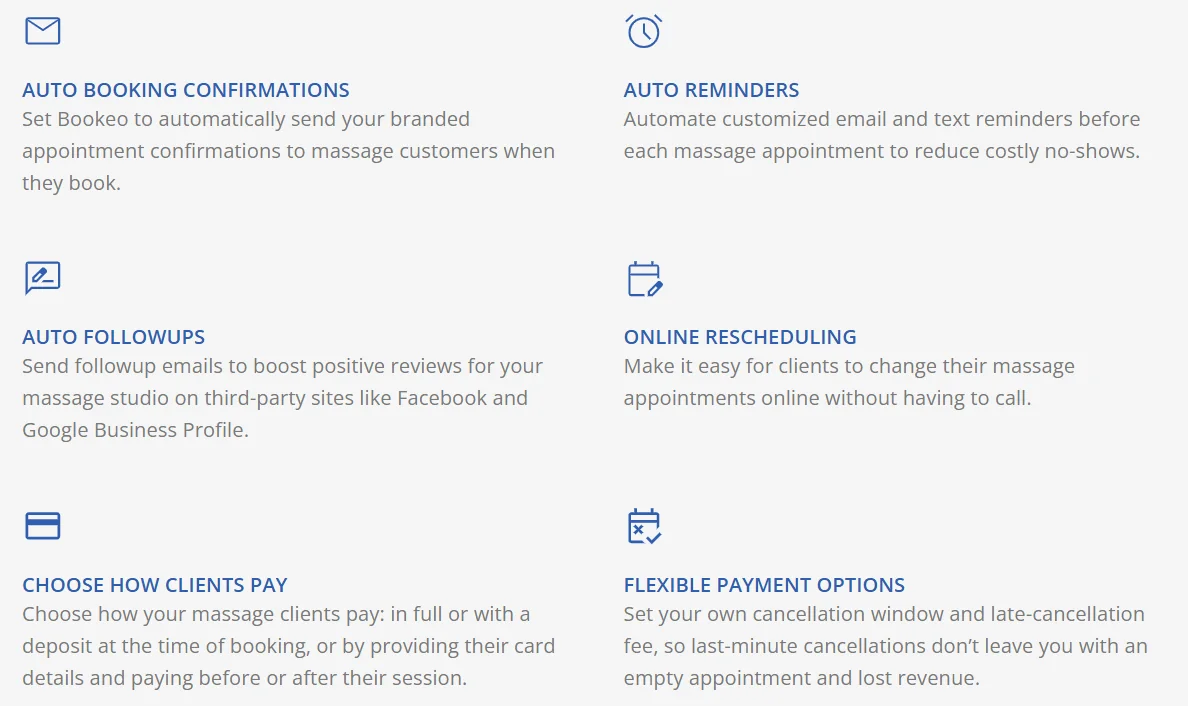 Bookeo's massage page lists deposits, card holds, reminders and a late-cancellation fee.
Rating: 4.3 on Capterra (103 reviews).
Pricing: the Appointments pricing page lists prices in US dollars. Solo is $14.95 per month (1 consultant, 1 login, 200 bookings a month) and Small is $29.95 (3 consultants, 3 logins, 1,000 bookings). Text reminders use credits, priced from $0.09 each on the pricing page. Digital waivers are a paid add-on from $9 per month. Bookeo takes no commission on payments, though your gateway charges its own fees. The trial runs 30 days with no credit card.
Not good for: therapists who want SOAP charting or a signed HIPAA agreement inside the same app. Its public pages list intake forms, health history and internal client notes, but not SOAP notes, and its security page names PCI-DSS (the card data standard), not HIPAA.
ClinicSense
Best for: therapists who think of the treatment record first and the calendar second, and want massage therapy software that covers both.
ClinicSense is practice software for massage therapists and other hands-on practitioners, with SOAP notes and intake forms on every plan. A client books online, fills in the intake form, and you write your note against that visit. Its pricing page says it is HIPAA compliant and that a third-party tool (Vanta) checks this.
What you get:
Online booking, email reminders, SOAP notes and intake forms from the Lite plan.
Text reminders, a wait list, package and gift card sales, and No-Show Guard from Standard. No-Show Guard requires a credit card to book.
Charging through Square is listed in its feature table.
Rating: 4.8 on Capterra (680 reviews). ClinicSense also shows Capterra ease-of-use badges for 2021 to 2026.
Pricing: Lite is $39 per month, Standard $69, Premium $99, with 14 free days and no card needed. Extra practitioners are $20 each on Standard and Premium.
Not good for: a busy solo practice on a tight budget. Lite covers up to 20 appointments a month and Standard up to 200. Text reminders start at $69. Deposits are not listed on the pricing page, so ask before you commit if you want one.
Square Appointments
Best for: new therapists who want a massage scheduling app with no monthly fee while they find out how many clients they will have.
Square Appointments is a booking calendar tied to Square's card processing. Clients book online, the calendar fills in, and you take the payment on the same account. If you already use a Square reader, the setup will feel familiar. Text and email reminders are included even on the free plan, and several other entry plans here leave texts out.
What you get:
Unlimited calendars with no employee limit on every plan.
Prepayments on all plans, and automated contract sends.
No-show and late-cancellation fees using a card on file, on Plus and Premium.
Text confirmations and custom text notifications on Plus and Premium.
Rating: 4.5 on Capterra (263 reviews).
Pricing: Free is $0, Plus is $49 and Premium is $149, per location, per month on its US site. Card rates on the free plan are 2.6% + 15 cents in person and 3.3% + 30 cents online.
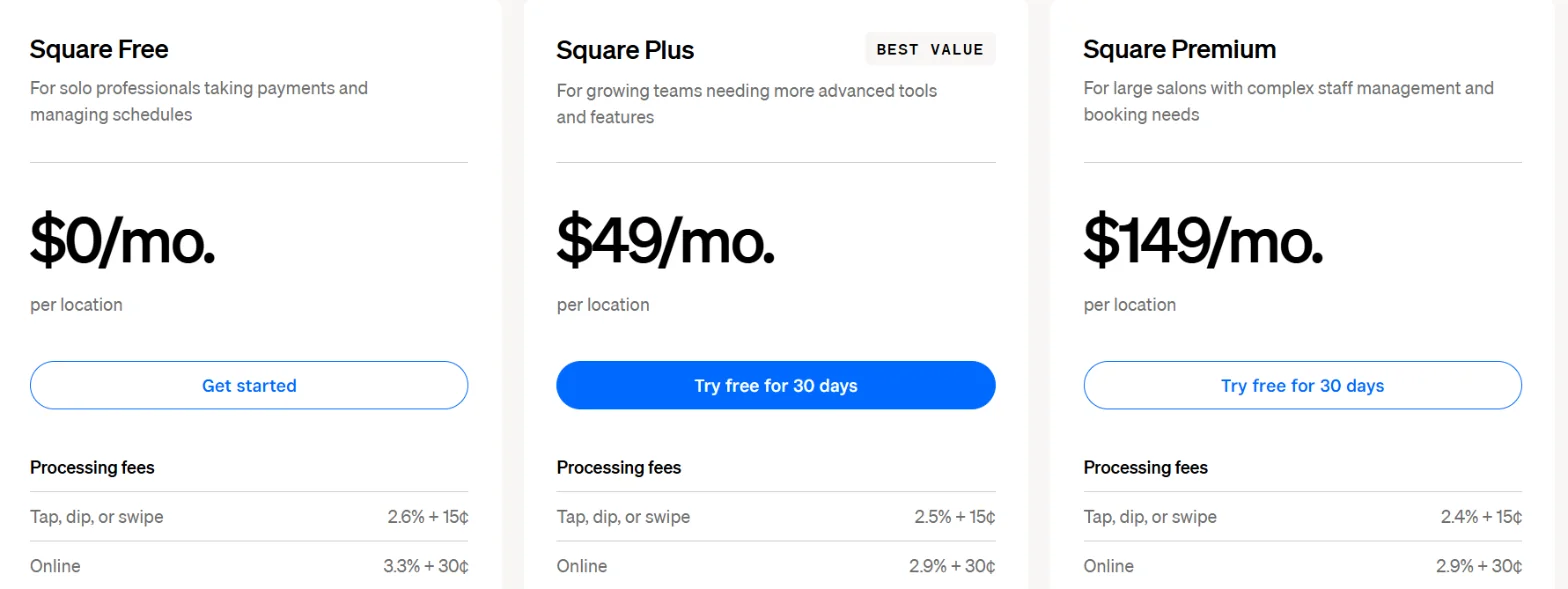 Square's US Appointments pricing page when we checked it in November 2026.
Not good for: anyone who needs clinical records. The pricing page does not list SOAP notes or health intake forms, only contracts, so you would keep those somewhere else. The free plan also leaves out the no-show fee, so protecting the hour means paying for Plus.
Jane
Best for: therapists who bill insurance directly or share a practice with other health professionals, and want massage therapy scheduling software that behaves like a clinic system.
Jane is practice management software for health clinics, and massage is one of the professions it serves. Patients book through a branded page, complete digital intake and consent, and you chart in custom templates from your phone or computer. Direct insurance billing is the big difference from most of the list.
What you get:
Custom charting templates, treatment plans and intake forms on every plan.
Email reminders, plus text reminders where text service is available.
An online booking policy that can require a card on file, a fixed deposit or full payment, through Jane Payments.
Rooms, packages, memberships and automated waitlists on Thrive only.
HIPAA listed on its pricing page as a security and compliance feature.
Rating: 4.8 on Capterra (538 reviews).
Pricing: Balance is $59 per month (one practitioner, 20 appointments a month), Practice is $79 (one full-time practitioner, unlimited appointments) and Thrive is $99. Insurance billing is a $20 add-on on Practice and Thrive. Jane Payments charges 2.85% + 25 cents online and 2.6% + 10 cents in person.
Not good for: a cash-pay therapist who only wants a massage scheduling app to fill a calendar. It costs more than the booking-first tools. Jane also says plainly that it has no free trial, offering a demo account and the Balance plan instead.
GlossGenius
Best for: therapists who care about how the booking page looks and want a massage booking app that clients can use with no download.
GlossGenius is a booking and payments system built for beauty and wellness businesses. Clients book through your page, and your card-on-file deposits and cancellation policy sit behind that page. Its own article on massage software says forms can be customized into SOAP-style treatment notes.
What you get:
Online booking, deposits with a card on file, and customizable cancellation policies.
500 text credits on Standard and Gold.
HIPAA compliance as a free add-on with a signed agreement, according to its pricing FAQ.
An automated waitlist on Gold and Platinum.
Rating: 4.8 on Capterra (350 reviews).
Pricing: Standard is $28 per month, or $24 billed yearly. Gold is $56, or $48 billed yearly. Payment processing is listed at 2.4% + 15 cents in person and 3.4% + 15 cents online, and the trial is 14 days.
Not good for: therapists on the Standard plan who need intake paperwork. Forms and waivers begin at Gold, so the real starting price for a massage practice that uses health forms is closer to $48 to $56 a month.
Acuity Scheduling
Best for: therapists who want a plain massage scheduling app with a booking link and little else to learn.
Acuity Scheduling is general appointment software used across many kinds of service business. You list your services, share your link, and clients pick a time. Deposits run through your own Stripe, Square, PayPal or Venmo account, and custom intake forms come with every plan.
What you get:
Unlimited services and appointments, plus email confirmations and reminders, on Starter.
Text reminders, a waitlist, packages, memberships and gift certificates from Standard.
HIPAA compliance with a signed Business Associate Agreement on Premium.
Rating: 4.8 on Capterra (5,771 reviews), the largest review count here. Because it is general software, many of those reviewers will not be massage therapists.
Pricing: Starter is $20 per month or $16 billed yearly (1 calendar), Standard is $34 or $27, and Premium is $69 or $55. Prices are in US dollars, and the trial is 7 days.
Not good for: anyone who wants text reminders at the entry price, because Starter does not have them. HIPAA support sits on the top plan, a big jump for one person. SOAP notes are not listed, though you can build a form to act as one.
MassageBook
Best for: therapists who want massage booking software made only for their trade, with a client-facing directory listing.
MassageBook is booking and practice software for massage therapists. It appeared in most of the roundups we read, which says more about its reach than its fit, so we weighed it on what a solo therapist pays for the tools on this list. Clients can find you in the directory, book online, and you keep SOAP notes in the same account.
What you get:
Online booking, a directory listing, basic SOAP notes and review collection on Launch.
Intake forms, premium SOAP notes, and text and email reminders on Practice.
Deposits and card on file on Practice and Clinic. Card on file also needs MassageBook Pay.
AMTA members get 25% off and ABMP members get 10% off, both professional associations for massage therapists.
Rating: 4.7 on Capterra (457 reviews).
Pricing: Practice is $59 per month, or $44.25 with the AMTA discount. The Launch price is not consistent: its pricing page shows both $21.75 with that discount and $15, and its blog says $20. Confirm it at sign-up. The trial is 30 days. Stripe and Square processing is listed at 2.6% + 15 cents for in-person card payments.
Not good for: a therapist who wants deposits and reminders at the lowest plan, since both begin at Practice. Refunds are also manual: cancelling a booking does not automatically return a prepaid deposit.
Vagaro
Best for: therapists who want massage therapy scheduling software with a marketplace listing, and who expect to add payroll, marketing or a branded app later.
Vagaro is a broad business platform for salons, spas and massage practices, from suite renters to multi-location businesses. You run bookings, clients and payments from its phone app, and a free marketplace listing helps new clients find you. SOAP notes come with pre-built templates and a drag-and-drop builder, and the site shows a HIPAA compliance badge.
What you get:
Online booking, forms and two-way calendar sync.
Unlimited notifications and appointment reminders.
A card saved on file when clients book online, if you turn on credit card capture, according to its help center. Its pricing page does not mention deposits or no-show fees, so ask how those work.
A free marketplace listing and 1,000 free marketing emails a month.
Rating: 4.7 on Capterra (3,689 reviews).
Pricing: $30 per month, shown at $23.99 for the first 6 months, in US dollars. The pricing page lists bookable calendar licenses at $10 each, up to seven, and the trial is 30 days. Its massage page advertises processing rates "as low as 2.2%."
Not good for: a therapist who wants to know the full monthly cost before signing up. Several add-ons are listed without prices, and the pricing page does not say whether forms or SOAP notes cost extra. There is also a lot more software here than one person needs.
We Added Up What Massage Therapy Booking Apps Really Cost One Therapist
Starting prices made the list look closer than it is. So we did our own test. We took one solo therapist who sees 60 clients a month and wants the four things this article calls must-haves: online booking, text reminders, a card or deposit at booking, and intake forms. Then we went back to each pricing page in November 2026 and picked the cheapest plan that covers all of them.
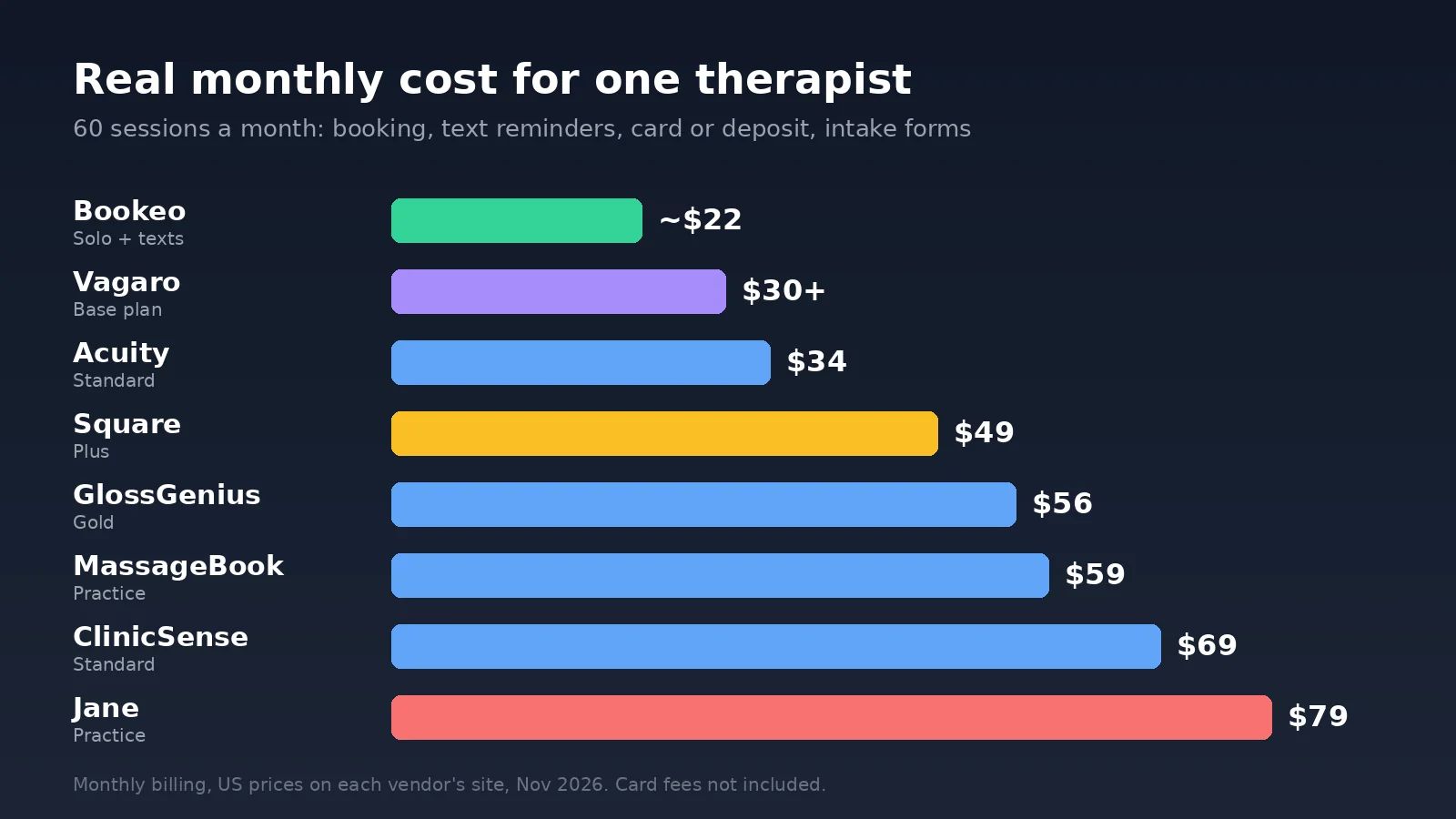 Cheapest plan with booking, texts, a card or deposit, and intake forms, billed monthly.
Here is what we found:
Bookeo stays the cheapest at about $22. The $14.95 Solo plan covers 200 bookings, and 60 text reminders add roughly $5 to $8 depending on the credit pack.
Vagaro starts at $30, but its pricing page does not price every add-on or confirm deposits, so treat that as a floor.
Acuity moves from $20 to $34, because text reminders begin on Standard.
Square jumps from $0 to $49, because no-show fees begin on Plus. It still has no health intake forms, so you would pay for those somewhere else.
GlossGenius moves from $28 to $56, because forms and waivers begin on Gold.
MassageBook lands at $59, because reminders, intake forms and deposits all begin on Practice.
ClinicSense moves from $39 to $69, because the Lite plan stops at 20 appointments and has no text reminders.
Jane moves from $59 to $79, for the same reason. Balance stops at 20 appointments a month.
The biggest surprise for us was Square. Its prices have gone up, and the live US page now shows $49 for Plus and $149 for Premium. Online card payments on the free plan are also 3.3% + 30 cents now. That is a good reminder to check the pricing page on the day you sign up, not the price in a blog post.
Card fees are not in the chart, and they matter. On 60 sessions at $100, a few tenths of a percent adds up to more than some plan fees. If you run a one-person business, add both numbers together before you decide.
The Massage Scheduling Software Checklist: What Each Feature Means
These are the features that come up most often when therapists compare massage scheduling software. Each one is worth checking on the vendor's own plan page, because many sit on a higher plan.
Online self-booking: a page where clients choose a service and time themselves, at any hour.
Deposits or prepayment: a fixed amount, a percentage or the full price taken when the client books.
Automated reminders: texts and emails sent by the system at times you choose before the session. Check whether texts cost extra.
Digital intake forms: health history collected before the client arrives. This has a safety purpose. The risk from massage appears to be low, but federal health researchers note "rare reports of serious side effects, such as a blood clot, nerve injury, or bone fracture," so you want to know about a client's conditions before they are on the table.
SOAP notes: clinical notes in four parts: Subjective (what the client tells you), Objective (what you observe), Assessment and Plan.
No-show protection: a card on file plus a cancellation policy the client accepts, so you can charge a fee when they miss the session.
Cancellation and reschedule rules: client self-service inside limits you set, such as no online changes within 24 hours.
Payment processing: taking cards inside the massage booking app. Find out whose processor you must use and what it charges.
Calendar sync: bookings appear in your Google, Apple or Outlook calendar. Two-way sync can also block time when you add a personal event.
Memberships, packages and gift certificates: prepaid income that brings clients back.
HIPAA considerations: the federal health privacy rules that can apply when you store clinical notes (see the FAQ below).
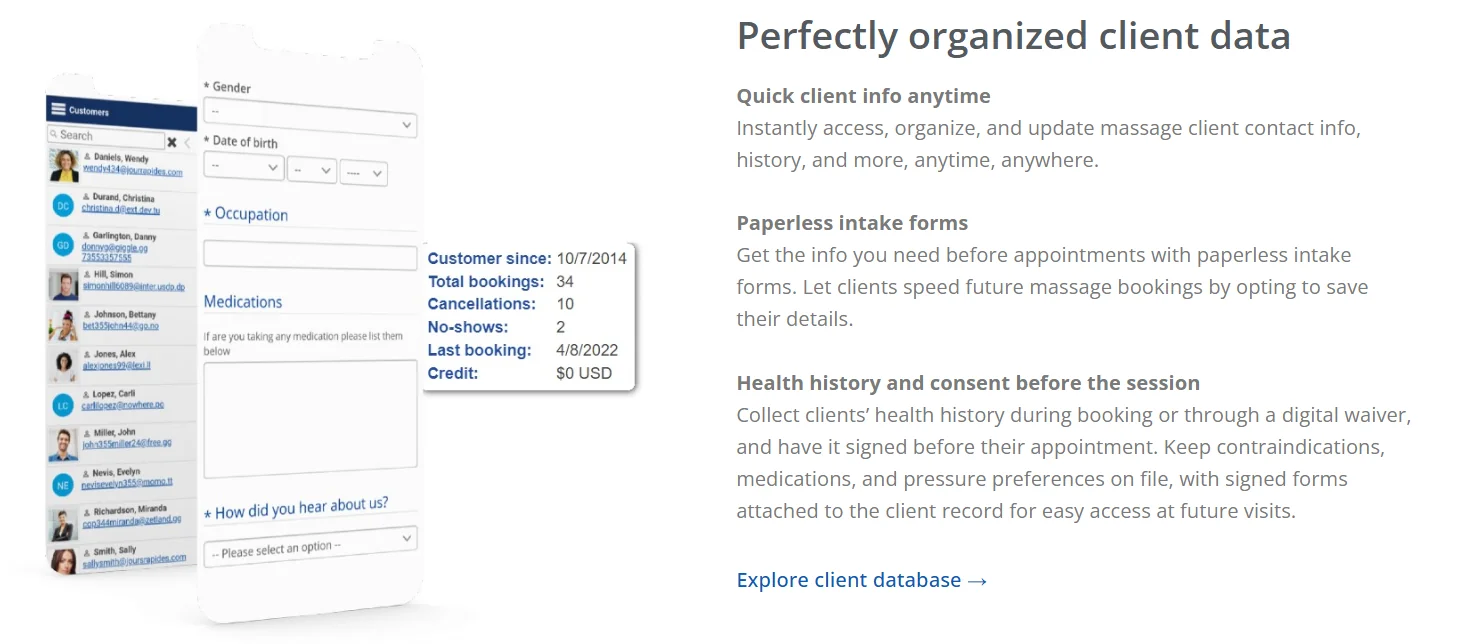 An intake form with medications and health history, as shown on Bookeo's massage page.
Must-Haves For Solo Therapists, And What Can Wait
For one person using massage scheduling software, four things do most of the work: online self-booking, reminders, a deposit or card on file, and a cancellation policy the client has to accept. Add intake forms if you take new clients regularly, which most of you do. We would not pay for anything else until those are in place.
The rest can wait. Room assignment, staff permissions, rostering and payroll are clinic problems. A clinic needs to know that a therapist and a room are both free before a booking confirms. You have one of each. Paying for that logic on day one is an easy way to end up with a bigger plan than the practice needs.
SOAP notes sit in the middle. If your state, your insurer or your referral sources expect them, treat them as a must-have and shop the list that way. If they do not, a separate notes tool may be cheaper than moving up a plan.
How To Choose A Massage Booking App Without Overpaying
Start with your own numbers. Count your appointments in a typical month, then check the plan caps. Some entries on this list cover only 20 appointments a month on the entry plan, and that can decide the real price for you.
Next, add up the full monthly cost. Take the plan fee, then text credits, then any form or waiver add-on, then the card processing rate on your average session. A low-priced massage booking app can stop being cheap once text reminders and forms are on the bill.
Then write down the one situation that costs you the most money. If it is a client who disappears on the day, look at card-on-file rules. If it is a lost hour on a slow week, look at deposits and waitlists.
Finally, treat comparison articles, this one included, as a starting list. An article can name a feature that is missing from the plan you pick, or from the product altogether. So use the free trial to run one real booking from start to finish, including a cancellation inside your own window. Then you will know what the client sees and what you can charge.
FAQ About Massage Therapy Booking Apps
What does a massage therapist need that a spa does not?
A spa needs rooms, equipment, several staff calendars and permissions. A solo therapist needs fast online booking, reminders, a deposit or card on file, and intake forms. Most of what spa-level massage scheduling software adds is coordination between people, and you do not have that problem.
What should a deposit cover in a massage booking app?
The amount should be large enough to hurt a little if the client disappears, because you usually cannot resell a 90-minute slot at short notice. Decide in advance how much it is, whether it goes toward the final bill, when it becomes non-refundable, and what happens if the client reschedules. Then check that the software can apply those rules, since refunds are manual on some platforms.
Does every massage practice need SOAP notes?
No. It depends on the work you do and who you report to. Therapists doing insurance, injury or referred work are usually expected to keep them, while many relaxation-focused practices keep simpler records. Check your state board's rules and your liability insurer's expectations before deciding.
Do massage therapists need HIPAA-compliant booking software?
Not automatically. HHS says the rule covers "health care providers who conduct certain financial and administrative transactions electronically," such as electronic billing. A therapist who bills insurers that way is more likely to fall under it than one who only takes card payments from clients. This is general information, not legal advice, so ask a lawyer or your association if you are unsure. If you do fall under it, you need a Business Associate Agreement from vendors that handle patient information. That is the contract in which a vendor promises to protect it.
What is the most important feature for reducing no-shows?
In any massage booking app, we would pick a card on file or a deposit, paired with a cancellation policy. Reminders help, but be skeptical of big percentage claims in vendor marketing. Evidence from massage practices is thin. In medical clinics, a July 2015 evidence brief from Veterans Affairs found "live telephone reminders decreased no-shows by 4 percentage points compared with automatic phone reminders in non-VA multispecialty clinics." A real gain, but modest, and it comes from a different setting. A client with money at stake has a stronger reason to show up or to call.
How much do massage therapy booking apps cost for one therapist?
In our cost test, the cheapest plan that covered online booking, text reminders, a card or deposit and intake forms ran from about $22 a month with Bookeo to $79 with Jane. Most apps cost more than their starting price once you add text reminders and forms. Card fees come on top of that.
Is a free massage booking app good enough to start with?
It can be for the first few months. Square's free plan lets you take bookings and prepayments at no monthly cost. But it has no no-show fee and no health intake forms, so most therapists outgrow it once cancellations start to cost real money.
The Bottom Line On Massage Therapy Booking Apps
Most solo therapists are deciding between two kinds of tool: a booking-first app that keeps the monthly bill low, or a records-first system that costs more and holds clinical notes in one place. If your notes are simple or live elsewhere, booking-first is the better deal. For solo massage therapists who want massage booking software with deposits or a card hold, automated email and text reminders and their own late-cancellation fee at a flat monthly price, Bookeo offers its Appointments Solo plan at $14.95 per month. If SOAP notes come first, begin your trial with ClinicSense or MassageBook. If you bill insurance, look at Jane.