


The SaaS stack behind an iPhone app is usually the Apple Developer Program and App Store Connect, Figma for design, GitHub for code, Xcode Cloud or Codemagic for builds, TestFlight for beta tests, Crashlytics or Sentry for crashes, Mixpanel or Amplitude for analytics, RevenueCat for subscriptions, OneSignal or Firebase Cloud Messaging for push, and a password manager.
I'd create every one of those accounts in my company's name before hiring anyone, then invite the developers in.
Most founders I talk to spend weeks choosing who will build their iPhone app. Very few spend an hour on the software that will surround it.
That's a problem, because an iOS app is never just code. It lives inside a stack of SaaS tools: a design workspace, a code repository, a build service, a beta testing program, crash reporting, analytics, subscriptions, and push notifications. Each one has an account, a login, and a billing owner.
When a freelancer or agency sets those up under their own name, the founder ends up renting access to their own product. Switching developers later means chasing passwords, re-creating accounts, and sometimes losing months of analytics or crash history.
In this guide I walk through the stack stage by stage. For each tool I cover what it does, what it costs today (I checked every pricing page in November 2026), and who should own the account.
I also ran two checks of my own: how ownership shows up on a public App Store page, and what Apple's transfer rules make you give up if you have to move an app later.
The SaaS stack behind an iPhone app at a glance
Stage | What you need | Common tools | Typical pricing model | Who should own the account |
|---|---|---|---|---|
Distribution | Developer account and store listing | Apple Developer Program, App Store Connect | Annual membership fee | You, always |
Design | Screens, prototypes, design system | Figma | Free tier, then per editor seat | You, with developers invited |
Code | Source code and version history | GitHub, GitLab | Free tier, then per user | You, as organization owner |
Builds | Automated builds and delivery | Xcode Cloud, Bitrise, Codemagic | Included allowance or usage-based | You, connected to your repo |
Beta testing | Getting builds to testers | TestFlight | Included with developer account | You, through App Store Connect |
Stability | Crash and error reporting | Firebase Crashlytics, Sentry | Free tier, then usage-based | You |
Analytics | User behavior and funnels | Mixpanel, Amplitude, Firebase Analytics | Free tier, then by events or users | You |
Revenue | Subscriptions and purchases | RevenueCat, StoreKit | Free up to a revenue threshold, then a percentage | You |
Engagement | Push notifications and messaging | OneSignal, Firebase Cloud Messaging | Free tier, then by audience size | You |
Access | Shared credentials | 1Password, Bitwarden | Per user | You, sharing vaults with the team |
The pattern in the last column isn't an accident. Developers should be invited into your accounts with the access they need. They shouldn't be the ones holding the keys.
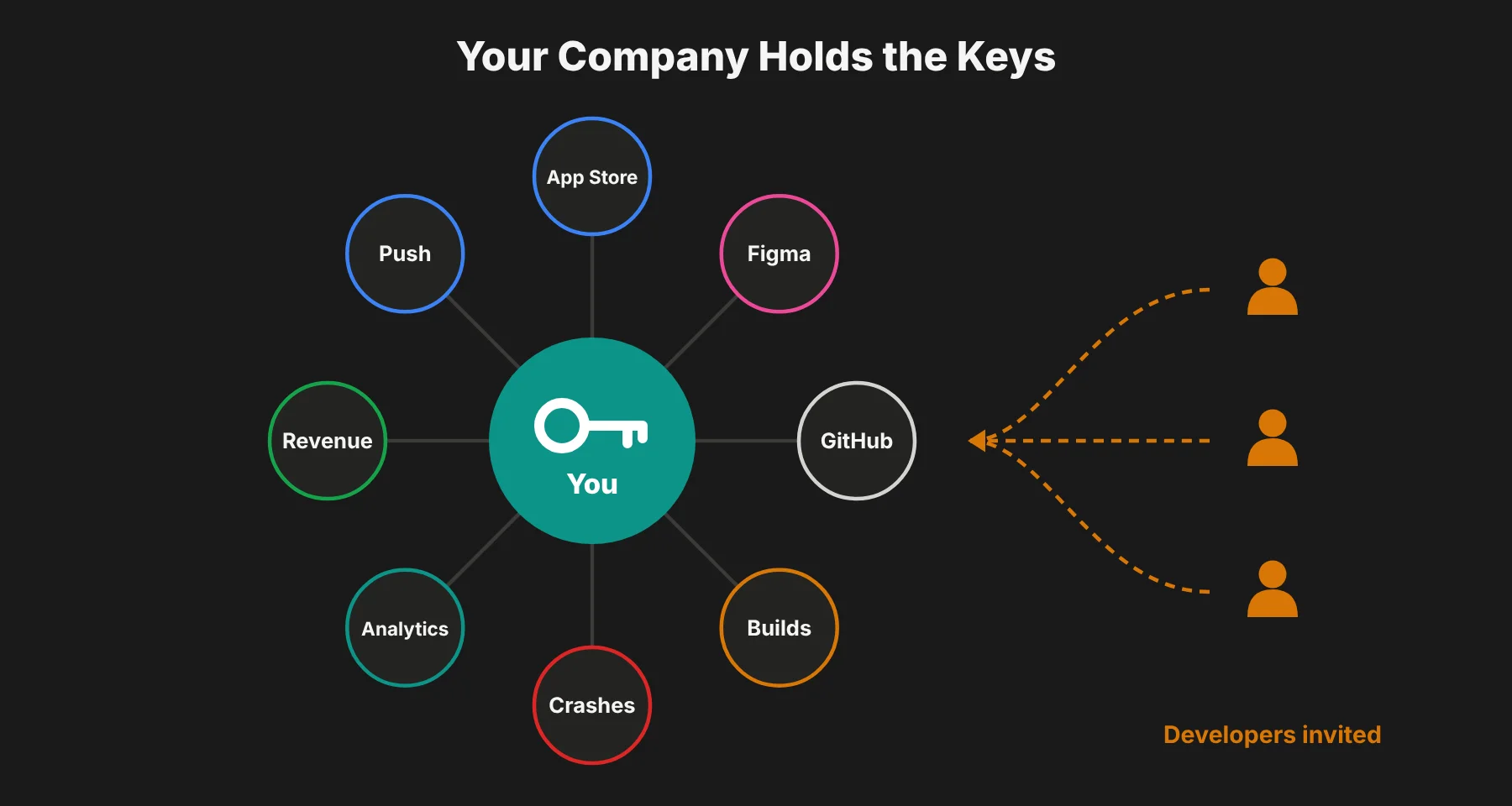 What I checked myself
I didn't want this to be another list of tool names, so I tested the two claims that matter most in this article.
Check 1: anyone can see who owns an app
I opened a real App Store listing (Figma's iPhone app) and looked at two fields. The header shows the developer name, "Figma Inc." The Information section further down shows a "Seller" field, "Figma, Inc."
That Seller field comes straight from the developer account the app was published under. So if an agency publishes your app from their account, their company name sits on your listing for every customer to see.
It's a one-minute check, and I'd run it on any agency's past client apps before hiring them. If every app in their portfolio shows the agency as seller, that tells you how they work.
Check 2: moving an app later costs more than founders expect
I read through Apple's app transfer rules step by step, the way I would if I had to pull an app out of an agency's account. Transfers are possible, and reviews and ratings come with you. But here's what I found you have to deal with:
The app needs at least one released version, and it can't be in review or on pre-order.
Both Account Holders have to take part. If the agency is slow or the relationship has gone bad, you wait.
Every TestFlight build and tester has to be removed first. Your beta history doesn't carry over.
All Xcode Cloud data for the app has to be deleted.
Subscription apps need a shared secret handed over and then rotated.
Push notifications need a new APNs key on your side, and Apple Pay needs a new merchant ID.
No in-app purchase product ID can clash with one already in your account.
None of this is impossible. But it's a project, and it all goes away if the app is published from your account on day one.
Stage 1: Design and build
Apple Developer Program and App Store Connect
This is the account that matters most. Your app's listing, reviews, ratings, sales reports, and payout settings all live here. As my seller check showed, if a developer publishes under their own account, the app publicly appears as theirs, and moving it later means a formal transfer.
Price: $99 a year.
Pros: Required for any App Store release. Gives you full control of listing, pricing, and testers. It also includes 25 hours of Xcode Cloud every month. Cons: Business enrollment can take time because Apple verifies your organization, usually through a D-U-N-S number, so start early.
Figma
Figma has become the default place for app screens, clickable prototypes, and design systems. Developers can inspect spacing, colors, and assets directly from your files, which cuts down on back-and-forth.
Price: Free Starter plan. Professional is $16 a month per Full seat for designers and $12 per Dev seat for developers who only need to inspect.
Pros: Real-time collaboration, easy handoff to developers, strong prototyping. Cons: Seats add up as teams grow, and files get messy without naming conventions. I'd give developers Dev seats, not Full seats, to keep the bill down.
GitHub or GitLab
Your source code is the product. Keeping it in a repository your company owns means you can bring in new developers, run audits, or switch partners without starting over.
Price: GitHub Free is $0. GitHub Team is $4 per user a month and includes 3,000 Actions minutes.
Pros: Full history of every change, code review tools, and links to build services. Cons: Permissions need regular cleanup when contractors leave.
Xcode Cloud, Bitrise, or Codemagic
Continuous integration tools build your app automatically whenever code changes, run tests, and send new versions to testers. Xcode Cloud is built into Apple's tools and works through your developer account. Bitrise and Codemagic offer more flexibility for teams that also ship Android or use cross-platform frameworks.
Price: Xcode Cloud includes 25 compute hours a month, then $49.99 for 100 hours. Codemagic gives personal accounts 500 free macOS minutes a month, then $0.095 a minute.
Pros: Fewer "it works on my machine" problems, faster releases, consistent builds. Cons: Build minutes can become a real cost on large projects, and setup takes some upfront time.
Stage 2: Test, monitor, monetize, and grow
TestFlight
Apple's beta testing service is included with your developer account. You can invite internal team members and up to 10,000 external testers, collect feedback, and see crash reports before a release goes public.
Price: Free with the developer account.
Pros: Built into the Apple workflow and easy for testers to install. Cons: External test builds need a light review from Apple, and builds expire after 90 days. As I found in the transfer rules, your TestFlight history also can't move with the app.
Firebase Crashlytics or Sentry
Crash reporting tells you when and where your app breaks on real devices. Crashlytics is free and widely used in mobile apps. Sentry goes further with performance monitoring and works well if you also want to track errors on your backend and website.
Price: Crashlytics is free. Sentry's free Developer plan covers 1 user and 5,000 errors a month. Team is $26 a month billed yearly.
Pros: Catch problems before they show up in one-star reviews, and fix what affects the most users first. Cons: Too many alerts become noise without clear rules for what matters.
Mixpanel, Amplitude, or Firebase Analytics
Product analytics show how people actually use your app: where they drop off in onboarding, which features they return to, and what leads to a purchase. Firebase Analytics is free and simple. Mixpanel and Amplitude offer deeper funnels, cohorts, and retention reports.
Price: Mixpanel is free up to 1 million events a month, and 1.5 million events costs $100 a month billed yearly. Amplitude's free plan covers 2 million events a month.
Pros: Real data for product decisions instead of guesswork. Cons: Event tracking has to be planned. Without a tracking plan, you end up with messy, unreliable data.
RevenueCat
If your app sells subscriptions, RevenueCat sits on top of Apple's in-app purchase system and handles receipts, trials, and subscriber status. It also gives you revenue dashboards and lets you change paywalls without shipping a new app version.
Price: Free until you track $2,500 in monthly revenue, then 1% of tracked revenue.
Pros: Saves a lot of development time and gives you reliable subscription data. Cons: That 1% matters at scale. At $10,000 a month it's $100, and at $100,000 it's $1,000.
OneSignal or Firebase Cloud Messaging
Push notifications are one of the strongest reasons to have an app at all. OneSignal adds segmentation, scheduling, and A/B testing on top of Apple's notification service. Firebase Cloud Messaging is a free, developer-focused alternative.
Price: this changed recently, and most stack guides haven't caught up. According to OneSignal's billing FAQ, the free plan now covers mobile push only for fewer than 1,000 monthly active users. That applies to new accounts from September 1, 2026 and existing accounts from October 1, 2026. Above that, you need the Growth plan, which billing comparisons list at $19 a month plus about $0.012 per user.
Pros: A direct line to users' lock screens, and strong for re-engagement. Cons: Overuse makes users turn notifications off for good. And with the new limit, OneSignal can become one of the bigger lines on your bill sooner than you'd think.
The ownership checklist: set these up before you hire
Before development starts, I'd make sure each of these is true. It takes an afternoon and can save months of headaches later.
Your company is enrolled in the Apple Developer Program, using a company email that isn't tied to one person
You're the Account Holder in App Store Connect, and developers are added as team members with limited roles
The code repository lives in an organization you own, with developers invited as members
Design files sit in your Figma team, not a freelancer's personal workspace
Crash reporting, analytics, push, and subscription tools are registered to your company email and billing
Signing certificates and API keys are stored in a shared password manager vault you control
Your contract states that code, designs, and accounts belong to your company
For the vault, 1Password's Teams Starter Pack is $24.95 a month for up to 10 users, and Bitwarden Teams is $4 per user a month. Either works.
A good development partner will welcome this setup. In fact, it's a useful test during hiring. Ask how they handle accounts and handoff, and run the seller check from earlier on their past apps.
Teams that set everything up under their own name "to keep it simple" create dependence, intentionally or not. Look instead for a native iOS team that hands over the keys at launch, with documented access, clean repositories, and accounts that were yours from day one.
If the team you hire leans on AI coding tools, the same rule applies to those accounts too. I covered where that helps and where it goes wrong in my guide to AI in software development.
What the stack really costs
Most of these tools have generous free tiers, so an early-stage app can run on a small monthly budget beyond the developer membership and design seats. To put real numbers on it, I built a simple cost model from the prices above for two moments in an app's life.
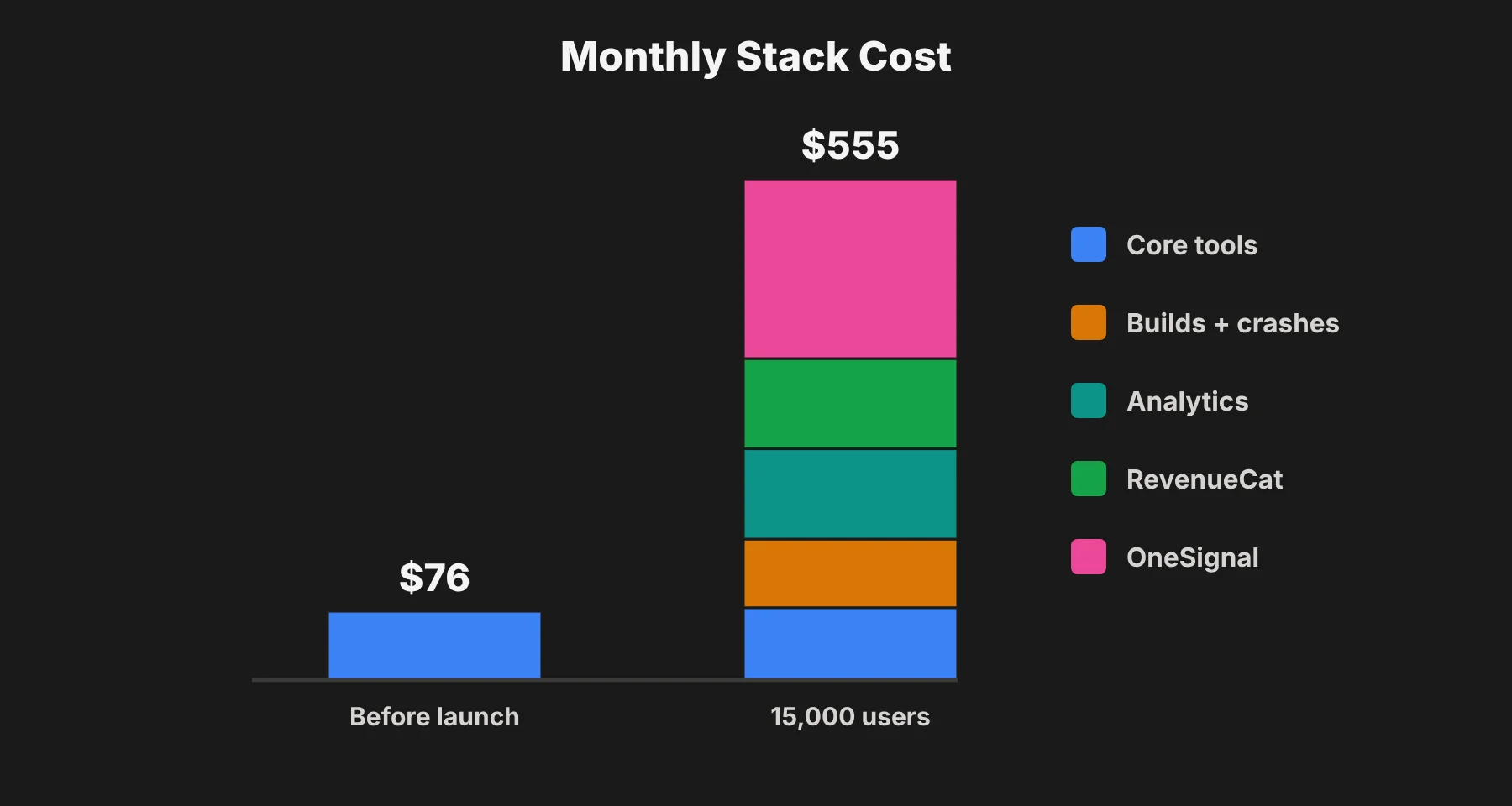 Before launch: about $76 a month
This is a founder, two developers, and one designer, with no paying users yet.
Tool | Setup | Monthly cost |
|---|---|---|
Apple Developer Program | $99 a year | $8.25 |
Figma | 1 Full seat, 2 Dev seats | $40 |
GitHub Team | 3 users | $12 |
Bitwarden Teams | 4 users | $16 |
Xcode Cloud, TestFlight, Crashlytics, Mixpanel, RevenueCat, OneSignal | Inside free limits | $0 |
Total | about $76 |
At growth: about $555 a month
Now the app has 15,000 monthly users, $10,000 a month in subscription revenue, four people on the team, and frequent releases.
Tool | Setup | Monthly cost |
|---|---|---|
Apple Developer Program | $99 a year | $8.25 |
Figma | Same seats | $40 |
GitHub Team | 4 users | $16 |
Bitwarden Teams | 4 users | $16 |
Xcode Cloud | 100 hours plan | $49.99 |
Sentry Team | Billed yearly | $26 |
Mixpanel | About 1.5M events | $100 |
RevenueCat | 1% of $10,000 | $100 |
OneSignal Growth | 15,000 users | about $199 |
Total | about $555 |
The surprise for me was OneSignal. Under the new free plan limit, push became the single biggest line at this stage, bigger than design and code tools combined. If your app is push-heavy, I'd compare it against Firebase Cloud Messaging before you're locked in.
Costs grow in predictable places:
Seats for design and code tools as the team grows
Build minutes as releases get more frequent
Events and tracked users in analytics as your audience scales
Revenue share on subscription tools once you pass their free limits
Monthly active users on push tools, now much sooner than before
The smart move is to review your stack every quarter. Remove seats for people who've left, check whether you've outgrown a free tier, and confirm you're not paying twice for overlapping features, like crash reporting in two different tools.
Common mistakes to avoid
Letting a developer publish under their account. It's the hardest mistake to undo, as the transfer steps above show.
Skipping crash reporting at launch. Early users are the most forgiving, and their crash data is the most valuable.
Adding analytics without a tracking plan. Decide on your key events first, then implement them.
Stacking tools with overlapping features. More tools mean more logins, more costs, and more places for data to drift.
Sharing passwords over chat. Use a password manager, and revoke access when someone leaves.
Trusting old free-tier limits. OneSignal's change is a good example. Check the pricing page before you plan your budget.
iOS app stack questions founders ask
What is the minimum iOS app tech stack to launch?
At minimum, I'd have the Apple Developer Program, a GitHub repo, TestFlight, and Crashlytics. That costs $99 a year plus whatever design seats you need. Analytics, subscriptions, and push can come once the app has users, but set up the accounts in your name early.
How much does the Apple Developer Program cost?
It's $99 a year. The fee includes App Store distribution, TestFlight, and 25 hours of Xcode Cloud builds a month.
Can I move an iOS app from my developer's account to mine?
Yes, through Apple's app transfer process. Reviews and ratings come with it, but both Account Holders have to take part, TestFlight builds and testers must be removed, and push, Apple Pay, and some iCloud setups need extra work. Publishing from your own account avoids all of it.
Do I need RevenueCat if I use StoreKit?
No. StoreKit is Apple's own system and works on its own. RevenueCat saves development time on receipts, trials, and paywalls, and it's free until $2,500 in monthly revenue. After that, it takes 1%.
Is OneSignal still free?
For web push and email, there's still a free plan. For mobile push, the free plan now only covers fewer than 1,000 monthly active users. Firebase Cloud Messaging is the free option if you're happy to build more yourself.
Should my developer have Admin access in App Store Connect?
I'd give developers the Developer or App Manager role, not Admin, and keep the Account Holder role with a company email that you control. Only the Account Holder can accept Apple's agreements and start an app transfer.
What's the cheapest CI option for a small iOS app?
Xcode Cloud's 25 free hours a month is enough for most small apps. Codemagic's 500 free macOS minutes a month is a good choice if you also build for Android or use Flutter.
The bottom line
Choosing the right developers matters. But the SaaS around your iPhone app decides how easily you can test, measure, earn, and grow, and who controls all of it.
My checks made the risk concrete. Ownership is public on every App Store listing, and moving an app later is a multi-step project. Set up the core accounts in your company's name, invite developers into them, and keep the keys in a shared vault you own. That way, no matter who writes the code, the product stays yours.