


AI in software development is now the normal way to work, not an experiment. It writes first drafts of code, explains errors, generates tests, flags problems in code reviews and turns product ideas into clickable prototypes in hours.
But it is not a replacement for developers. It makes mistakes that look correct, it can slow experienced people down, and everything it produces still needs human review.
The short version: use AI for drafts, searches and repetitive work, and keep humans in charge of decisions, security and anything that touches users' money or data.
The Trust Gap Nobody Talks About
Here is the number that changed how I think about this topic.
In Stack Overflow's 2025 Developer Survey of more than 49,000 developers, 84% said they use or plan to use AI tools. But 46% said they do not trust the accuracy of what those tools produce, up from 31% a year earlier.
Google's 2025 DORA report found something similar. According to the 2025 DORA report, about 90% of software professionals now use AI, and over 80% say it makes them more productive. Yet only 24% trust it "a lot" or "a great deal."
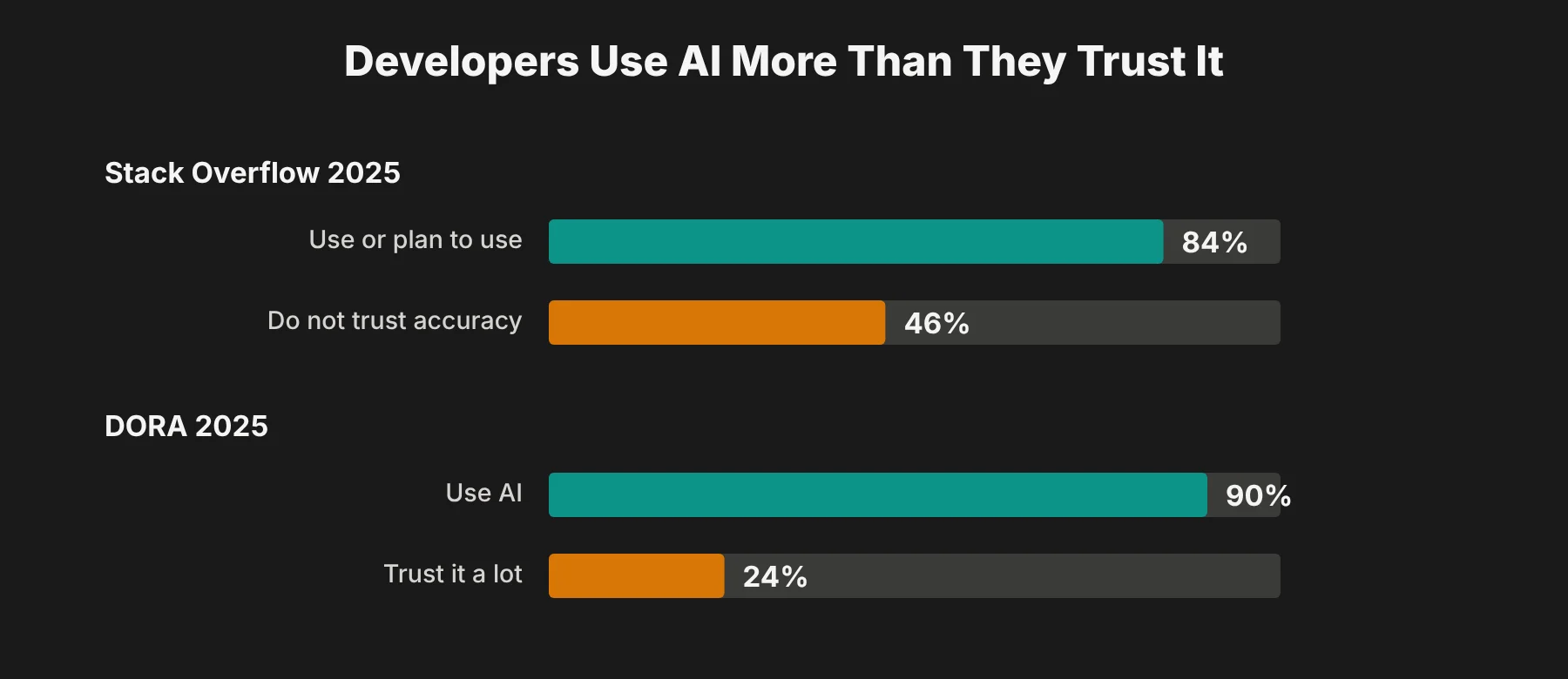 So developers are using a tool most of them do not fully trust. That is not a contradiction. It is the right attitude. AI is a fast, confident assistant that is sometimes wrong, and the teams getting real value from it are the ones who built their process around that fact.
The rest of this guide is about how to do exactly that.
Where AI Fits in the Software Development Lifecycle
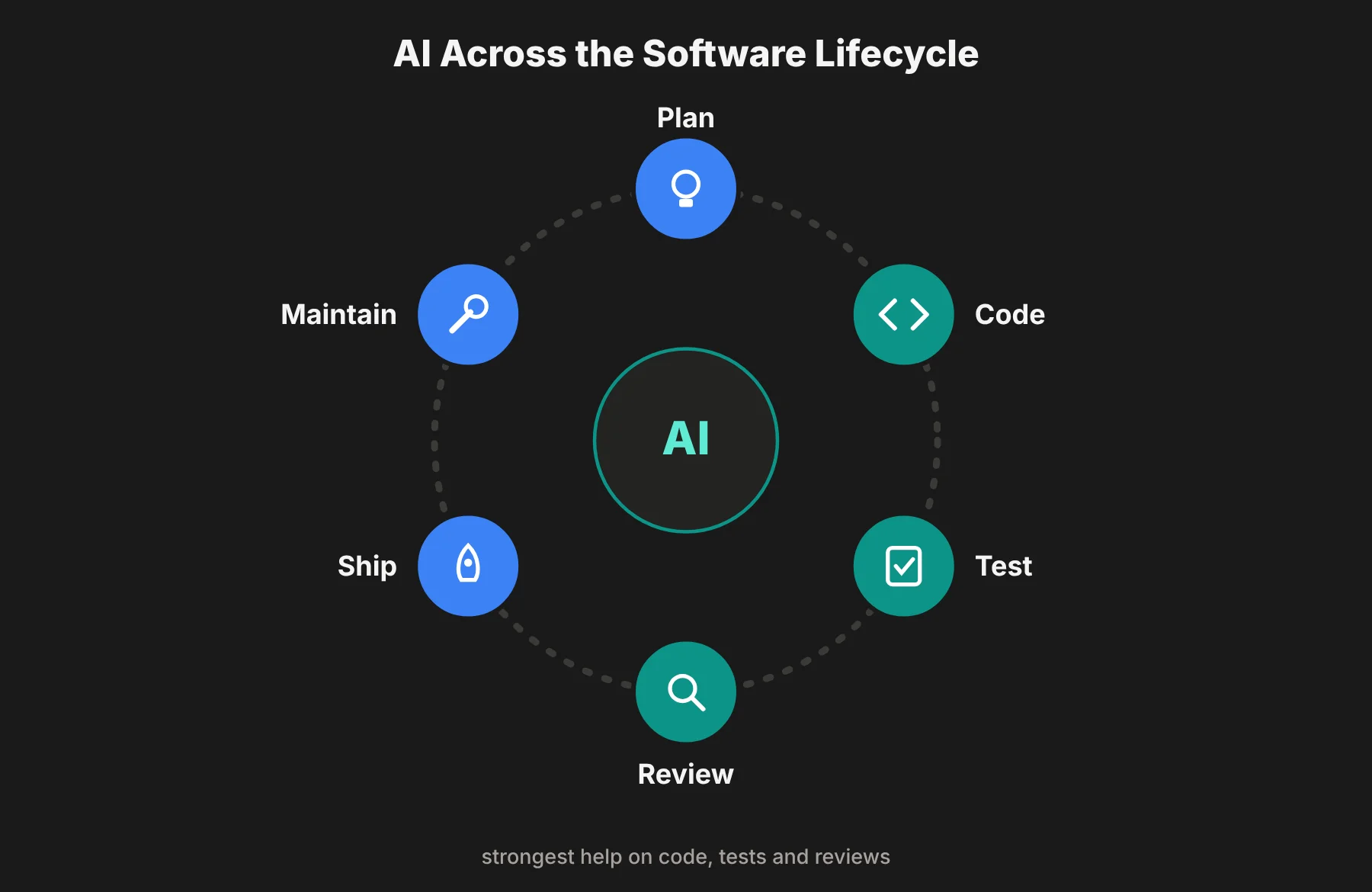
I find it easiest to look at AI stage by stage, because it helps a lot in some places and very little in others.
 Writing Code Faster Without Lowering Quality
This is where most people start. AI coding assistants like GitHub Copilot, Cursor, Claude Code, Amazon Q Developer and JetBrains AI Assistant suggest code as you type, write whole functions from a description, and explain code you did not write.
Where I think they help most:
Boilerplate. Forms, API routes, data models and config files that follow a known pattern.
Unfamiliar code. Asking "what does this function do?" on a legacy file saves real time.
First drafts. A developer building a customer dashboard can get a working rough version quickly, then spend their time on the parts that matter.
Where they struggle: business rules only your team knows, code that spans many files, and anything where "almost right" is dangerous. Treat every suggestion as a draft from a new junior developer. Read it before you keep it.
Finding Bugs Earlier With AI-Assisted Debugging
Debugging used to mean searching through files and logs for hours. Now you can paste an error message and a stack trace into an AI assistant and get a list of likely causes in seconds.
Say a login system starts failing for some users. AI can quickly suggest suspects: an expired token, a time zone mismatch, a session cookie setting. That narrows the search.
But it only narrows it. You still have to test each cause, and you have to check that your fix does not break something else. In Stack Overflow's 2025 survey, 45% of developers said debugging AI-generated code is time-consuming, which tells you AI can create bugs as well as find them.
Improving Test Coverage
AI is good at thinking of test cases a tired human misses. Tools like Diffblue Cover (for Java) and Qodo can generate unit tests, and general coding assistants can write tests on request.
For an online restaurant booking system, AI might suggest tests for booking on a day the restaurant is closed, double-booking a table, or booking for zero guests. Those are edge cases that slip through.
The catch is that AI does not know your business logic. It can write a hundred tests and still miss the one rule your customers care about most. I would use AI to widen test coverage, then have a person check that the important scenarios are actually covered.
Making Code Reviews More Efficient
AI code review tools like CodeRabbit and GitHub Copilot's code review can read a pull request and flag issues before a human looks at it: repeated logic, missing error checks, slow database calls or confusing names.
For example, if a developer adds a feature that loads customer records, an AI reviewer might point out a database call inside a loop, a classic performance problem.
This makes human reviews faster and more focused. It does not replace them. A human reviewer still decides what matters, understands how the change affects the rest of the system, and catches the problems AI does not know to look for.
Maintaining Software More Consistently
Software is never finished. It needs regular updates to fix bugs, close security holes and stay compatible with new systems. I explained the basics of this in my guide to software patching.
AI helps here by explaining old code, spotting risky changes, suggesting fixes for known vulnerabilities and helping teams decide which updates need attention first. Security tools like Snyk and GitHub Advanced Security now use AI to suggest fixes for issues they find.
But I would never let AI push an update on its own when it touches payments, personal data or login systems. Those changes need full testing and a human sign-off before they go live.
Turning Product Ideas Into Prototypes Faster
In my view, this is one of the biggest shifts AI has brought. Tools like v0, Bolt and Lovable can turn a written description into a working web prototype, with screens, sample data and basic flows, often in under an hour.
A team planning a new subscription management feature can show stakeholders a clickable demo of how customers will change plans or view invoices, before a single sprint is spent on it.
Just remember that a prototype is not a product. It usually skips security, accessibility, performance and proper error handling. Plan for real engineering work after the demo, not instead of it.
Designing Around Real User Needs
AI design tools, including the AI features in Figma, can suggest layout variations, write clearer button labels and flag obvious usability problems. That lets designers explore more options quickly.
But a design that looks good is not the same as one that works for real people. In my view, AI should speed up exploration, while real user interviews and usability testing decide what ships. Skipping those to save time usually costs more later.
Understanding Customer Feedback at Scale
Feedback arrives from support tickets, app reviews, surveys and social media. For a growing product, that is far too much to read. AI tools like Dovetail and Productboard can group comments into themes and summarize what customers keep asking for.
For example, a SaaS company might discover that many new users get stuck at the same onboarding step, then redesign that step to keep more of them.
Be careful, though. AI summaries can miss sarcasm, lose context, or turn one loud customer into a "trend." I would always read a sample of the original comments behind any theme before acting on it.
Automating Documentation and Repetitive Workflows
AI is very good at the writing work developers tend to put off: code comments, README files, API documentation and release notes. Tools like Mintlify focus on documentation, and most coding assistants can draft it too.
Two rules I would follow. First, a human approves anything before it is published.
Second, if your team publishes AI-assisted text to customers, like help articles or release announcements, it is worth checking how it reads. An AI checker can flag text that sounds machine-written, so you can rewrite it in your own voice before it goes out.
For automated workflows that can change code or settings, set clear permissions and approval steps so nothing is changed or released by accident.
Making Better Decisions With Product Data
AI can scan product analytics and point out patterns: a feature that suddenly gets less use, a drop in sign-ups on one device, or users who leave after a certain screen.
That is a useful starting point. But correlation is not causation. A drop might be seasonal, a tracking error or caused by something outside your product. Before making a big decision, I would combine what the AI found with customer feedback and a proper test, such as an A/B experiment.
The Speed Paradox: Can AI Make Developers Slower?
This is the part most "AI in software development" guides leave out.
In early 2025, the research group METR ran a randomized study with 16 experienced open-source developers working on 246 real tasks in projects they knew well. Before starting, developers expected AI to cut their time by about 24%.
The result: with AI tools, they took 19% longer.
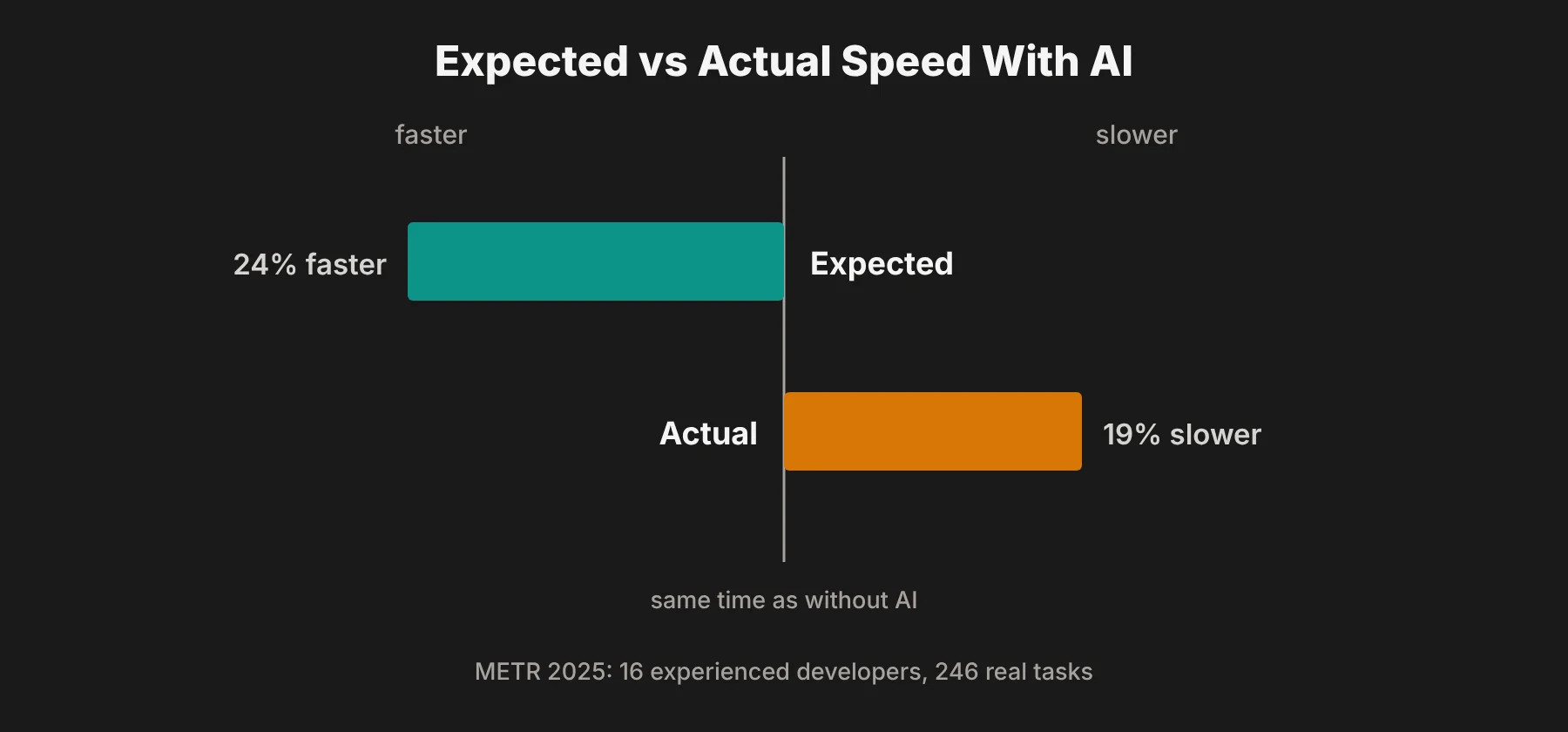 Why would that happen? My reading is that time went into writing prompts, waiting for answers, and checking and fixing code that was almost right. For experts working in a codebase they already know deeply, that overhead can outweigh the help.
The researchers were careful to say this does not prove AI always slows people down, and newer tools may change the picture. But it is a useful warning. Feeling faster and being faster are not the same thing, so measure real results, not impressions.
A Simple Map of AI Tools by Development Stage
Here is how I would group the main tools. These are examples, not endorsements. Test them on your own code before you commit.
Stage | What AI helps with | Example tools |
|---|---|---|
Coding | Suggestions, functions, explanations | GitHub Copilot, Cursor, Claude Code, Amazon Q Developer |
Testing | Generating unit tests and edge cases | Diffblue Cover, Qodo |
Code review | Flagging issues in pull requests | CodeRabbit, Copilot code review |
Security and maintenance | Finding and suggesting fixes for vulnerabilities | Snyk, GitHub Advanced Security |
Prototyping | Turning ideas into working demos | v0, Bolt, Lovable |
Design | Layout ideas, labels, usability hints | Figma AI |
Feedback | Grouping and summarizing customer comments | Dovetail, Productboard |
Documentation | Docs, comments, release notes | Mintlify, coding assistants |
Risks of AI in Software Development
I would not roll AI out across a team without a plan for these five risks.
Security. AI can suggest code with vulnerabilities, outdated libraries or packages that do not exist. Run AI-written code through the same security checks as any other code.
Data leaks. Pasting customer data, secrets or private code into a public AI tool can expose it. Use business plans with clear data policies, and set rules on what can be shared.
Licensing and ownership. AI can produce code that closely matches existing open-source code. Check your tool's settings for filtering matched code, and know your licensing obligations.
Skill loss. Junior developers who always accept AI suggestions may never learn why the code works. Make sure people still understand and can explain what they ship.
False confidence. AI output looks polished even when it is wrong. That is exactly why so many developers do not trust it, and why review steps matter.
How to Start Using AI in Your Team: A 30-Day Plan
If you are a small team or a SaaS business just starting out, this is the order I would follow. It fits well with short, iterative work cycles, the same idea behind the Agile Manifesto principles.
Week 1: Pick one repetitive task. Choose something low risk, like writing unit tests or release notes. Measure how long it takes today.
Week 2: Try one tool on that task. Give two or three developers access and set simple rules on what code and data they can share.
Week 3: Measure the real results. Compare time spent, bugs found later and how much AI output had to be rewritten. Remember the METR result: ask for real numbers, not just feelings.
Week 4: Decide and set guardrails. If it helped, roll it out wider with written rules for review, security checks and approval. If it did not, try a different task, not just a different tool.
Only after one use case works would I add the next. Teams that try to use AI everywhere at once usually end up with more code to review and less clarity about what helped.
Questions Teams Ask About AI in Software Development
Will AI replace software developers?
Not in any way I can see today. AI handles more of the typing, but developers still decide what to build, design how systems fit together, judge trade-offs and take responsibility for what ships. Developers who learn to use AI well will have an advantage over those who do not.
Is AI-generated code safe to use?
It can be, but only after review. AI-generated code can contain bugs, security holes or outdated dependencies. Test it, review it and run it through the same security checks as human-written code.
Which development tasks benefit most from AI?
Based on the research and tool reports I have read, the clearest wins are boilerplate code, explaining unfamiliar code, generating tests, first-pass code reviews, documentation and summarizing customer feedback. Complex design decisions and business rules benefit least.
Does AI actually make developers more productive?
It depends on the task and the developer. Most developers in the DORA 2025 report say AI makes them more productive, but METR's 2025 study found experienced developers took 19% longer on familiar projects. Measure results in your own team rather than assuming.
How can a small SaaS business start using AI?
Start with one repetitive, low-risk task, try one tool for a few weeks and compare quality, time saved and cost against how you work today. Expand only once that first use case clearly works.