


A web page in 1998 that took eight seconds to load was normal. The same page today would lose most of its visitors before it finished.
What changed was not one breakthrough. It was a series of fixes, each solving a specific bottleneck that the previous generation of the web had run into.
I build things for the web, so I find this history useful rather than nostalgic. Every technique below still matters, and understanding why each one was invented tells you which of your own performance problems it actually solves.
So here are the thirteen technologies that made the web fast, in roughly the order they arrived, each solving the bottleneck the last one exposed.
The Web Was Slow for Structural Reasons
To see why each fix mattered, it helps to know what was actually slow.
Early web pages made a separate connection for every file. One request for the HTML, another for each image, each stylesheet, each script.
Every one of those connections carried setup overhead before a single byte of content moved.
The data also traveled the full physical distance to wherever the server lived. A visitor in Karachi loading a site hosted in Virginia waited for every request to cross the planet and back.
And nothing was reused. Return to a page tomorrow and the browser fetched everything again from scratch.
Three problems, then. Connection overhead, physical distance, and no reuse. Almost every performance technology since has attacked one of them.
1. Caching: Stop Fetching the Same Thing Twice
The first big idea was the simplest. If a file has not changed, do not download it again.
The browser cache lets a site tell the browser to keep a copy of a file for a set period. The logo, the stylesheet, the script.
On the next visit the browser reads them from disk instead of the network, which is thousands of times faster.
The server cache attacks a different version of the same waste. Instead of rebuilding a page from the database on every request, the server keeps a ready made copy and serves that.
This is what shapes your server response time, measured as Time to First Byte, or TTFB.
It marks how long the browser waits before the first byte arrives, and a slow one delays everything that follows no matter how well the rest is optimized.
Caching is still the highest leverage performance work available, and it costs nothing to transfer what you never request.
2. CDNs: Move the Files Closer
Caching solved reuse. It did nothing about distance, which is where content delivery networks came in.
A CDN stores copies of your files on servers spread across the world. When someone visits, they are served from the location nearest them rather than from wherever your origin server sits.
The visitor in Karachi now loads from a nearby city instead of another continent. The physics does not change, the distance does.
Cloudflare, Fastly and Akamai built enormous networks doing exactly this, and a CDN is now standard rather than a luxury.
For a global audience it is often the single largest speed improvement available, because latency is dead time that no amount of code optimization recovers.
That same local versus cloud tradeoff decides how other software performs. I dug into it comparing SEO software on Mac, where a native app behaves nothing like one in a browser tab.
3. Resource Hints: Tell the Browser What Is Coming
By default a browser discovers what it needs as it parses the page. It reads the HTML, finds a stylesheet, goes and gets it, finds a script, goes and gets that. Each discovery is a fresh delay.
Resource hints let a page get ahead of that. They are small instructions telling the browser to start work before it would otherwise know to.
Preconnect opens the connection to another server early, so it is ready the moment a file is needed. DNS prefetch does the lookup step ahead of time.
Preload tells the browser to fetch an important file now rather than when it stumbles across it. Prefetch quietly grabs something likely to be needed on the next page.
The gain is timing rather than size. Nothing gets smaller, but the waiting happens in parallel instead of one step after another, which on a page pulling from several domains adds up quickly.
4. Edge Computing: Run the Code Nearby, Not Just the Files
A CDN moved your files closer to visitors. Edge computing moves the work closer too.
The limitation of a plain CDN is that it stores static assets well but sends dynamic content back to your origin server. A personalized page, a logged in view, an API response. Those still made the long trip.
Edge computing runs actual code on those distributed servers. Logic that once waited for a round trip to a single data center now executes at the location nearest the visitor.
So a page that adapts to the user, checks a condition, or assembles a response can do it close by rather than continents away.
It extends the original CDN idea from moving files to moving computation, and it is where much of the current speed frontier sits.
5. HTTPS: The Speed Myth, and Why It Enables the Rest
For years the assumption was that encryption made sites slower, because encrypting and decrypting data takes work.
That stopped being true. Modern encryption is fast, and more importantly the newer protocols that made the web quicker were built to require it.
So enabling HTTPS today does not slow you down. It is the entry ticket to the protocols that speed you up, which is the opposite of the old belief.
6. HTTP/2: One Connection Instead of Many
Here is where a structural problem got a structural fix.
The original HTTP fetched files more or less one at a time per connection. Browsers worked around this by opening several connections at once, but each carried its own overhead, and there was a ceiling.
HTTP/2 changed the model. A single connection now carries many files at once, interleaved, with no waiting in line.
It also compresses the invisible header data sent with every request, which adds up across a page pulling dozens of resources.
The effect was immediate on image heavy and asset heavy pages. All those separate requests stopped queuing and started flowing together.
7. HTTP/3 and QUIC: Fixing the Last Bottleneck
HTTP/2 still sat on top of an older transport layer called TCP, which had a stubborn flaw. If one packet went missing, everything behind it waited, even unrelated files. On a shaky mobile connection that stall was common.
HTTP/3 replaced the foundation. It runs on a new transport called QUIC, built on UDP.
There, a lost packet only holds up the specific stream it belongs to rather than stalling the whole connection.
It also merges the connection and the TLS encryption handshake into a single step, so the conversation starts faster instead of waiting through two round trips.
The result is most noticeable exactly where the old web struggled most, on mobile networks with patchy signal. Adoption has climbed steadily, and it is now a mainstream part of how fast sites are served.
8. Compression: Send Fewer Bytes
Running alongside the protocol improvements was a simpler idea. Make the files smaller before sending them.
Gzip was the long standing default, shrinking text files like HTML, CSS and JavaScript before transfer.
Brotli, developed at Google, went further. It compresses text meaningfully smaller than Gzip at the levels used for files that do not change often, which means less data crossing the wire for the same content.
Compression pairs with everything else. A CDN serving Brotli compressed files over HTTP/3 is three separate ideas stacking into one fast delivery.
9. Image Optimization: Attack the Heaviest Part
For most pages, images are the largest thing by weight. So the formats used to store them matter enormously.
The old standbys, JPEG and PNG, were designed decades ago.
WebP replaced them with noticeably smaller files at the same visual quality, and AVIF pushed smaller still.
Switching a page's images from JPEG to a modern format can cut their weight substantially without any visible difference. On an image heavy page that is often the biggest single saving available.
Responsive images added a second layer, letting a page serve a small image to a phone and a large one to a desktop, rather than sending everyone the largest version and letting the browser shrink it.
10. Lazy Loading: Do Not Load What Nobody Sees
A neat idea that arrived once pages grew long. Do not load images and content that are far down the page until the visitor scrolls toward them.
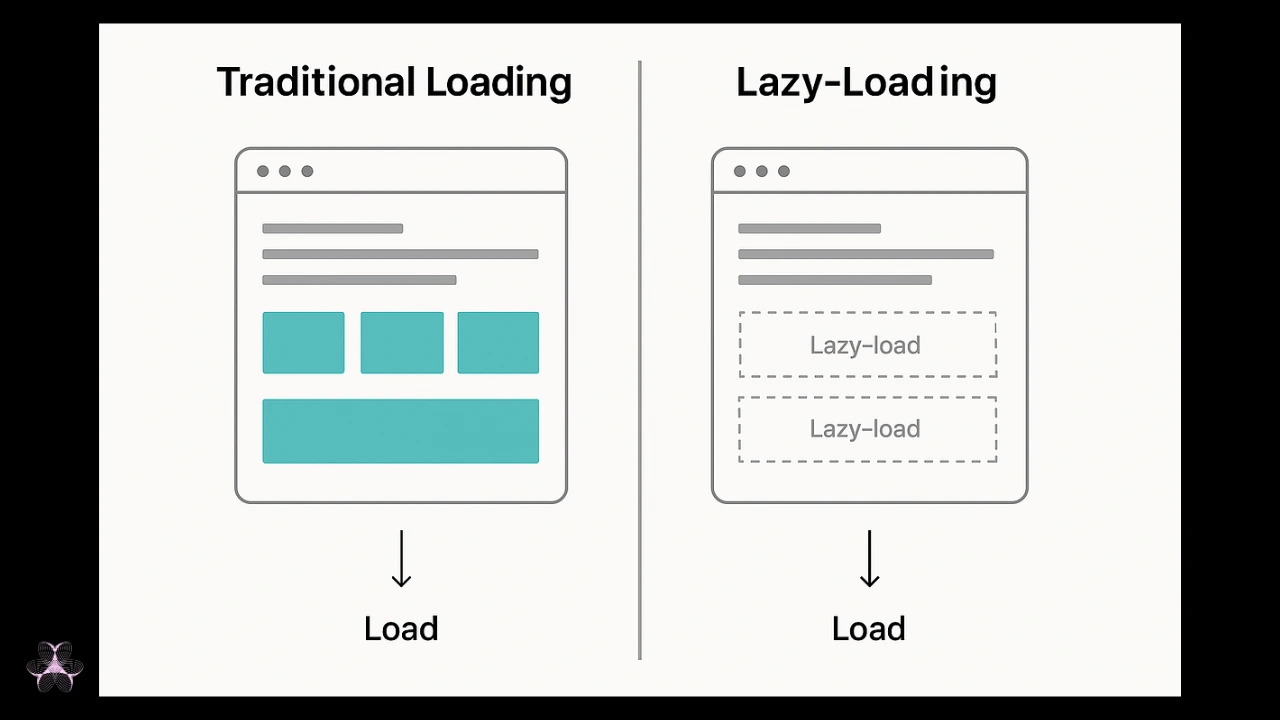 Most visitors never reach the bottom of a page. Loading the whole thing upfront spends bandwidth and time on content that is never seen.
Lazy loading defers those offscreen resources, so the visible part of the page appears faster and the rest arrives just in time. It is now built into browsers directly, needing a single attribute rather than a script.
11. JavaScript Optimization: Ship Less, Run Less
As sites grew more interactive, JavaScript became the new bottleneck, and a subtler one. It is not just about transfer size.
The browser has to parse and run it, which ties up the main thread and can leave a page looking ready while refusing to respond to taps.
A cluster of techniques grew up to manage this.
Minification strips whitespace and shortens names to shrink files. Code splitting breaks a large bundle into pieces so a page loads only the code it needs now.
Tree shaking removes code that is never actually called. Critical CSS inlines the small amount of styling needed for the visible area, so the page can render before the rest arrives.
Asynchronous and deferred loading let scripts load without blocking the page from displaying, which was once a routine cause of blank screens.
These are less glamorous than a new protocol, but on a modern JavaScript heavy site they are often where the real time is won or lost.
12. Server Side Rendering: Send the Page Already Built
The JavaScript problem above created its own answer.
For years the trend ran one way. Send a near empty page plus a large bundle of JavaScript, and let the browser build the content after it arrives.
Flexible, but it meant the visitor waited for code to download, parse and run before seeing much at all.
Server side rendering flips that. The server builds the finished HTML and sends a page that is ready to display immediately, with JavaScript enhancing it afterwards rather than creating it.
Static site generation goes further still, building the pages ahead of time so the server just hands over a finished file, which pairs perfectly with a CDN.
This is exactly why platform choice matters for speed see the best blog platforms compared on cost and fit, from WordPress to Ghost.
This is the shift the web is living through now. After a decade of pushing work into the browser, the fastest modern frameworks are sending leaner, pre built pages again.
That is the most direct fix available for the responsiveness problem that trips up so many sites.
13. Core Web Vitals: How We Started Measuring
You cannot improve what you cannot measure, and for years website performance was measured in vague terms. Google's Core Web Vitals gave the industry a shared, specific vocabulary for web performance.
Three metrics, each targeting a different way a page can feel slow.
Largest Contentful Paint measures loading. It marks when the main content becomes visible, with a good score under 2.5 seconds.
Interaction to Next Paint measures responsiveness. It captures how quickly the page reacts when you tap or click, with a good score under 200 milliseconds.
It replaced the older First Input Delay metric in March 2024, so any guide still naming FID is out of date.
Cumulative Layout Shift measures visual stability. It scores how much the page jumps around as it loads, with a good target under 0.1, and it is why reserving space for images and ads matters.
Google publishes the current thresholds and measurement detail in its Core Web Vitals documentation, which is the reference worth trusting over secondhand summaries.
The detail most articles skip is that these are field measurements. Google grades you on data from real Chrome users at the 75th percentile, not on a lab test from your own fast laptop.
A perfect score in your dev tools means little if a quarter of your visitors on mid range phones get a slow result.
This is also why the metrics matter beyond raw speed. They tie user experience directly to search engine optimization, since a page that frustrates real users now measurably affects where it ranks.
The Metric Most Sites Fail
Worth singling out, because it reflects where the web's current bottleneck sits.
Of the three, Interaction to Next Paint is the one most sites fail. Reporting through 2026 puts the failure rate around 43 percent, higher than the other two combined in many datasets.
The reason is structural, which is why it is hard. Loading problems can often be fixed by compressing an image or adding a cache.
Responsiveness problems usually mean too much JavaScript running on the main thread, and fixing that means changing how the code is built rather than tuning a setting.
That single fact tells you where the web is now. The transfer and delivery problems are largely solved by the technologies above. The remaining frontier is the cost of all the code we now ship.
The Tools That Show You the Truth
A short note on measurement, since the whole field depends on it.
Google's PageSpeed Insights and the built in Lighthouse tool give you both lab and field data for a page. Search Console reports your real Core Web Vitals across the site from actual visitors.
Chrome DevTools lets you profile exactly what the browser is doing, which is where you diagnose a JavaScript responsiveness problem.
Independent tools like GTmetrix and Pingdom add their own testing angles.
The rule worth remembering is the one about field versus lab. A tool testing from a fast connection tells you what is possible. The field data tells you what your actual visitors get, and only the second one affects your ranking.
The Pattern Underneath All Thirteen
Step back and the thirty year story has one shape. Each technology solved the bottleneck the previous generation exposed, then revealed the next.
Connection overhead produced HTTP/2 and HTTP/3. Distance produced CDNs and then edge computing. File size produced Brotli and AVIF. Discovery delay produced resource hints.
And the cost of JavaScript, the bottleneck we are standing in now, is producing the return to server rendered pages.
Notice where that lands. After a decade of moving everything into the browser, the fastest modern web sends leaner, pre built pages again, only now with caching, CDNs, modern protocols and compression all fast underneath it.
The web did not get fast in one leap. It got fast in thirteen, and the next one is already forming around whatever the current frontier exposes.
Frequently Asked Questions
What technologies made the web faster?
Caching, CDNs, resource hints, edge computing, HTTP/2 and HTTP/3, Brotli compression, modern image formats, lazy loading, JavaScript optimization and server side rendering.
What is a CDN and how does it help?
A content delivery network stores copies of your files on servers worldwide, serving each visitor from the nearest location to cut the delay caused by distance.
How does HTTP/3 improve speed?
It runs on a new transport called QUIC, where a lost packet no longer stalls unrelated files, which helps most on unstable mobile connections.
Why is caching important?
It avoids re downloading or rebuilding things that have not changed, and the fastest request is the one you never have to make.
What are Core Web Vitals?
Three Google metrics measuring loading, responsiveness and visual stability, scored from real users, and used as a ranking signal.
Which Core Web Vital do sites fail most?
Interaction to Next Paint, failed by around 43 percent of sites, because fixing it usually means restructuring JavaScript rather than adjusting a setting.
What is lazy loading?
Deferring offscreen images and content until a visitor scrolls toward them, so the visible part of the page loads faster.
Which tools measure website speed?
PageSpeed Insights, Lighthouse, Search Console for field data, and Chrome DevTools, GTmetrix and Pingdom for deeper testing.
The Short Version
The web got fast in layers, and those thirteen technologies are the layers.
Caching stopped needless downloads, CDNs killed distance, HTTP/2 and HTTP/3 fixed connection overhead, compression and modern image formats cut file size, and lazy loading skipped what nobody sees.
Each solved the problem the previous era exposed, and each still applies to your site today.
The current bottleneck is JavaScript, which is why Interaction to Next Paint is the metric most sites fail and the one worth your attention first.
If you want to know where your own site stands, the same principle runs through all of it.
Measure with real user data rather than a lab test, fix whatever is in the poor band first, and remember that the fastest byte is always the one you never send.