


Video Surveillance as a Service, or VSaaS, moves video storage, management and access from a recorder in each building to cloud or hybrid-cloud software. My honest take is that most organizations should not go cloud only. They should go hybrid, and the survey numbers point the same way.
Here is the number that made me want to write this. Genetec's 2026 physical security research found that hybrid-cloud deployments increased from 43% to 45%, while 48% of respondents still operated completely on-premises systems, and only 7% were fully cloud-based.
So the cloud is growing, but almost nobody is switching everything over.
For scale, Omdia reported that the global video surveillance market grew 4.3% in 2025 to roughly $27 billion. That is a lot of cameras, and a lot of hard drives.
The rest of this guide is detail hanging off that one picture. I cover what an NVR does, what VSaaS changes, the storage math most brochures skip, and what I would check before choosing.
How I Think About an NVR
A network video recorder, or NVR, is a box that sits in the building. Cameras send footage across the local network, the footage is written to drives inside the box, and people connect to it when they need to review something.
For one site with a steady number of cameras and fixed retention, that works well. I would not rip it out.
The trouble starts at scale. Every extra site can mean another recorder, more drives, rack space, configuration, software maintenance, replacements and someone local to troubleshoot. IT teams already solved a version of this for laptops and servers with remote monitoring and management software, where one central console looks after devices at many sites instead of a visit to each one.
What VSaaS Changes
VSaaS shifts storage, management, software and video access into cloud or hybrid environments. Depending on the product, footage might go straight to remote storage, stay local and get backed up to the cloud, or be split between devices at the edge and the cloud.
The biggest practical change is scale. If a retail company opens its twentieth store, or a school district adds cameras to another campus, nobody has to rebuild the same recording setup in every building. You adjust capacity instead.
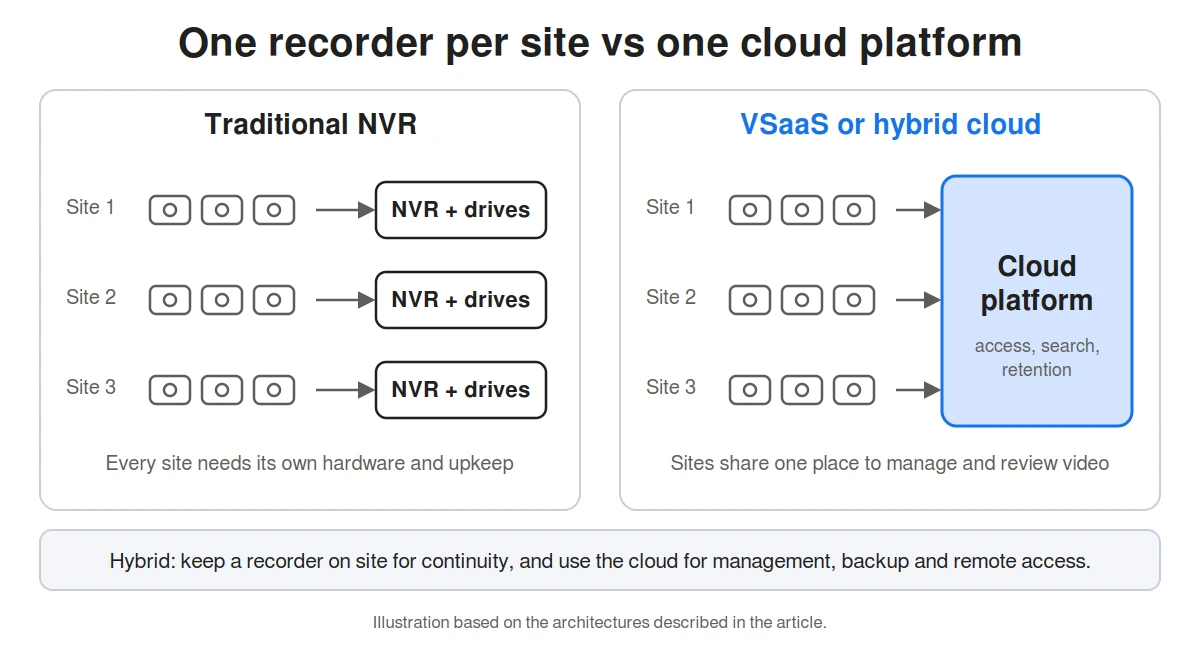 So it is not just a different place to save footage. It changes how the system is run, expanded, searched and maintained.
Remote Access and Central Management
This is the part I think matters most, more than storage.
Take a district administrator looking after several schools. With separate NVR systems, checking an event at another campus can mean connecting to that site's recorder, learning a different interface, or asking staff there to export footage. In a lockdown, every one of those steps costs time.
A regional security manager with 30 locations does not want 30 separate surveillance systems. Browser-based platforms let authorized people review cameras and recordings without standing next to the recorder, and access rules still decide who can see which camera.
Axis names remote access, easier expansion and less duplicated local infrastructure as the main differences between conventional and cloud surveillance. I agree with all three.
Storage Becomes a Setting, Not a Box
With an NVR, retention is decided by how many drives you bought. With a cloud platform, retention becomes something you configure.
For organizations considering cloud storage video surveillance, Coram is one example of the hybrid approach. According to its guide, it works with IP cameras, combines local and cloud storage, offers AI-powered search for specific events, objects or people, and supports retention from 30 to 365 days. You set the policy to match your operational or compliance needs, instead of living with the fixed capacity of one recorder.
This fits a wider trend. Genetec found that more than 70% of respondents already used unified or integrated security systems. It also found that 60% named integrating legacy systems with newer technology as a main reason for replacing older infrastructure.
The Storage Math Nobody Puts in the Brochure
I like to check the size of the data before I believe any pricing page. So here is the arithmetic. The assumptions are mine and meant for illustration, so swap in your own.
Assume a 1080p camera recording continuously at 4 Mbps. That is 0.5 MB per second.
Step | Result |
|---|---|
One camera, one day | about 43 GB |
One camera, 30 days | about 1.3 TB |
20 cameras, 30 days | about 26 TB |
20 cameras, 365 days | about 315 TB |
20 cameras streaming to the cloud at once | 80 Mbps of upload, around the clock |
Real numbers depend on resolution, compression and motion-based recording, which can cut these figures a lot. The shape does not change, though. Retention days multiplied by camera count drives the storage bill, and upload bandwidth is the limit people forget.
That is also why hybrid makes sense to me. Keep the bulk of the footage close to the cameras, and use the cloud for the things it does best.
What Changes After an Incident
The most visible benefit often shows up after something goes wrong. A traditional investigation means finding the right recorder, the right camera and a rough time window, then scrubbing through footage by hand.
Centralized systems cut some of those steps. A security director can work from one environment instead of signing into a separate recorder at every location.
Imagine a warehouse that finds damaged inventory after a night shift. Instead of starting at a physical recorder and tracing activity camera by camera, investigators can review the right areas remotely and share footage with authorized colleagues. The same applies to vandalism at a school, an unauthorized entrance at an office, a parking lot incident or a suspected theft in a store.
Where Cloud Surveillance Still Hurts
Newer is not automatically better just because it uses the cloud. Here is where I would be careful.
Governance. Footage can contain sensitive information about employees, students, customers, patients and visitors. Decide who can view it, how accounts are authenticated, how exports are handled and when video is deleted. Keeping footage forever just because storage is available creates privacy, compliance and cost problems.
Bandwidth. The math above is the reason. High-resolution cameras produce a lot of data, and sending continuous footage beyond the local network can strain your internet connection. If people rely on remote systems for live or archived video, availability matters too.
Cost. Subscriptions can reduce some hardware purchases, but recurring storage, retention and bandwidth costs add up as camera counts and retention periods grow. Earlier Genetec research found that 41% of respondents had slowed cloud adoption because of storage, retention and bandwidth costs. I keep that figure in mind whenever I read a vendor claim.
So start with your requirements, not a cloud-first rule. Camera count, resolution, available bandwidth, retention needs, investigation patterns, regulation, existing hardware and business continuity should decide whether local, cloud or hybrid fits.
Why I Think Hybrid Wins
Genetec's 2026 survey of 7,368 physical security professionals found that in 2025, 48% of end users still ran fully on-premises environments. Another 45% used hybrid cloud, and 7% used completely cloud-based systems.
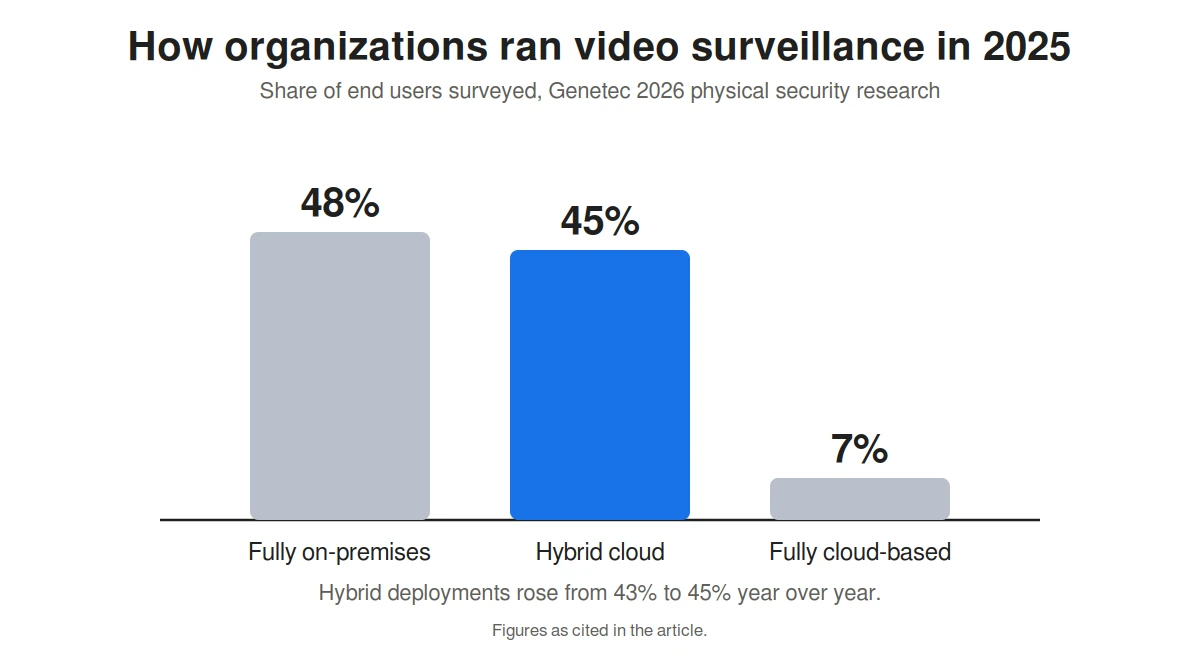 Those numbers tell me organizations want cloud features, but many also want local resilience, control, predictable bandwidth, and the option to keep some workloads on site.
A hybrid setup splits the work by what each side does best. Video can stay close to the camera for immediate recording and continuity. The cloud can handle central administration, longer storage, remote access, analytics, system management and teamwork across locations.
It also gives you a gradual way to move. Nobody has to throw away a working NVR installation. Find where local hardware causes friction, and add cloud features there. For organizations with a large number of existing cameras, that is far more realistic than replacing every recorder at once.
What I Would Check Before Choosing
Here is the short list I would use with any vendor.
Camera compatibility. Some platforms connect existing IP cameras through gateways. Others need their own cameras. Check before you sign.
Retention settings. Can you set different retention for different cameras, or is it one setting for everything?
Upload bandwidth. Work out the continuous upload your cameras would need, using the math above.
Internet outages. Does recording continue locally if the connection drops?
Pricing basis. Is it per camera, per gigabyte or per day of retention? Ask for the 12 month total at your camera count and retention period.
Access and exports. Who can view footage, how accounts are protected, and how exports are logged.
Common Questions
What is Video Surveillance as a Service?
It is a model where video management, storage, access and related software are delivered through cloud-connected infrastructure. You usually log in through a web or mobile interface instead of relying only on software and recorders at each site.
Does VSaaS completely replace the NVR?
Not always. Some systems store video mainly in the cloud. Others combine local recording with cloud services, which keeps local resilience and adds central management, remote access, backup or scalable storage.
Why are organizations moving surveillance storage to the cloud?
The common reasons are easier remote access, central management, scale, less dependence on individual recorders, and managing many locations from one platform. It can also be easier to change retention without adding storage hardware at every site.
Can existing IP cameras work with cloud video platforms?
It depends on the platform and the cameras. Some use gateways or other connected devices to work with existing IP cameras. Others require proprietary cameras. Check compatibility before you pick a service.
Is cloud video surveillance more secure than local storage?
Neither is automatically more secure. It depends on encryption, account protection, network design, software updates, access permissions, retention policies, the provider, and how well you manage your own users and devices. A badly configured cloud setup can be as risky as an outdated local recorder.
Final Thoughts
Cloud video surveillance is growing, but NVRs are not going away. Many environments will keep using them.
The better question is not cloud or local. It is which jobs belong where. Check bandwidth, resilience, privacy, security, retention and your existing equipment together, and you can modernize without replacing useful hardware just to say you did.