


Visual Crossing is a strong choice if you need historical weather and forecasts through one simple API. It offers 50+ years of history on every plan, a free tier of 1,000 records a day, and pay-per-record pricing that stays cheap if you request only the data you need.
It suits developers building weather-aware apps and analysts who want to test how weather affects their business.
Weather data can answer very practical questions. A retailer might want to know whether rainfall affects sales. A developer might need forecasts for a planning dashboard.
These projects need reliable access to the right records and a clear way to plug them into existing systems.
In this Visual Crossing review, I look at its services, API design and usage model to judge how well it fits app development and data analysis.
Meet Visual Crossing: the platform behind the data
Visual Crossing provides global historical weather, current conditions and forecasts for developers, analysts, researchers and businesses. Its website works as both a product hub and a workspace for exploring and downloading weather data.
You can build queries, download datasets, read the technical documentation and compare subscription plans, all from the browser. That gives analysts an easy starting point, and gives developers what they need to connect through code.
To me, the platform's biggest appeal is that it works for different skill levels. You can look at a dataset first, then decide whether to use a downloaded file, a spreadsheet integration or the API.
Services beyond a basic forecast
The Weather API is the core product. Its Timeline endpoint pulls weather information for a chosen location and time period.
The Query Builder is an interactive tool for choosing dates, weather variables, units and output options. I like that you can preview results before downloading records or writing any code, so you know you're asking for the right thing.
Output options cover most needs:
CSV for spreadsheet and table-based analysis
JSON for apps that read structured data
Excel and Power BI options for business users
Code generation tools that help write requests and scripts
Generated code is a handy starting point, but I'd still review it before putting it into production.
Additional services include weather maps, historical forecasts and specialized agriculture and energy datasets. Access varies by service and plan.
Historical forecasts deserve special attention. They show what was predicted at an earlier time, not what actually happened. That lets analysts separate the information that was available before an event from the conditions observed afterwards, which matters a lot when testing forecast-based decisions.
Inside the Timeline API
In my view, the Timeline API's biggest technical strength is its consistent request structure.
It uses simple HTTP GET requests authenticated with an API key. It accepts coordinates, addresses or city names as locations, and optional dates set the time period.
A historical date-range request follows this path pattern:
/timeline/{location}/{startDate}/{endDate}
The full request also needs the service's base URL and your API key. Because historical and forecast queries use the same endpoint, developers can reuse the same request-building code for both.
Several parameters control the response:
unitGroup=metricselects metric units.include=daysrequests daily data only.elementspicks which fields to return.contentTypechooses JSON or CSV output.
For an analysis focused on temperature and rainfall, the query parameters could be:
unitGroup=metric&include=days&elements=datetime,temp,precip
Picking only the fields you need makes responses smaller and easier to process. But it usually doesn't lower your bill, because billing is based on the number of records returned, not the number of fields.
How records and billing actually work
This is the part I'd make sure to understand before building anything, because it's where costs can surprise you.
Visual Crossing bills in records, not API calls. One API call can use one record or thousands.
Here is how the official queryCost documentation explains it:
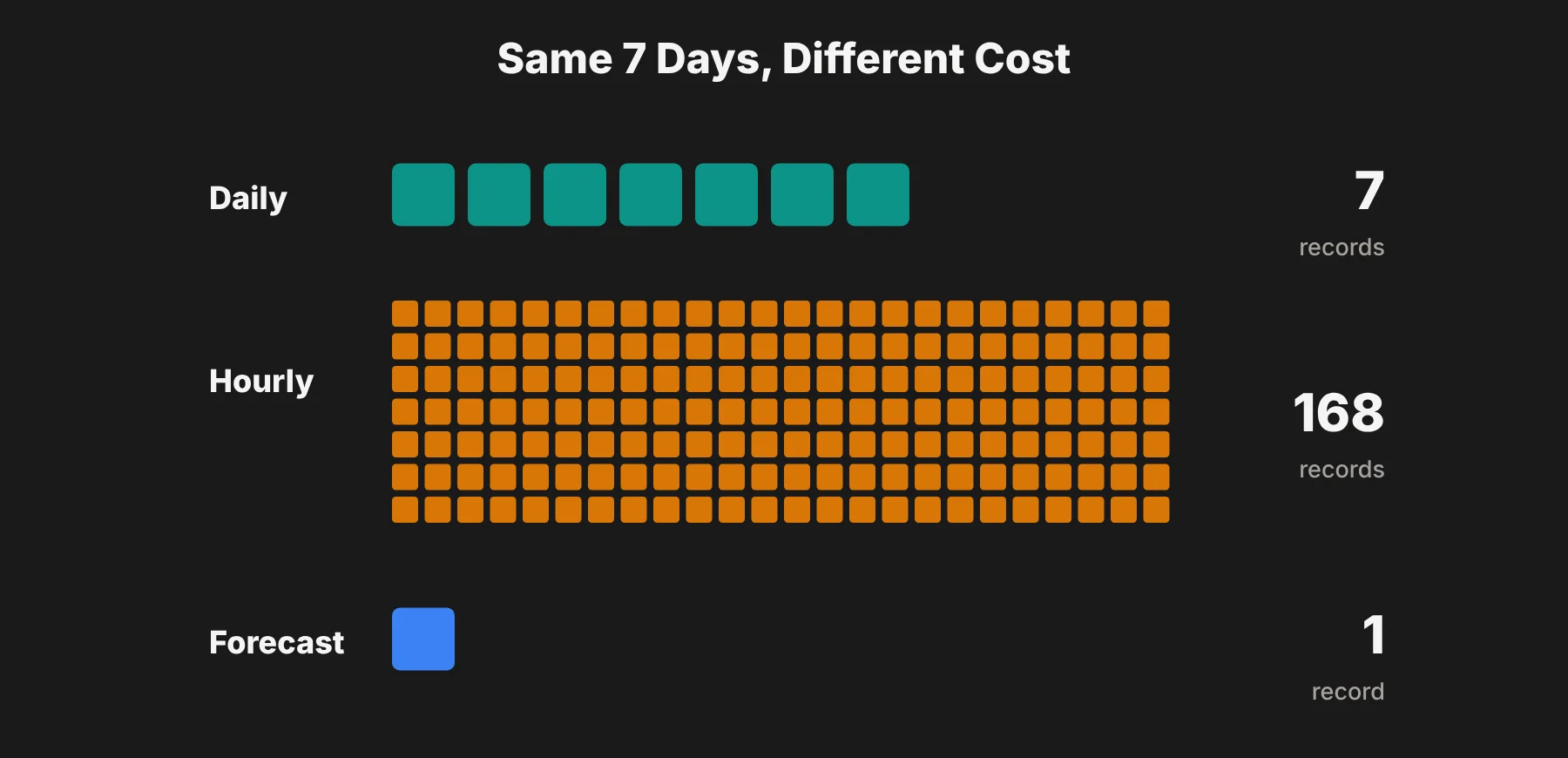
Forecast requests have a fixed cost of 1 per location, even if they include multiple days, hours and current conditions.
Historical requests cost one record per row returned.
Seven days of daily history (
include=days) costs 7 records.Seven days of history with the default daily and hourly data costs 168 records (24 hours × 7 days).
Multiple locations add up. Seven days of daily history for four locations costs 28 records.
Sub-hourly data costs much more. A full day at 15-minute intervals is 96 records.
 Every response includes a
 queryCost value, so you can see exactly how many records each request used.
My tip: if your analysis is daily, like daily sales, always add include=days. Pulling hourly history you don't need uses 24 times more records.
Visual Crossing pricing and plan limits
Visual Crossing's free plan includes 1,000 records per day, and commercial use is allowed on all plans.
Here's what each plan includes, based on Visual Crossing's plan comparison page in October 2026:
Plan | Records | Records per query | Locations per query | API concurrency | Attribution |
|---|---|---|---|---|---|
Free | 1,000/day (30,000/month) | 1,000 | 5 | 1 | Required |
Professional | 10 million/month | 10,000 | 100 | 1 | Required |
Metered | Unlimited, pay per record | 25,000 | 5 | Unlimited | Required |
Corporate | Unlimited (fair use) | 25,000 | 1,000 | 10 | Not required |
Enterprise | Unlimited | Custom | Custom | Unlimited | Not required |
On pricing:
Metered (pay as you go): $0.0001 per record, with no minimum. That's $1 for 10,000 records.
Professional: third-party reviews in 2026 list it at about $35 a month for 10 million records. Visual Crossing shows plan prices through its pricing page and calculator, so I'd confirm the current figure there.
Corporate and Enterprise: priced through Visual Crossing's pricing page and sales team.
Every plan, including Free, gets access to 50+ years of historical data.
Before choosing a plan, I'd check three things that matter when you move from a test project to a real product:
Concurrency. Free and Professional allow only one request at a time.
Attribution. Free, Professional and Metered require you to credit Visual Crossing.
Advanced datasets. Some specialized data, like agriculture and energy, varies by plan.
Turning weather records into analytical context
Let's go back to the retailer comparing daily sales with historical temperature and rainfall.
After pulling weather records for each store, the analyst needs to join them to sales data using the right location and the right local date. A mismatch of even one day can break the analysis.
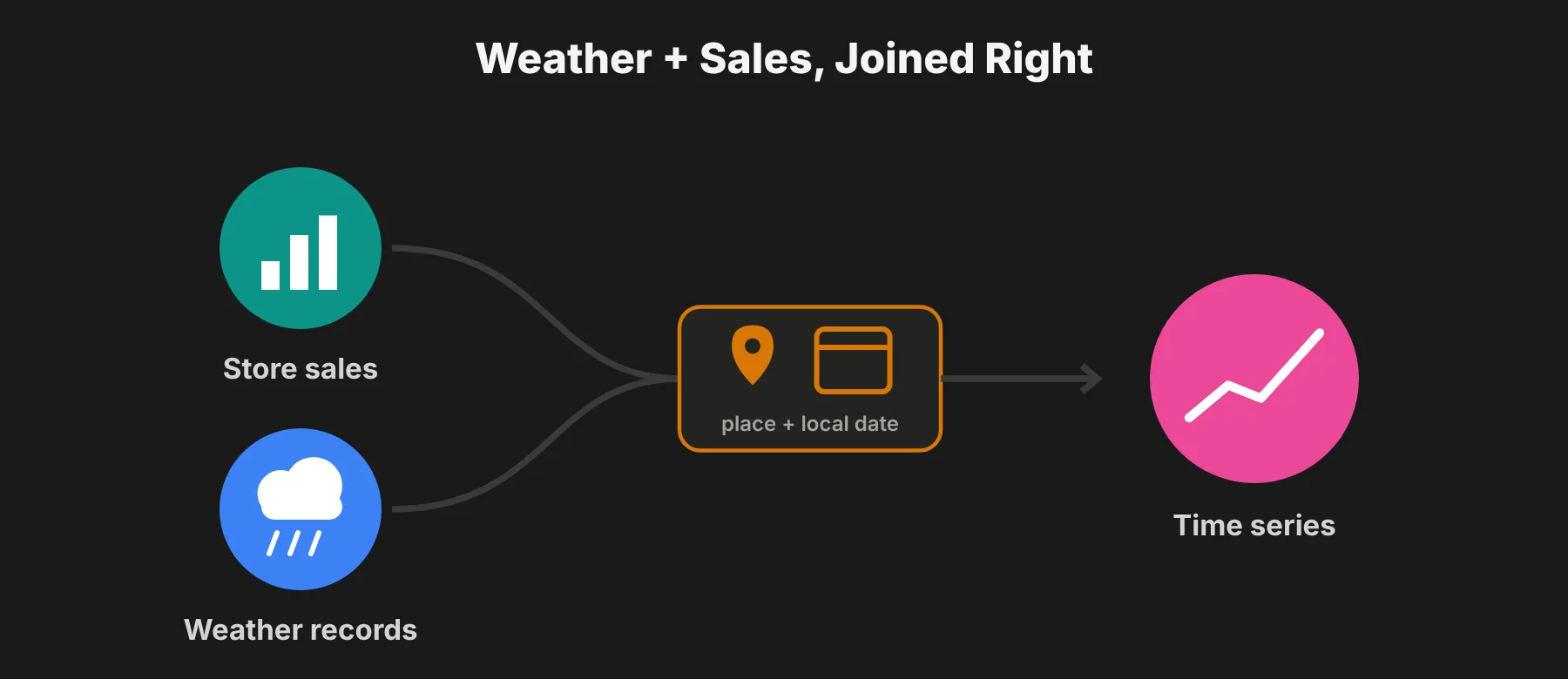 The response includes the resolved address and time zone, which help confirm you're matching the right place and time. Units also need to stay consistent across the whole dataset.
Once joined, the records can support time series analysis, such as comparing seasons or checking sales during rainy or unusually warm periods.
Interpretation needs care, though. Promotions, holidays and store closures can affect the same numbers. I'd treat weather as an explanatory variable to investigate, not an automatic cause of changes in demand.
Forecast data could then feed a planning dashboard. But any recommendations would depend on the retailer's own model and business assumptions, not the API alone.
If you're combining weather with sales, footfall and other large datasets, my guide to big data explains the basics of working at that scale.
Visual Crossing pros and cons
Pros
Deep history on every plan. 50+ years of historical weather, even on the free plan.
One API for history and forecasts. The Timeline endpoint uses the same structure for both, which keeps code simple.
Cheap per-record pricing. At $0.0001 per record, small and medium projects cost very little.
Easy for non-developers. The Query Builder, CSV downloads and Excel and Power BI options let analysts work without code.
Historical forecasts. Useful for testing how good past predictions were.
Commercial use allowed on all plans, including Free.
Cons
Billing takes some learning. The difference between records and calls can surprise new users, especially with hourly history.
Attribution required on lower plans. You need Corporate or Enterprise to remove it.
Low concurrency on Free and Professional. One request at a time can slow down bulk jobs.
Plan prices aren't easy to find. Most prices sit behind the pricing calculator rather than in a simple table.
Visual Crossing vs other weather APIs
When comparing the best weather APIs, I'd weigh Visual Crossing against your project's geographic coverage, data resolution, licensing and expected usage. Here's how it stacks up with popular alternatives, based on published plans in 2026:
API | Free tier | History | Best for |
|---|---|---|---|
Visual Crossing | 1,000 records/day, commercial use allowed | 50+ years on all plans | Historical analysis plus forecasts |
OpenWeather | Large free call allowance | Limited on the free plan | High-volume current weather and forecasts |
WeatherAPI.com | 100,000 calls/month | Back to 2010 on paid plans | Low-cost bundles with extra data like marine and air quality |
Tomorrow.io | Limited free plan | Enterprise focus | Advanced weather intelligence and alerts |
Open-Meteo | Free for non-commercial use, no API key | On paid plans | Hobby projects and open-source setups |
My take: if historical data is central to your project, Visual Crossing is one of the strongest options, because the full archive is available on every plan. If you mostly need current weather at very high volume, OpenWeather or WeatherAPI.com may be cheaper.
Who gets the most value?
The strongest fit is a project that needs historical context alongside forecasts. Analysts can explore how weather relates to their business, and developers can build the results into an app.
Data analysts can test weather effects on sales, energy use, deliveries or footfall.
Developers can add forecasts and history to apps with one consistent API.
Learners working with Python for data analytics can use weather datasets to practice HTTP requests, data cleaning, joins and charts.
Researchers can pull long historical series without building their own archive.
For production apps, I'd plan for secure API key storage, error handling and sensible refresh intervals. Forecasts don't need to be pulled every minute.
Visual Crossing review: final verdict
I think Visual Crossing is a strong candidate for teams building weather-aware apps and analytics tools. Its biggest advantage is the combination of consistent API access, easy data exploration and clear record tracking through queryCost.
For projects that need both historical analysis and forecasts, it gives you a practical foundation at a low cost per record.
The final choice should come down to whether your plan's limits, like concurrency and attribution, fit your app's data needs and budget. My advice: start on the free tier, check queryCost on your real queries, and estimate your monthly records before upgrading.
Visual Crossing FAQs
Is Visual Crossing free?
Yes, there's a free plan with 1,000 records per day, and commercial use is allowed. You'll need to credit Visual Crossing in your app or report.
How much does Visual Crossing cost?
The Metered plan costs $0.0001 per record with no minimum. The Professional plan includes 10 million records a month, and Corporate and Enterprise plans offer unlimited use. Check Visual Crossing's pricing calculator for current plan prices.
What counts as a record in Visual Crossing?
A record is one row of weather data, like one day or one hour for one location. A forecast request costs 1 record per location, while seven days of hourly history costs 168 records.
How far back does Visual Crossing historical data go?
Visual Crossing offers 50+ years of historical weather data, and this is available on every plan, including Free.
Can I use Visual Crossing in Excel or Power BI?
Yes. Visual Crossing offers Excel and Power BI options, CSV downloads and a no-code Query Builder, so you can work with weather data without writing code.
Is Visual Crossing good for commercial apps?
Yes. Commercial use is allowed on all plans. For production apps, check the concurrency limit and attribution rules on your plan, since only Corporate and Enterprise remove the attribution requirement.