


The Similarweb traffic checker is the tool I reach for when I want a traffic number for a site I have no access to. I type the domain in, and about forty seconds later I have monthly visits, where those visits came from, which countries they sit in, and how the site is trending.
No login. No tracking code. No permission from the site owner.
That last part is the whole appeal. It lets me check website traffic without analytics access of any kind, which is the only way to see competitor traffic at all.
It is also the catch. Everything the tool gives me is an estimate built from the outside, and estimates behave differently depending on how big the site is. So this guide covers both halves: how to actually use it, and where it quietly stops being reliable.
What the Similarweb traffic checker actually is
The Similarweb website traffic checker is a free tool that sits on a public URL. You give it a domain, it gives you a traffic report. People call it the Similarweb traffic tool, the site traffic checker or just Similarweb traffic analysis, and it is all the same product.
What matters is what sits underneath. Similarweb never sees the site's server logs, because it has no tracking code installed. It builds its picture from a recruited user panel, clickstream data collected through browser extensions and network partners, public data it crawls, and direct measurement from sites that voluntarily connect their own analytics.
Those inputs feed statistical models that scale a sample up into a full estimate.
So when the tool says a site gets 340,000 monthly visits, it is not reporting a count. It is reporting a model's best guess at a count. Hold onto that, because it explains every limitation further down.
How to check website traffic on Similarweb, step by step
Learning how to use the Similarweb traffic checker takes about a minute, because the process is short enough that I can describe it honestly in five steps.
One. Go to similarweb.com and find the website analysis box on the homepage, or go straight to the traffic checker page.
Two. Type the bare domain. Use example.com rather than https://www.example.com/pricing. Subfolders and full URLs confuse it, and you want the root domain anyway.
Three. Hit enter and wait. The report loads in one page.
Four. Read the top block first. Total visits, bounce rate, pages per visit and average visit duration sit together at the top, and those four tell you most of what you need.
Five. Scroll for the breakdowns. Traffic sources, top countries, device split and ranking positions come below.
That is the whole job. There is no account step, no verification, no waiting for a report to build.
If you want to know how to check competitor website traffic across several sites, the fastest approach is opening each domain in its own tab rather than using the comparison view, which caps how many sites you can line up at once on free. Just watch the daily search counter while you do it.
What every number on the report means
The report throws a lot of metrics at you and not all of them are worth the same.
Total visits is the headline. It counts sessions, not people. One person visiting four times in a month is four visits. This is the number everyone quotes and the number most likely to be wrong on small sites.
Unique visitors is the people-level figure, and Similarweb leads with total visits rather than uniques, which is worth remembering when you compare its output against somebody's Google Analytics screenshot.
Average visit duration is how long a typical session lasts. This one holds up better than most, and independent testing has found it tracks closer to real analytics than the traffic counts do.
Pages per visit is pageviews divided by sessions. Treat it with suspicion. When I checked the tool against a site that publishes its real numbers, pages per visit was off by nearly three times.
Bounce rate is the share of sessions that ended on the entry page. Directionally useful, not precise.
Traffic sources splits the mix across organic traffic, paid traffic, direct traffic, referral traffic, social traffic, email and display. This is one of the most useful blocks on the page, because the shape of the mix is more robust than the size of it.
Top countries gives you audience geography as a traffic share per country. Free shows you the top five.
Device breakdown splits desktop and mobile. Handle with care, since the two come from different measurement pathways with different coverage.
Global rank, country rank and category rank place the site against everything else Similarweb tracks. These are comparative by nature, which is exactly what the tool is best at.
Month over month change shows the traffic trend as a percentage. If I could keep only one number from the whole report, it would probably be this one.
What you get free, and where the wall is
The free version is more generous than people expect on breadth and much tighter than people expect on depth.
Every metric I listed above is visible without paying. What the free plan does is limit how much of each one you see.
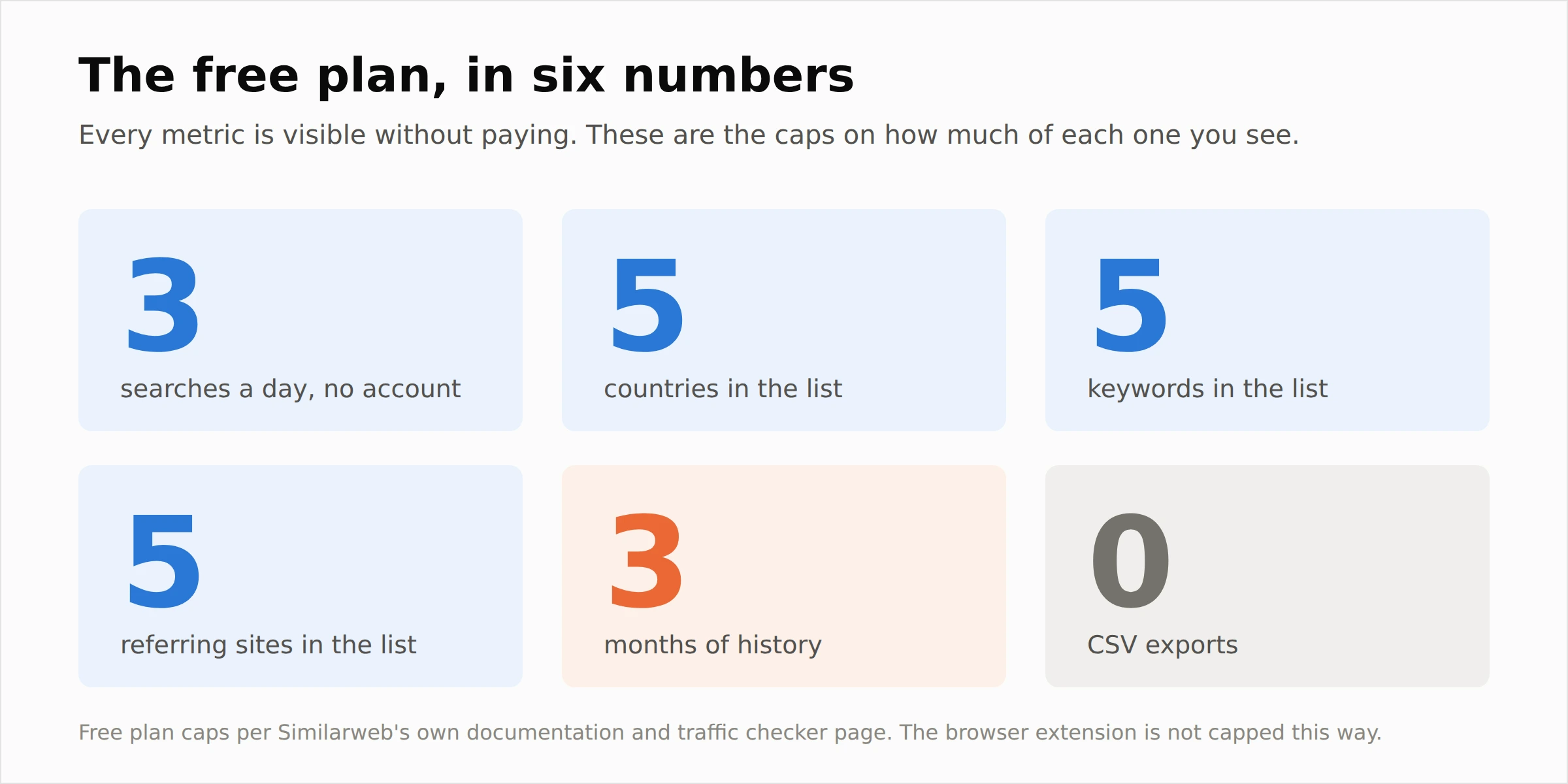 Three limits matter more than the rest.
History stops at three months. That is enough to see a direction and not enough to see a seasonal pattern or a year over year comparison.
Lists cap at five. Top keywords, top referring sites and top countries all cut off at five entries. Fine for confirming a market, useless for building a prospect list.
Export is off. There is no CSV on the free plan, so anything you want to keep, you retype or screenshot. If that is the limit you keep hitting, it is worth reading what the paid tiers actually unlock in my Similarweb pricing breakdown before you commit to anything.
The fourth limit is the one that catches people out, and it is stricter than most guides admit. Without an account you get three searches a day. The tool shows you a counter on the page, counting down as you use them. So "check any website traffic" is true, but only three of them before tomorrow.
There is a way around that, and it is the part almost nobody mentions.
The browser extension is the better free route
Similarweb publishes a free browser extension, and for day to day work I use it far more than the website itself.
It runs on Chrome, Edge, Firefox and Opera. It is free, it needs no account, and it puts a traffic panel on whatever site you are already looking at. One click, no typing a domain, no daily counter ticking down.
What it shows is close to the full free report. Visits over time, bounce rate, pages per session and visit duration, traffic sources split across direct, organic, paid search, social, email, referrals and display, geography by country, desktop versus mobile, keywords with estimated clicks and CPC, and global, country and category ranking.
It also carries something the classic report does not, which I will come to next.
If your job involves working out how to check traffic of any website regularly, install the extension first and treat the web version as the place you go when you want to sit down and study one domain properly. It is the closest thing to a free website traffic checker with no login and no daily ceiling.
Checking AI traffic, which is new and worth knowing about
Similarweb now reports AI traffic as its own channel, and there is a free AI traffic checker alongside the standard one.
It breaks out visits arriving from ChatGPT, Gemini, Claude, Perplexity and other assistants, and the extension goes further by showing the top prompts people use when an assistant surfaces that site.
I would not build a strategy on those numbers yet, for the same reason I would not build one on any estimate from a thin sample. AI referral volumes are small for most sites, and small numbers are exactly where this kind of modelling is weakest.
What it is useful for right now is direction. If a competitor's AI channel is growing month over month and yours is flat, that is worth knowing early, and almost no other free traffic checker reports it at all.
Why some websites come back with no data at all
This is the most common complaint about the tool and it is not a bug.
When a site's traffic is too low, Similarweb shows "not enough data" rather than a number. Its own documentation explains that it chooses not to display data when it does not meet reliability standards, because estimates on very small sites carry too much variance to be trustworthy.
I went looking for a published cutoff and Similarweb does not give one. What independent testing consistently shows is that reliability falls apart somewhere below roughly 5,000 monthly visits, and that is the range where the blank report tends to appear.
The logic is simple once you know how the model works. On a large site, the panel and clickstream networks capture thousands of real sessions to extrapolate from. On a tiny site they might capture none. A blank report is the tool admitting it has nothing to work with, which I would rather have than a confident invented number.
There is a fix if it is your own site. Connect your Google Analytics to Similarweb and it will display your verified session counts instead of an estimate.
Can I check my own website's traffic with it?
You can, and it is the single most useful thing you can do with the tool, though not for the reason people assume.
Checking your own site tells you almost nothing you did not already know, because you have GA4 open in another tab. What it tells you is how wrong Similarweb is about a site of your size.
So run it. Note the gap between its estimate and your real sessions. Then assume a gap of roughly that size on every competitor of similar scale you look at.
That single calibration step turns the tool from a number generator into something you can actually reason with, and it takes about two minutes.
How it compares to the other free traffic checkers
The free traffic checker market is crowded and the tools are not measuring the same thing, which is where most comparisons go wrong.
Ahrefs offers a free traffic checker with no account needed, but it estimates organic search traffic only. Comparing its number against Similarweb's total traffic figure is comparing two different quantities, and people do it constantly.
Semrush requires an account and allows roughly ten traffic overview reports a day on free. Its estimates lean organic-first too, though it does report total traffic on some views.
Ubersuggest requires an account and limits you to about three website lookups a day, which makes it fine for a spot check and painful for research.
Google Analytics and Google Search Console are not competitors here at all. They measure your own site directly because you installed them. Similarweb estimates other people's sites from outside. If you can get GA access to a site, take it and ignore every estimator.
Similarweb's real edge in this group is that it reports total traffic rather than organic only, and that you can check a site without creating an account. Its real weakness is the same as everyone else's, which is small sites. I go deeper on how the paid tools stack up against each other in my Similarweb competitors comparison, but for free use the summary above is the whole picture.
Where two of these tools agree on a direction, that direction is probably real. Where they disagree, you have learned nothing, and it is better to admit that than to pick whichever number suits the argument.
What I actually use it for
The tool earns its keep on some jobs and quietly loses money on others.
For competitor research and niche research, it is genuinely good. You are comparing sites against each other rather than counting anybody exactly, and the model's bias mostly cancels out when both sides carry it.
For prospecting and client pitching, it works well. Walking into a call already knowing a prospect's rough traffic shape and where their visitors come from is a real advantage, and rough is all the situation needs.
For affiliate site research and media buying research, use it to build a shortlist rather than to set a price. Directional is fine at the shortlist stage.
For partnership vetting, it is fine for a sanity check on whether a potential partner is the size they claim.
For site valuation and buying a website, do not lean on it. This is the use case where the error costs real money. One study of 1,787 ecommerce sites found Similarweb overreporting sessions by around 94 percent, and a number roughly double reality is not something you can price around. Use it to check whether a seller's claims are plausible, then insist on verified analytics access before any money moves.
How much to trust the numbers
Short version: trust the shape of the Similarweb traffic data, not the size of it.
The error in Similarweb's estimates is large, but it is consistent, and it points upward far more often than down. A consistent error is workable in a way a random one would not be.
That means comparisons survive and absolutes do not. "This competitor is roughly twice our size" holds up even if both figures are 40 percent off, because the ratio is what you are reading. "This competitor gets 340,000 visits a month" does not hold up, and it is the sentence that ends up in a pitch deck right before somebody with the real number corrects it.
Similarweb says as much itself. Its documentation states that as an estimation tool it does not expect its figures to match direct measurement, and that what it aims for is trend alignment. The direction of the number rather than the number.
That is the company telling you how to use the product properly, and most people asking about the traffic checker never get told.
Frequently asked questions
What is the Similarweb traffic checker?
It is a free traffic checker tool that estimates any website's traffic from outside, using panel data, clickstream data, public data and voluntary analytics connections rather than a tracking code on the site. You enter a domain and the Similarweb traffic report returns visits, engagement metrics, traffic sources and geography.
How much traffic does a website get, and how do I find out?
For any site above Similarweb's reporting threshold, the total visits figure at the top of the report is your answer, and it counts sessions rather than people. If you want to know how many visitors a website gets as individual people rather than sessions, no free estimator will tell you reliably, because unique visitor modelling is harder than session modelling and the free tier leads with visits.
How to check website traffic for free with Similarweb?
Go to similarweb.com, enter the bare domain in the website analysis box, and press enter. The report loads on one page with total visits at the top and the breakdowns below. No account is needed for a basic lookup.
Can I check any website's traffic?
Almost any, as long as it is big enough to measure. Sites below Similarweb's reporting threshold return "not enough data" instead of numbers, and very new domains usually have nothing at all.
Is the Similarweb traffic checker free?
Yes, the core traffic check is free and always has been. What costs money is depth: longer history, full lists rather than top five, country filtering, export and API access.
How many free traffic checks do you get?
Three a day without an account. The traffic checker page shows a counter telling you how many of the three you have left. A free account raises that ceiling, and the seven day trial of the paid product allows around fifteen actions a day. The browser extension is not metered the same way, which makes it the practical choice if you check website traffic online regularly.
Can I check traffic without an account?
Yes. A basic website traffic lookup works with no login at all, capped at three searches a day, which is unusual in this category. The browser extension is also a website traffic checker with no login. Semrush and Ubersuggest both require an account before they show you anything.
Why does a website show no traffic data?
Because its traffic is below the level Similarweb considers reliable enough to publish. Rather than show a number it cannot stand behind, it shows nothing. This is a deliberate quality decision, not an outage.
What is the minimum traffic Similarweb can measure?
Similarweb does not publish a specific cutoff. Independent testing puts the practical floor at somewhere around 5,000 monthly visits, below which estimates become unreliable and often stop appearing entirely.
Can I check my own website's traffic?
Yes, and you should, but use it as a calibration exercise rather than a measurement. Compare Similarweb's estimate against your real GA4 sessions, note the size of the gap, and apply that gap to competitors of similar size. You can also connect your Google Analytics so the tool displays your verified numbers.
Can I export traffic data?
Not on the free plan. CSV export and API access both sit behind paid tiers, so free users are limited to reading the report on screen or taking screenshots.
How far back does the traffic data go?
Up to three months on the free version, and you can narrow that to one or two months if you want a tighter window. Longer historical ranges require a paid plan, which is the limit most people hit first when they try to analyse a traffic trend properly.
Before you quote a number from it
If you take one habit from this, make it the calibration check on your own site. It costs two minutes and it changes how you read every other report you pull.
After that, the rule I stick to is to never write a Similarweb figure into anything without the word "roughly" in front of it, or without turning it into a comparison. The tool is genuinely good at telling you who is bigger, who is growing and where their visitors come from. It is not good at telling you how many.
Used that way, a free website traffic checker that needs no login and no permission is a remarkable thing to have. Used the other way, it is a confident number that will eventually embarrass you in front of somebody holding the real analytics.